
1. Ifihan
O ṣeun fun riraasing the Nobsound NS-01G Pro Bluetooth 5.0 Power Ampolùgbéjáde. Kékeré yìí tí ó lágbára síbẹ̀ tí ó sì kéré amplifier is designed to deliver high-fidelity audio for your speakers, offering versatile input options including Bluetooth 5.0, AUX, and USB. This manual provides detailed instructions for setup, operation, maintenance, and troubleshooting to ensure you get the best performance from your device.
2. Ọja Ipariview
2.1 Key Awọn ẹya ara ẹrọ
- 2-ni-1 Apẹrẹ: Functions as both a Bluetooth receiver and a power amplifier.
- Asopọ Alailowaya: Seamlessly connect to smartphones and other devices via Bluetooth 5.0.
- Agbara Ijade giga: Despite its mini size, it delivers up to 100W output power.
- Awọn igbewọle pupọ: Supports AUX, USB, and Bluetooth audio inputs.
- Awọn iṣakoso ohun orin: Features Bass, Middle, and Treble tone controls for sound customization.
2.2 Package Awọn akoonu
- 1 × Nobsound NS-01G Pro Ampitanna
- 1 × DC 19V Power Adapter
- 1 able Okun USB
- 1 × RCA Cable
- 1 × 3.5mm Okun Olohun
- 1 × Afowoyi olumulo

2.3 Ìṣètò Pánẹ́lì Iwájú

2.4 Ru Panel Ìfilélẹ
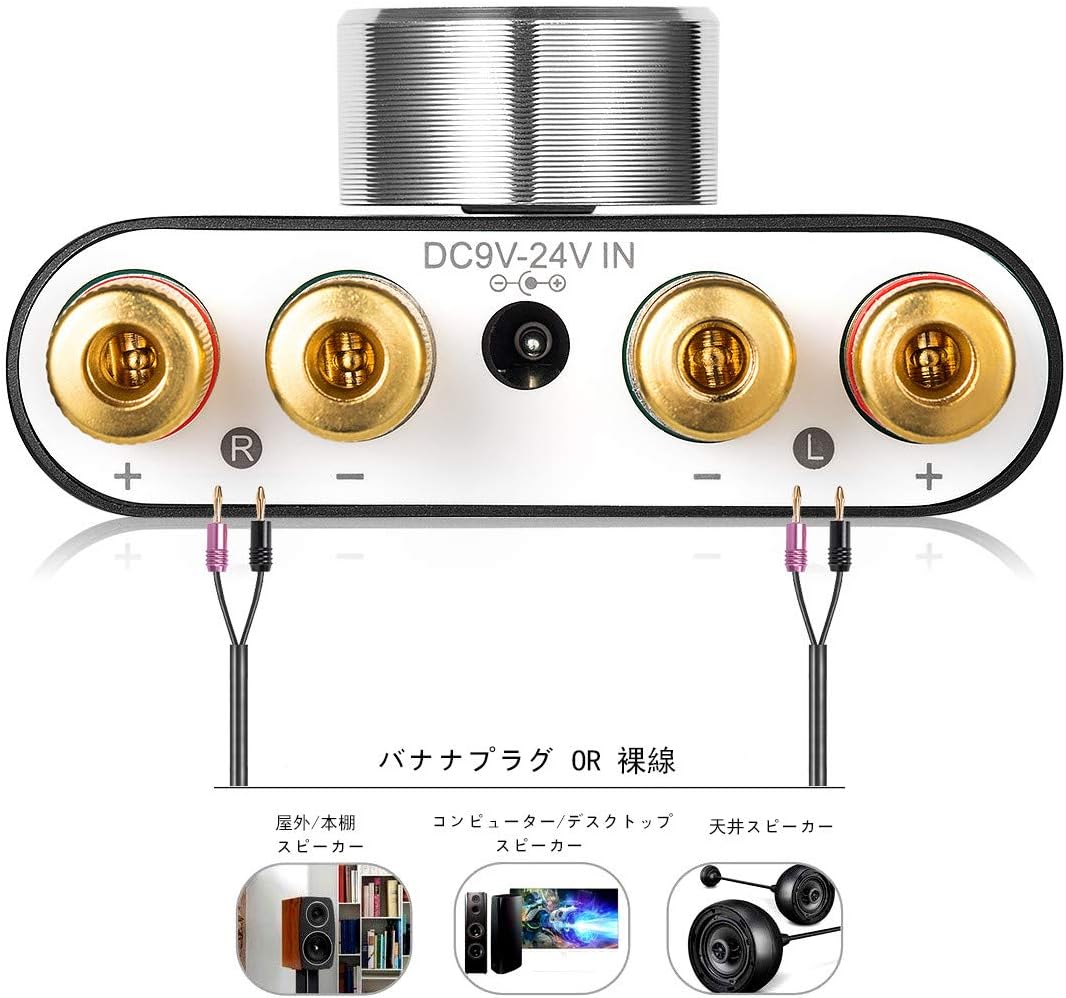
3. Awọn ilana iṣeto
3.1 Asopọ Agbọrọsọ
- Rii daju pe amplifier ti wa ni pipa.
- Connect your passive speakers to the speaker output terminals on the rear panel. Pay attention to polarity: connect the red (+) terminal on the amplifier to the red (+) terminal on the speaker, and the black (-) terminal on the ampìdènà sí ẹ̀rọ dúdú (-) lórí agbọ́hùnsọ̀.
3.2 Ìsopọ̀ Orísun Ìṣíṣẹ́
The NS-01G Pro supports three input methods: AUX, USB, and Bluetooth.

3.2.1 Iṣawọle AUX
- Connect your audio source (e.g., smartphone, CD player, TV) to the AUX input jack on the front panel using a 3.5mm audio cable.
3.2.2 USB Input
- Connect your computer to the USB sound input port on the front panel using a USB cable. No drivers are typically required for this plug-and-play connection.

3.2.3 Bluetooth Input
- Attach the Bluetooth antenna to the RF connector on the rear panel.
- Switch the input selector on the front panel to 'BT' mode.
- Lori ẹrọ alagbeka rẹ, mu Bluetooth ṣiṣẹ ki o wa fun
Ask a question about this manual
Ask about setup, troubleshooting, compatibility, parts, safety, or missing instructions. Manuals+ will review the question and use this page’s manual context to help answer it.