
Ọrọ Iṣaaju
Thank you for choosing the Calypso K5769/2 Analogue Digital Quartz Watch. This manual provides detailed instructions for setting up, operating, and maintaining your watch to ensure optimal performance and longevity. Please read this manual thoroughly before using your watch.
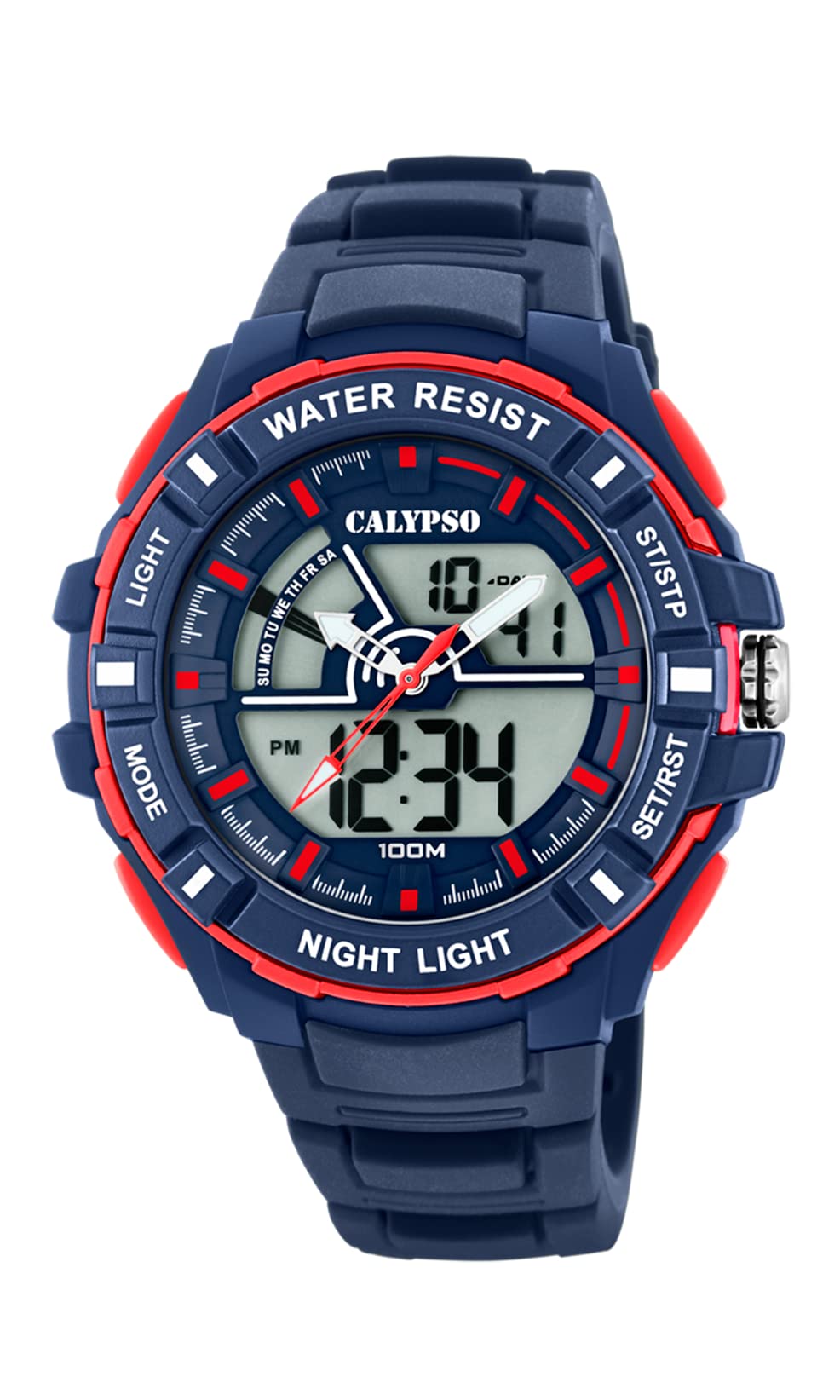
Aworan: Iwaju view of the Calypso K5769/2 Analogue Digital Quartz Watch, showcasing its blue plastic case and silicone strap.
Ṣeto
Aago Ibẹrẹ ati Eto Ọjọ
Your Calypso K5769/2 watch features both analogue and digital displays. Both need to be set for accurate timekeeping.
- Eto Aago oni-nọmba:
- Tẹ awọn MODE bọtini leralera titi ti ipo eto akoko yoo han (nfihan nigbagbogbo nipasẹ awọn nọmba ikosan).
- Lo awọn ṢAtunṣe button to select the digit you wish to change (hours, minutes, seconds).
- Lo awọn SET or Bẹrẹ/Duro bọtini lati mu iye.
- Ni kete ti ṣeto, tẹ MODE lẹẹkansi lati jade ni ipo eto.
- Analogue Time Setting:
- Pull the crown (the small knob on the side of the watch case) out to the first or second position (refer to specific watch model for exact crown positions).
- Yí adé náà padà láti ṣàtúnṣe àwọn ọwọ́ wákàtí àti ìṣẹ́jú sí àkókò tó tọ́.
- Titari ade pada si lati ni aabo eto akoko.
- Eto Ọjọ:
- In digital time setting mode, after setting the time, continue using the ṢAtunṣe button to navigate to the date (month, day, year) settings.
- Adjust values using the SET or Bẹrẹ/Duro bọtini.
- Exit by pressing MODE.

Aworan: Apa view of the Calypso K5769/2 watch, highlighting the control buttons and the crown used for adjustments.
Awọn ilana Iṣiṣẹ
Your watch is equipped with several functions accessible via the control buttons.
Aṣayan Ipo
Tẹ awọn MODE button to cycle through the available functions:
- Time Display (Analogue & Digital)
- Itaniji
- Aago iṣẹju-aaya
- Agbegbe Aago Meji
- Ifihan ọjọ
Iṣẹ-ṣiṣe itaniji
- Tẹ MODE títí tí a ó fi fi ààyè ìróran hàn.
- Tẹ ṢAtunṣe lati yan awọn nọmba wakati tabi iṣẹju.
- Lo SET or Bẹrẹ/Duro lati ṣeto akoko itaniji ti o fẹ.
- Tẹ MODE lati jẹrisi ati jade.
- To activate/deactivate the alarm, press a specific button (often ṢAtunṣe or SET) while in Alarm mode. An alarm icon will appear when active.
Iṣẹ Aago iṣẹju-aaya
- Tẹ MODE until the Stopwatch mode is displayed (usually showing 00:00:00).
- Tẹ Bẹrẹ/Duro lati bẹrẹ akoko.
- Tẹ Bẹrẹ/Duro lẹẹkansi lati sinmi / bẹrẹ akoko.
- Tẹ Tunto (often the ṢAtunṣe button) to clear the stopwatch to zero.
Agbegbe Aago Meji
This feature allows you to display a second time zone simultaneously.
- Tẹ MODE until the Dual Time Zone mode is displayed.
- Lo ṢAtunṣe ati SET or Bẹrẹ/Duro lati ṣeto agbegbe aago keji ti o fẹ.
- Tẹ MODE lati jẹrisi ati jade.
Imọlẹ Up Išė
Láti tan ìmọ́lẹ̀ sí ìfihàn oní-nọ́ńbà ní àwọn ipò ìmọ́lẹ̀ tí kò tó nǹkan, tẹ Imọlẹ button (usually located on the top left of the watch case).
Itoju
Water Resistance (10 ATM / 100 Metres)
Your Calypso K5769/2 watch is water resistant up to 10 ATM (100 meters). This means it is suitable for swimming, snorkeling, and showering. However, it is kii ṣe suitable for high-impact water sports or diving. Do not operate buttons or the crown while the watch is wet or submerged, as this can compromise the water resistance.
Ninu
Láti nu aago rẹ, fi aṣọ rirọ nu ún pẹ̀lẹ́pẹ̀lẹ́ pẹ̀lú aṣọ ìrọ̀rùn, damp cloth. Avoid using harsh chemicals, solvents, or abrasive cleaners, as these can damage the case and strap materials.
Batiri Rirọpo
The watch is powered by a Quartz (battery) movement. When the display becomes dim or the watch stops functioning, the battery may need replacement. Battery replacement should be performed by a qualified watch technician to ensure proper sealing and maintain water resistance.
Laasigbotitusita
| Isoro | Owun to le Fa | Ojutu |
|---|---|---|
| Watch not displaying time/functions. | Kekere tabi okú batiri. | Rọpo batiri (iṣẹ amọdaju ni a ṣe iṣeduro). |
| Analogue hands not moving. | Adé ti yọ jáde; ìṣòro bátírì. | Push crown back in; if still not working, replace battery. |
| Digital display is dim or flickering. | Batiri kekere. | Rọpo batiri. |
| Omi inu aago. | Buttons operated underwater; seal compromised. | Lẹsẹkẹsẹ mu lọ si iṣẹ atunṣe aago ọjọgbọn kan. Maṣe gbiyanju lati gbẹ funrararẹ. |
| Àkókò/ọjọ́ tí kò tọ́ ni a fi hàn. | Settings were not saved or incorrectly set. | Refer to the "Initial Time and Date Setting" section and re-set the watch. |
Awọn pato
| Nọmba awoṣe: | K5769/2 |
| Brand: | Calypso |
| Iru ifihan: | Analogue-Digital |
| Iru gbigbe: | Quartz (Battery) |
| Omi Resistance: | 10 ATM (100 Metres) |
| Ohun elo ọran: | Polycarbonate (Ṣíṣíkà) |
| Ohun elo okun: | Ṣiṣu (Silikoni) |
| Opin Ọran: | 53 Milimita |
| Sisanra Ọran: | 19 Milimita |
| Ìbú Bàbá: | 26 Milimita |
| Awọn ẹya afikun: | Alarm, Dual Time Zone, Light Up, Stopwatch |
| Ìwọ̀n Nkan: | 65 giramu |
Alaye atilẹyin ọja
Calypso watches typically come with a manufacturer's warranty covering defects in materials and workmanship for a specified period from the date of purchase. This warranty usually does not cover damage resulting from improper handling, accidents, unauthorized repairs, or normal wear and tear (e.g., battery, strap, crystal). Please retain your proof of purchase for warranty claims. For specific warranty terms and conditions, refer to the warranty card included with your watch or contact Calypso customer support.
Onibara Support
If you encounter any issues or have questions regarding your Calypso K5769/2 watch that are not addressed in this manual, please contact Calypso customer support. You can typically find contact information on the official Calypso webojula tabi lori apoti ti ọja rẹ.
- Atilẹyin Ayelujara: Visit the official Calypso Watches webAaye fun FAQs ati atilẹyin awọn alaye olubasọrọ.
- Awọn ile-iṣẹ iṣẹ: For repairs or battery replacement, locate an authorized Calypso service center.