
Ọrọ Iṣaaju
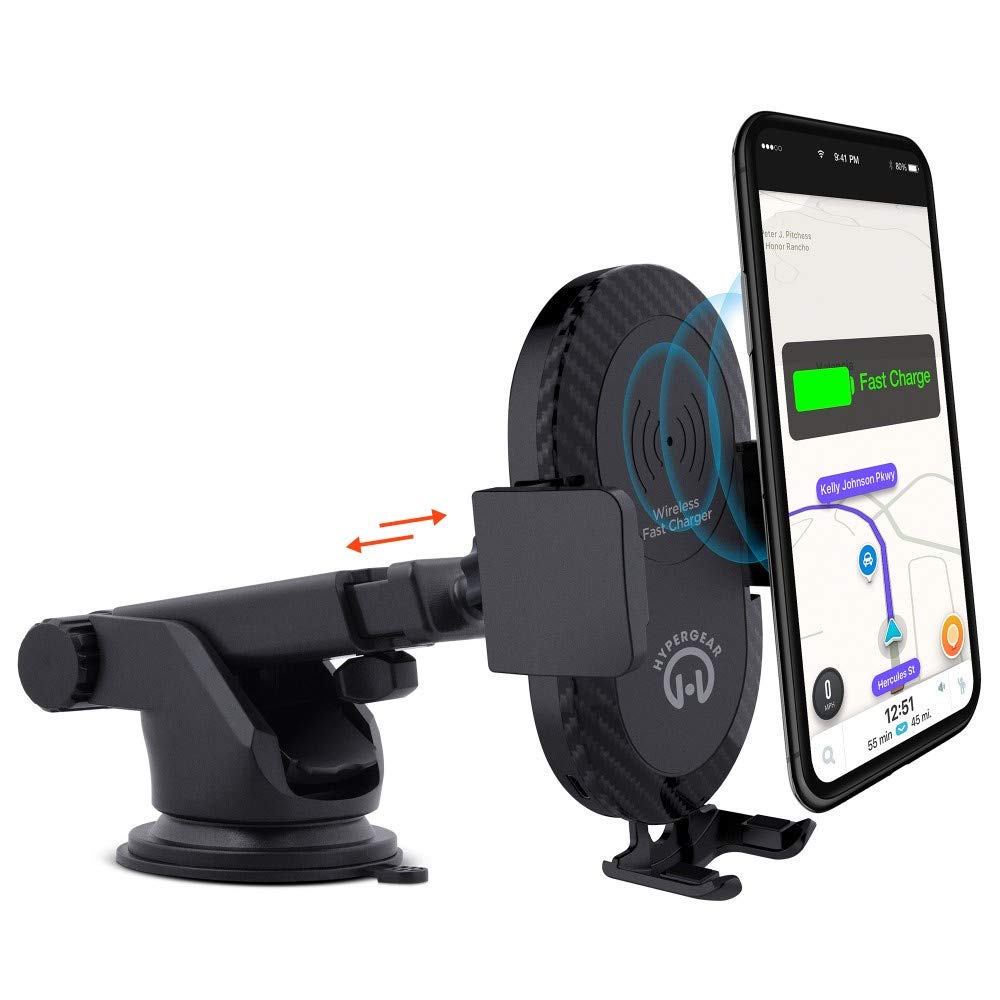
This manual provides instructions for the HyperGear HYG-14590 Wireless Fast Charging Car Dash Mount. This device is designed to securely hold and wirelessly charge Qi-enabled smartphones in your vehicle, offering hands-free navigation and communication.
Package Awọn akoonu
Jẹrisi pe gbogbo awọn ohun kan wa ninu package:
- Telescopic Mount
- Fast Charge Car Adapter
- Micro USB Cable
- Afowoyi Olumulo (iwe-ipamọ yii)
Awọn ilana iṣeto
- Yan Ibi Igbesoke: Select a clean, flat surface on your dashboard or windshield. Ensure the location does not obstruct your view tabi dabaru pẹlu awọn iṣakoso ọkọ.
- So Oke:
- Clean the chosen surface thoroughly.
- Remove the protective film from the sticky gel suction cup.
- Tẹ ife mimu naa ṣinṣin lori dada.
- Engage the 2-step locking lever to secure the mount in place.
- So agbara:
- Insert the Micro USB cable into the charging port on the mount.
- Plug the other end of the Micro USB cable into the Fast Charge Car Adapter.
- Insert the Fast Charge Car Adapter into your vehicle's 12V power outlet (cigarette lighter socket).
- Adjust the Mount:
- Extend the telescopic arm up to 8 inches as needed.
- Pivot the arm up to 230° to achieve the desired angle.
- Rotate the cradle head 360° to switch between portrait and landscape orientation.
Awọn ilana Iṣiṣẹ
- Gbigbe Ẹrọ Rẹ: Gently open the adjustable padded cradle grips and place your Qi-enabled smartphone into the mount. The grips will automatically secure the device.
- Gbigba agbara Alailowaya: Once your device is placed in the mount and the mount is powered, wireless charging will begin automatically. Ensure your device is centered on the charging pad for optimal performance.
- Yiyọ Ẹrọ Rẹ kuro: To remove your device, gently open the cradle grips and lift your smartphone out.
- Lilo Ọwọ: The mount allows for hands-free use of navigation, calls, and other applications while driving. Always ensure your device is positioned safely and does not obstruct your view ti opopona.
Itoju
- Ninu: Use a soft, dry cloth to clean the mount. Do not use abrasive cleaners or solvents.
- Itọju Ifọmu: If the sticky gel suction cup loses adhesion, rinse it with warm water and let it air dry. This can help restore its stickiness.
- Ibi ipamọ: Tí o kò bá lò ó fún ìgbà pípẹ́, tọ́jú àpótí náà sí ibi gbígbẹ tí ó tutù, tí kò sí ìmọ́lẹ̀ oòrùn tààrà.
Laasigbotitusita
- Ẹrọ ko gba agbara lailowa:
- Ensure your smartphone is Qi-enabled or has a Qi-enabled receiver.
- Verify the Micro USB cable is securely connected to both the mount and the car adapter.
- Check that the car adapter is firmly seated in the vehicle's 12V power outlet.
- Ensure your phone is centered on the charging pad of the mount.
- Yọ eyikeyi awọn ọran foonu ti o nipọn ti o le dabaru pẹlu gbigba agbara alailowaya.
- Mount not sticking to surface:
- Clean the dashboard or windshield surface thoroughly before attachment.
- Ensure the 2-step locking lever is fully engaged.
- Rinse the sticky gel suction cup with warm water and air dry to restore adhesion.
- Avoid mounting on textured or porous surfaces.
- Phone not held securely:
- Ensure the adjustable padded cradle grips are properly closed around your device.
- Verify that your phone's size is compatible with the mount's adjustable range.
Awọn pato
| Nọmba awoṣe | HYG-14590 |
| Brand | HyperGear |
| Asopọmọra Technology | Ailokun |
| Asopọmọra Iru | USB, Alailowaya |
| Awọn ẹrọ ibaramu | Àwọn fóònù alágbékalẹ̀ (tí a lè lo Qi) |
| Awọn awoṣe Foonu ibaramu | iPhone X/8/8 Plus, Samsung Galaxy S9/S9+, S8/S8+, Note 8, and other Qi-enabled devices |
| Pataki Ẹya | Gbigba agbara yara, Gbigba agbara alailowaya |
| Wattage | 10 watt |
| Orisun agbara | Vehicle 12V Power Outlet |
| Main Power Asopọmọra Iru | USB Type C (for car adapter) |
| Iwọn Nkan | 11.84 iwon |
| Ohun elo apade | Gel (suction cup) |
| Àwọ̀ | Dudu |
| UPC | 633755145902 |
Alaye atilẹyin ọja
Ọjà HyperGear yìí wá pẹ̀lú 30-ọjọ atilẹyin ọja from the date of purchase. This warranty covers manufacturing defects. Please retain your proof of purchase for warranty claims. For further details or to initiate a claim, please refer to the HyperGear official webaaye tabi kan si atilẹyin alabara wọn.
Onibara Support
For technical assistance, product inquiries, or warranty support, please visit the official HyperGear webojú òpó wẹ́ẹ̀bù tàbí kí o kàn sí ẹ̀ka iṣẹ́ oníbàárà wọn. Àwọn ìwífún ìbáṣepọ̀ lè wà lórí àpótí ọjà tàbí lórí ìkànnì ayélujára tí ilé-iṣẹ́ náà wà.