
1. Ifihan
This manual provides essential instructions for the safe and effective operation of the Mustool MT866 Digital True RMS Clamp Meter. The MT866 is a versatile instrument designed for measuring AC/DC voltage, AC/DC current, frequency, temperature, capacitance, resistance, and continuity. It also features a live wire check function and non-contact voltage detection for enhanced safety. Please read this manual thoroughly before using the device.
2. Alaye Aabo
Máa tẹ̀lé àwọn ìlànà ààbò wọ̀nyí nígbà gbogbo láti dènà ìpalára tàbí ìbàjẹ́ sí mita náà:
- Má ṣe kọjá ààlà ìtẹ̀wọlé tó pọ̀ jùlọ for any measurement function.
- Ṣọra gidigidi nígbà tí o bá ń ṣiṣẹ́ pẹ̀lú àwọn iyika aláàyè.tages le jẹ ewu.
- Ensure the test leads are in good condition, without any damage to the insulation.
- Do not operate the meter if it appears damaged or if the battery cover is not properly closed.
- Always disconnect the test leads from the circuit before changing the function dial.
- Use the correct function and range fun kọọkan wiwọn.
- Pa awọn ika ọwọ mọ lẹhin awọn oluso ika ọwọ lórí àwọn ìwádìí ìdánwò nígbà tí a bá ń wọn.
- Avoid using the meter in wet environments or in the presence of explosive gases or dust.
- The meter is rated for CAT III 600V and CAT II 600V. Do not use it for measurements exceeding these categories.
3. Ọja Ipariview
The Mustool MT866 is a compact and feature-rich clamp meter. Familiarize yourself with its components:
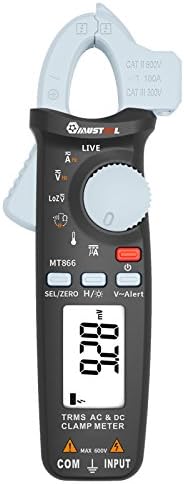
olusin 1: Iwaju View of the Mustool MT866 Clamp Mita. This image displays the main components including the clamp jaw, LCD display, function dial, and control buttons.
3.1. Awọn irinše
- Clamp Ẹrẹ: A lo fun wiwọn agbara AC/DC ti ko ni ifọwọkan.
- Clamp Itusilẹ Lever: Ṣí cl náàamp bakan.
- Non-Olubasọrọ Voltage (NCV) Sensor: Ṣe awari AC voltage lai taara olubasọrọ.
- Ifihan LCD: Ṣe afihan awọn kika wiwọn, awọn ẹya, ati awọn afihan iṣẹ.
- Ṣiṣe ipe iṣẹ: Selects the desired measurement mode.
- SEL/ZERO Button: Selects sub-functions or zeros the DC current reading.
- H/💡 Button: Activates Data Hold or backlight.
- Bọ́tìnì Ìkìlọ̀ V~: Activates the V~ alert function for live wire detection.
- Input Terminals (COM, INPUT): Fun sisopọ awọn itọsọna idanwo fun voltage, resistance, capacitance, igbohunsafẹfẹ, ati iwọn otutu wiwọn.
- Back Hook: For convenient hanging of the meter.
3.2. Awọn afihan Ifihan
- AC/DC: Indicates Alternating Current or Direct Current.
- V: Volts (Iwọntagati).
- A: Amperes (Lọwọlọwọ).
- Ω: Ohms (Agbára ìdènà).
- F: Farad (Agbara).
- Hz: Hertz (Ìgbàgbogbo).
- °C/°F: Degrees Celsius/Fahrenheit (Temperature).
- LIVE: Live wire detection indicator.
- LOZ: Low ikọjujasi voltage wiwọn mode.
- H: Data Hold activated.
- Àmì Bátírì: Atọka batiri kekere.
4. Eto
4.1. Fifi sori batiri
The Mustool MT866 requires batteries for operation (not included in the package). To install or replace batteries:
- Ensure the meter is turned off and all test leads are disconnected.
- Wa ideri ibi ipamọ batiri naa ni ẹhin mita naa.
- Tú àwọn skru tí ó wà ní ìpamọ́ náà kí o sì yọ ìbòrí náà kúrò.
- Insert new batteries, observing the correct polarity (+ and -).
- Rọpo ideri batiri naa ki o si fi skru(s) so o mọ.
4.2. Nsopọ Awọn itọsọna Igbeyewo
Fún ọ̀pọ̀lọpọ̀ ìwọ̀n (ìwọ̀n)tage, resistance, capacitance, etc.), test leads are required.

Figure 2: Mustool MT866 with Test Leads. The black test lead is connected to the COM terminal, and the red test lead is connected to the INPUT terminal.
- Sopọ awọn okun idanwo dudu si awọn COM (wọpọ) ebute titẹ sii.
- Sopọ awọn asiwaju idanwo pupa si awọn ÀWỌN Ọ̀RỌ̀ ebute.
- Ensure connections are firm before taking any measurements.
5. Awọn ilana Iṣiṣẹ
Turn the function dial to the desired measurement mode. Use the SEL/ZERO button to switch between sub-functions (e.g., AC/DC, Resistance/Continuity/Diode).
5.1. AC / DC Voltage Iwọn (V)
- Yii ipe kiakia iṣẹ si V ipo.
- Lo awọn SEL/ZERO button to select AC (V~) or DC (V=) voltage.
- So awọn itọsọna idanwo ni afiwe si Circuit tabi paati labẹ idanwo.
- Ka voltage iye lori ifihan.
5.2. Iwọn Impedance Kekeretage (LOZ) Measurement
- Yii ipe kiakia iṣẹ si LOZ ipo.
- This mode automatically detects AC or DC voltage with a low input impedance, which can help drain ghost voltages and provide more accurate readings in certain applications.
- Connect the test leads in parallel to the circuit.
5.3. AC/DC Current Measurement (A) - Clamp
- Yii ipe kiakia iṣẹ si A ipo.
- Lo awọn SEL/ZERO button to select AC (A~) or DC (A=) current.
- Tẹ clamp tu lefa lati ṣii clamp bakan.
- Fi adarí kan ṣoṣo ti Circuit naa sinu cl naaamp bakan.
- For DC current, press SEL/ZERO to zero the reading before measurement if necessary.
- Ka iye lọwọlọwọ lori ifihan naa.
5.4. Resistance (Ω), Continuity, Diode Test
- Yii ipe kiakia iṣẹ si Ω ipo.
- Lo awọn SEL/ZERO button to cycle between Resistance, Continuity, and Diode Test modes.
- Atako: Connect test leads across the component. Ensure the circuit is de-energized.
- Itesiwaju: If resistance is below approximately 30Ω, the buzzer will sound.
- Idanwo Diode: So okun pupa mọ anode ati okun dudu mọ katode naa. Ifihan naa fihan okun iwaju.tage silẹ. Yipada awọn itọsọna lati ṣayẹwo fun Circuit ṣiṣi.
5.5. Capacitance (µF) Measurement
- Yii ipe kiakia iṣẹ si µF ipo.
- Discharge the capacitor completely before connecting the test leads.
- So awọn itọsọna idanwo kọja awọn ebute kapasito.
- Ka iye kapasito lori ifihan.
5.6. Frequency (Hz) Measurement
- Frequency can be measured from the jaw (when in AC current mode) or from the input terminals (when in AC voltage mode).
- When in ACV or ACA mode, press the SEL/ZERO button to cycle to the frequency measurement.
- Connect the test leads or clamp the conductor as appropriate for the primary measurement.
5.7. Temperature (°C/°F) Measurement

Figure 3: Mustool MT866 with Temperature Probe. The temperature probe is connected to the input terminals for temperature measurements.
- Yii ipe kiakia iṣẹ si IDANWO ipo.
- Connect the temperature test probe to the input terminals (red to INPUT, black to COM).
- Fi opin ohun elo iwọn otutu si ori tabi nitosi ohun ti a fẹ wọn iwọn otutu rẹ.
- Read the temperature on the display. Use SEL/ZERO lati yipada laarin Celsius ati Fahrenheit.
5.8. Live Wire Check (LIVE)
- Yii ipe kiakia iṣẹ si LIVE ipo.
- Insert the red test lead into the live wire socket. The display will show "LIVE" and an alarm will sound if a live wire is detected.
5.9. Non-olubasọrọ Voltage (V~Alert) Detection
- Tẹ awọn V ~ Itaniji bọtini lati mu ipo NCV ṣiṣẹ.
- Move the top of the meter (where the NCV sensor is located) close to a conductor or outlet.
- Ti AC voltage is detected, the meter will beep and the LED indicator will flash, with the intensity increasing as the voltagagbára e ń pọ̀ sí i.
5.10. µA HVAC Flame Rod Test
- Yii ipe kiakia iṣẹ si .A ipo.
- This function is specifically designed for measuring microamperes in HVAC flame rod applications (0-200.0µA).
- Connect the test leads in series with the flame rod circuit.
5.11. Data Hold (H) and Backlight (💡)
- Tẹ awọn H/💡 button briefly to activate Data Hold, freezing the current reading on the display. Press again to release.
- Tẹ mọlẹ H/💡 bọtini lati tan-an tabi pa.
6. Itọju
6.1. Ninu
- Pa mita naa pẹlu ipolowoamp asọ ati ìwọnba detergent. Maṣe lo awọn abrasives tabi awọn nkan ti a nfo.
- Ensure the meter is completely dry before use.
6.2. Batiri Rirọpo
When the battery symbol appears on the display, replace the batteries as described in Section 4.1. Prompt battery replacement ensures accurate readings and proper device function.
6.3. Ibi ipamọ
- If the meter is not used for an extended period, remove the batteries to prevent leakage.
- Tọ́jú mita náà sí ibi tí ó tutù tí ó sì gbẹ, kúrò níbi tí oòrùn kò ti lè tàn án tàbí ibi tí ó gbóná jù.
7. Laasigbotitusita
| Isoro | Owun to le Fa | Ojutu |
|---|---|---|
| Ko si ifihan tabi baibai àpapọ | Awọn batiri kekere tabi okú; fifi sori batiri ti ko tọ. | Rọpo awọn batiri; ṣayẹwo polarity batiri. |
| "OL" tàbí "OVER" ni a fi hàn | Wíwọ̀n náà ju ìwọ̀n tí a yàn lọ. | Select a higher range or check if the input is too high for the meter. |
| Awọn kika ti ko pe | Poor test lead connection; incorrect function/range selected; external interference. | Ensure firm connections; select appropriate function/range; move away from strong electromagnetic fields. |
| Ko si ariwo itesiwaju | Circuit resistance too high; continuity mode not selected. | Ensure resistance is below 30Ω; press SEL/ZERO to select continuity mode. |
8. Awọn pato
The following are the general specifications for the Mustool MT866 Digital True RMS Clamp Mita:
- Max. Display: Awọn iṣiro 6000
- Agbara AC (ACA): 6A/60A/100A (±2.5%+5)
- DC Current (DCA): 6A/60A/100A (±2.5%+5)
- AC Voltage (ACV): 6V/60V/600V (±1%+3)
- DC Voltage (DCV): 6V/60V/600V (±1%+3)
- Low Impedance Voltage (LoZ ACV-DCV Auto Scan): 600.0V / 300kΩ input impedance
- Atako (OHM): 600Ω/6KΩ/60KΩ/600KΩ/6MΩ/60MΩ (±1%+3)
- Agbara: 600.0µF/6000µF (±4%+3)
- Igbohunsafẹfẹ (Hz): 60Hz/1000Hz (from jaw or input terminals)
- Iwọn otutu: -20~500°C / -4~932°F
- µA HVAC Flame Rod Test: 0-200.0µA
- Ìtẹ̀síwájú Ìpèsíwájú: Kere ju 30Ω
- Ara: Oni-nọmba
- Iru wiwọn: Multimeter
- Iwọn Aabo: Nran III 600V, Nran II 600V
9. Package Awọn akoonu
The Mustool MT866 package typically includes the following items:
- 1 x Mustool MT866 Digital True RMS Clamp Meter (Batteries are not included)
- 1 x Pair Test Probe (Red and Black)
- 1 x 1M (Length) Temperature Test Probe
- Ìwé Ìtọ́sọ́nà Olùlò Gẹ̀ẹ́sì 1 x (Ìwé yìí)
10. Atilẹyin ọja ati Support
Fun alaye atilẹyin ọja, atilẹyin imọ ẹrọ, tabi awọn ibeere iṣẹ, jọwọ tọka si iwe ti a pese ni akoko rira tabi kan si alagbata rẹ. Tọju iwe-ẹri rira rẹ bi ẹri rira.