
Koss BT232i
Koss BT232i Alailowaya Bluetooth Earclips olumulo Afowoyi
Model: BT232i | Brand: Koss
Ọrọ Iṣaaju
Thank you for choosing the Koss BT232i Wireless Bluetooth Earclips. These earclips are designed to provide high-quality wireless audio with the convenience of Bluetooth connectivity, an in-line microphone, and remote controls. Their sweat-resistant design makes them ideal for active lifestyles. Please read this manual carefully to ensure proper use and maintenance of your device.

Image: The Koss BT232i Wireless Bluetooth Earclips, dark grey and black, featuring the earclip design and the in-line remote control.
Ohun ti o wa ninu Apoti
Your Koss BT232i package should contain the following items:
- Koss BT232i Wireless Bluetooth Earclips
- Three (3) pairs of ear cushion sizes (Small, Medium, Large)
- Agekuru isakoso USB
- USB charging cable (not explicitly listed but implied for rechargeable battery)
Ọja Pariview
The Koss BT232i features an intuitive design for ease of use and comfort.
Earclips and Earbuds
The earclips are designed to securely fit over your ears, providing stability during movement. The earbuds are equipped with soft silicone cushions for comfortable in-ear placement and optimal sound delivery.
Aworan: Isunmọ view of the Koss BT232i earclips and earbuds, highlighting the ergonomic design.
In-Line Microphone and Remote
The in-line remote control is conveniently located on the cable, allowing easy access to various functions without needing to interact directly with your connected device.

Aworan: Alaye view of the in-line remote control on the Koss BT232i, showing the buttons for volume, play/pause, and call management.
Ṣeto
1. Charging the Earclips
Before first use, fully charge your BT232i earclips. A full charge provides over 6 hours of battery life.
- Locate the charging port on the in-line remote.
- Connect the provided USB charging cable to the earclips and a compatible USB power source (e.g., computer USB port, wall adapter).
- The LED indicator on the remote will show charging status (refer to LED indicator section for details, if available).
- Ni kete ti o ti gba agbara ni kikun, ge asopọ okun naa.

Image: An illustration showing the Koss BT232i earclips connected to a power source, indicating the charging process and battery icon.
2. Sisopọ Bluetooth
To connect your BT232i earclips to a Bluetooth-enabled device:
- Ensure the earclips are turned off.
- Press and hold the multi-function button on the in-line remote until the LED indicator flashes blue and red, indicating pairing mode.
- Lori ẹrọ rẹ (foonuiyara, tabulẹti, kọmputa), lọ si awọn eto Bluetooth ki o si mu Bluetooth ṣiṣẹ.
- Wa fun available devices and select "Koss BT232i" from the list.
- Once paired, the LED indicator on the earclips will flash blue slowly or turn solid blue (refer to LED indicator section for specifics).
- The earclips are now ready for use.
3. Fitting the Earclips
For optimal comfort and sound quality, select the correct ear cushion size and adjust the cable.
- Awọn iṣu Eti: Experiment with the three included ear cushion sizes (Small, Medium, Large) to find the best fit for your ears. A good seal improves bass response and noise isolation.
- Cable Management Clip: Use the cable management clip to secure any excess cable, preventing tangles and ensuring a snug fit during activities.

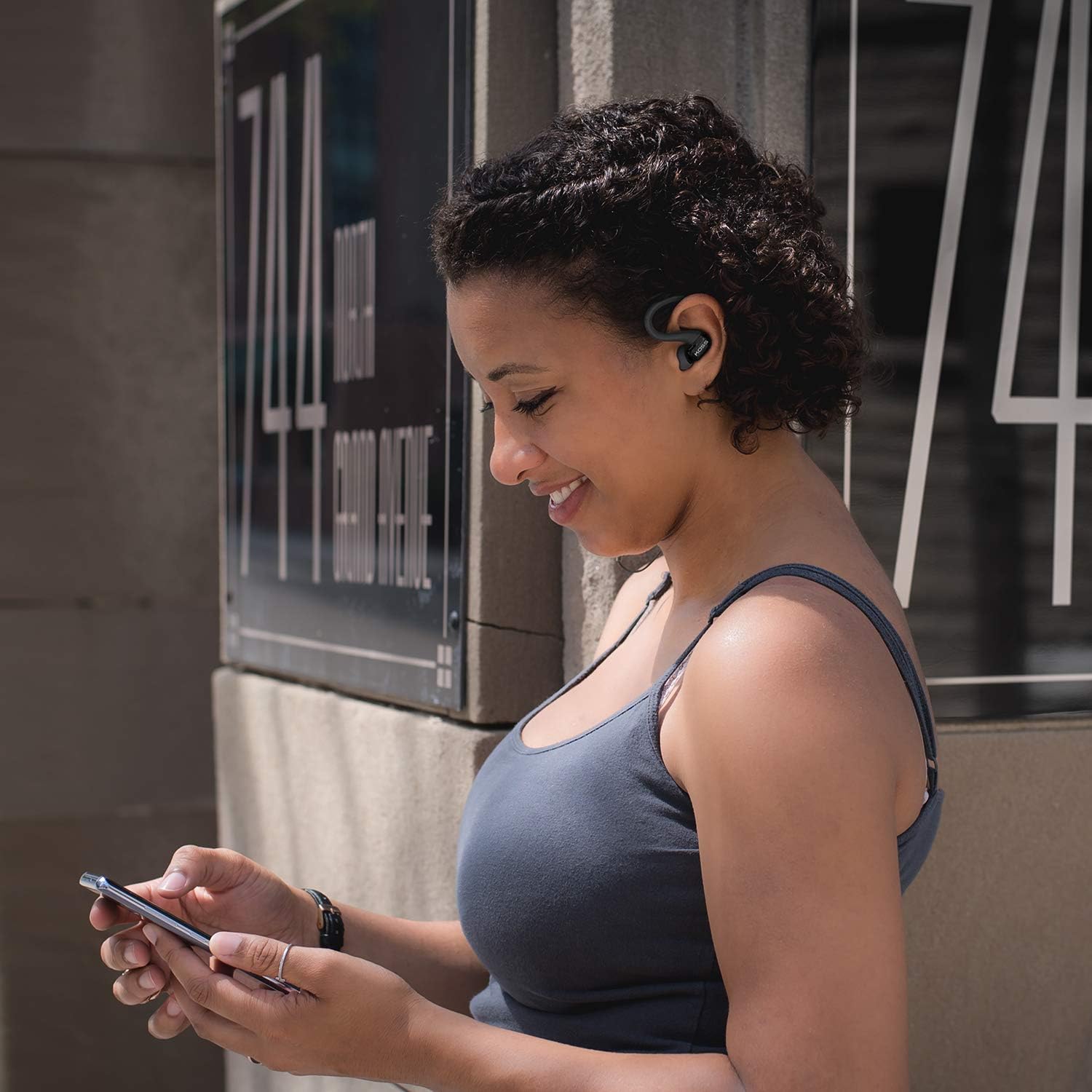
Image: A person wearing the Koss BT232i earclips, demonstrating the over-ear fit and in-ear placement.
Awọn ilana Iṣiṣẹ
The in-line remote provides convenient control over your audio and calls.
| Bọtini / Action | Išẹ |
|---|---|
| Titan / Paa | Tẹ mọlẹ bọtini iṣẹ-ọpọlọpọ. |
| Mu ṣiṣẹ/Danu Orin duro | Tẹ bọtini iṣẹ-ọpọlọpọ lẹẹkan. |
| Next Track | Tẹ mọlẹ bọtini Iwọn didun Up (+). |
| Ti tẹlẹ Track | Tẹ mọlẹ bọtini Iwọn didun isalẹ (-). |
| Iwọn didun soke | Press the Volume Up (+) button once. |
| Iwọn didun isalẹ | Press the Volume Down (-) button once. |
| Idahun/Pari Ipe | Tẹ bọtini iṣẹ-ọpọlọpọ lẹẹkan nigba ipe ti nwọle tabi ipe lọwọ. |
| Kọ Ipe | Tẹ mọlẹ bọtini iṣẹ-ọpọlọpọ nigba ipe ti nwọle. |
| Mu Oluranlọwọ Ohun ṣiṣẹ | Double-press the multi-function button (functionality may vary by device). |
Itoju
Proper care will extend the life and performance of your Koss BT232i earclips.
- Ninu: Gently wipe the earclips and earbuds with a soft, dry cloth. For ear cushions, remove them and clean with a mild soap solution if necessary, then rinse and dry thoroughly before reattaching. Do not use harsh chemicals or abrasive materials.
- Resistance lagun: The BT232i earclips are sweat resistant. After intense workouts, it is recommended to wipe them dry to prevent moisture buildup. Do not submerge the earclips in water.
- Ibi ipamọ: When not in use, store the earclips in a clean, dry place away from extreme temperatures and direct sunlight. Avoid tangling the cable.
Laasigbotitusita
If you encounter issues with your Koss BT232i earclips, try the following solutions:
| Isoro | Owun to le Solusan |
|---|---|
| Earclips won't turn on. | Rí i dájú pé batiri náà ti gba agbára. So mọ́ orísun agbára kan kí o sì jẹ́ kí ó gba agbára fún o kere ju ìṣẹ́jú 30 kí o tó gbìyànjú láti tún tan agbára náà. |
| Ko le so pọ pẹlu ẹrọ. |
|
| Ko si ohun tabi iwọn kekere. |
|
| Ohun ti wa ni daru tabi ge jade. |
|
Awọn pato
| Ẹya ara ẹrọ | Ẹ̀kúnrẹ́rẹ́ |
|---|---|
| Orukọ awoṣe | BT232i Bluetooth Wireless Headphones |
| Nọmba Awoṣe Nkan | 196651 |
| Asopọmọra Technology | Ailokun |
| Imọ-ẹrọ Ibaraẹnisọrọ Alailowaya | Bluetooth 4.2 |
| Igbesi aye batiri | Awọn wakati 6 |
| Akoko gbigba agbara | Awọn wakati 6 |
| Iwọn Igbohunsafẹfẹ | 18-20,000 Hz |
| Omi Resistance Ipele | Ohun tí kò ní omi (kò ní jẹ́ kí ó gbóná) |
| Iṣakoso Iru | Volume Control, Touch-based In-Line Remote |
| Gbohungbohun | Gbohungbohun inu ila |
| Gbigbe Eti | Ninu Eti |
| Fọọmù ifosiwewe | Lori Eti |
| Ohun elo | Ṣiṣu |
| Iwọn Nkan | 1.94 iwon (0.06 kilo) |
| Ọja Mefa | 0.98 x 0.98 x 0.98 inches |
Atilẹyin ọja ati Support
Alaye atilẹyin ọja
The Koss BT232i Wireless Bluetooth Earclips come with a Atilẹyin ọja Odun kan. Please retain your proof of purchase for warranty claims. For detailed warranty terms and conditions, please refer to the official Koss webAaye tabi kan si atilẹyin alabara Koss.
Onibara Support
For further assistance, technical support, or warranty inquiries, please visit the official Koss webojula tabi kan si wọn onibara iṣẹ Eka. O le wa alaye siwaju sii ati awọn ọja ni Koss Store on Amazon.
Awọn iwe aṣẹ ti o jọmọ - BT232i
 |
Itọsọna olumulo Awọn agbekọri Bluetooth Koss, Awọn pato, ati Alaye Aabo Itọsọna olumulo okeerẹ fun awọn agbekọri Bluetooth Koss, pẹlu awọn awoṣe KOSS BT115i V2, KOSS BT232i V2, KOSS BT221i V2, KOSS KSC35 Alailowaya V2, ati KOSS Utility UBTA. Bo awọn ikilọ ailewu, atilẹyin ọja, awọn pato imọ-ẹrọ, ati itọju batiri. |
 |
Koss BT232i Bluetooth Wireless Headphones User Guide User guide for the Koss BT232i Bluetooth wireless headphones. Learn about pairing, controls, charging, safety precautions, specifications, and warranty information from Koss Corporation. |
 |
KIMAFUN G100-A User Manual: Professional Wireless Sweat-Resistant Headset Microphone Comprehensive user manual for the KIMAFUN G100-A, a high-performance 2.4G wireless sweat-resistant headset microphone. Learn about key features, technical specifications, operating instructions, troubleshooting, and safety care for optimal use in active environments. |
 |
Koss Plug Wireless Bluetooth Headset User Guide User guide for the Koss Plug Wireless Bluetooth headset. Learn how to pair, control playback, charge, and understand indicator lights. Includes safety and compliance information. |
 |
Koss Warranty and Repair Guide for Headphones Detailed information on Koss warranty services, repair procedures for the US and Canada, and an overview of limited lifetime, 90-day, and one-year warranties for Koss audio products like headphones and stereophones. |
 |
Wicked Audio FIGHT Earbuds: Features, Specifications, and Safety Guide A comprehensive guide to the Wicked Audio FIGHT earbuds, covering in-line microphone functions, secure fitting instructions, technical specifications, and essential hearing safety precautions. |
Ask a question about this manual
Ask about setup, troubleshooting, compatibility, parts, safety, or missing instructions. Manuals+ will review the question and use this page’s manual context to help answer it.