
1. Ifihan
This manual provides comprehensive instructions for the Came ZBK Electronic Control Board, model 88001-0063. This control board is designed for use with Came BK series sliding gate motors, specifically compatible with BK800, BK1200, and BK1800 models. It serves as a direct replacement for the older 3199ZBK generation control board. Please read this manual thoroughly before installation and operation to ensure proper function and safety.
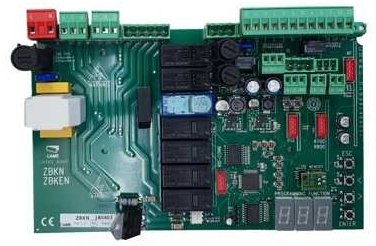
Image showing the Came ZBK Electronic Control Board, model 88001-0063, a replacement part for gate automation systems.
2. Alaye Aabo
Pataki: Installation and maintenance of this electronic control board should only be performed by qualified personnel. Failure to follow these safety guidelines may result in serious injury or damage to property.
- Always disconnect the main power supply to the gate motor before performing any installation, maintenance, or troubleshooting.
- Ensure all electrical connections comply with local electrical codes and regulations.
- Protect the control board from moisture, dust, and extreme temperatures.
- Do not attempt to modify the control board. Use only genuine Came replacement parts.
- Keep children and unauthorized persons away from the gate area during installation and operation.
3. Eto & Fifi sori
3.1 Package Awọn akoonu
- 1 x Came ZBK Electronic Control Board (Model 88001-0063)
3.2 Ibamu
This control board is compatible with Came BK series sliding gate motors: BK800, BK1200, and BK1800. It is designed as a direct replacement for the previous generation 3199ZBK control board.
3.3 fifi sori Igbesẹ
- Ge Agbara: Ensure the main power supply to the gate motor is completely disconnected at the circuit breaker. Verify with a voltage idanwo.
- Access Control Box: Open the gate motor's control box cover.
- Awọn isopọ iwe: Carefully photograph or sketch the existing wiring connections on the old control board (if replacing). This will be crucial for correct re-connection.
- Yọ Igbimọ atijọ kuro: Disconnect all wires from the old 3199ZBK control board and carefully remove it from its mounting.
- Fi sori ẹrọ Igbimọ Tuntun: Mount the new Came ZBK 88001-0063 control board in the same position.
- Asopọmọra Waya: Reconnect all wires to the new control board according to your documentation from step 3. Refer to the specific wiring diagram provided with your Came BK series motor for detailed connection points. Pay close attention to power, motor, safety device, and accessory connections.
- Awọn isopọ to ni aabo: Ensure all terminal connections are tight and secure.
- Close Control Box: Securely close the control box cover, ensuring no wires are pinched.
- Pada Agbara pada: Reconnect the main power supply to the gate motor.
Note: For detailed wiring diagrams and specific motor configurations, always refer to the original instruction manual for your Came BK800, BK1200, or BK1800 motor.
4. Isẹ
After successful installation, the Came ZBK control board will manage the operation of your sliding gate motor. Initial setup and programming typically involve:
- Itọsọna moto: Verifying and setting the correct motor rotation direction.
- Awọn iyipada Iwọn: Adjusting and programming the open and close limit switches for precise gate positioning.
- Awọn iṣakoso latọna jijin: Pairing and programming remote control transmitters.
- Awọn Ẹrọ Aabo: Testing and configuring safety photocells and other safety devices.
- Awọn Ilana Iṣiṣẹ: Setting parameters such as opening/closing speed, pause time, and force.
Consult the specific programming guide for your Came BK series motor for detailed instructions on configuring these settings. The ZBK board's functionality is integrated with the motor's overall system.
5. Itọju
Regular maintenance ensures the longevity and reliable operation of your Came ZBK control board and gate system.
- Ayewo wiwo: Periodically inspect the control board for any signs of damage, corrosion, or loose connections.
- Mimọ: Keep the control box interior clean and free from dust, insects, and debris. Use a soft, dry brush or compressed air.
- Wiring Checks: Ensure all wiring connections remain secure and free from wear or damage.
- Ṣayẹwo Ọjọgbọn: It is recommended to have the entire gate automation system, including the control board, inspected by a qualified technician at least once a year.
Máa yọ agbára kúrò nígbà gbogbo kí o tó ṣe ìtọ́jú èyíkéyìí.
6. Laasigbotitusita
If you encounter issues with your gate system, refer to the following common troubleshooting steps. For complex problems, contact a qualified technician.
| Isoro | Owun to le Fa | Ojutu |
|---|---|---|
| Ẹnubodè kò dáhùn sí àwọn àṣẹ. | No power to the control board. Batiri iṣakoso latọna jijin ti ku. Safety devices (photocells) obstructed or faulty. | Ṣàyẹ̀wò ìpèsè agbára àkọ́kọ́ àti ẹ̀rọ ìfọ́mọ́ra. Rọpo batiri isakoṣo latọna jijin. Clear obstruction from photocells; check their alignment and wiring. |
| Ẹnu-ọna ṣi ṣugbọn ko tii. | Safety devices (photocells) obstructed or faulty. Close limit switch not registering. | Check photocells for obstructions or malfunction. Inspect and adjust the close limit switch. |
| Motor nṣiṣẹ sugbon ẹnu-bode ko ni gbe. | Motor clutch disengaged. Mechanical issue with the gate or motor. | Check if the motor's manual release is engaged. Re-engage clutch. Inspect gate for obstructions or damage to gears/rack. |
| Control board LEDs are off. | No power supply to the board. | Verify main power supply and check fuses on the board (if present). |
Máa yọ agbára kúrò nígbà gbogbo kí o tó ṣe àyẹ̀wò àwọn ohun èlò inú.
7. Awọn pato
| Ẹya ara ẹrọ | Ẹ̀kúnrẹ́rẹ́ |
|---|---|
| Nọmba awoṣe | 88001-0063 |
| Brand | Wa |
| Ibamu | Came BK800, BK1200, BK1800 series sliding gate motors |
| Rọpo | Came 3199ZBK control board |
| ASIN | B07FW83F4Y |
| Olupese | WÁ |
| Ọjọ Akọkọ Wa | Oṣu Keje 25, Ọdun 2018 |
| Apoju Awọn ẹya ara wiwa | Alaye ko si |
8. Atilẹyin ọja & Atilẹyin
For information regarding the warranty period and terms for your Came ZBK Electronic Control Board, please refer to the documentation provided at the time of purchase or contact your authorized Came dealer. For technical support, installation assistance, or spare parts inquiries, please contact Came customer service or an authorized service center.
You can typically find contact information on the official Came webaaye ayelujara tabi nipasẹ olupese ọja rẹ.