
Ọrọ Iṣaaju
This manual provides essential instructions for setting up, operating, and maintaining your Optoma W335 WXGA DLP Professional Projector. Designed for business presentations, classrooms, and home use, this projector delivers bright, clear images with a long lamp life. Please read this manual thoroughly before use to ensure optimal performance and safety.
Ṣeto
Unpacking ati Ibẹrẹ Ayewo
Carefully remove the projector and all accessories from the packaging. Verify that all components listed in the 'What's in the Box' section are present and undamaged.
- W335 projector
- Okun agbara
- Latọna jijin
- Batiri
Ipo
The Optoma W335 is portable, weighing less than 7 pounds, making it easy to move between rooms. For optimal viewing, place the projector on a stable, flat surface. Ensure adequate ventilation around the unit to prevent overheating.

Image: The Optoma W335 projector showing its compact size and dimensions (12.44" width, 9.2" depth, 4.27" height).
The projector features adjustable legs for easy height and angle adjustments, allowing you to find the perfect screen area for projection. This helps in achieving a level and properly aligned image.
Asopọmọra
The W335 offers a variety of input options for connecting to different devices:
- HDMI: Fun fidio oni-nọmba giga-giga ati ohun.
- VGA: For analog video connections, commonly used with computers.
- Fidio Apapo: Fún fídíò ìtumọ̀ boṣewa.
- Ohun Wọle/Jade: For connecting external audio sources or speakers.
- USB Power Out (5V/1.0A): For powering external devices like streaming sticks.
- GBU232: Fun isopọmọ eto iṣakoso.
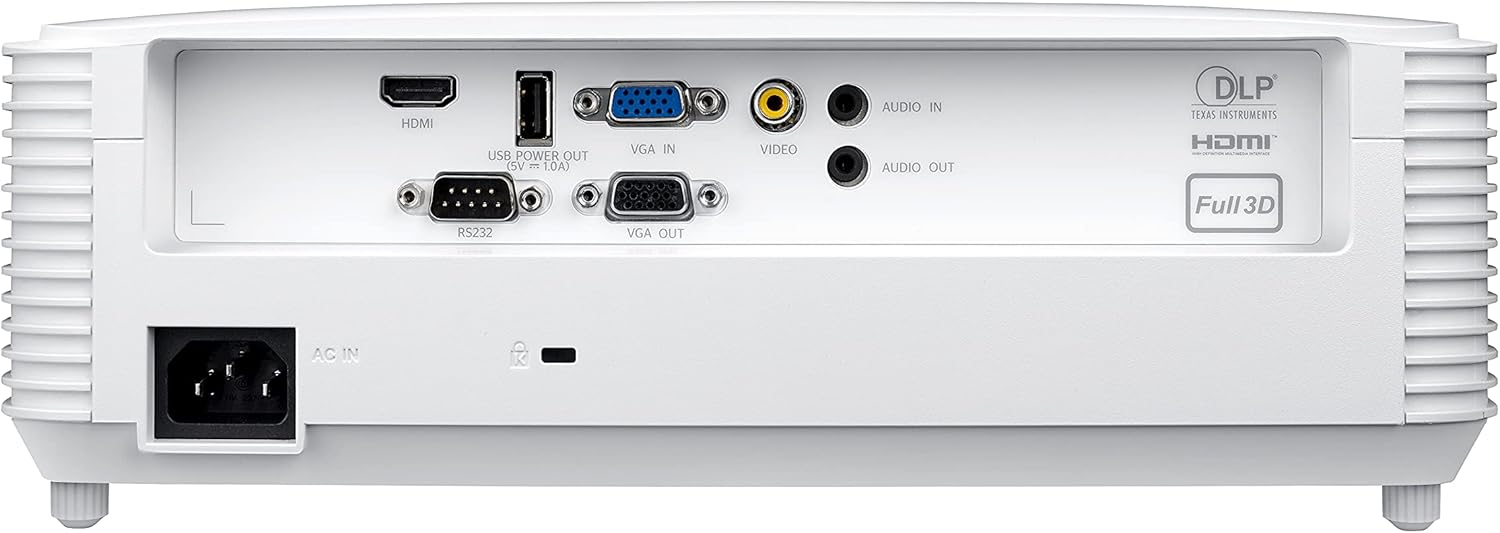
Image: Rear panel of the Optoma W335 projector, clearly showing the HDMI, VGA In, VGA Out, Video, Audio In, Audio Out, RS232, and USB Service Only ports.
Connect your source device (e.g., laptop, Blu-ray player) to the appropriate input port on the projector. Ensure the power cord is securely connected to the projector and a power outlet.
Awọn ilana Iṣiṣẹ
Titan / Pipa agbara
Press the power button on the projector's control panel or the remote control to turn the unit on or off. Allow a few moments for the projector to warm up or cool down.

Aworan: Oke view of the Optoma W335 projector, highlighting the control panel with power, menu, and navigation buttons, along with focus and zoom rings.
Siṣàtúnṣe Aworan
- Idojukọ: Yi oruka idojukọ lori lẹnsi lati mu aworan naa pọ.
- Sun-un: Use the zoom ring to adjust the image size without moving the projector.
- Atunse okuta bọtini: The W335 supports vertical keystone correction to square the image if the projector is not perfectly perpendicular to the screen. This can be adjusted via the on-screen menu.
The projector delivers vibrant and sharp WXGA resolution (1280 x 800) images with a 22,000:1 contrast ratio, suitable for various environments including well-lit rooms due to its 3,800 lumens brightness.
Ohun
An integrated 10-watt speaker provides room-filling audio. For enhanced sound, connect external speakers to the Audio Out port.
Itoju
Lamp Igbesi aye
Pirojekito lamp has a life of up to 15,000 hours, providing many years of use with minimal maintenance. When the lamp reaches the end of its life, a warning indicator will appear, and the lamp will need to be replaced. Refer to the full user manual for detailed lamp rirọpo ilana.
Ninu
- Lẹnsi: Use a soft, lint-free cloth and lens cleaning solution to gently clean the projector lens.
- Òde: Nu ita rẹ casing pẹlu asọ ti o gbẹ. Yago fun abrasive ose tabi epo.
- Awọn atẹgun atẹgun: Regularly check and clean the air vents to ensure proper airflow and prevent overheating. Use a soft brush or compressed air to remove dust.
Laasigbotitusita
- Ko si Aworan:
- Ensure the projector is powered on and the source device is connected and active.
- Check the input source selection on the projector.
- Daju gbogbo awọn kebulu ti sopọ ni aabo.
- Aworan ti ko boju mu:
- Ṣatunṣe oruka idojukọ lori lẹnsi naa.
- Ensure the projector is at the correct distance from the screen.
- Use keystone correction if the image is distorted.
- Ko si Ohun:
- Check the volume settings on both the projector and the source device.
- Ensure external speakers (if used) are properly connected and powered.
- Verify the audio cable connection.
- Pirojekito gbigbona:
- Rí i dájú pé àwọn ihò afẹ́fẹ́ mọ́ kedere, wọn kò sì dí wọn lọ́wọ́.
- Ṣiṣẹ́ ẹ̀rọ ìṣiṣẹ́ náà ní agbègbè tí afẹ́fẹ́ kò lè yọ́.
- If the issue persists, power off the projector and allow it to cool down before restarting.
Awọn pato
| Ẹya ara ẹrọ | Ẹ̀kúnrẹ́rẹ́ |
|---|---|
| Ọja Mefa | 9.6 x 12.4 x 3.9 inches |
| Iwọn Nkan | 6.61 iwon |
| Nọmba Awoṣe Nkan | W335 |
| Brand | Optoma |
| Niyanju Lilo | Business, Education |
| Pataki Ẹya | Jabọ Kuru |
| Asopọmọra Technology | hdmi, vga |
| Ipinnu Ifihan | 1280 x 800 (WXGA) |
| Imọlẹ | 3800 Lumens |
| Ipin Itansan | 22,000:1 |
| Lamp Igbesi aye | Titi di wakati 15,000 |
| Agbọrọsọ Iṣọkan | 10-watt |
| Jabọ Ratio | 1.55 – 1.73:1 |
Atilẹyin ọja & Atilẹyin
For detailed warranty information and technical support, please refer to the official Optoma website or the documentation included with your product. You can also contact Optoma customer service directly for assistance.
Ṣabẹwo si Optoma Store on Amazon fun ọja alaye siwaju sii.