
Ọrọ Iṣaaju
This manual provides essential information for the safe and effective operation of your Ampeg BA-210V2 450-Watt Bass Combo Amplifier. The BA-210V2 is designed to deliver classic Ampeg bass tone with features optimized for stage performance. It includes a Bass Scrambler overdrive, a true 60-degree monitoring angle, front-facing controls, auxiliary inputs, and a headphone jack.
Please read this manual thoroughly before using the amplifier to ensure proper setup and to maximize your experience with this product.
Awọn Itọsọna Aabo pataki
- Ka awọn ilana wọnyi.
- Pa awọn ilana wọnyi.
- Tẹtisi gbogbo awọn ikilọ.
- Tẹle gbogbo awọn ilana.
- Maṣe lo ohun elo yii nitosi omi.
- Mọ pẹlu asọ gbigbẹ nikan.
- Ma ṣe dina eyikeyi awọn ṣiṣi atẹgun. Fi sori ẹrọ ni ibamu pẹlu awọn ilana ti olupese.
- Maṣe fi sori ẹrọ nitosi awọn orisun ooru gẹgẹbi awọn imooru, awọn iforukọsilẹ ooru, awọn adiro, tabi awọn ohun elo miiran (pẹlu ampliifiers) ti o gbe ooru jade.
- Ma ṣe ṣẹgun idi aabo ti polarized tabi pilogi iru ilẹ. Plọọgi polarized ni awọn abẹfẹlẹ meji pẹlu ọkan gbooro ju ekeji lọ. Plọọgi iru-ilẹ ni awọn abẹfẹlẹ meji ati prong grounding kẹta. Abẹfẹlẹ ti o gbooro tabi prong kẹta ni a pese fun aabo rẹ. Ti pulọọgi ti a pese ko ba wo inu iṣan-ọna rẹ, kan si alamọdaju kan fun rirọpo ti iṣan igba atijọ.
- Dabobo okun agbara lati ma rin lori tabi pin, ni pataki ni awọn pilogi, awọn ohun elo irọrun, ati aaye nibiti wọn ti jade kuro ninu ohun elo naa.
- Lo awọn asomọ/awọn ẹya ara ẹrọ ti olupese pato.
- Lo nikan pẹlu rira, iduro, mẹta, akọmọ, tabi tabili ti a ti sọ tẹlẹ nipasẹ olupese, tabi ta pẹlu ohun elo. Nigbati a ba lo ọkọ ayọkẹlẹ kan, lo iṣọra nigbati o ba n gbe akojọpọ rira / ohun elo lati yago fun ipalara lati itọsi.
- Yọọ ohun elo yi nigba iji manamana tabi nigba lilo fun igba pipẹ.
- Tọkasi gbogbo iṣẹ si awọn oṣiṣẹ iṣẹ ti o peye. Iṣẹ nilo nigbati ohun elo ba ti bajẹ ni ọna eyikeyi, gẹgẹbi okun ipese agbara tabi plug ti bajẹ, omi ti ta silẹ tabi awọn nkan ti ṣubu sinu ẹrọ, ohun elo naa ti farahan si ojo tabi ọrinrin, ko ṣiṣẹ deede. , tabi ti lọ silẹ.
Awọn ẹya ara ẹrọ
Awọn Ampeg BA-210V2 Bass Combo Amplifier offers a range of features designed for bass players seeking powerful tone and versatility:
- 450 Watts RMS Power: Delivers substantial power suitable for stage išẹ.
- 2x10" Ampeg Custom Speakers: Equipped with two 10-inch Ampeg Custom speakers for clear and robust bass reproduction.
- Bass Scrambler Overdrive: Provides a classic tube-like grind, allowing for versatile tonal options.
- Ultra Hi/Lo Tone Shaping: Offers enhanced tonal flexibility for sculpting your sound.
- 1" HF Tweeter: Includes a 1-inch high-frequency tweeter for extended treble response.
- 60° Monitoring Angle: The cabinet design allows for a true 60-degree monitoring angle, directing sound towards the player.
- Front-Facing Controls: All controls are conveniently located on the front panel for easy access.
- Iṣawọle Iranlọwọ: Allows connection of external audio devices for practice.
- Jack agbekari: Enables silent practice.
Awọn iṣakoso ati awọn isopọ
Iwaju Panel idari
The front panel provides all necessary controls for shaping your sound and connecting your instrument and other devices.

olusin 1: Iwaju Panel Loriview of the BA-210V2 Amplifier.
- Iṣawọle: So gita baasi rẹ pọ nibi.
- -15 dB Pad: Engages a 15 dB attenuation for active basses or high-output instruments to prevent input clipping.
- Scrambler (Drive, Blend):
- Wakọ: Adjusts the amount of overdrive/distortion.
- Parapo: Mixes the overdriven signal with the clean signal.
- Iwọn didun: Išakoso awọn ìwò o wu ipele ti awọn amplifier.
- Kabiyesi: Boosts high frequencies for added clarity and presence.
- Ultra Lo: Boosts low frequencies for a deeper, fuller bass tone.
- Bass: Adjusts the low-frequency equalization.
- Aarin: Adjusts the mid-frequency equalization.
- Tirẹbu: Adjusts the high-frequency equalization.
- AUX Level: Controls the volume of the auxiliary input.
- AUX Ninu: 3.5mm stereo input for connecting external audio devices like MP3 players or phones.
- Laini Jade: XLR balanced output for connecting to a mixing console or recording interface.
- Firanṣẹ: Output for sending signal to external effects processors.
- Pada: Input for receiving signal from external effects processors.
- Awọn foonu: 1/4-inch stereo headphone output for silent practice.
- HF Mute: Mutes the high-frequency tweeter. Useful for certain tones or when using external cabinets without tweeters.
- Ẹsẹ ẹlẹsẹ: Input for an optional footswitch to control the Scrambler and HF Mute functions.
- Agbara: Yipada/Titiipa fun amplifier.
Ru Panel Awọn isopọ
The rear panel provides connections for power and external speaker options.
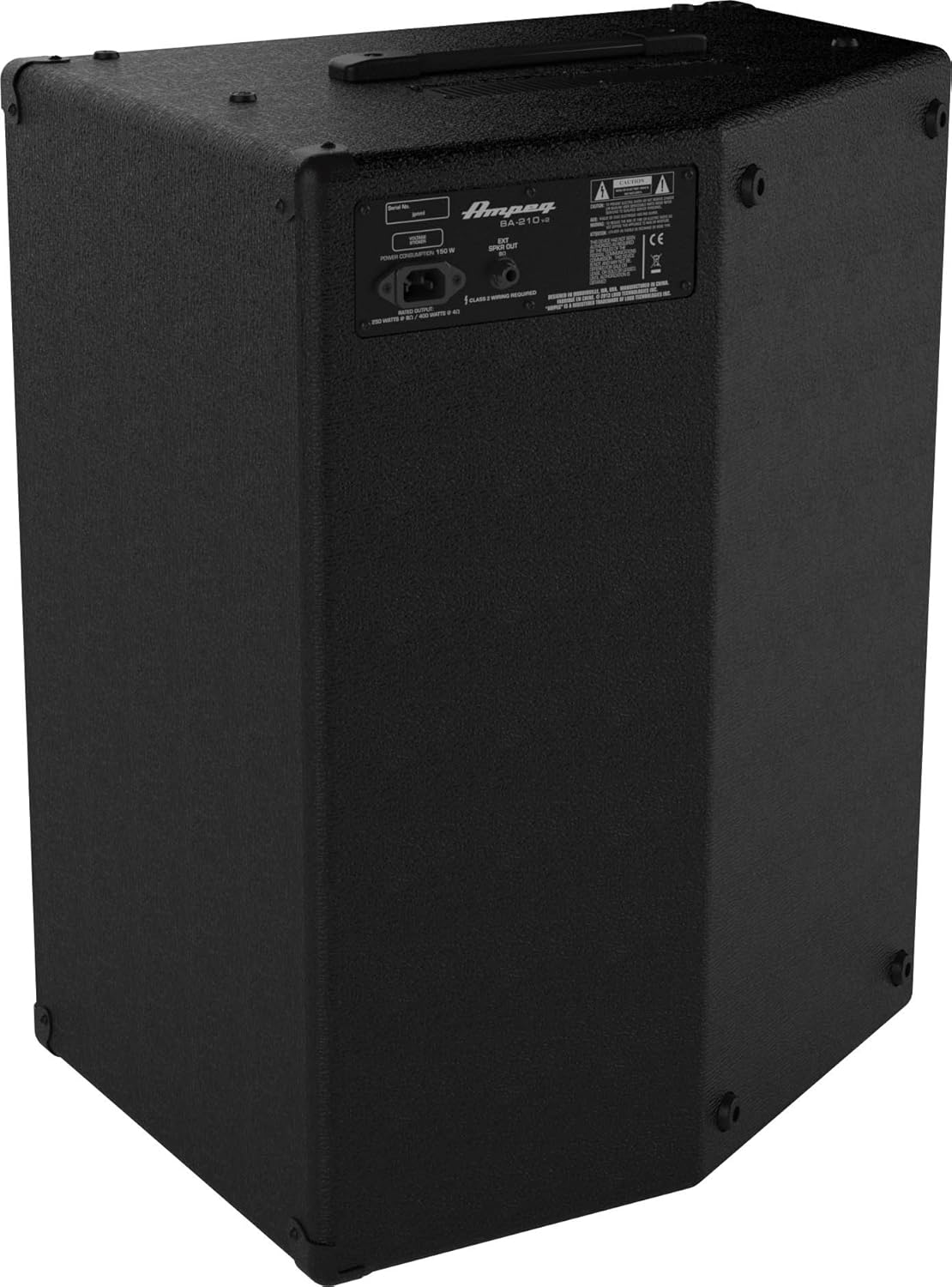
olusin 2: Ru Panel Loriview of the BA-210V2 Amplifier.
- Input Agbara AC: Connect the supplied AC power cord here.
- Àgbéjáde Agbọrọsọ Ìta: 1/4-inch output for connecting an external speaker cabinet. Ensure the impedance matches the ampawọn ibeere ti lifier.
Ṣeto
Unpacking ati Placement
- Fara yọ awọn amplifier lati awọn oniwe-apoti.
- Gbe awọn amplifier on a stable, level surface.
- Rii daju pe fentilesonu to peye ni ayika ẹyọ naa. Maṣe dina awọn atẹgun atẹgun.
- The BA-210V2 can be used in a standard upright position or tilted back at a 60-degree angle for use as a floor monitor.
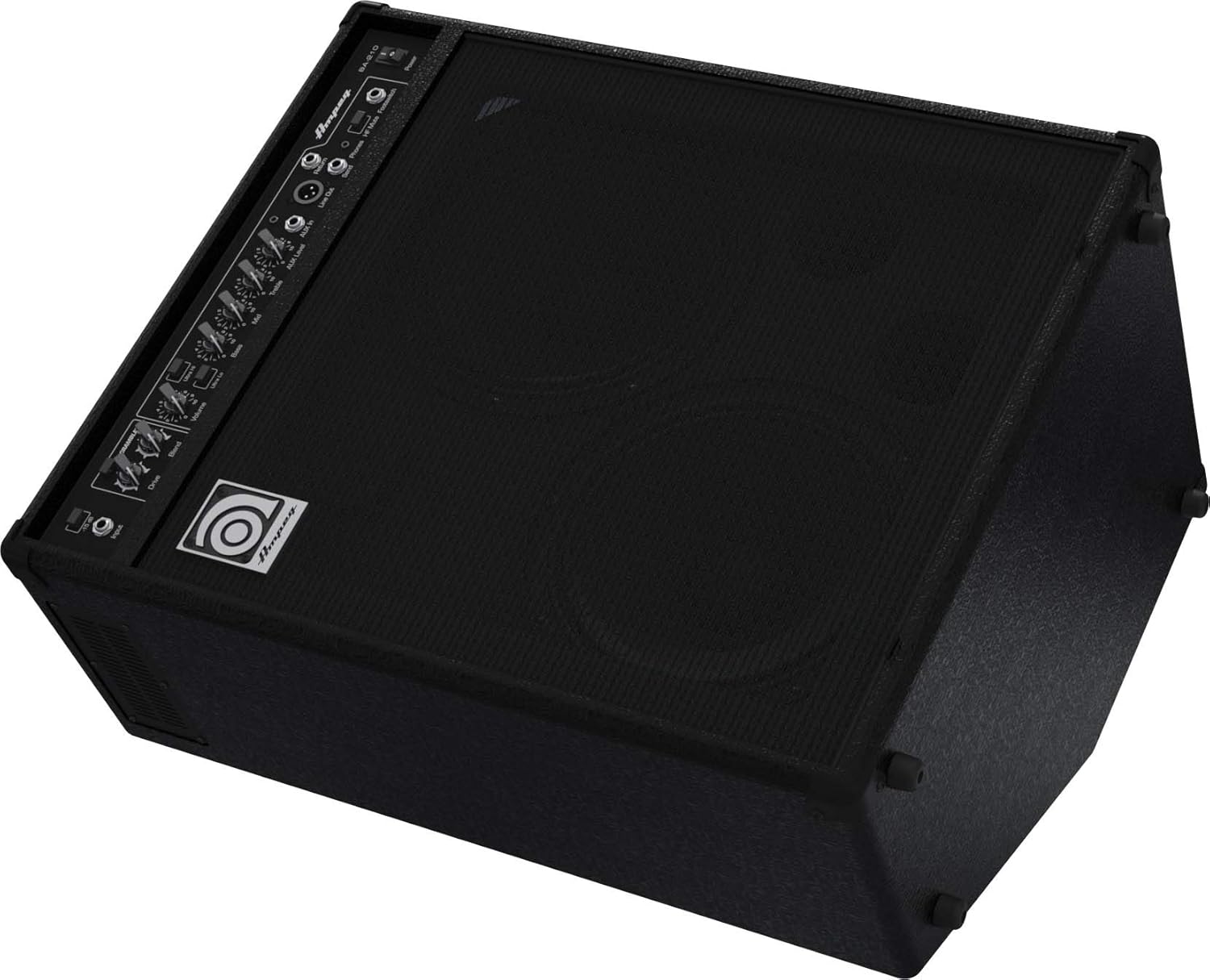
Figure 3: BA-210V2 in 60-degree monitoring position.
Síso Ohun Èlò Rẹ Mọ́
- Rii daju pe ampswitch agbara lifier wa ni ipo PA.
- So gita bass rẹ pọ mọ Iṣawọle jack using a standard 1/4-inch instrument cable.
- If using an active bass or a high-output instrument, engage the -15 dB paadi switch to prevent input clipping.
Titan / Pipa agbara
- Before powering on, ensure all volume controls are set to their minimum.
- So okùn agbara AC ti a pese pọ mọ Input Agbara AC on the rear panel and then to a grounded electrical outlet.
- Yipada awọn Agbara switch to the ON position. The power indicator light will illuminate.
- To power off, turn down all volume controls, then flip the Agbara yipada si PA ipo.
Awọn ilana Iṣiṣẹ
Basic Tone Setting
- Bẹrẹ pẹlu awọn Bass, Aarin, ati Treble controls at their center (12 o'clock) positions.
- Laiyara mu awọn Iwọn didun control to a desired listening level.
- Ṣatunṣe awọn Bass, Aarin, ati Treble controls to achieve your preferred tone.
- Ṣe idanwo pẹlu Ultra Hi ati Ultra Lo switches to further shape your sound.
Using the Bass Scrambler Overdrive
- Fi ọwọ kan si Scrambler switch to activate the overdrive circuit.
- Ṣatunṣe awọn Wakọ knob to control the amount of distortion.
- Lo awọn Darapọ knob to mix the overdriven signal with your clean bass tone. A lower blend setting will retain more of your original signal, while a higher setting will emphasize the overdrive.
Auxiliary Input and Headphone Use
- Connect an external audio source (e.g., smartphone, MP3 player) to the AUX Ninu jack using a 3.5mm stereo cable.
- Adjust the playback volume on your external device and the AUX Ipele koko lori awọn amplifier to balance the sound with your bass.
- Fún ìdánrawò ìdákẹ́jẹ́ẹ́, so agbekọri pọ̀ mọ́ Awọn foonu jack. This will mute the amplifier's internal speakers.
Asopọ Agbọrọsọ Ita
- The BA-210V2 can power an external speaker cabinet. Connect a speaker cable from the Ijade Agbọrọsọ Ita on the rear panel to your external cabinet.
- Ensure the impedance of the external cabinet matches the amplifier's requirements (typically 8 ohms). Refer to the specifications section for details.
DI Output and Effects Loop
- Awọn Laini Jade (XLR) provides a balanced signal for direct connection to a mixing console or recording device.
- Awọn Firanṣẹ ati Pada jacks form an effects loop, allowing you to integrate external effects processors into your signal chain. Connect the Send to the input of your effect and the output of your effect to the Return.
Itoju
- Ninu: Mọ awọn amplifier with a dry, lint-free cloth. Do not use liquid cleaners or solvents.
- Ibi ipamọ: Nigbati o ko ba wa ni lilo fun awọn akoko ti o gbooro sii, tọju awọn ampìfọ́mọ́ra ní àyíká gbígbẹ, tí a ń ṣàkóso ìwọ̀n otútù.
- Afẹfẹ: Nigbagbogbo rii daju wipe awọn amplifier's ventilation openings are clear and unobstructed to prevent overheating.
- Ṣiṣẹ: Refer all servicing to qualified service personnel. Do not attempt to service the unit yourself.
Laasigbotitusita
| Isoro | Owun to le Fa | Ojutu |
|---|---|---|
| Ko si ohun | Power cord not connected; Power switch off; Volume controls at minimum; Instrument cable faulty; Speaker cable faulty (if external speaker used); HF Mute engaged. | Check power connections; Turn power switch ON; Increase volume; Test/replace cables; Check HF Mute switch. |
| Ohun ti o daru | Input signal too hot; Volume too high; Scrambler Drive too high; Faulty instrument or cable. | Engage -15 dB pad; Reduce input gain or instrument volume; Lower amplifier volume; Adjust Scrambler Drive/Blend; Test with another instrument/cable. |
| Hum tabi ariwo | Ground loop; Faulty cables; Nearby electrical interference. | Ensure proper grounding; Use shielded cables; Try different power outlets; Move ampìdènà kúrò lọ́dọ̀ àwọn ẹ̀rọ itanna mìíràn. |
Awọn pato
| Ẹya ara ẹrọ | Sipesifikesonu |
|---|---|
| Awoṣe | BA-210v2 |
| Ijade Wattage | 450 Wattis RMS |
| Awọn agbọrọsọ | 2 x 10" Ampeg Custom Speakers, 1 x 1" HF Tweeter |
| Awọn iwọn (H x W x D) | 25.7 x 15.7 x 20.7 inches (65.3 x 39.9 x 52.6 cm) |
| Iwọn | 50 poun (22.7 kg) |
| Paadi igbewọle | -15 dB |
| Input Iranlọwọ | 3.5mm Sitẹrio Jack |
| Agbekọri Ijade | 1/4" Stereo Jack |
| Laini Jade | Iwontunwonsi XLR |
| Ipa Ipa | Send/Return 1/4" Jacks |
| Footswitch Iṣakoso | Scrambler On/Off, HF Mute On/Off |
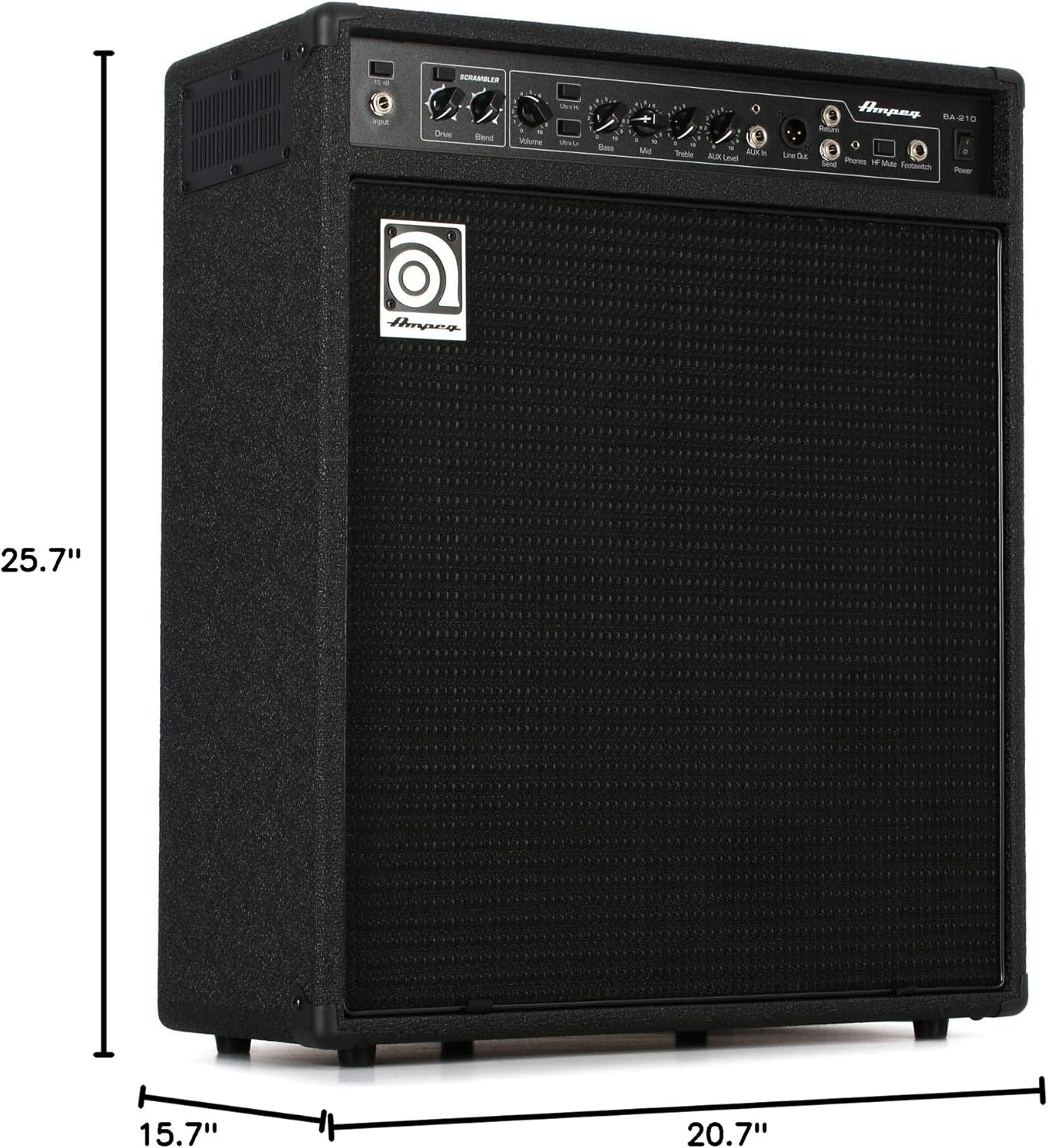
Figure 4: Dimensions of the BA-210V2 Amplifier.
Atilẹyin ọja ati Support
For warranty information and technical support, please refer to the warranty card included with your product or visit the official Ampeg webAaye naa. Maṣe gbiyanju lati tun ẹrọ naa ṣe funrararẹ, nitori eyi le fa idaniloju rẹ.
Fun iranlọwọ siwaju, kan si Ampeg customer support through their official channels.