
Lexmark E460DN
Lexmark E460DN Laser Printer User Manual
Model: E460DN
Ọrọ Iṣaaju
This manual provides essential instructions for the Lexmark E460DN laser printer. Designed for small and midsize workgroups, the E460DN offers efficient, high-quality monochrome printing with advanced features. This document covers unpacking, setup, operation, maintenance, and troubleshooting to ensure optimal performance of your device.
The Lexmark E460DN is a Certified Refurbished product, meaning it has been tested and certified to function like new. It includes a toner drum and comes with a 90-day warranty.
Ọja Pariview
The Lexmark E460DN is a compact laser printer featuring a light gray and dark gray exterior. It is equipped with a user-friendly control panel and supports various paper handling options.
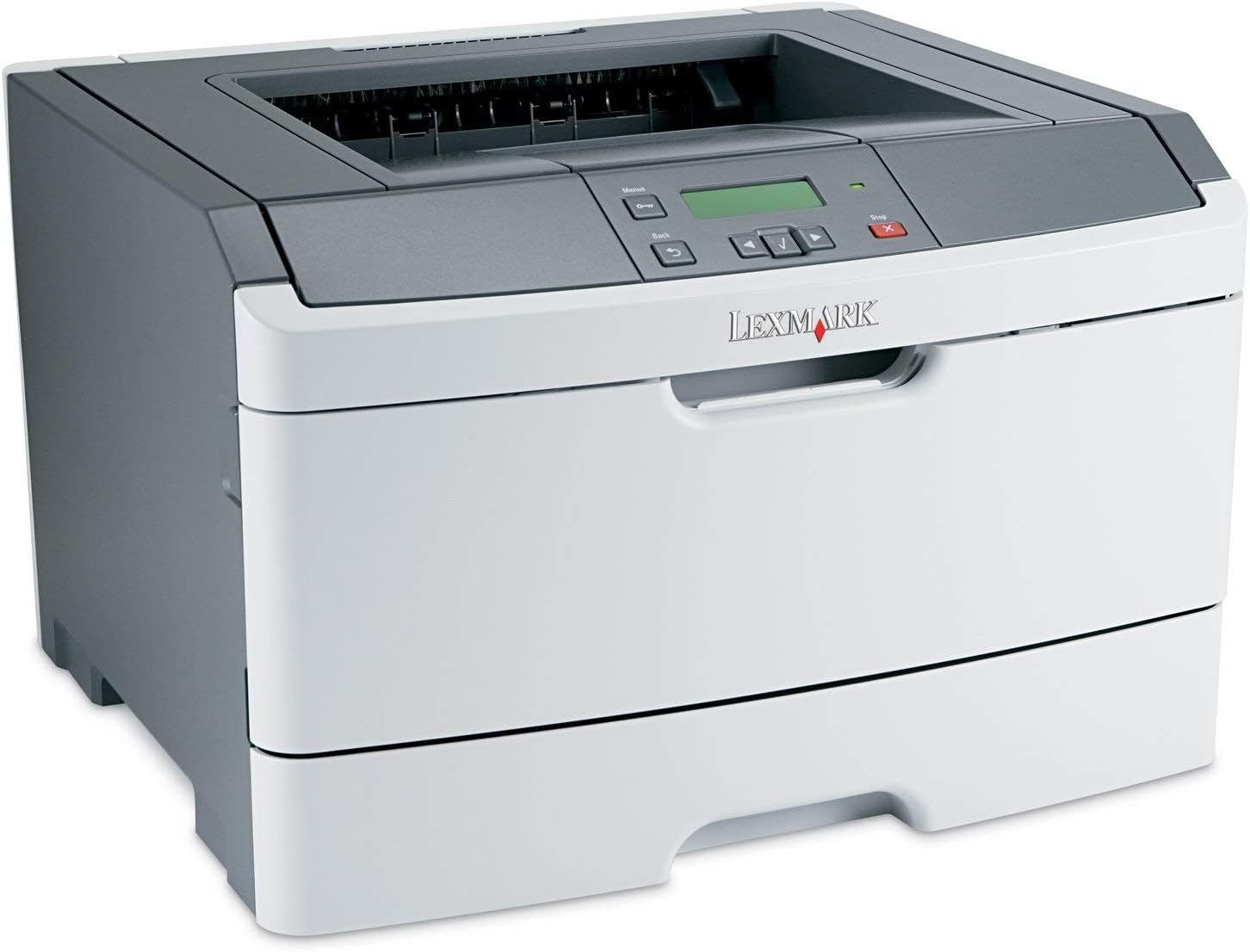
Nọmba 1: Iwaju view of the Lexmark E460DN Laser Printer. The image displays the printer's light gray body with a dark gray top section, including the output tray and control panel. The Lexmark logo is visible on the front panel.
Awọn ẹya pataki:
- Awọn iyara Titẹ sita: Up to 40 pages per minute (ppm) for monochrome documents.
- High Print Quality: True 1200 x 1200 dpi resolution for sharp text and graphics.
- Duplexing laifọwọyi: Standard feature for two-sided printing, reducing paper consumption.
- Network Ready: Ethernet connectivity for shared use in workgroup environments.
- Ni wiwo olumulo-ore: Four-line operator panel for easy navigation and control.
- Imudara Aabo: Numeric pad for confidential printing.
- Isẹ ti o munadoko: Instant warm-up fuser for fast first-page-out times and reduced power consumption.
Awọn ilana iṣeto
- Yọ Atẹwe naa kuro: Carefully remove the printer from its packaging. Remove all packing materials, tapes, and protective films.
- Gbe ẹrọ itẹwe naa: Position the printer on a stable, level surface with adequate ventilation. Ensure sufficient space around the printer for paper loading and output.
- So agbara: Plug the power cord into the printer's power inlet, then into a grounded electrical outlet.
- Install Toner/Drum (if applicable): If the toner cartridge and imaging drum are not pre-installed, follow the instructions provided with the consumables to install them. For refurbished units, these components are typically pre-installed.
- Iwe Fifuye: Open the paper tray and adjust the paper guides to fit the paper size. Load the desired print media (e.g., plain paper, envelopes) into the tray.
- Connect to Network/Computer:
- Ethernet (Wired): So okùn Ethernet kan lati ibudo Ethernet ti itẹwe si olulana nẹtiwọọki rẹ tabi yipada.
- USB (Optional, if available): So okun USB kan lati inu ẹrọ itẹwe si kọmputa rẹ.
- Fi Awọn awakọ sii: Turn on the printer. Install the appropriate printer drivers on your computer. Drivers can usually be found on the manufacturer's webojula.
- Ṣe titẹ idanwo kan: After driver installation, print a test page to confirm proper setup and connectivity.
Awọn ilana Iṣiṣẹ
Control Panel Navigation:
The Lexmark E460DN features a four-line display and several buttons for navigating menus and controlling printer functions. Use the arrow buttons to scroll through options and the 'Menu' or 'Select' button to confirm selections. The 'Back' button allows you to return to previous menus, and the 'Stop' button can cancel print jobs.
Ìtẹ̀wé Pàtàkì:
- Rii daju pe itẹwe ti wa ni titan ati ti sopọ si kọnputa tabi nẹtiwọki rẹ.
- Ṣii iwe ti o fẹ lati tẹ sita lori kọnputa rẹ.
- Yan File > Tẹjade (tabi aṣẹ deede ninu ohun elo rẹ).
- Choose the Lexmark E460DN from the list of available printers.
- Ṣàtúnṣe àwọn ètò ìtẹ̀wé bí ó ṣe pọndandan (fún àpẹẹrẹ, iye àwọn àdàkọ, ìwọ̀n ìwé, dídára ìtẹ̀wé).
- For two-sided printing, select the duplex option in your printer settings. The E460DN supports automatic duplexing.
- Tẹ Titẹ sita.
Confidential Printing:
The printer supports confidential printing using a numeric pad. When sending a confidential print job from your computer, you will be prompted to enter a PIN. To release the job at the printer, enter the same PIN using the control panel's numeric pad.
Itoju
Toner Cartridge and Imaging Drum Replacement:
The Lexmark E460DN uses a combined toner cartridge and imaging drum unit. The printer's control panel will display early-warning alerts for low toner. When prompted:
- Ṣí ìlẹ̀kùn iwájú ẹ̀rọ ìtẹ̀wé náà.
- Carefully remove the old toner/drum unit by pulling it straight out.
- Unpack the new toner/drum unit and gently shake it to distribute the toner.
- Insert the new unit into the printer until it clicks into place.
- Ti ilẹkun ẹnu-ọna iwaju.
Dispose of used toner cartridges according to local regulations or return them to Lexmark for recycling.
Ninu ẹrọ itẹwe:
- Òde: Mu ese ita gbangba pẹlu asọ, damp, lint-free asọ. Ma ṣe lo abrasive ose tabi epo.
- Inu inu: Periodically clean the paper path and other accessible interior areas to remove dust and paper debris. Refer to the printer's on-screen messages or full service manual for detailed internal cleaning procedures.
Laasigbotitusita
This section provides solutions to common issues you may encounter with your Lexmark E460DN printer. For more complex problems, consult the full service manual or Lexmark support.
Awọn oran ti o wọpọ ati Awọn ojutu:
- Itẹwe Ko Dahun:
- Ṣayẹwo awọn asopọ agbara ati rii daju pe itẹwe ti wa ni titan.
- Ṣe àyẹ̀wò àwọn ìsopọ̀ nẹ́tíwọ́ọ̀kì tàbí okùn USB.
- Tun itẹwe ati kọmputa rẹ bẹrẹ.
- Rii daju pe awọn awakọ itẹwe ti fi sori ẹrọ daradara ati imudojuiwọn.
- Awọn Jams Iwe:
- Follow the instructions on the printer's display or in the full service manual to locate and clear jammed paper.
- Rí i dájú pé ìwé náà kún dáadáa, kò sì kún ju bó ṣe yẹ lọ nínú àwo náà.
- Lo awọn iru iwe ti a ṣeduro.
- Didara Titẹjade Ko dara:
- Check toner levels. Replace the toner/drum unit if low or empty.
- Ensure the imaging drum is clean and free from damage.
- Perform a print quality test from the printer's menu to diagnose issues.
- Clean the printer's interior as described in the maintenance section.
- Awọn ifiranṣẹ aṣiṣe:
Refer to the customizable operator panel messaging for specific error codes or descriptions. Consult the full service manual for detailed explanations and solutions for each error message.
Awọn pato
| Ẹya ara ẹrọ | Sipesifikesonu |
|---|---|
| Nọmba awoṣe | E460DN |
| Imọ-ẹrọ titẹ sita | Lesa |
| Ijade itẹwe | Monochrome |
| Iyara Titẹjade ti o pọju (Monochrome) | Up to 40 ppm (letter-size paper) |
| Titẹ Ipinnu | 1200 x 1200 dpi |
| Ile oloke meji Printing | Automatic (Dual-sided printing) |
| Asopọmọra Technology | Wired; Ethernet |
| Ni wiwo Hardware | Àjọlò |
| Agbara Ibi ipamọ Iranti | 64 MB |
| O pọju Input dì Agbara | 300 iwe |
| O wu Sheet Agbara | 150 iwe |
| Tẹjade Media Atilẹyin | Awọn apoowe, Iwe pẹlẹbẹ |
| Ọja Mefa | 14.55 x 15.98 x 10.2 inches |
| Àwọ̀ | Ina Grẹy / Dudu Grey |
| UPC | 748926547406 |
Atilẹyin ọja ati Support
This Lexmark E460DN printer is a Certified Refurbished product and comes with a 90-ọjọ lopin atilẹyin ọja. Atilẹyin ọja yi ni wiwa awọn abawọn ninu awọn ohun elo ati iṣẹ ṣiṣe labẹ lilo deede.
For warranty claims, technical support, or further assistance, please refer to the documentation provided with your refurbished product or contact the seller directly. Additional support resources may be available on the official Lexmark webojula.
Ask a question about this manual
Ask about setup, troubleshooting, compatibility, parts, safety, or missing instructions. Manuals+ will review the question and use this page’s manual context to help answer it.