
Ọrọ Iṣaaju
O ṣeun fun riraasing the CAMRY CR 1153 Digital Radio. This manual provides important information regarding the safe operation, setup, and maintenance of your device. Please read these instructions thoroughly before use and retain them for future reference.
The CAMRY CR 1153 is a modern digital radio featuring a classic design with a wooden finish. It includes an alarm clock, thermometer, and calendar functions, making it a versatile addition to any room. It can be powered by mains electricity or batteries for portable use.
Awọn Itọsọna Aabo pataki
- Ka gbogbo awọn ilana ṣaaju ṣiṣe ẹrọ naa.
- Pa ẹrọ naa kuro ninu omi ati ọrinrin.
- Do not expose to direct sunlight, heat sources, or extreme temperatures.
- Rii daju pe fentilesonu to dara; maṣe dina awọn ṣiṣi atẹgun.
- Lo ohun ti nmu badọgba agbara tabi awọn batiri nikan.
- Ma ṣe gbiyanju lati tunto tabi tun ẹrọ naa funrararẹ. Tọkasi gbogbo iṣẹ si oṣiṣẹ oṣiṣẹ.
- Clean the device with a soft, dry cloth. Avoid abrasive cleaners.
- Sọ awọn batiri sọnu ni ifojusọna ni ibamu si awọn ilana agbegbe.
Ọja Pariview
Familiarize yourself with the components of your CAMRY CR 1153 Digital Radio.
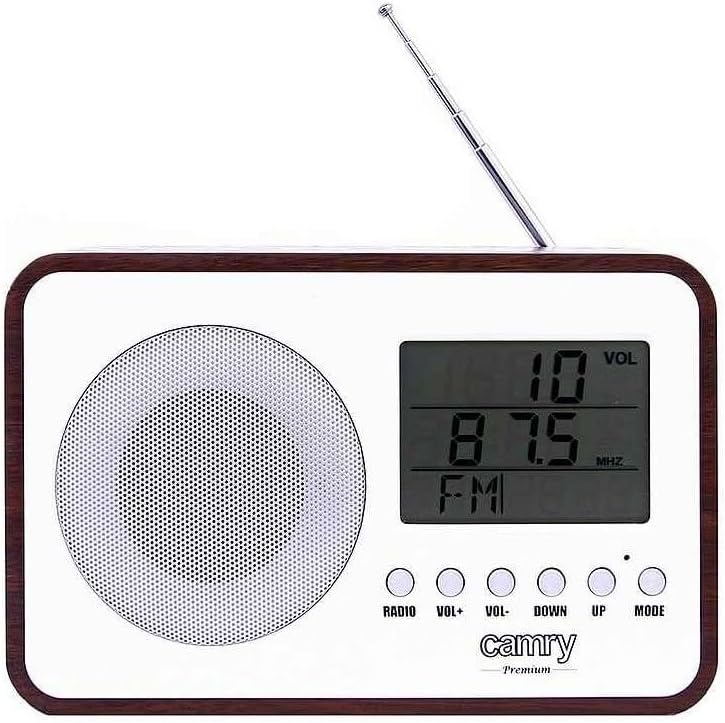
olusin 1: Iwaju View. This image shows the front of the CAMRY CR 1153 Digital Radio, featuring a large LCD display, a circular speaker grille on the left, and five control buttons below the display. The buttons are labeled RADIO, VOL+, VOL-, DOWN, UP, and MODE. A telescopic antenna is visible at the top right.

Figure 2: Display Close-up. A alaye view of the radio's LCD screen, showing "VOL" at the top right, "89.8 MHz" as the current frequency, and "FM" indicating the band. The control buttons are partially visible below the screen.

olusin 3: Ẹyìn View. This image displays the back of the radio, including the telescopic antenna on the left, a ventilation grille, and an open battery compartment designed for two AA (LR06) batteries. A label with model information (CR 1153, Input: DC 3V, 1A, Battery: 2x AA (LR06), Power: 0.4W) is also visible.

Figure 4: Dimensions. The radio is shown with its approximate measurements: 19 cm in width, 11 cm in height, and 7 cm in depth. The telescopic antenna is extended.
Awọn bọtini Iṣakoso:
- RADIO: Toggles between radio mode and other functions (e.g., clock/alarm).
- VOL+ / VOL-: Ṣe atunṣe ipele iwọn didun.
- DOWN / UP: Used for tuning radio frequencies, setting time, or navigating menu options.
- Ipo: Selects different operating modes or confirms settings.
Ṣeto
Agbara ẹrọ naa:
The CAMRY CR 1153 can be powered by either mains electricity or batteries.
- Agbara Ifilelẹ: Connect the provided power adapter to the DC 3V input port on the back of the radio and then plug it into a standard wall outlet.
- Agbara Batiri:
- Open the battery compartment cover on the back of the radio (refer to Figure 3).
- Insert two AA (LR06) batteries, ensuring correct polarity (+/-).
- Pa ideri batiri naa ni aabo.
Note: Batteries are not included. Remove batteries if the device will not be used for an extended period.
Eto Ibẹrẹ (Akoko ati Ọjọ):
Upon first power-on or after battery replacement, you may need to set the time and date.
- Tẹ awọn MODE button repeatedly until the time setting appears on the display.
- Lo awọn UP ati SILE awọn bọtini lati ṣatunṣe awọn wakati. Tẹ MODE lati jẹrisi.
- Lo awọn UP ati SILE awọn bọtini lati ṣatunṣe iseju. Tẹ MODE lati jẹrisi.
- Follow similar steps to set the year, month, and day.
Awọn ilana Iṣiṣẹ
Radio Operation (FM):
- Fa eriali telescopic fun gbigba ti o dara julọ.
- Tẹ awọn RADIO button to switch to FM radio mode. The display will show the frequency.
- Lo awọn UP ati SILE buttons to manually tune to your desired FM frequency.
- To automatically scan for stations, press and hold the UP or SILE button for a few seconds. The radio will stop at the next strong signal.
- Satunṣe iwọn didun nipa lilo awọn VOL+ ati VOL- awọn bọtini.
Iṣẹ Aago Itaniji:
The radio features an alarm that can wake you with a standard alarm tone or your preferred radio station.
- Tẹ awọn MODE button repeatedly until the alarm setting appears (e.g., "ALARM SET").
- Lo UP ati SILE lati ṣeto wakati itaniji, lẹhinna tẹ MODE.
- Lo UP ati SILE to set the alarm minute, then press MODE.
- Yan orisun itaniji (Buzzer tabi FM Radio) nipa lilo UP/SILE, lẹhinna tẹ MODE. If FM Radio is selected, ensure a station is tuned.
- To activate/deactivate the alarm, navigate to the alarm display and use the UP/SILE button to toggle it On/Off. An alarm icon will appear on the display when active.
Thermometer and Calendar:
The radio automatically displays the current temperature and date. These functions are typically visible in the default clock display mode or can be cycled through using the MODE bọtini.
Iṣẹ Tiipa Aifọwọyi:
The radio includes an automatic shut-off timer. By default, it is set to 10 minutes. This can be adjusted up to 1.5 hours (90 minutes).
- Nigba ti redio ba ndun, tẹ awọn MODE button until the "SLEEP" or "AUTO OFF" setting appears.
- Lo awọn UP ati SILE buttons to adjust the desired shut-off time (e.g., 10, 20, 30, 60, 90 minutes, or OFF).
- Redio yoo wa ni pipa laifọwọyi lẹhin akoko ti o yan.
Itoju
- Ninu: Wipe the radio's surface with a soft, slightly damp cloth. The special protective coating helps resist grease and water splashes, making it easy to clean. Do not use harsh chemicals or abrasive materials.
- Rirọpo Batiri: Replace batteries when the display dims or the radio's performance degrades. Always replace both batteries simultaneously with new ones of the same type (AA LR06).
- Ibi ipamọ: Ti o ba tọju redio fun igba pipẹ, yọ awọn batiri kuro lati yago fun jijo. Tọju ni itura kan, ibi gbigbẹ.
Laasigbotitusita
| Isoro | Owun to le Fa | Ojutu |
|---|---|---|
| Redio ko tan. | No power supply; batteries depleted or incorrectly inserted; power adapter not connected. | Check power adapter connection. Replace batteries or ensure correct polarity. |
| Gbigba redio ti ko dara. | Antenna not extended; weak signal area; interference from other electronics. | Fully extend the telescopic antenna. Reposition the radio. Move away from other electronic devices. |
| Itaniji ko dun. | Alarm not activated; volume too low; incorrect alarm time set. | Ensure alarm is set to ON. Increase volume. Verify alarm time. |
| Ifihan ti wa ni baibai tabi òfo. | Agbara batiri kekere. | Replace batteries or connect to mains power. |
Awọn pato
- Awoṣe: CR1153
- Brand: CAMRY
- Ibi ti ina elekitiriki ti nwa: DC 3V, 1A (Mains adapter) or 2 x AA (LR06) batteries
- Lilo Agbara: 0.4W
- Awọn ẹgbẹ redio: FM
- Awọn ẹya pataki: Digital FM Radio, Alarm Clock, Thermometer, Calendar, Automatic Shut-off, Portable
- Asopọmọra: Auxiliary (for compatible devices like headphones, MP3 players)
- Awọn iwọn (isunmọ): 19 cm (Iwọn) x 11 cm (Iga) x 7 cm (Ijinle)
- Olupese: Adler Itd
- Ilu isenbale: France
Atilẹyin ọja ati Support
For warranty information and technical support, please refer to the warranty card included with your product or contact your local CAMRY distributor. Keep your proof of purchase for any warranty claims.