
Casio MX-12B
Casio MX-12 Desk Calculator User Manual
Model: MX-12B
Ọrọ Iṣaaju
This manual provides detailed instructions for the proper use and maintenance of your Casio MX-12 Desk Calculator. Please read this manual thoroughly before using the calculator to ensure optimal performance and longevity.
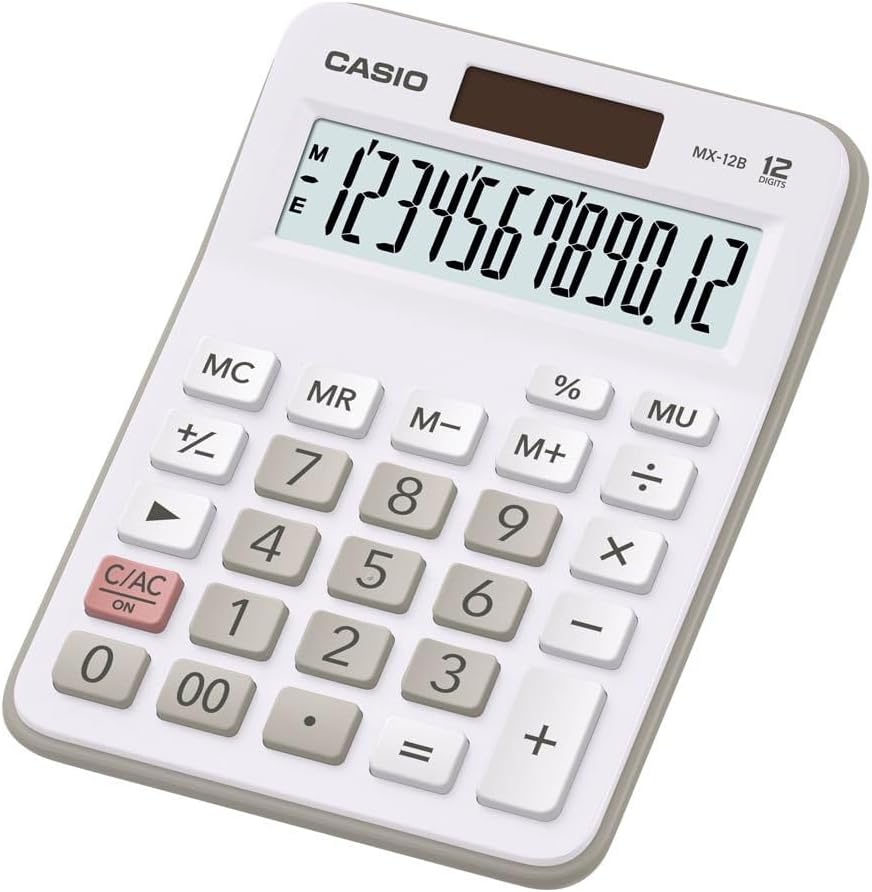
Image: The Casio MX-12 Desk Calculator, featuring a clear 12-digit display and a standard key layout for basic and advanced calculations.
Ṣeto
Orisun agbara
The Casio MX-12 calculator is dual-powered, operating on both solar energy and a battery backup. For optimal performance, use the calculator in a well-lit environment. The solar panel, located above the display, will power the unit and charge the internal battery.
Batiri sori / Rirọpo
The calculator requires one AAA battery (included) for backup power. If the display becomes dim or unresponsive in low light conditions, the battery may need replacement.
- Turn the calculator over.
- Locate the battery compartment cover.
- Remove the screw (if present) and slide the cover off.
- Insert a new AAA battery, ensuring the correct polarity (+/-).
- Rọpo ideri iyẹwu batiri ki o ni aabo.
Awọn ilana Iṣiṣẹ
The Casio MX-12 features a large, clear 12-digit display and a user-friendly key layout for various calculations.
Awọn Iṣiṣẹ Iṣiro Ipilẹ
- Afikun (+): Tẹ nọmba akọkọ sii, tẹ +, tẹ nọ́mbà kejì, lẹ́yìn náà tẹ =.
- Iyokuro (-): Tẹ nọmba akọkọ sii, tẹ -, tẹ nọ́mbà kejì, lẹ́yìn náà tẹ =.
- Ìsọdipúpọ̀ (×): Tẹ nọmba akọkọ sii, tẹ ×, tẹ nọ́mbà kejì, lẹ́yìn náà tẹ =.
- Ẹ̀ka (÷): Tẹ nọmba akọkọ sii, tẹ ÷, tẹ nọ́mbà kejì, lẹ́yìn náà tẹ =.
Awọn iṣẹ pataki
- Clear/All Clear (C/AC): Tẹ C/AC once to clear the last entry. Press it twice to clear all entries and reset the calculator.
- Ogoruntage (%): To calculate a percentage, enter the number, press ×, enter the percentage value, then press %. Fun example, to find 15% of 200: 200 × 15%.
- Change Sign (+/-): Tẹ +/- to change the sign of the displayed number from positive to negative or vice versa.
- Mark-up (MU): Awọn MU key is used for profit margin calculations. For example, to calculate the selling price with a 25% profit margin on a cost of 80: 80 ÷ 25 MU.
- Double Zero (00): Lo awọn 00 key for quick entry of two zeros.
Awọn iṣẹ iranti
The calculator includes a 4-key memory function:
- Memory Plus (M+): Ṣe afikun iye ti o han si iranti.
- Memory Minus (M-): Yọkuro iye ti o han lati iranti.
- Memory Recall (MR): Recalls the value stored in memory to the display.
- Memory Clear (MC): Ó pa iye tí a kó pamọ́ sínú ìrántí mọ́.
Itoju
Ninu
To clean the calculator, wipe it gently with a soft, dry cloth. Do not use abrasive cleaners, solvents, or excessive moisture, as these can damage the display or internal components.
Ibi ipamọ
Store the calculator in a cool, dry place away from direct sunlight and extreme temperatures. Prolonged exposure to direct sunlight can affect the solar panel's efficiency and the display's longevity.
Laasigbotitusita
- Ifihan ti ṣofo tabi baibai:
- Ensure the calculator is in a well-lit area for the solar panel to function.
- Check the AAA battery. Replace it if necessary (refer to "Battery Installation/Replacement" in the Setup section).
- Awọn abajade iṣiro ti ko tọ:
- Tẹ C/AC twice to clear all previous entries and memory.
- Re-enter the calculation carefully.
- Ensure you are using the correct function keys for your desired operation.
- Àwọn kọ́kọ́rọ́ kò dáhùn:
- Clean the calculator surface and keys to remove any debris.
- Ensure the calculator is adequately powered (solar or battery).
Awọn pato
| Nọmba awoṣe | MX-12B-WE-W-EC |
| Ifihan | 12 Digits, Large LCD |
| Orisun agbara | Dual Powered (Solar with Battery Backup) |
| Batiri Iru | 1 x AAA (pẹlu) |
| Awọn iwọn (L x W x H) | 5.79 x 4.21 x 1.14 inches (14.7 x 10.7 x 2.9 cm) |
| Iwọn | 4.9 iwon (139 giramu) |
| Awọn iṣẹ | Basic Arithmetic, Percentage, Mark-up (MU), Change Sign, 4-Key Memory |
Atilẹyin ọja ati Support
Casio products are manufactured to high-quality standards. For information regarding warranty coverage, service, or technical support, please refer to the warranty card included with your product or visit the official Casio webojula. Tọju iwe-ẹri rira rẹ bi ẹri rira.
Fun iranlọwọ siwaju sii, o le ṣabẹwo si Casio itaja lori Amazon or contact Casio customer service directly.
Ask a question about this manual
Ask about setup, troubleshooting, compatibility, parts, safety, or missing instructions. Manuals+ will review the question and use this page’s manual context to help answer it.