
Ọrọ Iṣaaju
The Celestron Travel Scope 80 is a compact and portable refractor telescope designed for both beginners and experienced users. It is suitable for observing distant landscapes during the day and celestial objects like the Moon and stars at night. Featuring fully coated glass optics and an 80mm aperture, this telescope provides brighter, sharper images. Its lightweight design and quick assembly make it ideal for travel and spontaneous observation sessions, requiring no tools for setup.
Ohun ti o wa ninu Apoti
- tube opitika
- Mount and tripod (preassembled)
- 20mm Eyepiece
- 10mm Eyepiece
- Diagonal aworan ti o tọ
- 5x24 Finderscope
- Ohun ti nmu badọgba foonuiyara
- Ilana itọnisọna
- apoeyin

Image: The Celestron Travel Scope 80 with its tripod, optical tube, eyepieces, diagonal, finderscope, smartphone adapter, and custom backpack.
Ṣeto
The Celestron Travel Scope 80 is designed for quick and tool-free assembly. Follow these steps to set up your telescope:
- Eto Tripod: Unfold the preassembled tripod and extend its legs to the desired height. Ensure the tripod is stable on a flat surface. The tripod can be adjusted for full height or collapsed for tabletop use.
- So Ọpọn Opitiki pọ mọ: Secure the telescope's optical tube to the tripod mount using the provided attachment mechanism. Tighten any knobs to ensure the tube is firmly in place.
- Fi Finderscope sori ẹrọ: Attach the 5x24 finderscope to its designated bracket on the optical tube. This accessory helps in locating objects before viewlílo wọn nípasẹ̀ ojú àkọ́kọ́.
- Insert the Erect Image Diagonal: Slide the erect image diagonal into the focuser of the telescope. This component corrects the image orientation, making the telescope suitable for both astronomical and terrestrial observations.
- Attach an Eyepiece: Insert either the 20mm (for wider views) or 10mm (for higher magnification) eyepiece into the erect image diagonal. Secure it with the small thumbscrew.
- Smartphone Adapter (Optional): If desired, attach the smartphone adapter to an eyepiece. This allows you to capture photos and videos through the telescope.
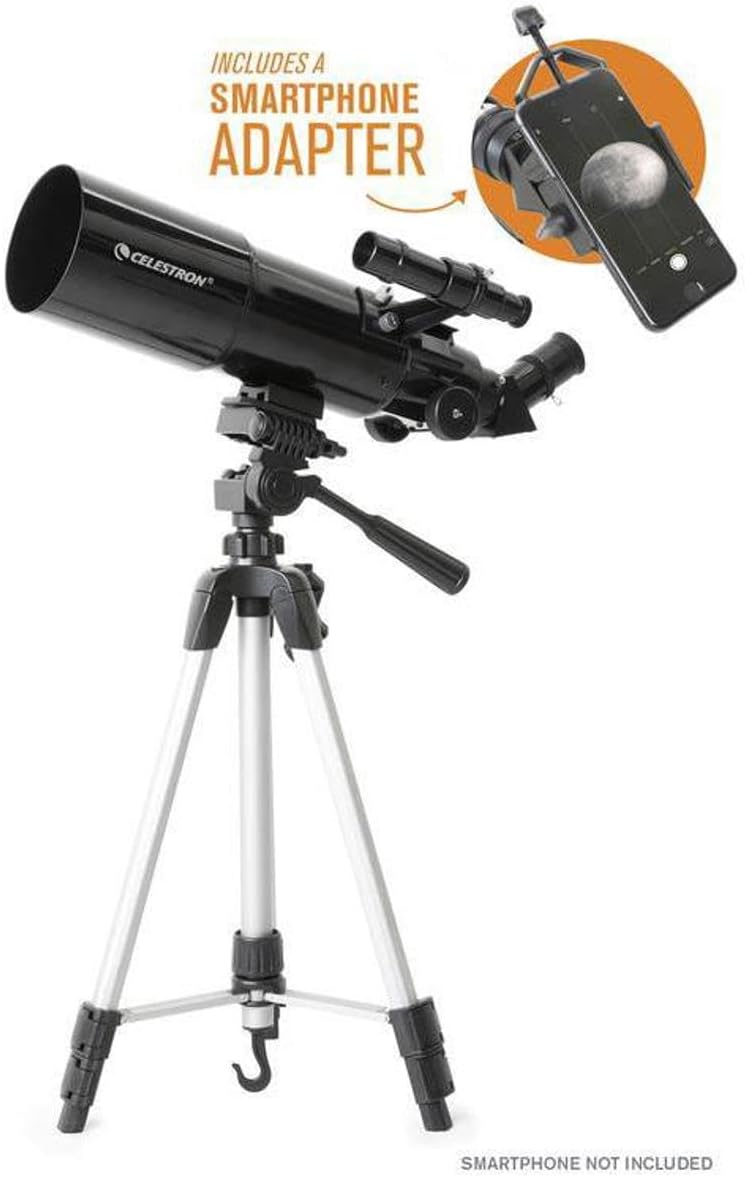
Image: The Celestron Travel Scope 80 fully assembled on its tripod, ready for use.
Video: A product tour demonstrating the assembly and features of the Celestron Travel Scope series.
Ṣiṣẹ
Once your telescope is set up, you can begin observing. The Travel Scope 80 is versatile for both daytime and nighttime viewing.
- Locating Objects with the Finderscope: Before looking through the main eyepiece, use the 5x24 finderscope to roughly center your desired object. The finderscope provides a wider field of view, making it easier to locate targets.
- Viewing with Eyepieces: Once the object is centered in the finderscope, look through the main eyepiece. Start with the 20mm eyepiece for a broader view, then switch to the 10mm eyepiece for higher magnification and more detail.
- Fojusi: Use the focus knobs on the telescope to bring the image into sharp focus. Turn them slowly until the image appears clear and crisp.
- Daytime Observations: The erect image diagonal ensures that images appear right-side up, making the telescope suitable for observing terrestrial subjects like wildlife, birds, or distant landscapes.
- Nighttime Observations: Explore the Moon's craters, visible planets like Saturn and Jupiter, and brighter star clusters. For assistance in identifying celestial objects, download Celestron's Starry Night astronomy software.
- Capturing Images (with Smartphone Adapter): If using the smartphone adapter, align your phone's camera with the eyepiece. Use your phone's camera app to capture photos or videos.

Image: A smartphone attached to the telescope's eyepiece via the smartphone adapter, showing a view of the moon on the phone screen.
Itoju
Proper maintenance ensures the longevity and optimal performance of your Celestron Travel Scope 80.
- Awọn lẹnsi mimọ: Use a soft, lint-free cloth specifically designed for optical lenses. Gently wipe away dust or smudges. Avoid touching the lens surfaces with your fingers.
- Cleaning the Telescope Body: Wipe the exterior of the optical tube and tripod with a soft, clean cloth. Avoid using abrasive cleaners or solvents.
- Ibi ipamọ: When not in use, store the telescope and its accessories in the included backpack in a dry, dust-free environment. Ensure all caps are on the lenses and eyepieces to protect them.
- Yago fun Awọn iwọn otutu to gaju: Do not expose the telescope to extreme temperatures or sudden temperature changes, as this can affect the optics.
Laasigbotitusita
If you encounter issues with your Celestron Travel Scope 80, refer to the following common troubleshooting tips:
- Awọn aworan blurry: Ensure the focus knobs are adjusted correctly. Check that the eyepiece is fully inserted and secured. Atmospheric conditions can also affect image clarity.
- Ìṣòro láti rí àwọn nǹkan: Make sure the finderscope is properly aligned with the main telescope. Start with the lowest magnification eyepiece (20mm) to get a wider field of view.
- Aiduroṣinṣin View: Ensure the tripod legs are fully extended and locked, and placed on a stable, level surface. Avoid touching the telescope during observation to minimize vibrations.
- Ko si Aworan: Check that all lens caps are removed from both the objective lens and the eyepiece. Ensure the eyepiece is correctly inserted.
Awọn pato
| Ẹya ara ẹrọ | Sipesifikesonu |
|---|---|
| Ọja Mefa | 12.7 x 22.5 x 5.6 inches |
| Iwọn Nkan | 4.5 iwon |
| Nọmba Awoṣe Nkan | 22030 |
| Ojú Tube Ipari | 457 millimeters |
| Idiwọn lẹnsi Idiwọn | 80 millimeters |
| Àpèjúwe Àgbékalẹ̀ Tẹ́lískópù | Altazimuth òke |
| Idojukọ Iru | Idojukọ Afowoyi |
| Awari wiwa | 5x24 |
Atilẹyin ọja ati Support
Celestron Travel Scope 80 wa pẹlu Atilẹyin ọja ọdun meji ti Amẹrika. For any questions or assistance, unlimited support is available from Celestron's US-based team of experts. Your purchase also includes a free download of Celestron’s Starry Night astronomy software, which can assist in identifying celestial objects and planning observation sessions.