
1. Ifihan
Thank you for choosing the Walfront LCD Digital Programmable Weekly Timer Switch. This device is designed for automatic control of various electrical appliances based on user-defined schedules. Please read this manual carefully before installation and operation to ensure proper use and to prevent damage.
2. Alaye Aabo
Ikilọ: Electrical installation should only be performed by qualified personnel. Disconnect power before installation or maintenance to prevent electric shock.
- Rii daju igbewọle voltage matches the timer's specifications (24V for this model).
- Do not exceed the maximum load capacity of 16A 250VAC (resistive load).
- Jeki ẹrọ naa kuro ninu omi ati ọriniinitutu pupọ.
- Do not attempt to disassemble or repair the unit yourself. Contact support if issues arise.
3. Ọja Ipariview
The Walfront LCD Digital Programmable Weekly Timer Switch is a high-precision device built with durable, moisture-resistant, and corrosion-protected materials. It features a clear LCD display and supports up to 16 ON/OFF programs daily and weekly.
3.1 Key Awọn ẹya ara ẹrọ
- High-quality construction for long lifespan.
- Automatic ON/OFF control for various electrical devices.
- Built-in 1.2V/40mA rechargeable battery for memory retention.
- Industrial-grade chip for high precision and strong anti-interference.
- Up to 16 ON and 16 OFF programming settings per day/week.
- LCD display showing real-time, hour, minute, and ON/AUTO/OFF status.
- DIN rail mounting design.
3.2 irinše

Aworan 1: Iwaju view of the Walfront LCD Digital Programmable Weekly Timer Switch. Shows the LCD display and control buttons.

Aworan 2: Pada view of the timer switch, illustrating the wiring terminals and basic electrical specifications printed on the unit.
4. Eto & Fifi sori
This timer is designed for DIN rail mounting. Ensure the DIN rail is securely installed before attaching the timer.
4.1 Wiring aworan atọka

Aworan 3: Wiring diagrams showing direct connection (left) and connection with an AC contactor (right). The direct connection illustrates neutral and live wire inputs and load output. The AC contactor diagram shows 220V power input and output to the load device.
Direct Wiring: Connect the neutral and live wires to the designated input terminals (L and N). Connect the load to the output terminals (typically 3 and 4 for normally open, or 3 and 5 for normally closed, as indicated on the device). Refer to the diagram on the device for exact terminal numbering.
Wiring with AC Contactor: For higher loads, connect the timer to control an AC contactor. The timer's output will switch the coil of the contactor, which in turn controls the main power to the load. This setup is shown on the right side of Image 3.
4.2 Initial Power-Up and Battery Charging
Upon first use, connect the timer to power. The internal 1.2V/40mA rechargeable battery will begin charging. If the display is blank or shows incorrect time, allow it to charge for a few minutes. Press the "Reset" button (often labeled with a small 'R' or 'C' and requires a pointed object) to clear all settings and start fresh.
5. Awọn ilana Iṣiṣẹ
5.1 Ṣíṣeto Àkókò Lọ́wọ́lọ́wọ́
- Tẹ awọn "CLOCK" button (often labeled with a clock icon) and hold it.
- Nigba dani "CLOCK", tẹ awọn "D+" bọtini lati ṣeto awọn ti isiyi ọjọ ti awọn ọsẹ.
- Nigba dani "CLOCK", tẹ awọn "H+" bọtini lati ṣeto awọn ti isiyi wakati.
- Nigba dani "CLOCK", tẹ awọn "M+" bọtini lati ṣeto awọn ti isiyi iseju.
- Tu silẹ "CLOCK" Bọ́tìnì náà. Àkókò náà ti wà nílẹ̀ báyìí.
5.2 Setting 12/24 Hour Mode
By default, the timer operates in 24-hour mode. To switch between 12-hour (AM/PM) and 24-hour modes, press and hold the "CLOCK" button for approximately 5 seconds. The display will show "AM" for 12-hour mode or switch back to 24-hour format.
5.3 Àwọn Ìṣètò Títẹ̀/Pàṣẹ Síṣe Ìṣètò
The timer supports up to 16 ON and 16 OFF programs. Each program consists of an ON time and an OFF time.
- Tẹ awọn "PROG" bọ́tìnì kan lẹ́ẹ̀kan. Ìfihàn náà yóò fi "1 ON" hàn.
- Tẹ "D+" to select the day(s) for this ON program (e.g., Mon-Fri, Sat-Sun, or specific days).
- Tẹ "H+" láti ṣètò wákàtí ON tí a fẹ́.
- Tẹ "M+" láti ṣètò ìṣẹ́jú ON tí a fẹ́.
- Tẹ "PROG" lẹ́ẹ̀kan sí i. Ìfihàn náà yóò fi "PA 1" hàn.
- Repeat steps 2-4 to set the OFF time for the first program.
- Tesiwaju titẹ "PROG" to cycle through "2 ON", "2 OFF", up to "16 ON", "16 OFF", setting each as needed.
- Lẹhin ti ṣeto gbogbo awọn eto ti o fẹ, tẹ bọtini naa "CLOCK" button to exit programming mode and return to real-time display.
Akiyesi: If you need to cancel a program, press the "PROG" button to select the program, then press the "MANUAL" button until "----" appears on the display for that program's time slot.
5.4 Manual Override (ON/AUTO/OFF)
Tẹ awọn "MANUAL" bọtini lati yipo nipasẹ awọn ipo iṣiṣẹ:
- LATI: The output is continuously ON, ignoring all programs.
- LATIO: The timer operates according to the programmed ON/OFF schedules.
- PA: The output is continuously OFF, ignoring all programs.
Rí i dájú pé aago aago náà wà nílẹ̀ "AUTO" mode for programmed operation.
5.5 Key Titiipa Išė
To prevent accidental changes to settings, the timer features a key lock function.

Aworan 4: The timer display showing the key lock symbol, indicating that the buttons are locked.
- To lock the keys: Press and hold the "C/R" (Cancel/Reset) button for approximately 4 seconds until a lock symbol appears on the LCD.
- To unlock the keys: Press and hold the "C/R" button again for approximately 4 seconds until the lock symbol disappears.
6. Awọn pato
| Paramita | Iye |
|---|---|
| Iṣagbewọle Voltage | AC/DC 24V (This model) |
| Contact Rated Voltage | AC 180V~264V (50/60Hz) |
| Agbara fifuye | 16A 250VAC (Resistive Load) |
| TAN/PA Awọn iṣẹ | 16 ON / 16 OFF (Manual/Auto) |
| Ifihan | LCD |
| Agbara agbara | 4.5VA (Max) |
| Asise | ≤2 seconds/day (at 25℃) |
| Iṣagbesori Ọna | DIN Rail (sold separately) |
| Ibiti akoko | Iṣẹju 1 si awọn wakati 168 |
| Aarin ti o kere julọ | 1 iseju |
| Awọn iwọn otutu ti nṣiṣẹ | -10 ℃ si 55 ℃ |
| Ọriniinitutu ti nṣiṣẹ | 35-85% RH |
| Awọn iwọn (L x W x H) | 86 x 36 x 65mm |
| Ti abẹnu Batiri | 1.2V/40mA rechargeable, >15 days backup |
| Nọmba ti iyika | Changeover switch (SPDT) |
| Igbesi aye Iṣẹ | Mechanical: 107, Electrical: 105 |
| Iwọn | 125g |
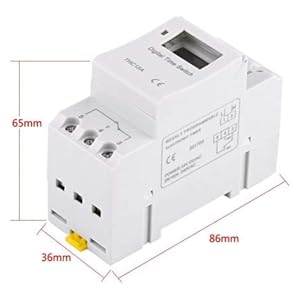
Aworan 5: Diagram illustrating the dimensions of the timer switch: 86mm length, 36mm width, and 65mm height.
7. Itọju
- Keep the timer clean and free from dust. Use a dry, soft cloth for cleaning.
- Ma ṣe lo abrasive ose tabi epo.
- Lokọọkan ṣayẹwo awọn asopọ onirin lati rii daju pe wọn wa ni aabo.
- The internal battery is designed for long life and typically does not require replacement. If the timer loses settings frequently after power outages, the battery may need servicing by a qualified technician.
8. Laasigbotitusita
| Isoro | Owun to le Fa | Ojutu |
|---|---|---|
| Ifihan jẹ òfo. | No power supply or internal battery discharged. | Check power connections. Allow the timer to charge for a few minutes after connecting to power. |
| Aago naa ko yipada/pa bi a ti ṣe eto rẹ. | Timer is not in "AUTO" mode, programs are incorrect, or key lock is active. | Press "MANUAL" until "AUTO" is displayed. Review and correct programs. Unlock keys if necessary. |
| Awọn bọtini ko dahun. | Iṣẹ́ títìpa bọtini ń ṣiṣẹ́. | Press and hold "C/R" for 4 seconds to unlock the keys. |
| Akoko ko pe. | Minor drift (within specifications) or internal battery issue. | Reset and re-set the time. If inaccuracy persists or settings are lost frequently, contact support. |
9. Atilẹyin ọja ati Support
Walfront strives to provide high-quality products. If you encounter any issues with your product, please contact us for prompt assistance. We offer return and refund services for product defects.
For support, please refer to the contact information provided with your purchase or visit the Walfront store on Amazon: Walfront Amazon Store.