
Ọrọ Iṣaaju
Thank you for choosing the MIFA A3 Soundbox Bluetooth Portable Speaker. This manual provides essential information for the safe and efficient use of your device. Please read it thoroughly before operating the speaker and retain it for future reference.
Alaye Aabo
- Ma ṣe fi agbọrọsọ si awọn iwọn otutu to gaju, imọlẹ orun taara, tabi ọriniinitutu giga.
- Yago fun sisọ tabi tẹriba agbọrọsọ si awọn ipa to lagbara.
- Do not disassemble or attempt to repair the speaker yourself. Contact qualified service personnel.
- Keep the speaker away from water and liquids, despite its waterproof rating, to prevent damage to charging ports or internal components.
- Lo okun gbigba agbara pato nikan ati ohun ti nmu badọgba.
Package Awọn akoonu
Jọwọ ṣayẹwo package fun awọn nkan wọnyi:
- MIFA A3 Bluetooth Portable Speaker
- Okun Ngba agbara USB
- AX Audio Okun
- Afowoyi Olumulo (iwe-ipamọ yii)
Ọja Pariview
The MIFA A3 speaker features intuitive touch controls and multiple connectivity options. Familiarize yourself with the speaker's layout:
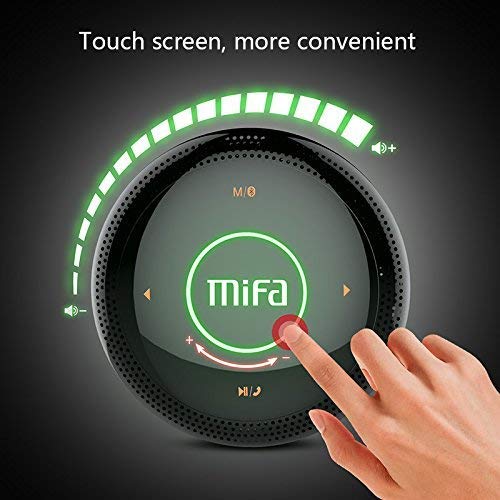
Nọmba 1: Oke view of the MIFA A3 speaker, highlighting the touch-sensitive control panel. The panel displays volume indicators, play/pause, and track navigation buttons. A central 'Mifa' logo is also visible.
- Igbimo Iṣakoso Fọwọkan: Located on the top surface for volume adjustment, playback control, and mode selection.
- Gbohungbohun: Fun ipe ti ko ni ọwọ.
- Ibudo gbigba agbara: Micro USB ibudo fun gbigba agbara.
- Iṣawọle AUX: 3.5mm audio jack for wired connection.
- Micro SD Kaadi Iho: Fun orin ti ndun taara lati kaadi iranti.
Ṣeto
1. Gbigba agbara Agbọrọsọ
Kí o tó lo ó fún ìgbà àkọ́kọ́, gba agbára sí agbọ́hùnsọ̀ náà pátápátá. So okùn gbigba agbára USB tí a pèsè mọ́ ibudo gbigba agbára agbọrọsọ náà àti ìpẹ̀kun kejì mọ́ adapter agbara USB (kò sí nínú rẹ̀) tàbí ibudo USB ti kọmputa kan.
- Ìmọ́lẹ̀ àmì ìgbóná yóò máa tàn nígbà tí a bá ń gba agbára.
- The indicator will turn off or change color once fully charged.
- A full charge provides approximately 8 hours of continuous playtime.
2. Agbara Tan / Paa
- Lati Fi agbara: Press and hold the Power button (usually integrated into the touch panel or a dedicated button) for 2-3 seconds until you hear an audible prompt or see an indicator light.
- Lati Paarẹ: Press and hold the Power button again for 2-3 seconds.
Awọn ilana Iṣiṣẹ
1. Sisopọ Bluetooth
- Ensure the speaker is powered on and in Bluetooth pairing mode (indicated by a flashing blue light or audible prompt).
- Lori ẹrọ rẹ (foonuiyara, tabulẹti, PC), mu Bluetooth ṣiṣẹ ki o wa awọn ẹrọ to wa.
- Select "MIFA A3" from the list of devices.
- Once paired, the speaker will provide an audible confirmation, and the indicator light will become solid blue.
- The speaker will automatically connect to the last-paired device when powered on, if that device's Bluetooth is active and within range.
2. Aux Asopọ
For devices without Bluetooth, use the provided 3.5mm AUX audio cable:
- So opin kan ti okun AUX pọ si ibudo igbewọle AUX ti agbọrọsọ.
- So opin miiran pọ si ori agbekọri ti ẹrọ ohun rẹ.
- Agbọrọsọ yoo yipada laifọwọyi si ipo AUX.
3. Micro SD Kaadi Sisisẹsẹhin
Insert a Micro SD card (up to 32GB, FAT32 format) with music files into the designated slot. The speaker will automatically detect the card and begin playback.
4. Touch Control Operations
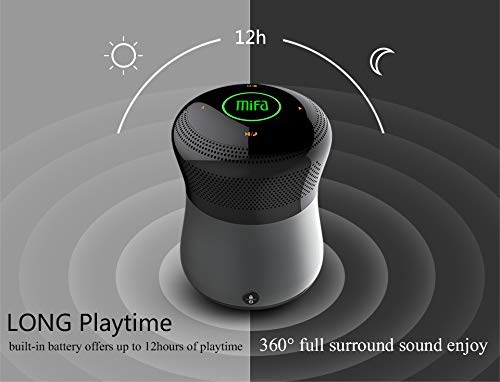
Nọmba 2: The MIFA A3 speaker shown with an overlay indicating "LONG Playtime" (up to 12 hours) and "360° full surround sound enjoy." This image emphasizes the speaker's battery life and audio dispersion.
- Iṣakoso iwọn didun: Slide your finger clockwise on the touch panel to increase volume, counter-clockwise to decrease.
- Ṣiṣẹ/Daduro: Tap the central Play/Pause icon.
- Orin t’okan: Tap the "Next" arrow icon.
- Tẹlẹ Orin: Tap the "Previous" arrow icon.
- Yipada ipo: Tap the "M/O" icon to cycle between Bluetooth, AUX, and Micro SD card modes.
- Bọtini Titiipa: Press the lock icon to prevent accidental touch inputs.
5. Call Handling (Bluetooth Mode)
- Idahun Ipe: Tap the Play/Pause icon when a call comes in.
- Ipe Ipari: Tap the Play/Pause icon again.
- Kọ Ipe: Press and hold the Play/Pause icon for 2 seconds.
Itoju
- Sọ agbọrọsọ mọ pẹlu asọ asọ ti o gbẹ. Ma ṣe lo abrasive ose tabi epo.
- Tọju agbohunsoke ni itura, ibi gbigbẹ nigbati o ko ba lo fun awọn akoko gigun.
- Gba agbara batiri naa ni o kere ju lẹẹkan ni gbogbo oṣu mẹta lati ṣetọju ilera batiri.
Laasigbotitusita
| Isoro | Owun to le Solusan |
|---|---|
| Agbọrọsọ ko ni agbara lori. | Rii daju pe batiri ti gba agbara. Sopọ si orisun agbara ati gbiyanju lẹẹkansi. |
| Ko le so pọ nipasẹ Bluetooth. |
|
| Ko si ohun. |
|
| Didara ohun ti ko dara. |
|
Awọn pato
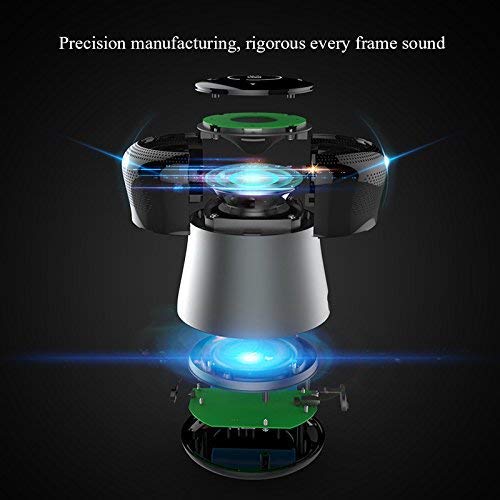
Nọmba 3: An exploded diagram of the MIFA A3 speaker, illustrating its internal components and structural design, emphasizing precision manufacturing.
| Awoṣe | MIFA A3 |
| Agbara Ijade | 10W |
| Asopọmọra | Bluetooth 4.2, AUX, Micro SD Card |
| Batiri | 1800 mAh Li-dẹlẹ |
| Akoko ere | Titi di awọn wakati 8 (ni iwọn 60%) |
| Akoko gbigba agbara | O fẹrẹ to awọn wakati 3-4 |
| Gbohungbohun | Ti a ṣe sinu fun awọn ipe laisi ọwọ |
| Mabomire | Yes (as per product specifications, but general caution advised for ports) |
| Ọna Iṣakoso | Fọwọkan |
| Awọn ẹrọ ibaramu | Kọǹpútà alágbèéká, PC, Foonuiyara, Tabulẹti |
Atilẹyin ọja ati Support
MIFA products are designed to provide reliable performance. For warranty information or technical support, please refer to the warranty card included with your purchase or visit the official MIFA webojula. Jeki ẹri rira rẹ fun awọn iṣeduro atilẹyin ọja.
For further assistance, you may contact MIFA customer support through their official channels.