
1. Ifihan
O ṣeun fun riraasing the MIFA A30 Bluetooth Speaker. This manual provides essential information for setting up, operating, and maintaining your device. Please read it thoroughly before use to ensure optimal performance and longevity of your speaker.
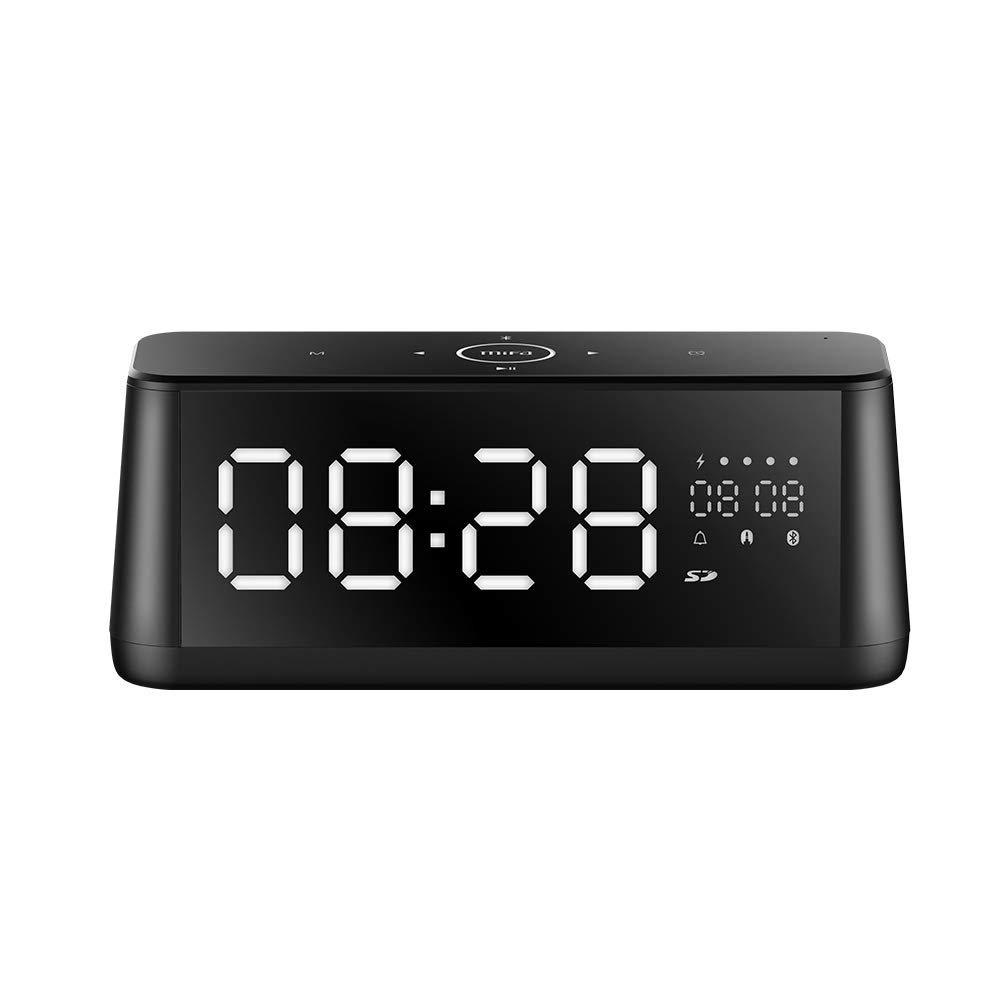
Aworan 1.1: Iwaju view of the MIFA A30 Bluetooth Speaker, displaying the time on its large LED screen.
2. Alaye Aabo
- Ma ṣe fi agbọrọsọ si awọn iwọn otutu to gaju, imọlẹ orun taara, tabi ọriniinitutu giga.
- Yago fun sisọ tabi tẹriba agbọrọsọ si awọn ipa to lagbara.
- Do not disassemble, repair, or modify the device yourself. Contact authorized service personnel for any repairs.
- Keep the speaker away from water and other liquids, despite its waterproof rating, to prevent damage to ports when open.
- Lo okun gbigba agbara pato nikan ati ohun ti nmu badọgba.
- Sọ agbọrọsọ mọ pẹlu asọ asọ ti o gbẹ. Maṣe lo awọn afọmọ abrasive.
3. Package Awọn akoonu
Jọwọ ṣayẹwo package fun awọn nkan wọnyi:
- MIFA A30 Bluetooth Speaker
- Okun Ngba agbara USB
- 3.5mm Audio USB
- Afowoyi Olumulo (iwe-ipamọ yii)
4. Ọja Ipariview
4.1. Awọn irinše
The MIFA A30 speaker features a robust design with advanced audio components for high-quality sound reproduction.

Aworan 4.1: exploded view illustrating the internal components of the MIFA A30, including two 15-watt drivers and two low-frequency passive radiators.
4.2. Control Panel and Ports
The speaker's top panel features capacitive touch controls, and the rear panel houses various connectivity ports.
Aworan 4.2: Oke-isalẹ view of the MIFA A30 control panel, indicating the functions of each touch button for mode, playback, volume, and clock adjustment.
- M (Ipo) Bọtini: Short press to switch between Bluetooth, TF Card, and AUX modes.
- Iṣakoso Bluetooth: Long press to turn off Bluetooth, short press to turn on.
- Bọtini orin ti tẹlẹ: Tẹ kukuru lati lọ si orin ti tẹlẹ.
- Play/Pause/Hands-Free Button: Tẹ kukuru lati mu ṣiṣẹ/daduro orin. Tẹ kukuru lati dahun/pari awọn ipe. Tẹ gun lati kọ awọn ipe.
- Bọtini Orin atẹle: Tẹ kukuru lati lọ si orin atẹle.
- Bọtini aago: Long press for clock adjustment.
- Iwọn didun Up: Yi lọ si ọna aago lati mu iwọn didun pọ si.
- Iwọn didun isalẹ: Yi lọna-ọna atako aago lati dinku iwọn didun.
- Mi: Gbohungbohun ti a ṣe sinu fun awọn ipe laisi ọwọ.
- Ifihan LED: Shows time, date, battery level, and current mode.
5. Eto
5.1. Gbigba agbara Agbọrọsọ
Before first use, fully charge the speaker. Connect the provided USB charging cable to the speaker's charging port and the other end to a USB power adapter (not included) or a computer's USB port. The LED display will indicate charging status.
5.2. Agbara lori / Paa
- Lati Fi agbara: Press and hold the Play/Pause button until the LED display lights up.
- Lati Paarẹ: Press and hold the Play/Pause button until the LED display turns off. The speaker will automatically screen out and power off to save battery after a period of inactivity.
6. Awọn ilana Iṣiṣẹ
6.1. Sisopọ Bluetooth
- Ensure the speaker is powered on and in Bluetooth mode (indicated by the Bluetooth icon on the LED display). If not, short press the 'M' button to switch to Bluetooth mode.
- Lori foonuiyara tabi tabulẹti, mu Bluetooth ṣiṣẹ ki o wa awọn ẹrọ to wa.
- Select "MIFA A30" from the list of devices.
- Once paired, the speaker will emit a confirmation sound, and the Bluetooth icon on the display will stop flashing.
- The speaker will automatically re-connect to the last paired device when powered on, if the device is within range.
6.2. Sisisẹsẹhin Audio
- Ṣiṣẹ/Daduro: Kukuru tẹ bọtini Play/Daduro.
- Orin t’okan: Short press the Next Track button.
- Tẹlẹ Orin: Short press the Previous Track button.
- Atunse iwọn didun: Yi iṣakoso iwọn didun lọ si ọna aago lati mu iwọn didun pọ si, ni idakeji aago lati dinku iwọn didun.
6.3. Ọwọ-Ọfẹ Npe
Nígbà tí a bá sopọ̀ mọ́ fóònù alágbéka nípasẹ̀ Bluetooth:
- Idahun Ipe: Kukuru tẹ bọtini Play/Daduro.
- Ipe Ipari: Kukuru tẹ bọtini Dun/Daduro lakoko ipe kan.
- Kọ Ipe: Long press the Play/Pause button when a call comes in.
6.4. TF Kaadi Sisisẹsẹhin
- Insert a Micro-SD (TF) card with supported audio files (FLAC/APE/MP3/WMA/WAV) into the TF card slot.
- Short press the 'M' button to switch to TF Card mode. The speaker will automatically begin playing music from the card.
6.5. Apọju AX
- Connect one end of the 3.5mm audio cable to the speaker's AUX input port and the other end to the audio output of your device (e.g., MP3 player, computer).
- Short press the 'M' button to switch to AUX mode.
- Audio yoo ṣiṣẹ ni bayi nipasẹ agbọrọsọ lati ẹrọ ti o sopọ.
6.6. Clock and Display Settings
- Atunṣe aago: Long press the Clock button to enter time setting mode. Use the Next/Previous buttons to adjust values and the Play/Pause button to confirm.
- Display Luminance: The LED display has 7 adjustable luminance levels. Refer to the full product documentation for specific adjustment steps, typically involving short presses of the Clock button or a combination with volume controls.
7. Itọju
- Ninu: Fi aṣọ rírọ̀, gbígbẹ, tí kò ní àwọ̀ rẹ́, nu ojú agbọ́rọ̀ náà. Má ṣe lo ohun èlò ìfọmọ́ omi tàbí aerosol.
- Ibi ipamọ: Nigbati o ko ba wa ni lilo fun awọn akoko ti o gbooro sii, tọju agbohunsoke si tutu, ibi gbigbẹ, kuro lati orun taara ati awọn iwọn otutu to gaju.
- Itọju Batiri: Lati pẹ aye batiri, yago fun gbigba agbara si batiri ni kikun nigbagbogbo. Gba agbara si agbọrọsọ nigbagbogbo, paapaa ti kii ṣe ni lilo.
8. Laasigbotitusita
| Isoro | Owun to le Fa | Ojutu |
|---|---|---|
| Agbọrọsọ ko ni agbara lori. | Batiri kekere. | Gba agbara fun agbọrọsọ naa fun o kere ju wakati mẹrin lọ. |
| Ko si ohun. | Iwọn didun kere ju; ipo ti ko tọ; ẹrọ ko sopọ mọ. | Increase speaker and device volume. Ensure correct mode (Bluetooth/AUX/TF Card). Re-pair Bluetooth device or check AUX cable connection. |
| Asopọ Bluetooth kuna. | Agbọrọsọ kii ṣe ni ipo sisopọ; ẹrọ jina ju; kikọlu. | Ensure speaker is in Bluetooth mode. Move device closer to speaker. Turn off other Bluetooth devices. Try forgetting "MIFA A30" on your device and re-pairing. |
| TF Card not playing. | Ipo ti ko tọ; ko ni atilẹyin file format; card error. | Switch to TF Card mode. Ensure files are FLAC/APE/MP3/WMA/WAV. Reinsert TF card or try a different card. |
9. Awọn pato
| Ẹya ara ẹrọ | Ẹ̀kúnrẹ́rẹ́ |
|---|---|
| Orukọ awoṣe | A30 |
| Agbọrọsọ Iru | Iwe ipamọ |
| Asopọmọra Technology | Bluetooth 4.2, Auxiliary (3.5mm), Micro-SD (TF Card) |
| Ipo Ijade Ohun | Sitẹrio |
| Agbọrọsọ Agbara Ijade ti o pọju | 30 Watts (Awọn awakọ 2 x 15W) |
| Bass Imudara | Two low-frequency boosters |
| Agbara Batiri | 4000 mAh |
| Akoko ere | Up to 10-12 hours (depending on volume and content) |
| Ọna Iṣakoso | Capacitive Fọwọkan Panel |
| Ifihan | 7.2" x 2.8" Mirror LED Screen with 106 LEDs, 7-level adjustable luminance |
| Awọn ọna kika Audio atilẹyin | FLAC/APE/MP3/WMA/WAV |
| Gbohungbohun ti a ṣe sinu | Bẹ́ẹ̀ni, fún àwọn ìpè tí kò ní ọwọ́ |
| Mabomire | Yes (Note: Ensure ports are covered for water resistance) |
| Àwọ̀ | Dudu |
| Iṣagbesori Iru | Tabletop Oke |
10. Atilẹyin ọja ati Support
The MIFA A30 Bluetooth Speaker typically comes with a 30-day warranty from the date of purchase, covering manufacturing defects. Please retain your proof of purchase for warranty claims.
For technical support, troubleshooting assistance beyond this manual, or warranty inquiries, please contact MIFA customer service through their official website or the retailer where the product was purchased. Provide your product model (A30) and purchase details when seeking support.