
Ọrọ Iṣaaju
Welcome to your new MIFA F6 Portable Bluetooth Speaker. This manual provides detailed instructions for the proper setup, operation, and maintenance of your device. Please read this manual thoroughly before using the product to ensure optimal performance and longevity.
Alaye Aabo
To ensure safe and proper use of your MIFA F6 speaker, please observe the following guidelines:
- Ma ṣe fi agbọrọsọ si awọn iwọn otutu to gaju (gbona tabi otutu) tabi imọlẹ orun taara fun awọn akoko ti o gbooro sii.
- While the speaker is IP56 dust-proof and water-resistant, do not submerge it in water or expose it to strong jets of water.
- Do not attempt to disassemble, repair, or modify the speaker yourself. This may void the warranty and cause damage.
- Keep the speaker away from medical devices, as it contains magnets that may interfere with their operation.
- Use only the provided Micro USB cable for charging.
- Jeki kuro ni arọwọto awọn ọmọde.
Package Awọn akoonu
Jọwọ ṣayẹwo apoti fun awọn nkan wọnyi:
- MIFA F6 Portable Bluetooth Speaker
- Micro USB Ngba agbara USB
- Itọsọna olumulo
Ọja Pariview
Familiarize yourself with the components and controls of your MIFA F6 speaker.
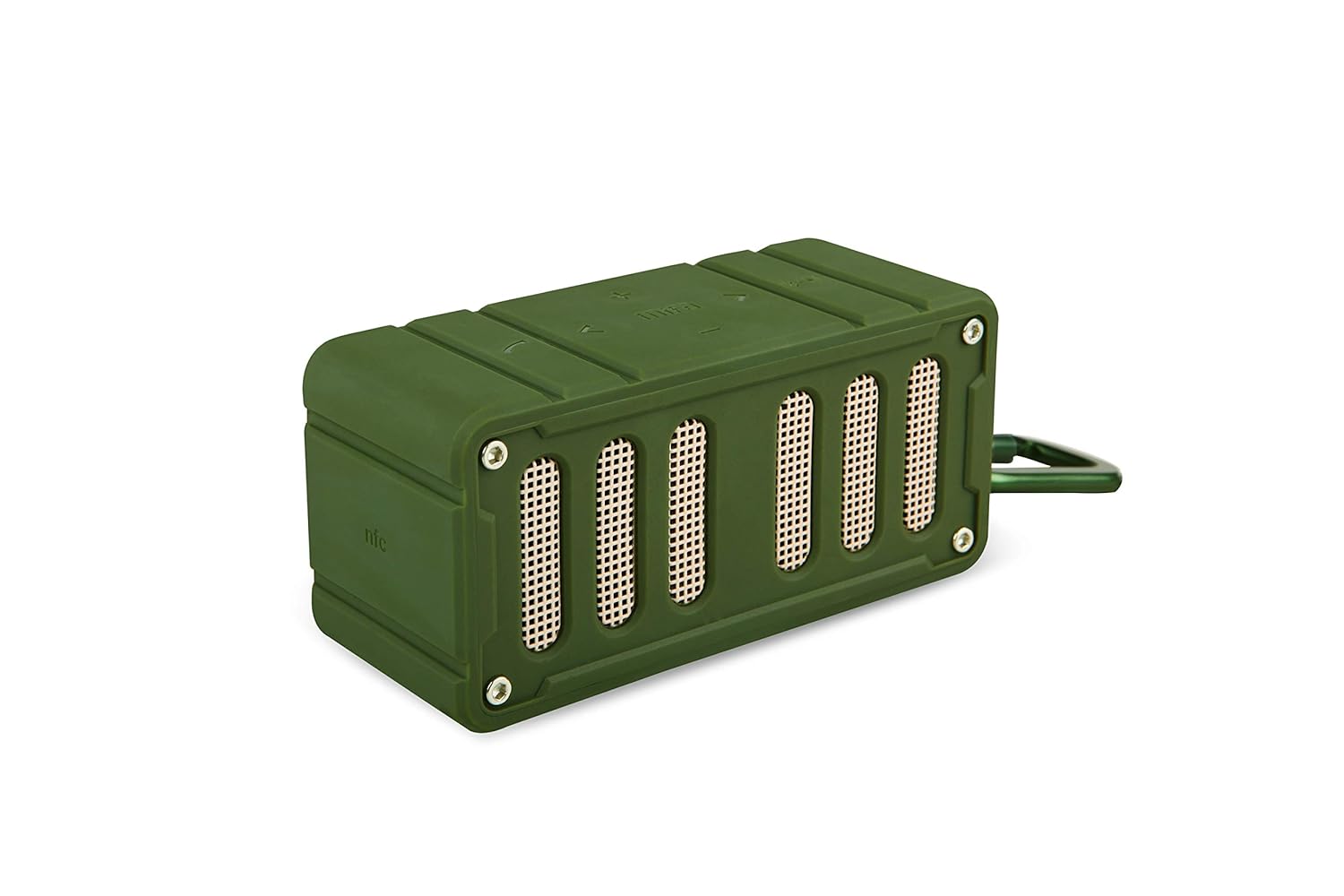
This image displays the MIFA F6 speaker in green, highlighting the front speaker grille and the control buttons located on the side panel.

This image shows the MIFA F6 speaker from a side angle, emphasizing its compact size and the detachable alloy metal loop hook (carabiner) for portability.
Awọn iṣakoso ati awọn ibudo
- Bọtini agbara: Tẹ mọlẹ lati tan/pa a.
- Bọtini Ilọsoke Iwọn didun / Bọtini Orin ti nbọ (+): Tẹ lati mu iwọn didun pọ si. Tẹ mọlẹ fun orin atẹle.
- Ìwọ̀n Ìsàlẹ̀ / Bọ́tìnì Orin Tẹ́lẹ̀ (-): Tẹ lati dinku iwọn didun. Tẹ mọlẹ fun orin iṣaaju.
- Play/Pause / Call Answer Button: Press to play/pause music. Press to answer/end calls.
- Gbohungbohun: Fun ipe ti ko ni ọwọ.
- Ibudo gbigba agbara USB Micro: Fun gbigba agbara si agbọrọsọ.
- Micro SD Kaadi Iho: For playing music directly from a Micro SD card (up to 32GB).
Ṣeto
Gbigba agbara si Agbọrọsọ
Before first use, fully charge your MIFA F6 speaker.
- So okun gbigba agbara Micro USB pọ mọ ibudo gbigba agbara agbọrọsọ naa.
- So opin okun miiran pọ si orisun agbara USB (fun apẹẹrẹ, ibudo USB kọnputa, ohun ti nmu badọgba ogiri USB).
- The LED indicator will illuminate to show charging status. It takes approximately 3 hours for a full charge.
Titan / Pipa agbara
- Lati Fi agbara: Tẹ bọtini agbara ki o si dimu fun iṣẹju-aaya diẹ titi ti o fi gbọ ifihan ti o gbọ ati pe ifihan LED naa yoo tan imọlẹ.
- Lati Paarẹ: Press and hold the Power button for a few seconds until you hear an audible prompt and the LED indicator turns off.
Awọn ilana Iṣiṣẹ
Asopọ Bluetooth
To connect your MIFA F6 speaker to a Bluetooth-enabled device:
- Ensure the speaker is powered on and within 33 feet (10 meters) of your device. The speaker will automatically enter Bluetooth pairing mode, indicated by a flashing LED.
- Lórí fóònù alágbèéká rẹ, tábìlẹ́ẹ̀tì tàbí ẹ̀rọ Bluetooth mìíràn, mu Bluetooth ṣiṣẹ́ kí o sì wá àwọn ẹ̀rọ tó wà.
- Select "MIFA F6" from the list of devices.
- Once successfully paired, the speaker will provide an audible confirmation, and the LED indicator will stop flashing. The speaker will automatically reconnect to the last-used device when powered on, if available.
Ti ndun Orin
- Nipasẹ Bluetooth: After successful pairing, play music from your connected device. Use the speaker's Play/Pause button or your device's controls.
- Nipasẹ Micro SD Kaadi: Insert a Micro SD card (up to 32GB) containing audio files into the designated slot. The speaker will automatically detect the card and begin playing music.
Iṣẹ Ipe
The MIFA F6 speaker features a built-in microphone for hands-free calling.
- Ndahun ipe kan: When an incoming call is received, press the Play/Pause button once to answer.
- Pari ipe kan: During a call, press the Play/Pause button once to end the call.
Iwọn didun ati Iṣakoso Track
- Atunse iwọn didun: Press the "+" button to increase volume, and the "-" button to decrease volume.
- Orin t’okan: Press and hold the "+" button to skip to the next track.
- Tẹlẹ Orin: Press and hold the "-" button to go to the previous track.
Itoju
Ninu
To keep your speaker in good condition:
- Nu ita agbọrọsọ naa pẹlu asọ rirọ, d diẹ dieamp asọ.
- Do not use abrasive cleaners, alcohol, or harsh chemicals, as these can damage the surface.
- Rí i dájú pé gbogbo àwọn èbúté gbẹ kí o tó gba agbára tàbí so àwọn ẹ̀rọ mìíràn pọ̀.
Ibi ipamọ
Nigbati ko ba wa ni lilo fun awọn akoko ti o gbooro sii:
- Tọ́jú agbọ́hùnsọ̀ náà sí ibi tí ó tutù tí ó sì gbẹ, tí kò sí ìmọ́lẹ̀ oòrùn tààrà àti ooru tó le koko.
- Charge the battery periodically (e.g., every 3 months) to maintain battery health.
Laasigbotitusita
If you encounter issues with your MIFA F6 speaker, refer to the following common problems and solutions:
- Agbọrọsọ kii yoo tan: Ensure the battery is charged. Connect the speaker to a power source using the Micro USB cable.
- Ko le so pọ nipasẹ Bluetooth:
- Rii daju pe agbọrọsọ wa ni ipo sisopọ (LED didan).
- Ensure Bluetooth is enabled on your device and it's within range (33 feet/10 meters).
- Forget "MIFA F6" from your device's Bluetooth settings and try pairing again.
- Tun mejeeji agbọrọsọ ati ẹrọ rẹ bẹrẹ.
- Ko si ohun tabi iwọn kekere:
- Ṣayẹwo awọn ipele iwọn didun lori mejeeji agbọrọsọ ati ẹrọ ti o sopọ.
- Rii daju pe agbọrọsọ ti so pọ daradara ati sopọ.
- If using a Micro SD card, ensure the audio files are in a compatible format and the card is inserted correctly.
- Didara ohun ti ko dara:
- Gbe agbọrọsọ sunmọ si ẹrọ Bluetooth rẹ lati dinku kikọlu.
- Rii daju pe ko si awọn idena laarin agbọrọsọ ati ẹrọ rẹ.
- Ṣàyẹ̀wò bóyá dídára orísun ohùn náà ga.
Awọn pato
Detailed technical specifications for the MIFA F6 Portable Bluetooth Speaker:
| Ẹya ara ẹrọ | Ẹ̀kúnrẹ́rẹ́ |
|---|---|
| Orukọ awoṣe | MIFA F6 |
| Agbọrọsọ Iru | 3D |
| Pataki Awọn ẹya ara ẹrọ | Built-in Microphone, Portable, Micro SD Card Support, USB Port |
| Niyanju Lilo | Volume control, Music Playback |
| Awọn ẹrọ ibaramu | Foonuiyara, Tabulẹti |
| Imọ-ẹrọ Ibaraẹnisọrọ Alailowaya | Bluetooth 4.0 |
| Orisun agbara | Battery Powered (1200 mAh Lithium Polymer) |
| Mabomire Rating | IP56 (Dust-proof & Water-resistant) |
| Akoko ere | Titi di awọn wakati 10 (ni iwọn 75%) |
| Akoko gbigba agbara | O fẹrẹ to awọn wakati 3 |
| Awọn iwọn | 3.8 x 3.4 x 1.4 inches |
| Iwọn | 5.9 iwon |
| Ohun elo | Aluminiomu |
| Ipo Ijade Ohun | Sitẹrio |
| Ọna Iṣakoso | Fọwọkan |
Atilẹyin ọja ati Support
Alaye atilẹyin ọja
This MIFA F6 Portable Bluetooth Speaker comes with a 30-day warranty from the date of purchase. Please retain your proof of purchase for any warranty claims. The warranty covers manufacturing defects under normal use. It does not cover damage caused by misuse, accidents, unauthorized modifications, or normal wear and tear.
Onibara Support
For further assistance, technical support, or warranty inquiries, please contact MIFA customer support through the retailer where you purchased the product or visit the official MIFA webojula fun alaye olubasọrọ.