
1. Ifihan
This user manual provides comprehensive instructions for the setup, operation, and maintenance of your SHARP LC-32HI5012E HD Ready Smart LED TV. Please read this manual thoroughly before using your television to ensure proper functionality and safety.
The SHARP LC-32HI5012E is an 81 cm (32-inch) HD Ready Smart LED TV featuring Active Motion 200 technology for enhanced picture quality and a Triple Tuner for versatile reception options. It includes integrated Wi-Fi and a Harman/Kardon sound system for a complete entertainment experience.
2. Package Awọn akoonu
Nigbati o ba ṣii package, jọwọ rii daju pe gbogbo awọn nkan wọnyi wa pẹlu:
- SHARP LC-32HI5012E Main Unit
- Iṣakoso latọna jijin (pẹlu awọn batiri)
- Afowoyi Olumulo (iwe-ipamọ yii)

Aworan: Iwaju view of the SHARP LC-32HI5012E television, displaying a vibrant city skyline on its screen. This image shows the slim bezel design and the central SHARP logo.
3. Eto
3.1 Nto Iduro
Carefully place the TV screen-down on a soft, flat surface to prevent damage. Attach the two stand feet to the designated slots at the bottom of the TV, securing them with the provided screws. Ensure the stand is firmly attached before proceeding.
3.2 Nsopọ Peripherals
Your TV offers various connection options for external devices:
- Awọn ibudo HDMI (x3): Connect Blu-ray players, game consoles, or set-top boxes.
- Awọn ibudo USB (x2): Fun ṣiṣiṣẹsẹhin media lati awọn awakọ USB.
- Antenna In (RF): Connect your terrestrial antenna for DVB-T/T2HD reception.
- Sat In: Connect your satellite dish for DVB-S/S2 reception.
- RJ45 (LAN): Fun isopọ Ayelujara ti a firanṣẹ.
- CI+ Port: Fún àwọn modulu ìwọ̀lé tí ó ní ààyè (CAM) sí view ti paroko awọn ikanni.
- Mini Component/YPbPr, Mini AV Composite: Fun awọn ẹrọ afọwọṣe atijọ.
- Ijade Ohùn Opiti Digital: Fun sisopọ si awọn ọna ṣiṣe ohun ita.
- Audio out / Headphone: Fun olokun tabi ita agbohunsoke.

Aworan: Ẹyin view of the SHARP LC-32HI5012E television, highlighting the arrangement of various input and output ports for connecting external devices.
3.3 Agbara Ibẹrẹ Lori ati Eto Akoko-akọkọ
After connecting all necessary cables, plug the power cord into an electrical outlet. Press the power button on the remote control or the TV. The first-time setup wizard will guide you through:
- Aṣayan ede.
- Asopọ nẹtiwọki (Wi-Fi tabi LAN ti a firanṣẹ).
- Channel scanning for DVB-C, DVB-S/S2, or DVB-T/T2HD.
- Agbegbe aago ati awọn eto ipilẹ miiran.
4. Awọn ilana Iṣiṣẹ
4.1 Ipilẹ TV Awọn iṣẹ
- Titan/Apapa: Lo bọtini agbara lori isakoṣo latọna jijin tabi TV.
- Iṣakoso iwọn didun: Lo awọn bọtini VOL +/-.
- Aṣayan ikanni: Use CH +/- or number buttons.
- Orisun igbewọle: Press the SOURCE button to switch between HDMI, AV, TV, etc.
- Lilọ kiri akojọ aṣayan: Use arrow keys and OK button to navigate menus.
4.2 Smart TV Awọn ẹya ara ẹrọ
Your SHARP LC-32HI5012E is equipped with integrated Wi-Fi and offers access to various smart features:
- Awọn ohun elo ti a ti fi sii tẹlẹ: Access popular streaming services like Netflix and YouTube directly.
- Web Aṣàwákiri: Lọ kiri lori intanẹẹti taara lati TV rẹ.
- Aquos Net+: Access additional online content and services provided by Sharp.
Ensure your TV is connected to the internet for full Smart TV functionality.
4.3 Audio System
The integrated Harman/Kardon sound system provides a high-quality audio experience with excellent dynamics and clarity. Adjust audio settings in the TV menu to customize your sound preferences.
5. Itọju
5.1 Ninu iboju
Lati nu iboju naa, rọra nu rẹ pẹlu asọ ti ko ni lint. Fun awọn ami alagidi, die-die dampen awọn asọ pẹlu omi tabi a specialized iboju regede. Maṣe ṣe fun omi taara si iboju naa.
5.2 Itọju Gbogbogbo
- Jeki TV kuro lati orun taara ati awọn orisun ooru.
- Rii daju pe fentilesonu to ni ayika TV.
- Yọ TV kuro ninu ibudo ina nigba iji mànàmáná tabi nigbati a ko ba tọju rẹ fun igba pipẹ.
6. Laasigbotitusita
If you encounter any issues with your TV, please refer to the following common problems and solutions before contacting support.
| Isoro | Owun to le Fa | Ojutu |
|---|---|---|
| Ko si Agbara | Power cord unplugged, power outlet issue. | Ṣayẹwo asopọ okun agbara. Gbiyanju iṣan ti o yatọ. |
| Ko si Aworan, ṣugbọn Ohun ti wa ni Lọwọlọwọ | Orisun titẹ sii ti ko tọ, okun ti ko tọ. | Verify correct input source. Check HDMI/AV cable connections. |
| Ko si Ohun | Iwọn didun ti dakẹ tabi ti lọ silẹ ju, ọrọ eto ohun afetigbọ ita. | Unmute volume, increase volume. Check external audio connections. |
| Ko le Sopọ si Wi-Fi | Incorrect password, router issue, TV too far from router. | Re-enter password. Restart router. Move TV closer or use wired connection. |
7. Awọn pato
| Ẹya ara ẹrọ | Ẹ̀kúnrẹ́rẹ́ |
|---|---|
| Brand | didasilẹ |
| Nọmba awoṣe | LC-32HI5012E |
| Imọ-ẹrọ Iboju | LED |
| Ipinnu | HD Ṣetan (awọn piksẹli 1366 x 768) |
| Aguntan iboju | 81.3 cm (32 inches) |
| Oṣuwọn sọtun | 60 Hz |
| Pataki Ẹya | Internet (Smart TV) |
| Awọn iṣẹ Intanẹẹti atilẹyin | Netflix, YouTube, Ẹ̀rọ lilọ kiri ayelujara |
| Asopọmọra Technology | USB, HDMI, LAN, Wi-Fi |
| Tuners | DVB-C, DVB-S/S2, DVB-T/T2HD |
| Ohun System | Harman / Kardon |
| Awọn Iwọn Ọja (W x H x D) | 74 x 49.1 x 18 cm (pẹlu iduro) |
| Iwọn | 4.8 kilo |
| Iṣagbesori Iru | Table Mount |
7.1 Lilo Agbara
The SHARP LC-32HI5012E has an energy efficiency rating of F. For detailed energy consumption information, please refer to the energy label and product information sheet.

Image: Energy efficiency label for the SHARP LC-32HI5012E television, showing its energy class F and power consumption details.
Fun awọn alaye diẹ sii, ṣabẹwo si ibi ipamọ data EPREL osise: https://eprel.ec.europa.eu/qr/402565
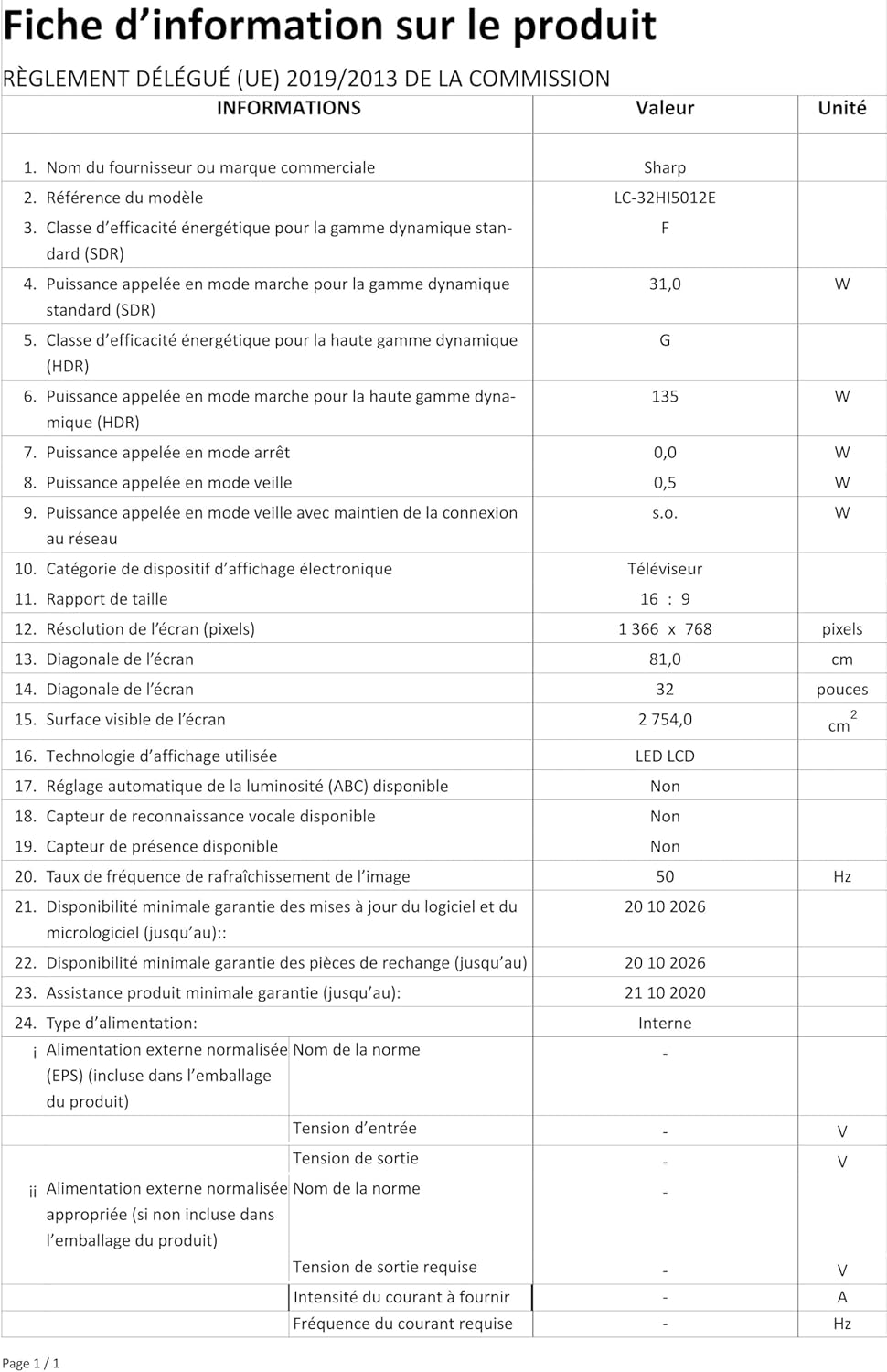
Image: Product information sheet detailing technical specifications and compliance information for the SHARP LC-32HI5012E television.
8. Atilẹyin ọja ati Support
For warranty information, please refer to the warranty card included with your product or visit the official SHARP webojula. Tọju iwe-ẹri rira rẹ bi ẹri rira fun eyikeyi awọn ibeere atilẹyin ọja.
For technical support or service inquiries, please contact SHARP customer service. Contact details can typically be found on the SHARP official webaaye tabi ni apoti ọja.