
1. Ifihan
The Cellularline EASYSPORT GPS is a smartwatch designed for sports enthusiasts, enabling comprehensive monitoring of athletic performance. Its integrated GPS allows tracking of workout routes without needing a smartphone. The ultra-bright touch display ensures clear visibility of settings in various outdoor conditions. With IP68 certification, the Easysport GPS is suitable for use during showering or swimming, making it an ideal companion for achieving fitness goals.
2. Package Awọn akoonu
Jọwọ ṣayẹwo pe gbogbo awọn nkan wa ninu package:
- Cellularline EASYSPORT GPS Smartwatch
- Charging Cable / Charging Dock
- Afowoyi Olumulo (iwe-ipamọ yii)
3. Ọja Ipariview
Familiarize yourself with the components of your EASYSPORT GPS smartwatch.
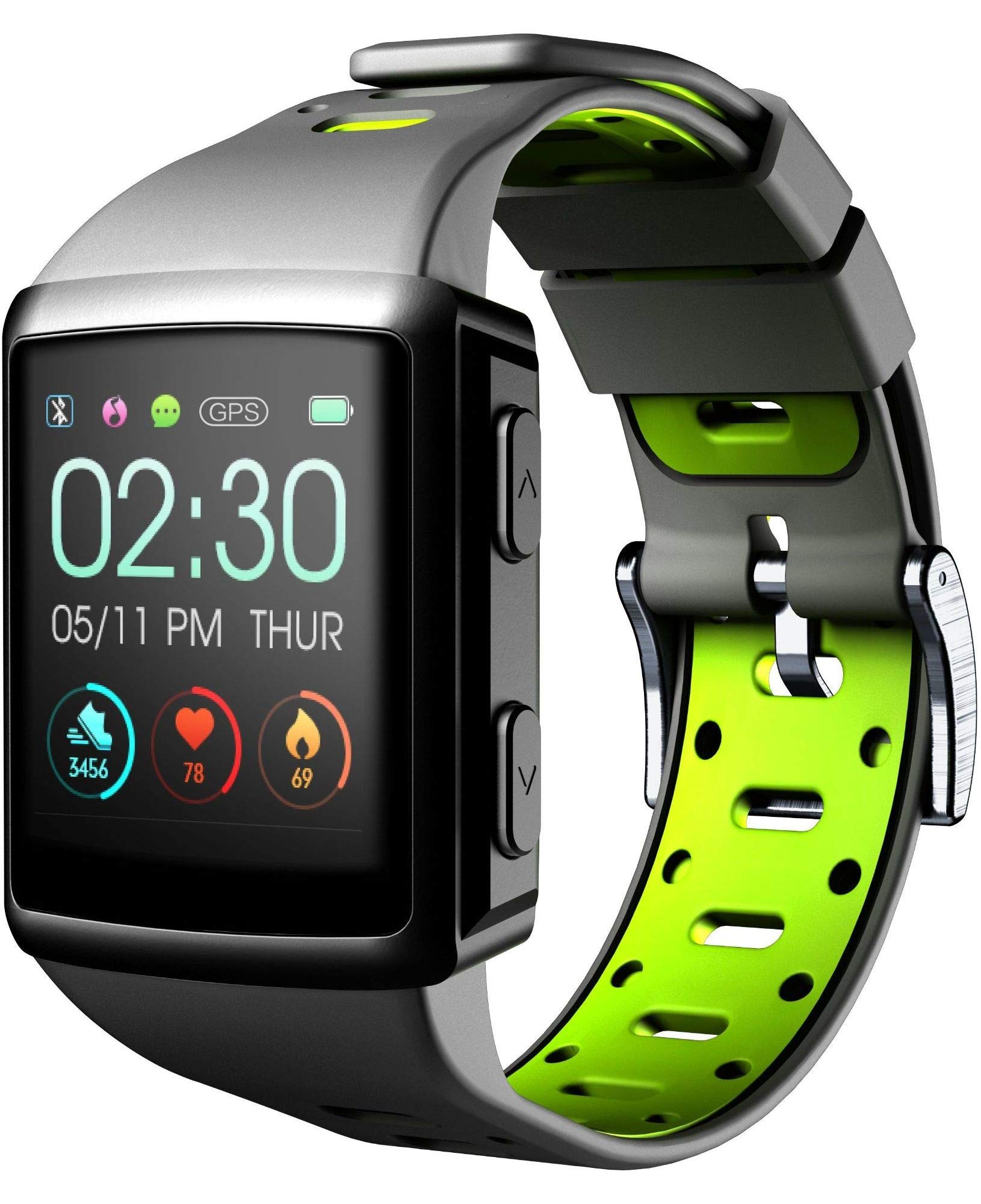
Nọmba 3.1: Iwaju view of the smartwatch display, showing current time, date, and activity metrics like steps, heart rate, and calories burned.

Nọmba 3.2: Igun view of the smartwatch, highlighting the sporty lime and black silicone strap and the physical control buttons on the side.

Nọmba 3.3: Ẹyìn view of the smartwatch, illustrating the integrated heart rate (HR) sensor designed for continuous monitoring during activities.
4. Eto
4.1 Ngba agbara si Ẹrọ
Before first use, fully charge your EASYSPORT GPS smartwatch. A full charge typically takes approximately 3 hours.
- Connect the charging cable to the charging dock.
- Align the smartwatch with the charging dock's contacts until it securely snaps into place.
- So opin USB ti okun gbigba agbara sinu adapter agbara USB ti o baamu (ko si ninu rẹ) tabi ibudo USB ti kọnputa kan.
- Ifihan naa yoo fihan ipo gbigba agbara.

Nọmba 4.1: The smartwatch connected to its charging dock, illustrating the charging process.
4.2 Agbara Tan / Pa
- Lati Fi agbara: Tẹ bọtini agbara naa ki o si di mu (nigbagbogbo o wa ni ẹgbẹ) fun iṣẹju-aaya diẹ titi iboju yoo fi tan imọlẹ.
- Lati Paarẹ: Navigate to the settings menu on the smartwatch, locate the "Power Off" option, and confirm. Alternatively, press and hold the power button until a power-off prompt appears, then confirm.
4.3 Sisopọ pọ pẹlu Foonuiyara
To unlock the full potential of your smartwatch, pair it with your smartphone via Bluetooth.
- Rii daju pe Bluetooth ti ṣiṣẹ lori foonuiyara rẹ.
- Download and install the companion app for Cellularline EASYSPORT GPS from your smartphone's app store.
- Ṣii app naa ki o tẹle awọn ilana loju iboju lati ṣẹda akọọlẹ kan tabi wọle.
- In the app, select "Add Device" or "Pair New Device" and choose "EASYSPORT GPS" from the list of available devices.
- Jẹrisi ibeere sisopọ lori foonu mejeeji ati smartwatch ti o ba ṣetan.
5. Awọn ilana Iṣiṣẹ
5.1 Lilọ kiri Iboju ifọwọkan
The EASYSPORT GPS features a responsive touchscreen for intuitive navigation.
- Ra soke/isalẹ: Yi lọ nipasẹ awọn akojọ aṣayan tabi awọn iwifunni.
- Ra osi/Ọtun: Wọle si awọn ẹrọ ailorukọ oriṣiriṣi tabi awọn eto iyara.
- Fọwọ ba: Yan ohun kan tabi jẹrisi iṣẹ kan.
- Tẹ mọlẹ: May activate specific functions or customize watch faces.
5.2 GPS Àtòjọ
The integrated GPS allows you to track your distance and route during outdoor activities without needing your smartphone.
- Start an outdoor activity (e.g., running, cycling) from the sports mode menu on your smartwatch.
- Ensure you are in an open area for optimal GPS signal acquisition.
- The smartwatch will automatically begin tracking your route and distance.
- Review your activity data, including maps, in the companion app after syncing.
5.3 Heart Rate Monitoring (HR Function)
The smartwatch continuously monitors your heart rate, providing valuable insights into your fitness and workout intensity.
- Ensure the smartwatch is worn snugly on your wrist, with the sensor making good contact with your skin.
- Access the heart rate widget or start a workout to view data oṣuwọn ọkan gidi-akoko.
- Historical heart rate data can be viewed in the companion app.

Nọmba 5.1: The smartwatch display showing heart rate data (e.g., 78 bpm) along with steps and calories, indicating active monitoring.
5.4 Notifications and Caller ID
Stay connected with full text notifications and caller ID directly on your wrist.
- Once paired with your smartphone, the smartwatch will display incoming call names (Caller ID) and full text of messages from WhatsApp, Twitter, and other social applications.
- Manage notification settings through the companion app on your smartphone.
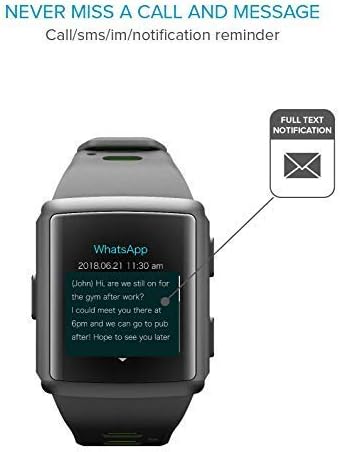
Nọmba 5.2: The smartwatch screen showing a detailed WhatsApp message notification, demonstrating the full text display feature.
6. Itọju
6.1 Water Resistance (IP68 Certified)
The EASYSPORT GPS is IP68 certified, meaning it is resistant to dust and can withstand immersion in water up to 1.5 meters for 30 minutes. This makes it suitable for showering and swimming.
- Rinse the smartwatch with fresh water after exposure to chlorinated or salt water.
- Ma ṣe tẹ awọn bọtini labẹ omi.
- Avoid exposing the device to hot water, steam, or high-pressure water jets.
- The water resistance is not permanent and may decrease over time with normal wear and tear.

Nọmba 6.1: Visual representation of the smartwatch's IP68 certification, showing its suitability for water-related activities like swimming and showering.
6.2 Ninu
Clean your smartwatch regularly to maintain its appearance and functionality.
- Nu iboju naa ki o si fi okùn naa nu pẹlu asọ, damp, lint-free asọ.
- Maṣe lo awọn kemikali lile tabi awọn afọmọ abrasive.
- Rii daju pe awọn olubasọrọ gbigba agbara jẹ mimọ ati ki o gbẹ ṣaaju gbigba agbara.
7. Laasigbotitusita
If you encounter issues with your EASYSPORT GPS smartwatch, try the following solutions:
| Isoro | Owun to le Solusan |
|---|---|
| Ẹrọ naa ko ṣiṣẹ | Ensure the device is fully charged. Connect it to the charging dock and power source for at least 30 minutes. |
| Ko le ṣe alawẹ-meji pẹlu foonuiyara |
|
| GPS ko tọpinpin deede | Rii daju pe o wa ni agbegbe ita gbangba ti o ṣii pẹlu mimọ view of the sky. Wait for the GPS signal to acquire before starting your activity. |
| Awọn iwifunni ko han |
|
| Heart rate readings are inaccurate | Ensure the smartwatch is worn snugly on your wrist, not too tight or too loose. Clean the sensor on the back of the device. |
8. Awọn pato
| Ẹya ara ẹrọ | Ẹ̀kúnrẹ́rẹ́ |
|---|---|
| Orukọ awoṣe | Easysport GPS |
| Nọmba awoṣe | BTEASYSPORTHRGPSK |
| Brand | Cellularline |
| Asopọmọra Technology | Bluetooth |
| Alailowaya Ibaraẹnisọrọ Alailowaya | Bluetooth |
| GPS | GPS ti a ṣepọ |
| Ifihan Iru | Iboju LCD |
| Iwon iboju | 2 inches |
| Pataki Ẹya | Touchscreen, Heart Rate Monitor, GPS |
| Omi Resistance Ipele | IP68 (omi ko le de awọn mita 1.5) |
| Ohun elo Band | Silikoni |
| Àwọ̀ | Lime, Black |
| Ohun elo atilẹyin | GPS (and companion app for notifications/data sync) |
| Awọn ẹrọ ibaramu | Awọn fonutologbolori |
| Olugbo ti a pinnu | Agba Unisex |
9. Atilẹyin ọja ati Support
The Cellularline EASYSPORT GPS Smartwatch comes with a warranty as specified by the manufacturer. For detailed warranty information and support, please refer to the official Cellularline webojula tabi kan si wọn onibara iṣẹ.
- Iru atilẹyin ọja: Igba aye
- Fun atilẹyin imọ-ẹrọ, iranlọwọ fun laasigbotitusita, tabi awọn ibeere atilẹyin ọja, jọwọ ṣabẹwo si Cellularline official webojula or contact their authorized service center.