
CkeyiN JS063A
CkeyiN JS063A 550ml Aroma Diffuser and Humidifier User Manual
Model: JS063A | Brand: CkeyiN
1. Ifihan
This manual provides detailed instructions for the safe and effective use of your CkeyiN JS063A 550ml Aroma Diffuser and Humidifier. Please read this manual thoroughly before operating the device and retain it for future reference.

2. Awọn Ilana Aabo pataki
- Always place the diffuser on a flat, stable surface.
- Do not place the diffuser near heat sources or in direct sunlight.
- Jeki kuro ni arọwọto awọn ọmọde ati awọn ohun ọsin.
- Omi omi tí ó mọ́ tàbí omi tí a ti yọ omi kúrò nìkan ni kí o lò. Má ṣe lo omi gbígbóná.
- Maṣe kọja ipele omi ti o pọju ti itọkasi.
- Only use 100% natural essential oils. Avoid corrosive or synthetic oils.
- Unplug the device before cleaning or refilling.
- Do not touch the ultrasonic plate with bare hands.
- If the device emits smoke or an unusual smell, unplug it immediately.
- Ma ṣe fi ẹrọ naa bọ omi tabi omi miiran.
3. Package Awọn akoonu
Jẹrisi pe gbogbo awọn ohun kan wa ninu package:
- 1 x CkeyiN 550ml Aroma Diffuser
- 1 x Agbara Adapter
- 1 x Iwọn Iwọn
- 1 x Isakoṣo latọna jijin
- 1 x Itọsọna olumulo
4. Ọja Ipariview
Familiarize yourself with the components of your aroma diffuser.
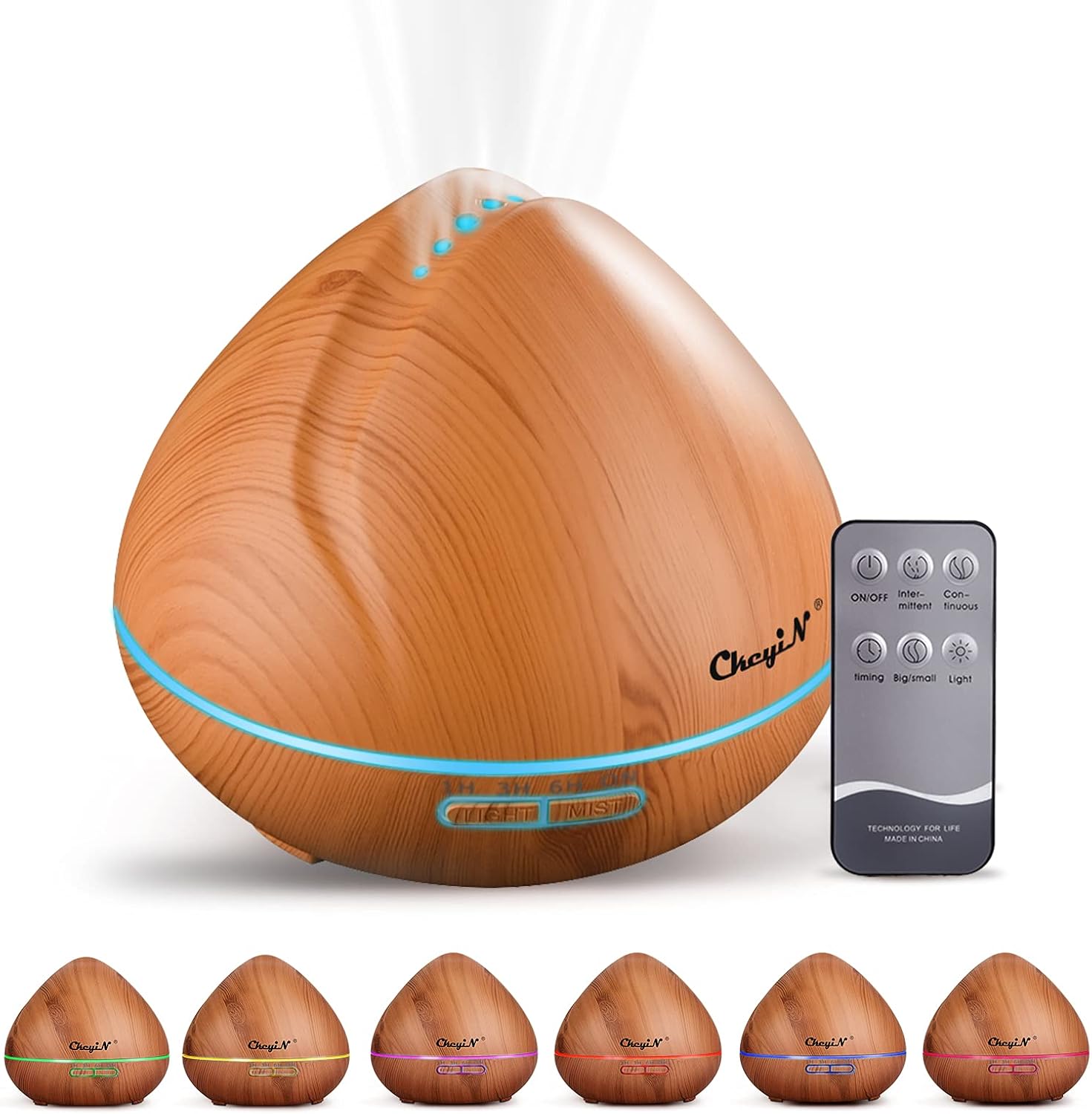


5. Eto Itọsọna
Tẹle awọn igbesẹ wọnyi fun iṣeto akọkọ:
- Place the diffuser on a stable, level surface.
- Remove the top cover by lifting it upwards.
- Connect the power adapter to the DC jack at the back of the diffuser.
- Fill the measuring cup with clean water (tap or distilled) up to the 550ml max line. Do not exceed the maximum water level indicator inside the tank.
- Add 2-3 drops of essential oil directly into the water tank (optional).
- Rọpo ideri oke, rii daju pe o wa ni ipo ti o ni aabo.
- Pulọọgi ohun ti nmu badọgba agbara sinu iṣan ogiri kan.

6. Awọn ilana Iṣiṣẹ
Operate your diffuser using the buttons on the unit or the included remote control.

6.1. Agbara Tan / Paa
- Press the 'ON/OFF' button on the remote or the 'MIST' button on the unit to turn on the diffuser.
- Press the 'ON/OFF' button on the remote or hold the 'MIST' button on the unit for 2 seconds to turn off the diffuser.
6.2. Mist Control
The diffuser offers continuous or intermittent mist, and adjustable mist volume.

- Òwú Tesiwaju: Press the 'Continuous' button on the remote or press the 'MIST' button on the unit once.
- Owusu Laarin: Press the 'Intermittent' button on the remote or press the 'MIST' button on the unit a second time. The diffuser will mist for 10 seconds and pause for 10 seconds.
- Iwọn owusu: Press the 'Big/Small' button on the remote or hold the 'MIST' button on the unit for 1 second to switch between high and low mist output.
6.3. Awọn Eto Aago
Set the diffuser to automatically turn off after a specified period.
- Press the 'Timing' button on the remote or the 'TIMER' button on the unit to cycle through 1 hour, 3 hours, 6 hours, or continuous operation.
- The diffuser will automatically shut off when the water level is too low, regardless of the timer setting.
6.4. LED Light Iṣakoso
Customize the ambient lighting with 7 color options.
- Press the 'Light' button on the remote or the 'LIGHT' button on the unit to turn on the LED light.
- Press again to cycle through the 7 colors.
- Hold the 'Light' button for 2 seconds to fix the light to a single color.
- Hold the 'Light' button again for 2 seconds to turn off the light.
7. Itọju ati Cleaning
Regular cleaning helps maintain optimal performance and extends the lifespan of your diffuser.
- Unplug the diffuser from the power outlet and remove the top cover.
- Empty any remaining water from the tank, ensuring to pour away from the air outlet side.
- Wipe the inside of the water tank with a soft cloth.
- For stubborn residue, add a small amount of white vinegar to the tank and let it sit for 10-15 minutes. Then, gently wipe clean with a soft brush or cotton swab.
- Clean the ultrasonic plate gently with a cotton swab. Do not use harsh chemicals or abrasive materials.
- Nu ita ti diffuser naa pẹlu asọ, damp asọ.
- Gba gbogbo awọn ẹya laaye lati gbẹ patapata ṣaaju iṣakojọpọ tabi titoju.
Akiyesi: Clean the diffuser after every 5-6 uses or every 3-5 days to prevent mineral buildup and ensure proper function.
8. Laasigbotitusita
If you encounter issues with your diffuser, refer to the following common problems and solutions:
| Isoro | Owun to le Fa | Ojutu |
|---|---|---|
| Ko si owusu tabi owusu alailagbara | Ipele omi kekere Ultrasonic awo ni idọti Idena iṣan afẹfẹ Omi pupọ ju | Add water to the appropriate level Nu ultrasonic awo Rí i dájú pé ìta afẹ́fẹ́ mọ́ kedere Do not exceed MAX water line |
| Ko si agbara | Adaparọ agbara ko sopọ Ko si agbara lati iṣan | Check power adapter connection Idanwo iṣan pẹlu ẹrọ miiran |
| Imọlẹ ko ṣiṣẹ | Ina iṣẹ pa | Press the 'LIGHT' button to activate |
| Isakoṣo latọna jijin ko ṣiṣẹ | Awọn batiri ti ku Idilọwọ laarin latọna jijin ati diffuser | Rọpo awọn batiri isakoṣo latọna jijin Rii daju pe ila oju ti o han |
| Ariwo ti ko wọpọ | Ipele omi kekere Diffuser ko lori alapin dada | Fi omi kun Gbe sori iduro, dada alapin |
9. Imọ ni pato
| Ẹya ara ẹrọ | Ẹ̀kúnrẹ́rẹ́ |
|---|---|
| Awoṣe | JS063A |
| Brand | CkeyN |
| Ohun elo | PP + ABS + PC |
| Iṣagbewọle Voltage | AC 100-240V, 50/60Hz |
| O wujade Voltage | DC 24V, 650mA |
| Ti won won Agbara | Isunmọ. 14W |
| Omi ojò Agbara | 550ml |
| Ariwo Ipele | ≤ 36dB |
| Ultrasonic Igbohunsafẹfẹ | 2.4MHz |
| Agbegbe Lilo ti a ṣeduro | 20-25 square mita |
| Humidification Method | Ultrasonic |
| Product Dimensions (H x W) | 15.5 x 17 cm (isunmọ 6.1 x 6.7 inches) |
| Iwọn Ọja | Isunmọ. 560g |
10. Atilẹyin ọja ati Support
This product comes with a standard manufacturer's warranty. Please refer to the product packaging or contact your retailer for specific warranty terms and conditions. For technical support or inquiries, please contact CkeyiN customer service through the details provided at the point of purchase.
Ask a question about this manual
Ask about setup, troubleshooting, compatibility, parts, safety, or missing instructions. Manuals+ will review the question and use this page’s manual context to help answer it.