
Ọrọ Iṣaaju
This manual provides instructions for the Elekpia CT-RC2US-17 remote control. This remote is designed for use with various Toshiba Smart LED HDTV models, offering a direct replacement experience without complex setup.
Compatible Toshiba Smart LED HDTV Models: 32L221U, 43L621U, 49L621U, 55L421U, 55L621U, 65L621U.
Ṣeto
The Elekpia CT-RC2US-17 remote control requires two AAA batteries (not included) for operation. No programming or pairing is necessary; the remote is ready for use once batteries are installed.
Fifi sori batiri
- Wa yara batiri ni ẹhin isakoṣo latọna jijin.
- Gbe ideri batiri si isalẹ lati ṣii.
- Insert two AAA batteries, ensuring correct polarity (+ and - ends align with the markings inside the compartment).
- Gbe ideri batiri pada si aaye titi yoo fi tẹ ni aabo.

Image: Back of the remote control, illustrating the battery compartment.
Awọn ilana Iṣiṣẹ
The CT-RC2US-17 remote control features standard buttons for navigating your Toshiba Smart LED HDTV. Below is a general overview ti awọn iṣẹ bọtini ti o wọpọ.
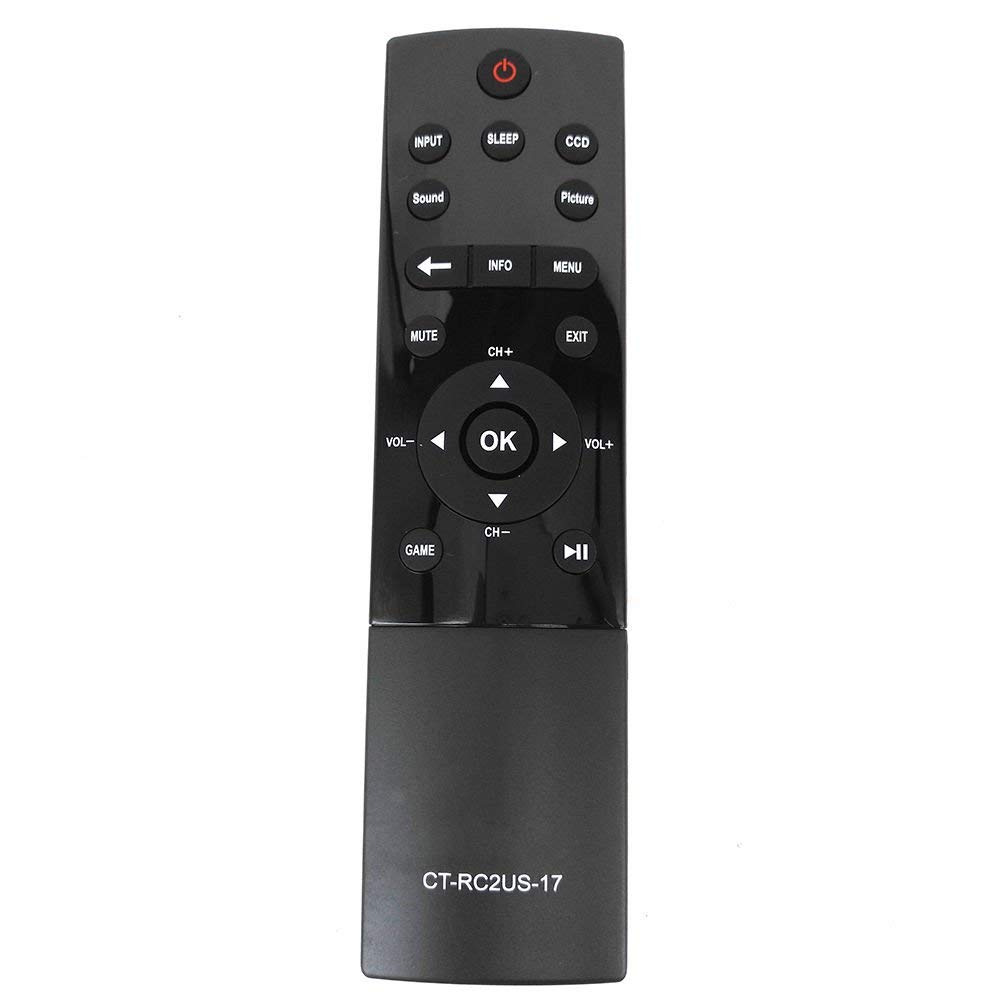
Image: Front of the remote control, displaying button layout.
Awọn iṣẹ bọtini
- Bọtini agbara: Tan TV si tan tabi paa.
- Bọtini titẹ sii: Yan orisun titẹ sii (fun apẹẹrẹ, HDMI 1, HDMI 2, AV).
- Bọtini orun: Activates the TV's sleep timer function.
- CCD Button: Controls Closed Captioning display.
- Bọtini aworan: Adjusts picture modes or settings.
- Bọtini Ohun: Adjusts sound modes or settings.
- Bọtini Mute: Ó pa ohùn tẹlifíṣọ̀n náà rẹ́ tàbí ó yọ ohùn kúrò.
- Bọtini Alaye: Ṣe afihan alaye loju iboju nipa eto lọwọlọwọ tabi titẹ sii.
- Bọtini Akojọ: Ó wọlé sí àkójọpọ̀ TV.
- Paadi lilọ kiri (Soke, Isalẹ, Osi, Ọtun, O DARA): Ti a lo lati lilö kiri ni awọn akojọ aṣayan ati jẹrisi awọn aṣayan.
- Àwọn bọ́tìnì CH+ / CH-: Yipada awọn ikanni soke tabi isalẹ.
- Àwọn bọ́tìnì VOL+ / VOL: O mu tabi dinku iwọn didun.
- Bọtini Jade: Jade ni ti isiyi akojọ aṣayan tabi iboju.
- Game Button: May activate a specific game mode or input.
- Playback Controls (Play/Pause, Rewind, Fast Forward): Used for media playback functions.
Itoju
Láti rí i dájú pé iṣẹ́ tó dára jùlọ àti pé agbára ìṣàkóso latọna jijin rẹ pé pérépéré, tẹ̀lé àwọn ìlànà ìtọ́jú wọ̀nyí:
- Rirọpo Batiri: Replace batteries when the remote's response becomes sluggish or stops working. Always replace both batteries simultaneously with new AAA batteries.
- Ninu: Wipe the remote control with a soft, dry cloth. Avoid using liquid cleaners or abrasive materials, as they may damage the remote's surface or internal components.
- Ibi ipamọ: Tọju isakoṣo latọna jijin ni itura, aye gbigbẹ kuro lati orun taara ati awọn iwọn otutu to gaju. Ti o ba fipamọ fun akoko ti o gbooro sii, yọ awọn batiri kuro lati yago fun jijo.
Laasigbotitusita
If you encounter issues with your Elekpia CT-RC2US-17 remote control, refer to the following common problems and solutions:
- Remote is unresponsive:
- Ensure there is a clear line of sight between the remote and the TV's infrared sensor.
- Ṣayẹwo boya awọn batiri ti wa ni fi sii bi o ti tọ pẹlu polarity to tọ.
- Rọpo awọn batiri atijọ pẹlu awọn batiri AAA tuntun.
- Limited functionality (e.g., only power and volume work):
- Some users have reported that this replacement remote may have limited functionality on certain Toshiba Smart LED HDTV models, primarily controlling power, volume, and basic menu access. Full navigation or advanced smart TV features might require the original TV remote or a universal remote specifically programmed for those functions.
- Verify your TV model is listed as compatible. If issues persist, consult the TV's original manual for remote control compatibility details.
- Awọn bọtini jẹ alalepo tabi ko dahun:
- This may indicate dirt or debris under the buttons. Gently clean around the buttons with a dry cotton swab. Do not attempt to disassemble the remote.
Awọn pato
| Ẹya ara ẹrọ | Ẹ̀kúnrẹ́rẹ́ |
|---|---|
| Nọmba awoṣe | CT-RC2US-17 |
| Brand | Elekpia |
| Ọja Mefa | 6.5 x 1.5 x 0.5 inches |
| Iwọn Nkan | 2.08 iwon |
| Awọn batiri ti a beere | Awọn batiri AAA 2 (kii ṣe pẹlu) |
| Asopọmọra Technology | Infurarẹẹdi |
| Awọn ẹrọ ibaramu | Toshiba Smart LED HDTVs |
| Pataki Ẹya | Apẹrẹ ergonomic |
| Nọmba ti o pọju Awọn ẹrọ Atilẹyin | 1 |
Alaye atilẹyin
For product support related to your Toshiba TV, please refer to the official Toshiba support channels:
- Webojula: www.toshiba.com
- Phone (US & Canada Market): 855-527-2411
Note: This remote control is a compatible replacement manufactured by Elekpia. For specific TV features or advanced troubleshooting, consult your Toshiba TV's original user manual.