
Ọrọ Iṣaaju
This manual provides instructions for the operation and maintenance of your Senville Remote Control, model AR2015-IR. This remote is designed for use with Senville AURA Series and LETO Series mini split air conditioning systems. Please read this manual thoroughly before using the remote control to ensure proper function and longevity.
Ọja Pariview
The Senville AR2015-IR remote control allows you to manage various functions of your compatible Senville mini split system, including temperature settings, operating modes, fan speed, and special features.
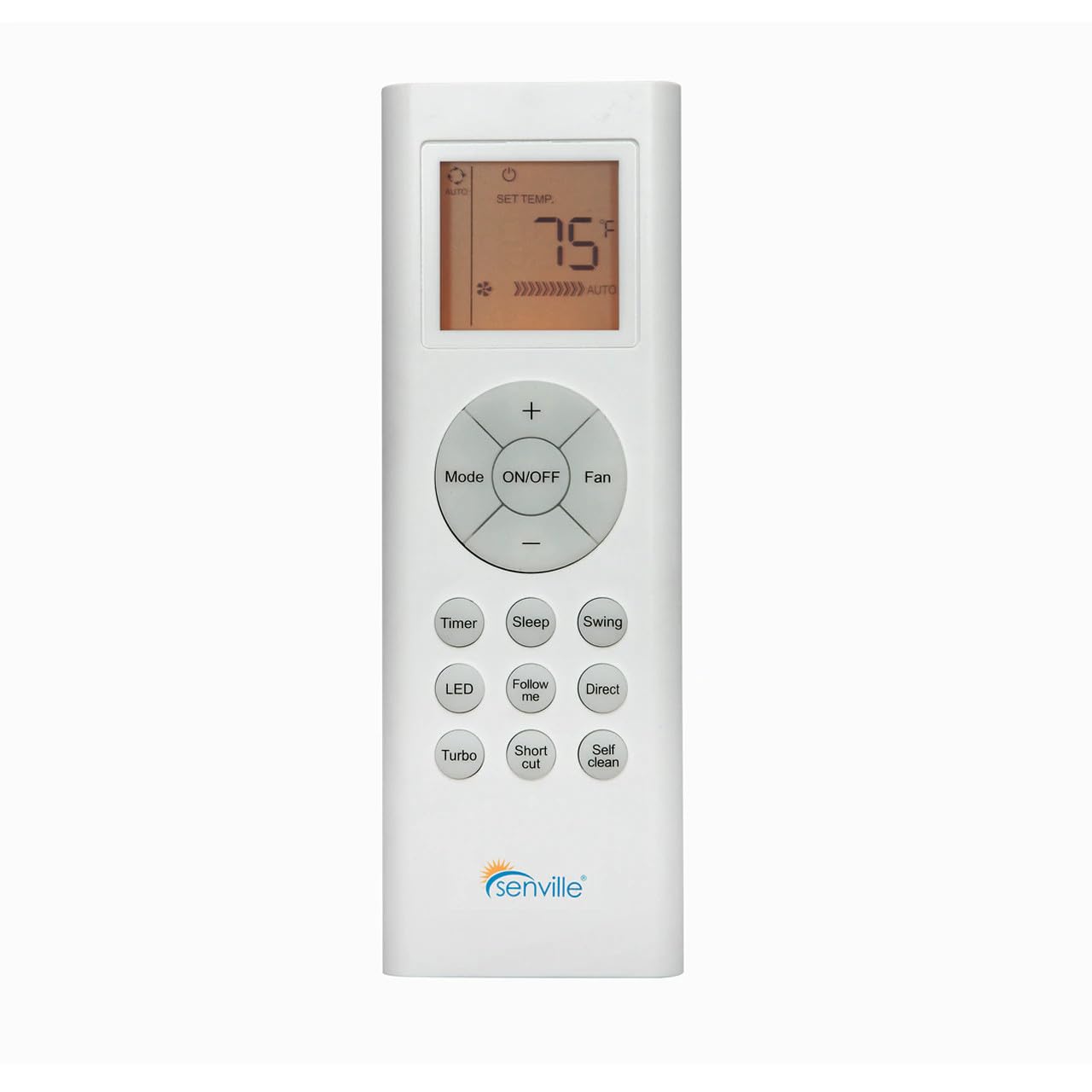
Nọmba 1: Iwaju view of the Senville AR2015-IR Remote Control. It features an LCD screen at the top, a central circular button cluster for power, mode, fan, and temperature adjustment, and additional function buttons below.
Ṣeto
1. Fifi sori batiri
- Wa ideri iyẹwu batiri ni ẹhin isakoṣo latọna jijin.
- Gbe ideri si isalẹ tabi tẹ latch lati ṣii.
- Fi awọn batiri AAA meji sii (kii ṣe pẹlu), aridaju polarity ti o pe (+ ati -) bi itọkasi inu yara naa.
- Rọpo ideri iyẹwu batiri.
Akiyesi: The remote control does not require programming and should function immediately upon battery installation with compatible Senville AURA and LETO series units.
Awọn ilana Iṣiṣẹ
Awọn iṣẹ bọtini
- TAN/PA: Press to turn the air conditioning unit on or off.
- Ipo: Awọn iyipo nipasẹ awọn ipo iṣẹ: Aifọwọyi, Itura, Gbẹ, Ooru, Fan.
- Àìpẹ: Ṣe atunṣe iyara àìpẹ: Aifọwọyi, Kekere, Alabọde, Ga.
- Temperature (+/-): Increases or decreases the set temperature. The display shows the set temperature in Fahrenheit or Celsius.
- Aago: Ó ń ṣètò aago tí a fi ń tan ara ẹni tàbí tí a fi ń pa ara ẹni.
- Orun: Activates or deactivates the Sleep mode for energy-efficient operation during sleep.
- Wiwa: Controls the vertical louver swing function.
- LED: Turns the indoor unit's display LED light on or off.
- Tele me kalo: Activates the Follow Me function, which senses the temperature at the remote's location.
- Taara: Adjusts the horizontal louver direction.
- Turbo: Ó ń mú kí ìtútù tàbí ìgbóná yára ṣiṣẹ́ fún ìgbà díẹ̀.
- Ọna abuja: Recalls your preferred settings.
- Mọ ara-ẹni: Initiates the self-cleaning function of the indoor unit.
Aṣayan Aṣayan iwọn otutu
To switch between Fahrenheit (°F) and Celsius (°C), ensure the unit is off. Press and hold the Temperature (+) and Temperature (-) buttons simultaneously for approximately 3 seconds. The display will change to the alternate unit.
Itoju
Batiri Rirọpo
Replace batteries when the display becomes dim or the remote's range decreases. Always replace both batteries at the same time with new AAA batteries. Dispose of used batteries according to local regulations.
Ninu Iṣakoso Latọna jijin
Fi aṣọ rírọrùn, gbígbẹ, nu iṣakoso latọna jijin. Má ṣe lo àwọn ohun èlò ìfọmọ́ omi tàbí àwọn ohun èlò ìpara, nítorí pé èyí lè ba ojú remote tàbí àwọn ohun èlò inú rẹ̀ jẹ́.
Laasigbotitusita
- Latọna jijin ko dahun:
- Ṣàyẹ̀wò bóyá àwọn bátìrì ti fi sori ẹrọ dáadáa tí wọn kò sì ti bàjẹ́. Rọpò rẹ̀ tí ó bá pọndandan.
- Ensure there are no obstructions between the remote control and the indoor unit's receiver.
- Jẹrisi isakoṣo latọna jijin ti tọka taara ni ẹyọ inu ile.
- Ifihan jẹ baibai tabi òfo:
- Rọpo awọn batiri.
- Unit not responding to specific functions:
- Verify that your specific Senville unit model supports the function you are trying to use. Refer to your air conditioner's manual for compatibility.
Awọn pato
| Nọmba awoṣe | AR2015-IR |
| Awọn ẹrọ ibaramu | Senville AURA Series, Senville LETO Series mini split air conditioners (HF, HF/Z, CD/X Models) |
| Asopọmọra Technology | Infurarẹẹdi |
| Orisun agbara | Awọn batiri 2 x AAA (kii ṣe pẹlu) |
| Awọn iwọn (L x W x H) | 6.89 x 2.68 x 0.83 inches |
| Iwọn | 2.89 iwon (laisi awọn batiri) |
Atilẹyin ọja ati Support
For warranty information or technical support regarding your Senville Remote Control or compatible air conditioning unit, please refer to the documentation provided with your main Senville product or visit the official Senville website. Contacting Senville customer service directly is recommended for specific inquiries.
O le wa alaye diẹ sii ati awọn orisun atilẹyin lori awọn Senville Store on Amazon.