
1. Ifihan
This user manual provides essential instructions for the proper setup, operation, and maintenance of your Socket Mobile Charging Stand with Anti-Theft Lock, Model AC4159-1956. This stand is designed to securely hold and charge compatible Socket Mobile S700 and D700 series barcode scanners, while also offering an automatic scanning function for specific 2D barcode scanner models.
2. Ọja Ipariview
The Socket Mobile Charging Stand is a robust accessory designed to enhance the functionality and security of your Socket Mobile barcode scanners. It provides a stable base for charging and hands-free operation.
- Iṣẹ ṣiṣe gbigba agbara: Serves as a stand for charging Socket Mobile S700, D700, and D600 series scanners.
- Anti-Theft Security: Includes a cable lock mechanism to help prevent unauthorized removal of the scanner.
- Automatic Scanning Mode: For compatible 2D barcode scanners (models S740, S760, D740, D750, D760), placing the scanner on the stand enables an automatic scanning function, allowing for hands-free barcode reading.

Nọmba 2.1: The Socket Mobile Charging Stand (Model AC4159-1956).

Nọmba 2.2: The charging stand shown with a compatible Socket Mobile barcode scanner in place.
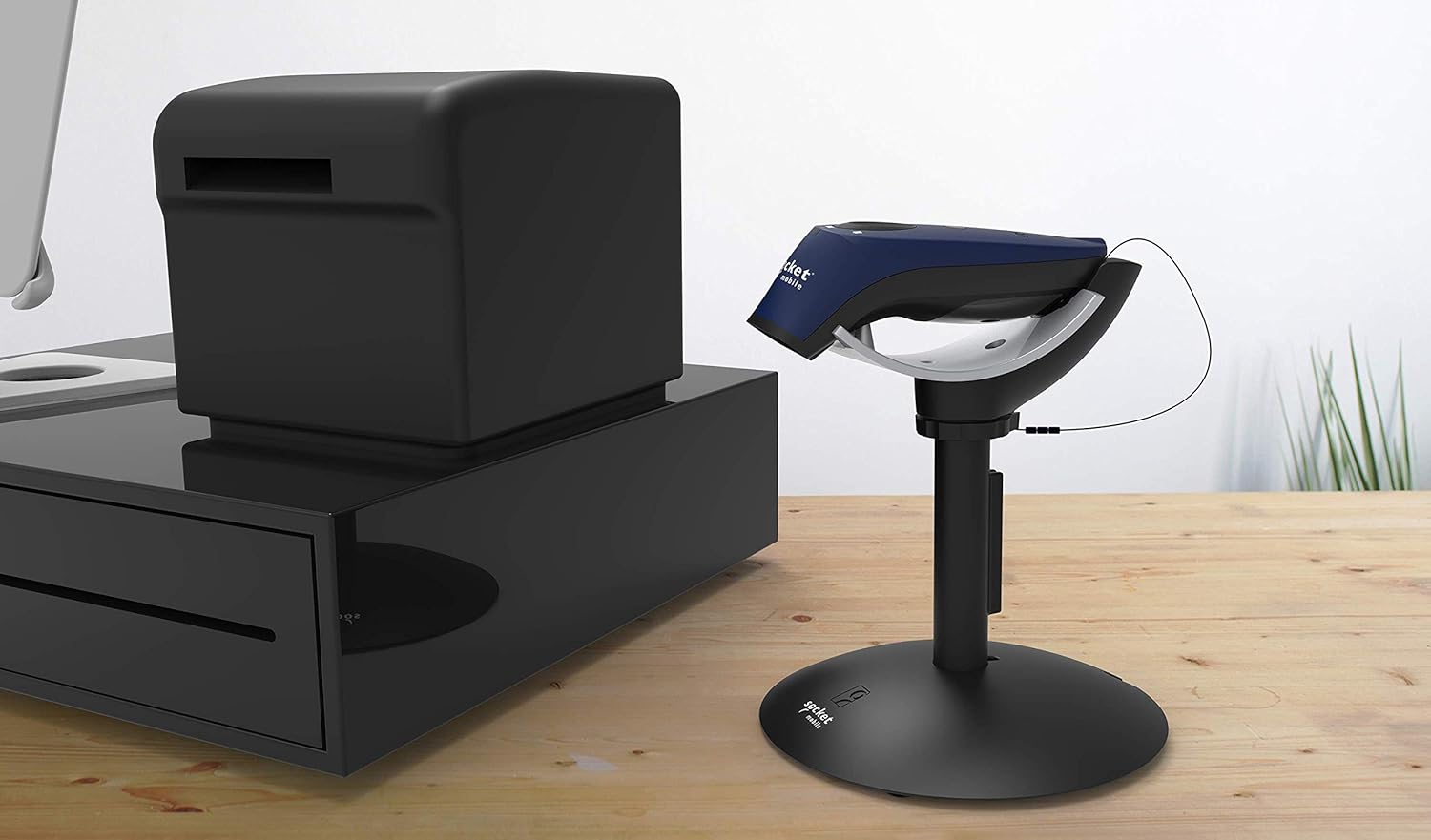
Nọmba 2.3: The charging stand integrated into a typical point-of-sale setup.
3. Eto
3.1. Unpacking
Carefully remove all components from the packaging. Verify that all parts are present: the charging stand base, the scanner cradle, and any included anti-theft cable lock accessories.
3.2. Apejọ
- Gbe ipilẹ iduro naa si ori ilẹ ti o duro ṣinṣin, ti o si rọgbọkú.
- Attach the scanner cradle to the stand post, ensuring it is securely fastened. Some models may require twisting or clicking into place.
- If using the anti-theft cable lock, route the cable through the designated slot on the stand and secure it to a fixed object.
3.3. Nsopọ Agbara
Connect the appropriate power adapter (sold separately or included with your scanner) to the charging port on the stand. Plug the power adapter into a standard electrical outlet. The stand is now ready to charge your scanner.
4. Awọn ilana Iṣiṣẹ
4.1. Gbigba agbara sikanu naa
To charge your Socket Mobile S700, D700, or D600 series scanner, simply place it into the cradle of the charging stand. Ensure the scanner makes proper contact with the charging pins. The scanner's charging indicator (typically an LED) will illuminate to confirm charging is in progress.
4.2. Automatic Scanning Mode (for compatible 2D scanners)
For Socket Mobile 2D barcode scanners (S740, S760, D740, D750, D760), placing the scanner on the stand activates an automatic scanning mode. In this mode, the scanner will automatically read barcodes when they are presented within its scanning field, eliminating the need to manually press the scan button.
4.3. Using the Anti-Theft Lock
The integrated anti-theft cable lock provides an additional layer of security. Once the scanner is placed in the cradle, ensure the cable lock is properly engaged and secured to a fixed anchor point to deter theft.
5. Itọju
- Ninu: Use a soft, dry, lint-free cloth to clean the stand. Avoid abrasive cleaners or solvents.
- Ibi ipamọ: Tọju iduro ni itura, aye gbigbẹ nigbati o ko ba lo.
- Ayewo: Periodically inspect the charging pins and cable for any signs of damage or wear.
6. Laasigbotitusita
If you encounter issues with your charging stand, refer to the following table for common problems and solutions:
| Isoro | Owun to le Fa | Ojutu |
|---|---|---|
| Scanner not charging | No power to the stand; scanner not seated correctly; dirty charging contacts. | Ensure power adapter is connected and plugged in. Re-seat the scanner firmly. Clean charging contacts on both scanner and stand with a dry cloth. |
| Automatic scanning not working | Scanner not compatible with auto-scan feature; scanner not seated correctly. | Verify your scanner model (S740, S760, D740, D750, D760) supports auto-scan. Re-seat the scanner firmly in the cradle. |
| Anti-theft lock not securing scanner | Cable not properly routed or secured; lock mechanism not engaged. | Ensure the anti-theft cable is correctly routed through the stand and secured to a fixed object. Verify the lock mechanism is fully engaged. |
7. Awọn pato
| Ẹya ara ẹrọ | Ẹ̀kúnrẹ́rẹ́ |
|---|---|
| Brand | Socket Mobile |
| Nọmba awoṣe | AC4159-1956 |
| Àwọ̀ | Charging Stand (with Anti-Theft Lock) |
| Ọja Mefa | 13.97 x 4.57 x 16.51 cm |
| Iwọn Ọja | 388.39 g |
| Orisun agbara | External Power (for charging battery-powered scanners) |
| UPC | 758497114679 |
| Olupese | Socket alagbeka |
8. atilẹyin ọja Information
Specific warranty details for the Socket Mobile Charging Stand (AC4159-1956) are typically provided with the product packaging or can be found on the official Socket Mobile webojula. Jọwọ tọka si awọn orisun wọnyi fun deede julọ ati awọn ofin atilẹyin ọja ti ode oni.
9. Onibara Support
For further assistance, technical support, or inquiries regarding your Socket Mobile Charging Stand, please visit the official Socket Mobile support webojula tabi kan si wọn onibara iṣẹ Eka. Alaye olubasọrọ le nigbagbogbo ri lori olupese ká webaaye tabi ni iwe ọja.
Webojula: www.socketmobile.com/support