
Ọrọ Iṣaaju
This manual provides comprehensive instructions for the Hoco ES20 Original Series Wireless V5.0 Earphones. Please read this manual carefully before using the product to ensure proper operation and to maximize your user experience. Keep this manual for future reference.
Ọja Pariview
The Hoco ES20 earphones are designed for wireless audio playback and hands-free communication. The package includes two wireless earphones and a portable charging case.

Aworan 1: Hoco ES20 Wireless Earphones. This image displays both the left and right earphones, highlighting their in-ear design and compact form factor.
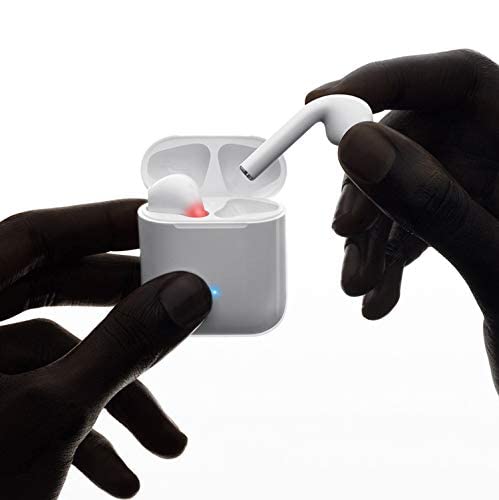
Aworan 2: Hoco ES20 Earphones in Charging Case. The earphones are shown placed inside their charging case, indicating the charging status with an illuminated LED.
Awọn pato
| Ẹya ara ẹrọ | Ẹ̀kúnrẹ́rẹ́ |
|---|---|
| Ẹya Alailowaya | V5.0 |
| Awọn Ilana atilẹyin | Headset, Hands-free, A2DP, Avrcp |
| Igbohunsafẹfẹ gbigbe | 2.4GHz |
| Gbigbe Range | 10 mita |
| Ngba agbara Voltage | DC5V |
| Akoko gbigba agbara (Earphone) | O fẹrẹ to wakati 1 |
| Aago Ọrọ | wakati meji 2 |
| Akoko Sisisẹsẹhin Orin | wakati meji 2 |
| Ngba agbara Batiri Case | 400mAh |
| Earphone Battery Capacity (Each) | 40mAh |
| Akoko Iduro | wakati meji 200 |
| Total Weight (with case) | 44.8g |
| Iwọn Earphone Nikan | 3.8g |
| Awọn irinše to wa | Bluetooth Headphones, 1 Charging Cable |
Ṣeto
1. Ngba agbara si Earphones ati Case
- Place both earphones into the charging case. Ensure they are correctly seated.
- Connect the charging cable to the charging port on the case and to a DC5V power source (e.g., USB wall adapter, computer USB port).
- The indicator light on the charging case will show charging status. A full charge for the earphones takes approximately 1 hour. The charging case itself has a 400mAh battery capacity.
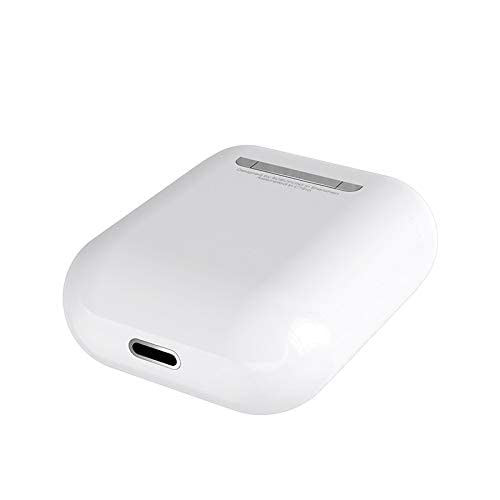
Aworan 3: Hoco ES20 Charging Case Port. This image shows the charging port located at the bottom of the charging case, where the charging cable is connected.
2. Sisopọ pẹlu Ẹrọ kan
- Rii daju pe awọn agbekọri ti gba agbara.
- Ṣii apoti gbigba agbara. Awọn agbekọri yoo tẹ ipo sisopọ laifọwọyi.
- Lori foonuiyara rẹ tabi ẹrọ Bluetooth miiran ti o ṣiṣẹ, lọ si awọn eto Bluetooth.
- Wa fun available devices and select "Hoco ES20" (or similar name) from the list.
- Ni kete ti a ti sopọ, awọn agbekọri yoo tọka si isọdọkan aṣeyọri (fun apẹẹrẹ, itọsi ohun tabi iyipada LED).
- For Apple phones and some Android phones, the battery level of the earphones may be displayed on your device.
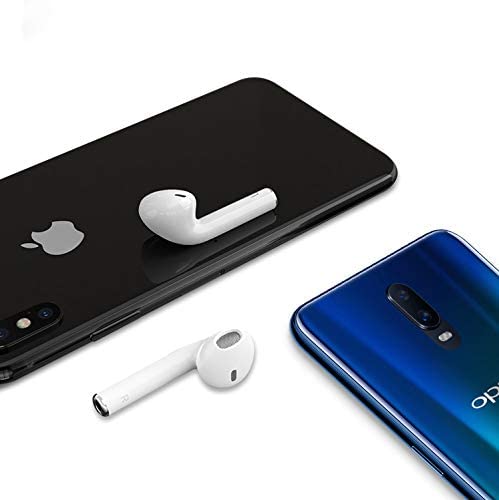
Aworan 4: Hoco ES20 Earphones with Smartphones. This image illustrates the earphones positioned near two different smartphones, demonstrating their compatibility with various mobile devices.
Awọn ilana Iṣiṣẹ
Basic Functions (Touch Control)
- Agbara Tan: Earphones power on automatically when removed from the charging case.
- Agbara Pa: Earphones power off automatically when placed back into the charging case.
- Ṣiṣẹ/Daduro: Tẹ ibi ifọwọkan lori foonu mejeeji lẹẹkan.
- Idahun/Ipe Ipari: Tap the touch area on either earphone once during an incoming call or an active call.
- Kọ Ipe: Press and hold the touch area on either earphone for approximately 2 seconds during an incoming call.
- Orin t’okan: Tẹ agbegbe ifọwọkan lẹẹmeji lori foonu agbekọri ọtun.
- Tẹlẹ Orin: Tẹ agbegbe ifọwọkan lẹẹmeji lori foonu agbekọri osi.
- Mu Oluranlọwọ Ohun ṣiṣẹ: Triple-tap the touch area on either earphone.
Itoju
- Jẹ́ kí àwọn agbekọri àti àpótí ìgbarajá mọ́ tónítóní kí ó sì gbẹ.
- Avoid exposing the product to extreme temperatures, humidity, or corrosive substances.
- Má ṣe gbìyànjú láti tú tàbí yí àwọn agbekọri tàbí àpótí ìgbarajá padà, nítorí pé èyí yóò sọ àtìlẹ́yìn náà di òfo, ó sì lè fa ìbàjẹ́.
- Use a soft, dry cloth to clean the earphones and charging contacts.
- Tọju awọn agbekọri sinu apoti gbigba agbara wọn nigbati ko si ni lilo lati daabobo wọn ati jẹ ki wọn gba agbara.
Laasigbotitusita
Wọpọ Oran ati Solusan
- Awọn agbekọri ti ko so pọ:
- Rii daju pe awọn agbekọri mejeeji ti gba agbara.
- Place earphones back in the case, close it, then open it again.
- Paa ati tan Bluetooth lori ẹrọ rẹ.
- Delete "Hoco ES20" from your device's Bluetooth list and try pairing again.
- Foonu agbekọri kan ṣoṣo ti n ṣiṣẹ:
- Rii daju pe awọn agbekọri mejeeji ti gba agbara.
- Place both earphones back in the charging case, close the lid, wait a few seconds, then open the lid and remove them together.
- If the issue persists, try resetting the earphones (refer to manufacturer's website if a specific reset procedure is not in this manual).
- Ko si ohun tabi iwọn kekere:
- Ṣayẹwo ipele iwọn didun lori ẹrọ rẹ mejeeji ati awọn agbekọri.
- Rii daju pe awọn agbekọri ti sopọ daradara si ẹrọ rẹ.
- Gbiyanju ohun ti ndun lati ohun elo ti o yatọ tabi orisun.
- Awọn iṣoro gbigba agbara:
- Rii daju pe okun gbigba agbara ti sopọ ni aabo si ọran mejeeji ati orisun agbara.
- Ṣàyẹ̀wò bóyá ibudo gbigba agbara lori apoti naa mọ́ tónítóní tí kò sì ní ìdọ̀tí kankan.
- Gbiyanju lilo okun gbigba agbara ti o yatọ tabi ohun ti nmu badọgba agbara.
- Poor connection/intermittent audio:
- Rí i dájú pé ẹ̀rọ rẹ wà láàárín ìwọ̀n ìgbékalẹ̀ ìṣiṣẹ́ mítà mẹ́ẹ̀ẹ́dógún.
- Avoid obstacles between your device and the earphones.
- Din kikọlu kuro lati awọn ẹrọ alailowaya miiran.
Atilẹyin ọja ati Support
The Hoco ES20 Wireless Earphones come with a 6-osu atilẹyin ọja lati ọjọ ti o ra. Atilẹyin ọja yi ni wiwa awọn abawọn iṣelọpọ. Jọwọ ṣe idaduro ẹri rira rẹ fun awọn iṣeduro atilẹyin ọja.
For technical support or warranty inquiries, please contact your retailer or the official Hoco support channels. Refer to the product packaging or Hoco's official webojula fun alaye olubasọrọ.