
1. Ifihan
The Edifier S3000Pro Audiophile Active Speakers are designed to deliver high-fidelity audio with versatile connectivity options. Featuring Bluetooth 5.0 with aptX HD, USB audio, planar diaphragm tweeters, and 6.5-inch woofers, these speakers offer a premium listening experience. The innovative KleerNet wireless technology allows for a wire-free connection between the left and right speakers, providing flexible placement without compromising sound quality.
2. Package Awọn akoonu
Jọwọ rii daju pe gbogbo awọn nkan wa ninu package:
- Edifier S3000Pro Speakers (1 pair)
- Isakoṣo latọna jijin
- Okun agbara
- Okun USB
- Okun Opitika
- Okùn Ohùn RCA sí RCA
- 3.5mm to RCA Audio Cable
- Itọsọna olumulo
3. Eto ati awọn isopọ
The Edifier S3000Pro speakers are designed for easy setup. The left and right speakers connect wirelessly to each other, eliminating the need for a speaker cable between them. Each speaker requires its own power connection.
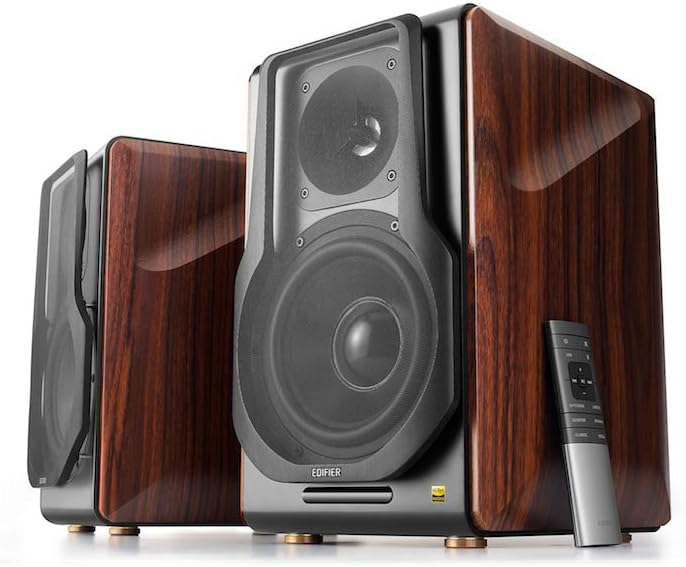
Figure 3.1: Edifier S3000Pro Speakers and Remote Control.
3.1 Agbọrọsọ Placement
Place the speakers in your desired listening area. Due to their wireless inter-speaker connection, you have flexibility in positioning them. Ensure each speaker is near a power outlet.

Olusin 3.2: Example placement of Edifier S3000Pro speakers in a room.
3.2 Asopọ agbara
Connect the included power cables to each speaker and then to a wall outlet. The speakers will automatically attempt to pair with each other upon power-on.
3.3 Audio Input Awọn isopọ
The active (right) speaker features a variety of input ports:
- Bluetooth 5.0 with aptX HD: Fun sisanwọle ohun afetigbọ lati awọn ẹrọ ibaramu.
- Ohùn USB: Connect directly to a computer for high-resolution audio playback.
- Ojú: For digital audio connection from TVs, game consoles, etc.
- Coaxial: Another digital audio input option.
- Ìlà Wíwọlé (RCA): Standard analog input for various audio sources.
- Iwontunwonsi (XLR): Professional-grade input for balanced audio signals.

Figure 3.3: Rear panel of the active speaker with various input options.
3.4 Wireless Inter-Speaker Connection
The S3000Pro utilizes KleerNet wireless technology for lossless audio transmission between the left and right speakers. This connection is established automatically. If re-pairing is ever needed, refer to the troubleshooting section.
Video 3.1: Official Edifier S3000Pro Audiophile Active Speakers overview, demonstrating key features and connectivity.
4. Awọn ilana Iṣiṣẹ
Control your S3000Pro speakers using the included wireless remote or the controls located on the active (right) speaker.
4.1 Latọna Iṣakoso Awọn iṣẹ

Figure 4.1: The wireless remote control for Edifier S3000Pro speakers.
- Bọtini agbara: Ó ń tan tàbí pa àwọn agbohunsoke.
- Iṣakoso iwọn didun: Ṣe atunṣe ipele iwọn didun gbogbogbo.
- Pa ẹnu mọ́: Pa tabi mu ohun ti o jade kuro.
- Aṣayan igbewọle: Dedicated buttons for USB, Bluetooth, Optical/Coaxial, and Line/Balanced inputs.
- Awọn idari Sisisẹsẹhin: Play/Pause, Skip Forward, Skip Backward (for Bluetooth and USB modes).
- Awọn ọna ohun: Buttons for Monitor, Dynamic, Classic, and Vocal sound profiles.
4.2 On-Speaker Controls
The active speaker features rotary knobs for direct control:
- Volume/Input Selection: Rotate to adjust volume; press to cycle through inputs.
- Iṣakoso Treble: Ó ń ṣe àtúnṣe ìjáde ìgbohùngbà gíga.
- Iṣakoso Bass: Ó ń ṣàtúnṣe ìjáde ìgbóná-ìgbóná kékeré.
5. Àwọn ẹ̀yà ara àti ìrísí
The S3000Pro speakers are crafted with both acoustic performance and aesthetic appeal in mind.
5.1 Acoustic Design
- Planar Diaphragm Tweeters: Deliver clear, detailed high frequencies.
- 6.5-inch Aluminum Alloy Woofers: Provide powerful and accurate bass response.
- Ti a ṣe sinu Ampolutọpa: Each speaker features a 78 watts amplifier, eliminating the need for external amplification.
- Ohun Hi-Res: Supports higher bit depth and sample rates (96 kHz or higher) for superior sound quality.
5.2 Construction and Aesthetics
The speaker cabinets are constructed from high-quality MDF (Medium-Density Fiberboard) with a brown wood finish, offering both durability and a classic aesthetic. The front features a matt black finish with removable cloth grilles.

olusin 5.1: Iwaju view highlighting the drivers and finish.

olusin 5.2: Apa view ifihanasing the wood finish.
6. Itọju
To ensure the longevity and optimal performance of your Edifier S3000Pro speakers, follow these maintenance guidelines:
- Ninu: Use a soft, dry cloth to wipe down the speaker cabinets. Avoid using abrasive cleaners, waxes, or solvents.
- Eruku: Regularly dust the speaker grilles and drivers with a soft brush or vacuum cleaner with a brush attachment.
- Ibi: Yẹra fún gbígbé àwọn agbọ́hùnsọ sí ibi tí oòrùn bá tàn tààrà, nítòsí àwọn ibi tí ooru ti ń mú, tàbí ní àwọn ibi tí ọriniinitutu pọ̀ sí. Rí i dájú pé afẹ́fẹ́ tó wà ní àyíká àwọn agbọ́hùnsọsọ náà.
- Mimu: Handle the speakers with care. Avoid pressing on the speaker cones or tweeters.
7. Laasigbotitusita
If you encounter issues with your S3000Pro speakers, refer to the following common solutions:
- Ko si Ohun:
- Ensure both speakers are powered on and connected to an electrical outlet.
- Verify the correct input source is selected on the active speaker or remote.
- Ṣàyẹ̀wò gbogbo àwọn okùn ohùn fún àwọn ìsopọ̀ tó ní ààbò.
- Increase the volume on both the speakers and the audio source.
- Speakers Not Pairing Wirelessly:
- Ensure both speakers are powered on. The wireless connection between them is factory-paired and should resume automatically.
- If the wireless connection fails, locate the small "Pair" button on the back panel of both the active (R) and passive (L) speakers. Press and hold the "Pair" button on the active speaker first, then on the passive speaker. The LED indicator on the passive speaker will blink rapidly during pairing.
- Awọn oran Asopọmọra Bluetooth:
- Ensure the speakers are in Bluetooth input mode.
- Delete the "Edifier S3000Pro" from your device's Bluetooth list and attempt to re-pair.
- Move your Bluetooth device closer to the speakers to reduce interference.
- Ohun Yiyi:
- Dín iwọn didun kù lórí àwọn agbohunsoke àti orísun ohùn náà.
- Ṣayẹwo awọn kebulu ohun fun ibajẹ tabi awọn asopọ alaimuṣinṣin.
- Rí i dájú pé orísun ohùn náà kò ń darí ìtẹ̀síwájú jù.
8. Awọn pato
| Ẹya ara ẹrọ | Sipesifikesonu |
|---|---|
| Brand | Atunṣe |
| Orukọ awoṣe | S3000PRO |
| Agbọrọsọ Iru | Iwe ipamọ |
| Ohun elo | MDF |
| Asopọmọra Technology | Bluetooth, USB |
| Imọ-ẹrọ Ibaraẹnisọrọ Alailowaya | Bluetooth |
| Ẹya Bluetooth | 5.0 pẹlu aptX HD |
| Iwọn Iwọn Woofer | 6.5 inches |
| Iruwe Tweeter | Planar Diaphragm |
| Agbọrọsọ Agbara Ijade ti o pọju | 256 Wattis |
| Ifihan Ibuwọlu-si-Noise | 85 dB |
| Ọja Mefa | 21.6"D x 13.4"W x 17.3"H |
| Iwọn Nkan | 3.3 iwon (1.5 kilo) |
| Awọn irinše to wa | ọja, Afowoyi |
9. Atilẹyin ọja ati Support
The Edifier S3000Pro speakers come with a full warranty. For detailed warranty information, product registration, or technical support, please visit the official Edifier webojula tabi kan si wọn onibara iṣẹ. Tọju iwe-ẹri rira rẹ fun awọn ẹtọ atilẹyin ọja.
Fun iranlọwọ siwaju sii, o le ṣabẹwo si Itaja Edifier on Amazon.