
Musway 02092P2
Musway P2 Digital 2-Channel Amplifier Afowoyi olumulo
Awoṣe: 02092P2
Ọrọ Iṣaaju
The Musway P2 is a super compact digital 2-channel amplifier designed to complement pre-amplified outputs of systems like MUSWAY M6 and D8. This mini power kit functions as a pure amplification module without a filtering section, focusing solely on boosting audio signals. Its highly efficient digital technology ensures impressive performance, capable of driving a medium-sized subwoofer or a high-quality stereo speaker system.
Due to its very compact dimensions, the amplifier can be installed in various locations within a vehicle, such as the glove compartment or behind the dashboard. The pluggable speaker and power connectors facilitate quick installation and removal. The P2 offers a compact and economical solution for applications requiring robust amplification for two channels.
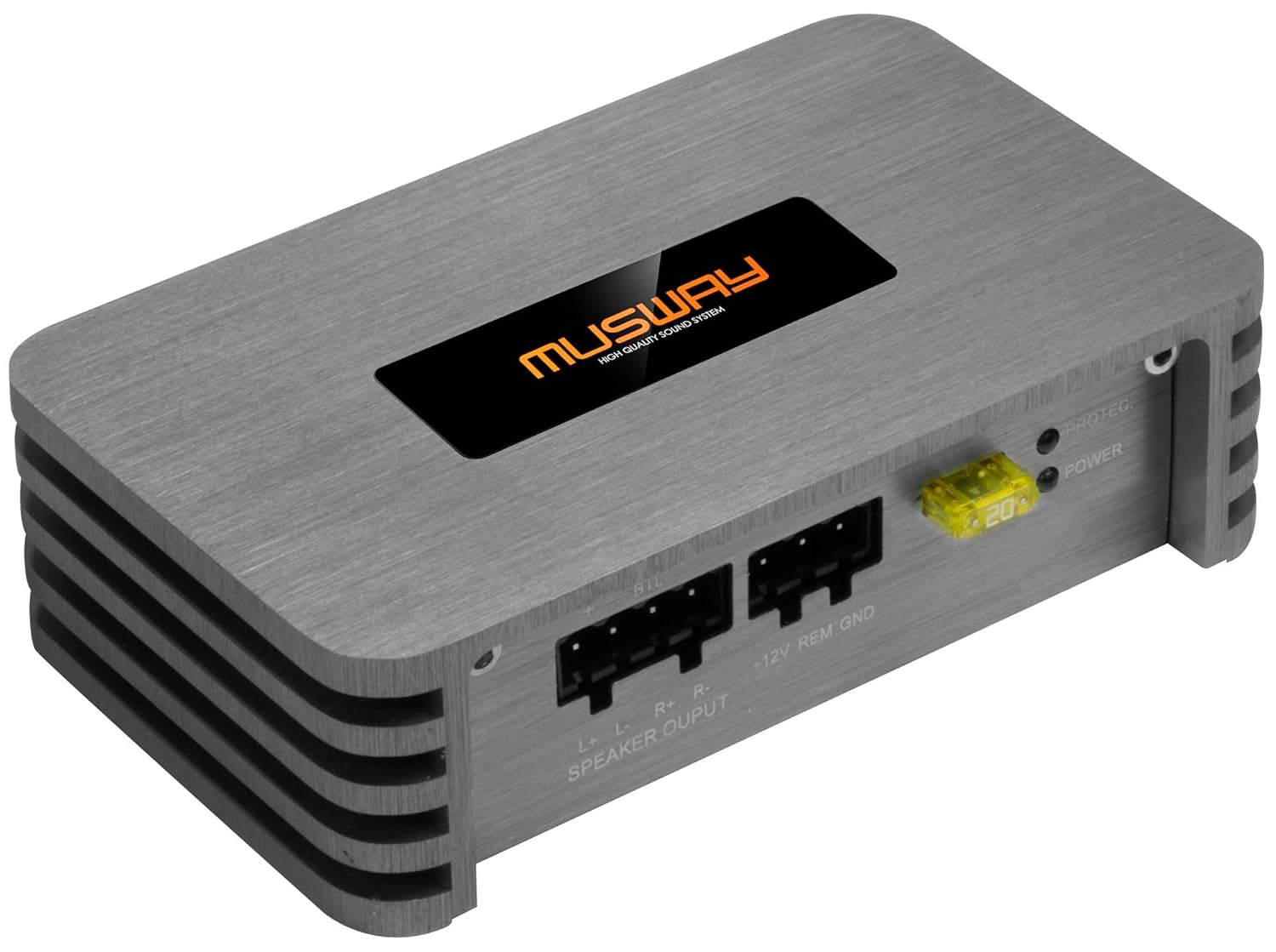
Figure 1: Musway P2 Digital 2-Channel Amplifier, showing its compact design and connection ports.
Eto ati fifi sori
Before beginning installation, ensure the vehicle's battery is disconnected to prevent electrical shorts. Choose a mounting location that is dry, well-ventilated, and away from direct heat sources or moving parts.
Awọn iwọn ti ara
- AmpAwọn iwọn lifier: 123 x 75 x 38 mm (Ipari x Iwọn x Giga)
- Awọn iwọn idii: 19.5 x 11.1 x 5.3 cm
- Ìwúwo: 660 giramu

Figure 2: The Musway P2 amplifier shown next to a smartphone, illustrating its compact size.
Awọn isopọ
The P2 amplifier features pluggable connectors for power and speakers, simplifying installation.
Power and Speaker Output Connections
- + 12V: Connect to the vehicle's positive battery terminal (via a fuse, not supplied).
- REM (Latọna jijin): Connect to the head unit's remote turn-on output.
- GND (Ilẹ): Connect to a solid, unpainted metal point on the vehicle's chassis.
- Speaker Output (L+, L-, R+, R-): Connect your speakers according to their polarity. For bridged mode (1 x 210W RMS @ 4 Ohms), connect to the designated terminals (BTL).
- Fiusi: The unit includes a 20A fuse for protection.

Nọmba 3: Alaye view of the power input (+12V, REM, GND) and speaker output (L+, L-, R+, R-) terminals, along with the 20A fuse and indicator lights.
RCA Input Awọn isopọ
- INPUT (L, R): Connect RCA cables from your head unit or pre-amplifier (e.g., Musway M6 or D8) to these inputs.
- IKỌRỌ: Adjust the input sensitivity using a small screwdriver to match the output level of your source unit. This is the only adjustable setting on the amplifier.

Nọmba 4: Alaye view of the RCA input terminals (L, R) and the sensitivity adjustment screw.
Awọn ilana Iṣiṣẹ
The Musway P2 is designed for straightforward operation as a pure power amplifier. Once properly installed and connected, it will power on automatically with your head unit via the remote turn-on wire.
- Atọka Agbara: The green "POWER" LED will illuminate when the amplifier is receiving power and operating correctly.
- Atọka Idaabobo: The red "PROTECT" LED will illuminate if the amplifier n ṣe awari aṣiṣe kan (fun apẹẹrẹ, iyipo kukuru, iwọn otutu ti o gbona ju, iwọn didun kekeretage). If this light comes on, immediately turn off your audio system and troubleshoot the issue.
- Atunse ifamọ: Fine-tune the input sensitivity to prevent distortion and ensure optimal sound quality. Start with the sensitivity at its lowest setting and gradually increase it until the desired volume is achieved without audible distortion.
Itoju
The Musway P2 amplifier requires minimal maintenance. Follow these guidelines to ensure longevity and optimal performance:
- Ninu: Lo asọ ti o gbẹ, ti o gbẹ lati nu mọlẹ amplifier's exterior. Do not use liquid cleaners or solvents, as they may damage the finish or internal components.
- Afẹfẹ: Rii daju pe awọn amplifier's heat sinks are not obstructed. Proper airflow is crucial for dissipating heat and preventing overheating.
- Awọn isopọ: Periodically check all power, ground, remote, and speaker connections to ensure they are secure and free from corrosion. Loose connections can lead to poor performance or damage.
- Rirọpo Fuse: If the 20A fuse blows, replace it only with a fuse of the same type and rating (20A). Using a fuse with a higher rating can lead to severe damage to the ampẹ̀rọ ìdènà tàbí ètò iná mànàmáná ọkọ̀.
Laasigbotitusita
If you experience issues with your Musway P2 amplifier, refer to the following troubleshooting guide:
| Isoro | Owun to le Fa | Ojutu |
|---|---|---|
| No Power (POWER LED off) |
|
|
| PROTECT LED is on |
|
|
| Ko si Ijade ohun |
|
|
| Ohun Daru |
|
|
Awọn pato
| Ẹya ara ẹrọ | Ẹ̀kúnrẹ́rẹ́ |
|---|---|
| Ọja Iru | Digital 2-Channel Amplifier (Class D) |
| Ijade agbara RMS (4 Ohms) | 2 x 70 W |
| Ijade agbara RMS (2 Ohms) | 2 x 10⁵ W |
| Bridged RMS Power Output (4 Ohms) | 1 x 210 W |
| Nọmba ti awọn ikanni | 2 |
| Iru igbewọle | RCA (Low-Level) |
| Awọn atunṣe | Input Sensitivity |
| Awọn iwọn (L x W x H) | 123 x 75 x 38 mm |
| Fiusi Rating | 20A |
| Awọn asopọ | Pluggable for Power and Speakers |
| Olupese | Musway |
| Nọmba awoṣe | 02092P2 |
Atilẹyin ọja ati Support
Specific warranty information for the Musway P2 amplifier may vary by region and retailer. Please refer to the documentation provided at the time of purchase or contact your authorized Musway dealer for details regarding warranty coverage and terms.
For technical support, troubleshooting assistance beyond this manual, or inquiries about spare parts, please contact Musway customer service or visit the official Musway webojula. Tọju iwe-ẹri rira rẹ bi ẹri rira fun eyikeyi awọn ibeere atilẹyin ọja.
Ask a question about this manual
Ask about setup, troubleshooting, compatibility, parts, safety, or missing instructions. Manuals+ will review the question and use this page’s manual context to help answer it.