
1. Ifihan
This manual provides essential information for the safe and efficient operation of your Strong SRT 32HB3003 32-inch HD LED TV. Please read these instructions carefully before using the television and retain them for future reference.
2. Alaye Aabo
Nigbagbogbo ṣe akiyesi awọn iṣọra ailewu atẹle lati ṣe idiwọ mọnamọna, ina, tabi ibajẹ si tẹlifisiọnu:
- Ma ṣe fi TV han si ojo tabi ọrinrin.
- Ma ṣii TV casing; tọka gbogbo iṣẹ si oṣiṣẹ ti o peye.
- Rii daju pe fentilesonu to dara ni ayika TV.
- Yọ TV kuro lakoko iji manamana tabi nigbati a ko lo fun igba pipẹ.
- Pa TV kuro lati awọn orisun ooru ati oorun taara.
3. Package Awọn akoonu
Daju pe gbogbo awọn nkan wa ninu apoti:
- Strong SRT 32HB3003 LED TV
- Isakoṣo latọna jijin
- 2x AAA batiri
- Iduro TV
- Itọsọna olumulo

Image: The Strong SRT 32HB3003 TV packaging, highlighting key features such as DVB-T2/C/S2 tuner, HDMI, USB, and Dolby Audio.
4. Eto
4.1 Duro fifi sori
Lati fi sori ẹrọ imurasilẹ TV:
- Farabalẹ gbe oju TV si isalẹ lori rirọ, dada mimọ lati ṣe idiwọ ibajẹ iboju.
- Ṣe deede awọn ipilẹ iduro pẹlu awọn iho ti o baamu ni isalẹ ti TV.
- Ṣe aabo awọn iduro nipa lilo awọn skru ti a pese.
4.2 Awọn isopọ
So awọn ẹrọ ita rẹ pọ mọ TV nipa lilo awọn ibudo ti o yẹ.
- Antenna/Cable: Connect your DVB-T2 or DVB-C antenna/cable to the 'ANT IN' port.
- Satẹlaiti: Connect your satellite dish to the 'SATELLITE IN' port for DVB-S2 reception.
- Awọn ẹrọ HDMI: Use HDMI ports for high-definition devices like Blu-ray players, game consoles, or set-top boxes. HDMI 1 supports ARC (Audio Return Channel).
- Awọn ẹrọ USB: Insert USB drives into the USB 2.0 ports for media playback.
- CI+ Module: Insert a CI+ module (Common Interface) into the CI+ slot for encrypted channels.
- Ijade ohun: Use the Headphone jack for private listening or the Digital Optical Output (TOS-Link) for external audio systems.
- AV NI: Fún àwọn ẹ̀rọ àtijọ́, lo ibudo AV IN.

Aworan: Ẹyin view of the Strong SRT 32HB3003 TV, illustrating the placement of connection ports including HDMI, USB, and antenna inputs.

Image: A diagram detailing the Common Interface (CI) slot and other connectivity options such as USB, headphone jack, AV IN, HDMI 1, HDMI 2, Satellite IN, and S/PDIF (digital optical audio out).
4.3 First Time fifi sori
After connecting the power cable and turning on the TV, the First Time Installation wizard will guide you through initial setup steps, including language selection, country, and channel scanning for DVB-T2, DVB-C, or DVB-S2.
5. Ṣiṣẹ
5.1 Iṣakoso latọna jijin Loriview
The remote control allows you to access all TV functions. Insert the two AAA batteries into the remote control, ensuring correct polarity.

Image: The remote control for the Strong SRT 32HB3003 TV, featuring buttons for power, numerical input, volume control, channel selection, menu access, source input, and media playback functions.
5.2 Ipilẹ Awọn iṣẹ
- Agbara: Tẹ awọn pupa agbara bọtini to turn the TV on or off.
- Iwọn didun: Lo awọn VOL +/- awọn bọtini lati ṣatunṣe iwọn didun.
- Ikanni: Lo awọn + + awọn bọtini lati yi awọn ikanni.
- Pa ẹnu mọ́: Tẹ awọn IKU bọtini lati fi si ipalọlọ awọn iwe ohun fun igba diẹ.
5.3 Orisun Aṣayan
Tẹ awọn ORISUN button on the remote control to select the desired input source (e.g., HDMI 1, HDMI 2, DVB-T2, DVB-C, DVB-S2, AV).
5.4 Lilọ kiri Akojọ aṣyn
Tẹ awọn Akojọ button to access the main menu. Use the arrow buttons to navigate and OK to confirm selections. The PADA button returns to the previous menu or exits the current menu.
5.5 Media Sisisẹsẹhin (USB)
Insert a USB storage device into one of the USB ports. The TV supports playback of photos, videos, and music files. Access the media player through the main menu or by selecting the USB source.
5.6 Itọsọna Eto Itanna (EPG)
Tẹ awọn EPG bọtini lati view the Electronic Program Guide, which displays program schedules for digital channels.
5.7 Hotel Ipo
The TV features a Hotel Mode, which allows for restricted access to certain settings and functions, ideal for hospitality environments. Consult the advanced settings menu for Hotel Mode configuration.
6. Itọju
6.1 Ninu
- Yọọ TV nigba gbogbo ṣaaju ṣiṣe mimọ.
- Lo asọ ti o gbẹ lati nu iboju ati minisita.
- Fun awọn ami alagidi, fẹẹrẹ dampen asọ pẹlu omi tabi a ìwọnba, ti kii-abrasive regede pataki apẹrẹ fun Electronics.
- Never spray cleaning liquids directly onto the TV.
6.2 Ibi ipamọ
If storing the TV for an extended period, ensure it is kept in a cool, dry place, protected from dust and extreme temperatures. It is recommended to use the original packaging for storage.
7. Laasigbotitusita
Ti o ba pade awọn ọran pẹlu TV rẹ, tọka si awọn solusan ti o wọpọ wọnyi:
| Isoro | Owun to le Fa / Solusan |
|---|---|
| Ko si agbara | Check if the power cable is securely connected. Ensure the power outlet is functional. |
| Ko si aworan, ṣugbọn ohun wa | Ṣayẹwo aṣayan orisun titẹ sii. Rii daju pe awọn ẹrọ ita ti wa ni titan ati ti sopọ ni deede. |
| Ko si ohun, ṣugbọn aworan wa | Check volume level and mute status. Verify audio settings in the menu. |
| Isakoṣo latọna jijin ko ṣiṣẹ | Check and replace batteries. Ensure no obstructions between remote and TV sensor. |
| Didara aworan ti ko dara | Check antenna/cable connection. Adjust picture settings in the menu. |
8. Awọn pato
Detailed technical specifications for the Strong SRT 32HB3003 HD LED TV:
| Ẹya ara ẹrọ | Sipesifikesonu |
|---|---|
| Nọmba awoṣe | SRT 32HB3003 |
| Iwon iboju | 32 inches (80 cm) |
| Ipinnu | 1366 x 768 pixels (HD-Ready) |
| Ifihan ọna ẹrọ | LED |
| Oṣuwọn sọtun | 60 Hz |
| Tuner Technology | DVB-C, DVB-S2, DVB-T2 |
| Awọn ibudo HDMI | 2 (1x HDMI ARC) |
| Awọn ibudo USB 2.0 | 2 |
| Miiran Awọn atọkun | Headphone, Digital Optical Out (TOS-Link), CI+ interface, AV IN |
| Pataki Awọn ẹya ara ẹrọ | Electronic Program Guide (EPG), USB Media Playback, Parental Control, Hotel Mode |
| Agbara agbara | 50 Watt |
| Agbara Agbara Kilasi | A+ |
| Lododun Lilo Lilo | 45 kWh / ọdun |
| Awọn Iwọn Ọja (W x H x D) | 73.2 x 43.5 x 7.78 cm |
| Iwọn | 4.15 kg |

Image: The energy efficiency label for the Strong SRT 32HB3003, indicating an A+ rating and an annual energy consumption of 45 kWh.
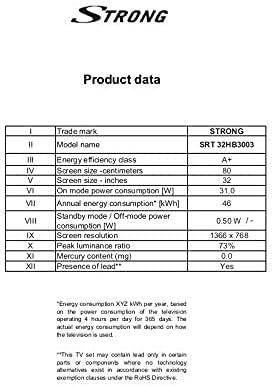
Image: A product data table providing detailed specifications for the Strong SRT 32HB3003, including screen size, resolution, and power consumption.
9. Atilẹyin ọja ati Support
Your Strong SRT 32HB3003 TV comes with a limited warranty. For specific warranty terms and conditions, please refer to the warranty card included in your product packaging or visit the official Strong website. For technical support, troubleshooting assistance, or service inquiries, please contact Strong customer service through their official channels.
Fun iranlọwọ siwaju sii, jọwọ ṣabẹwo si Strong official webojula.