
Sharp SJX-640-BK3
Sharp Side by Side Refrigerator SJX-640-BK3 User Manual
Awoṣe: SJX-640-BK3 | Brand: Dinku
1. Alaye Aabo pataki
Please read all safety instructions carefully before operating your new Sharp refrigerator. Keep this manual for future reference.
- Ensure the refrigerator is placed on a firm, level surface.
- Má ṣe dí àwọn ihò afẹ́fẹ́ nínú àpótí ẹ̀rọ tàbí nínú ilé tí a kọ́ sínú rẹ̀.
- Ma ṣe lo awọn ẹrọ darí tabi awọn ọna miiran lati yara si ilana yiyọkuro, miiran ju awọn ti a ṣeduro nipasẹ olupese.
- Maa ko ba awọn refrigerant Circuit.
- Ma ṣe lo awọn ohun elo itanna inu awọn yara ibi ipamọ ounje ti ohun elo, ayafi ti wọn ba jẹ iru iṣeduro nipasẹ olupese.
- Yọọ ohun elo ṣaaju ṣiṣe mimọ tabi ṣiṣe itọju.
2. Eto ati fifi sori
2.1 Ṣiṣii silẹ
Carefully remove all packaging materials, including tape and protective films. Retain packaging for potential future transport.
2.2 Ibi
Place the refrigerator in a location with adequate air circulation. Avoid direct sunlight or proximity to heat sources. Ensure sufficient clearance around the appliance for proper ventilation (e.g., 10cm at the back and sides, 30cm at the top).
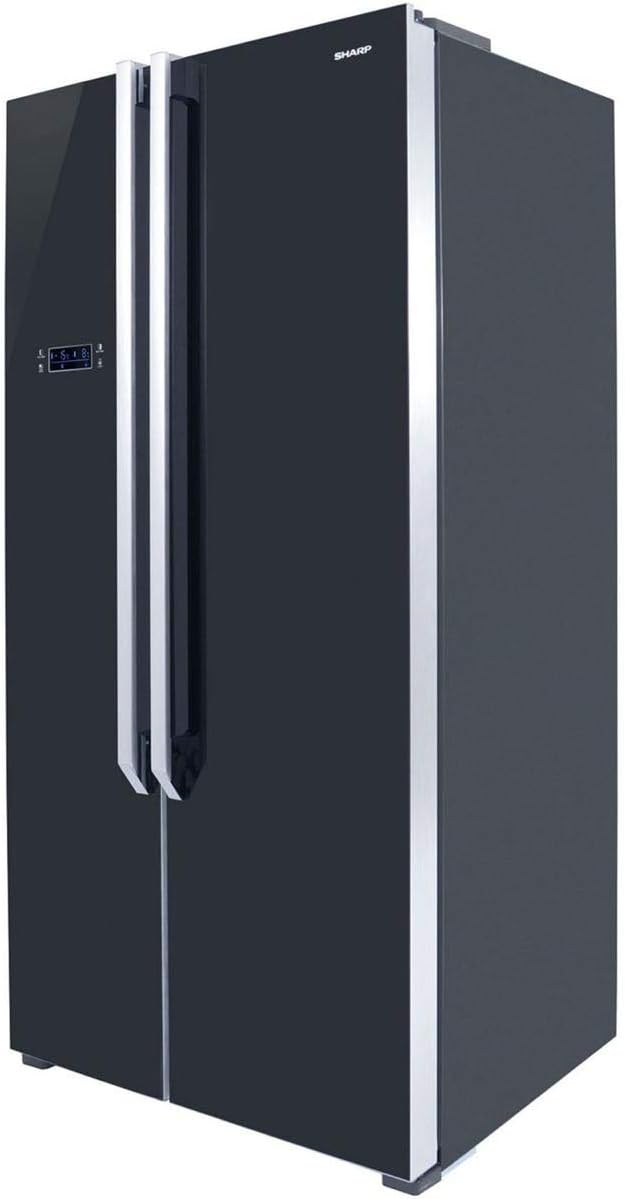
olusin 2.1: Angled view of the Sharp SJX-640-BK3 refrigerator, showing its sleek black glass finish and side profile, important for understanding placement requirements.
2.3 Ipele ipele
Ṣatunṣe awọn ẹsẹ ipele ni isalẹ ti firiji lati rii daju pe o jẹ iduroṣinṣin ati ipele. Eyi ṣe idilọwọ awọn gbigbọn ati ṣe idaniloju didimu ilẹkun to dara.
2.4 Itanna Asopọ
Connect the refrigerator to a dedicated, grounded electrical outlet. Do not use extension cords or adapters. Allow the refrigerator to stand upright for at least 2-4 hours before plugging it in to allow refrigerants to settle.
3. Awọn ilana Iṣiṣẹ
3.1 Iṣakoso igbimo Loriview
The Sharp SJX-640-BK3 features a Digital Smart Control panel located on the exterior of the freezer door. This panel allows you to adjust temperatures and access various functions.

olusin 3.1: Iwaju view of the Sharp SJX-640-BK3 refrigerator, highlighting the external Digital Smart Control panel on the left door.
3.2 Eto iwọn otutu
Use the control panel to set the desired temperature for both the refrigerator and freezer compartments. The Digital Smart Control senses when warm food is stored and adjusts cooling accordingly.
3.3 Magic Cool Zone
The Magic Cool Zone compartment offers flexible temperature control for specific items. Select from the following modes:
- Tuntun: Ideal for general produce and dairy.
- Ewebe: Optimized for keeping vegetables crisp and fresh.
- Eja: Maintains a lower temperature suitable for fresh fish.
- Eran: Provides optimal conditions for storing fresh meat.
3.4 Pataki Awọn ẹya ara ẹrọ
- Xpress Can Chiller: A dedicated compartment designed to rapidly chill beverages.
- Spill-Proof Shelves: Tempered glass shelves with raised edges to contain accidental spills and prevent liquids from dripping to lower shelves.
- Itaniji iwọn otutu: Alerts you if the internal temperature fluctuates significantly, helping to preserve food freshness.
- Itaniji ilekun: Sounds an alert if a refrigerator door is left open for an extended period.
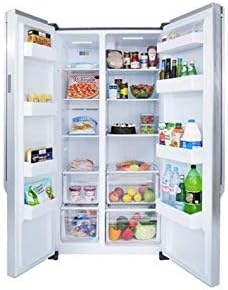
olusin 3.2: inu ilohunsoke view of the Sharp SJX-640-BK3 refrigerator, showcasing the spacious compartments, spill-proof glass shelves, and storage bins.
4. Itọju ati Cleaning
4.1 inu ilohunsoke Cleaning
Regularly clean the interior with a mild detergent and warm water. Wipe dry with a soft cloth. Remove shelves and drawers for thorough cleaning as needed. Do not use abrasive cleaners or solvents.
4.2 Ode Ninu
Wipe the exterior surfaces, including the black glass finish, with a soft, damp asọ. Fun awọn ami alagidi, lo ẹrọ mimọ gilasi kan. Yago fun awọn kẹmika lile ti o le ba ipari jẹ.
4.3 Awọn edidi ilekun
Clean the door seals regularly to ensure a tight seal. A dirty or damaged seal can lead to inefficient cooling.
4.4 Aifọwọyi Defrost
Firiji yii ṣe ẹya eto gbigbo laifọwọyi, imukuro iwulo fun yiyọkuro afọwọṣe ti iyẹwu firisa.
5. Laasigbotitusita
Ṣaaju ki o to kan si iṣẹ, jọwọ ṣayẹwo awọn ọran ti o wọpọ ati awọn ojutu wọnyi:
| Isoro | Owun to le Fa | Ojutu |
|---|---|---|
| Firiji ko itutu | Ọrọ ipese agbara, eto iwọn otutu ga ju, ilẹkun ko ni pipade daradara. | Check power plug, adjust temperature, ensure doors are fully closed. |
| Awọn ariwo dani | Refrigerator not level, items vibrating inside, normal compressor sounds. | Level the appliance, rearrange items, normal operation sounds are expected. |
| Itaniji ilẹkun n dun nigbagbogbo | Ilekun ko tii ni kikun, idinamọ, sensọ aṣiṣe. | Ensure nothing blocks the door, check door seals, close door firmly. |
| Omi lori pakà | Drain tube clogged, excessive humidity. | Clear drain tube (refer to service manual if needed), ensure proper ventilation. |
6. Awọn pato
Technical specifications for the Sharp SJX-640-BK3 Side by Side Refrigerator:
| Ẹya ara ẹrọ | Ẹ̀kúnrẹ́rẹ́ |
|---|---|
| Orukọ Brand | Dinku |
| Alaye Awoṣe | SJX-640-BK3 |
| Ọja Mefa | 70 x 90 x 178 cm |
| Agbara | 24 Ẹsẹ onigun (Liters 640) |
| Agbara firisa | 24 Cubic Feet (shared total capacity) |
| Iru fifi sori ẹrọ | Sisun |
| Fọọmù ifosiwewe | Ẹgbẹ Nipa Ẹgbẹ |
| Pataki Awọn ẹya ara ẹrọ | Compact, Digital Smart Control, Magic Cool Zone, Xpress Can Chiller, Spill-Proof Shelves, Temperature Alarm, Door Alarm |
| Àwọ̀ | Dudu |
| Dín | Laifọwọyi |
| Awọn ilẹkun ilẹkun | Ẹgbẹ nipa Ẹgbẹ |
| Enu Ohun elo Iru | Gilasi |
| Selifu Iru | Gilasi |
| Ohun elo Iru | Irin |
| Sowo iwuwo | 110 kg |
| Ọjọ Akọkọ Wa | Oṣu Kẹta Ọjọ 10, Ọdun 2019 |
7. Atilẹyin ọja ati Support
For detailed warranty information, please refer to the warranty card included with your product or visit the official Sharp website. For technical support or service inquiries, please contact Sharp customer service through their official channels.
You can visit the official Sharp store on Amazon for more products and information: Sharp Store
Ask a question about this manual
Ask about setup, troubleshooting, compatibility, parts, safety, or missing instructions. Manuals+ will review the question and use this page’s manual context to help answer it.