
Ọrọ Iṣaaju
This instruction manual provides essential information for the setup, operation, and maintenance of your Superior Electronics Universal Remote Control, model SUPTRB016. This remote is designed as a direct replacement for Telefunken televisions, including Smart TV models, and requires no programming for immediate use. Its ergonomic design and durable construction ensure comfortable and reliable control of your TV.
Ṣeto
1. Fifi awọn batiri sii
The remote control requires two (2) AAA batteries (not included). Follow these steps to insert them:
- Wa ideri iyẹwu batiri ni ẹhin isakoṣo latọna jijin.
- Gbe ideri si isalẹ tabi tẹ latch lati ṣii.
- Fi awọn batiri AAA meji sii, ni idaniloju awọn ebute rere (+) ati odi (-) ni ibamu pẹlu awọn ami ti o wa ninu yara naa.
- Rọpo ideri iyẹwu batiri, yiya pada si aaye titi yoo fi tẹ ni aabo.

Figure 1: Inserting AAA batteries into the remote control.
2. Lilo akọkọ
Once batteries are inserted, the remote control is ready for immediate use. No additional programming or code entry is required. Simply point the remote at your Telefunken TV and begin operating it.
Awọn ilana Iṣiṣẹ
The Superior Electronics SUPTRB016 remote control replicates the functions of your original Telefunken TV remote. Ensure a clear line of sight between the remote control and your TV's infrared receiver for optimal performance.

Figure 2: Remote control layout with streaming service buttons.
Awọn iṣẹ bọtini:
- Bọtini agbara: Tan TV si tan tabi paa.
- Awọn bọtini nọmba (0-9): Fun yiyan ikanni taara.
- Iwọn didun Soke/Isalẹ: Ṣe atunṣe iwọn didun TV.
- Ikanni Soke/Isalẹ: Ayipada TV awọn ikanni.
- Bọtini Mute: Pa ohun TV kuro tabi mu ohun foonu kuro.
- Navigation Pad (OK, Up, Down, Left, Right): Ti a lo fun lilọ kiri akojọ aṣayan ati yiyan.
- Pada/Jade: Pada si iboju iṣaaju tabi jade ni akojọ aṣayan kan.
- Awọn bọtini TV Smart: Dedicated buttons provide quick access to popular streaming applications such as Netflix, YouTube, and Prime Video (functionality depends on your TV model and internet connection).
- Orisun/Iwọle: Yan orisun titẹ sii (HDMI, AV, ati bẹbẹ lọ).
- Akojọ/ Alaye: Accesses TV menus and displays information.
The remote operates effectively within a maximum range of 10 meters, provided there are no obstructions between the remote and the TV's infrared sensor.
Itoju
Láti rí i dájú pé ìṣàkóso latọna jijin rẹ pẹ́ títí àti pé ó ń ṣiṣẹ́ dáadáa, tẹ̀lé àwọn ìlànà ìtọ́jú tó rọrùn wọ̀nyí:
- Ninu: Wipe the remote control with a soft, dry cloth. Avoid using liquid cleaners or abrasive materials, as these can damage the surface or internal components.
- Rirọpo Batiri: Rọpo awọn batiri nigbati idahun latọna jijin ba di alailera tabi ti o ba da iṣẹ duro. Paarọ awọn batiri mejeeji ni akoko kanna pẹlu awọn batiri AAA tuntun. Maṣe da awọn batiri atijọ ati tuntun, tabi awọn oriṣi awọn batiri oriṣiriṣi pọ.
- Ibi ipamọ: Tọju isakoṣo latọna jijin ni itura, aye gbigbẹ kuro lati orun taara ati awọn iwọn otutu to gaju.
- Yago fun awọn isọ silẹ: While constructed with durable materials, excessive drops or impacts can cause damage.
Laasigbotitusita
Tí o bá ní ìṣòro pẹ̀lú ìṣàkóso latọna jijin rẹ, jọ̀wọ́ wo àwọn ìdáhùn tí ó wọ́pọ̀ wọ̀nyí:
| Isoro | Owun to le Fa | Ojutu |
|---|---|---|
| Latọna jijin ko ṣiṣẹ rara. | Awọn batiri ti o ku tabi ti ko tọ fi sii. | Check battery orientation. Replace with fresh AAA batteries. |
| Latọna jijin n ṣiṣẹ lẹẹkọọkan. | Weak batteries, obstruction, or remote too far from TV. | Replace batteries. Ensure clear line of sight to TV. Move closer to the TV (within 10 meters). |
| Àwọn bọ́tìnì pàtó kan kò dáhùn. | Button malfunction or TV not supporting the function. | Ensure your TV model supports the specific function (e.g., Smart TV apps). If other buttons work, the specific button might be faulty. |
| TV does not respond to remote. | TV's IR sensor blocked or TV is not a Telefunken model. | Clear any obstructions in front of the TV's IR sensor. Verify that your TV is a Telefunken brand. |
Awọn pato
- Awoṣe: SUPTRB016
- Brand: Awọn Itanna Itanna Giga
- Awọn iwọn: 5 x 1.5 x 19 cm
- Ìwúwo: 90 giramu
- Awọn batiri ti a beere: 2 x AAA (1.5V)
- Awọn batiri To wa: Rara
- Imọ-ẹrọ Asopọmọra: Infurarẹẹdi
- Ibiti o pọju: 10 mita
- Awọn ẹrọ ibaramu: Telefunken Televisions (LED, LCD, OLED, Smart TV models)
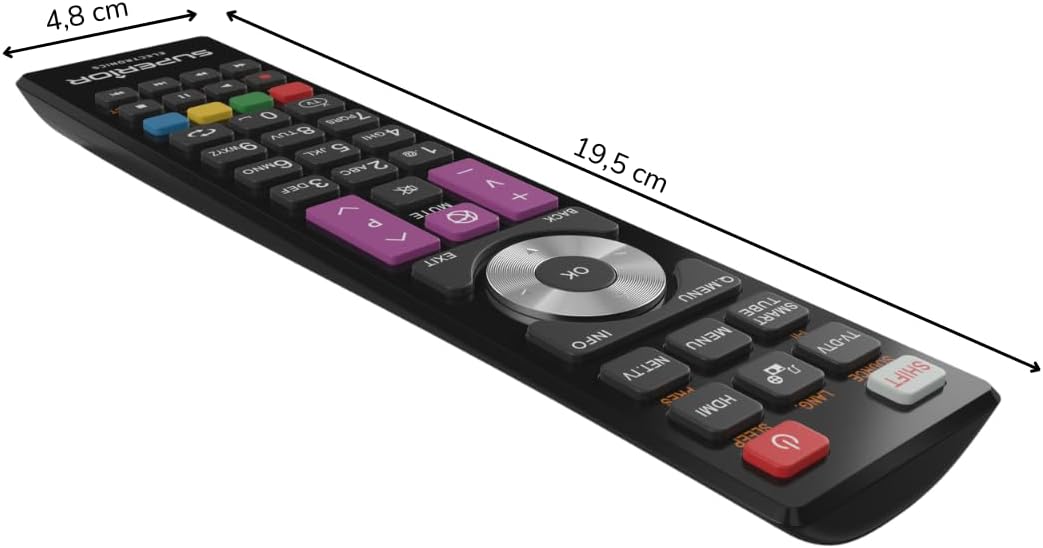
Nọmba 3: Awọn iwọn iṣakoso latọna jijin.
Atilẹyin ọja ati Support
For warranty information, please refer to the terms and conditions provided by your retailer at the time of purchase or contact Superior Electronics directly. For additional support or inquiries, you may visit the official Superior Electronics store on Amazon: