
1. Ifihan
Thank you for choosing the Hoco E30 Wireless Earphone. This manual provides essential information for setting up, operating, and maintaining your earphone. Please read it carefully before use to ensure optimal performance and longevity of your device.
2. Alaye Aabo
To prevent damage to your device or injury to yourself and others, please observe the following safety precautions:
- Yago fun ifihan pẹ si awọn ipele iwọn didun giga lati ṣe idiwọ ibajẹ igbọran.
- Do not use the earphone while driving or in situations where you need to be aware of your surroundings.
- Jeki ẹrọ naa kuro ni omi, ọrinrin, ati awọn iwọn otutu to gaju.
- Do not attempt to disassemble, repair, or modify the earphone. This will void the warranty.
- Lo awọn kebulu gbigba agbara ti a pese tabi ifọwọsi nikan ati awọn oluyipada.
- Jeki kuro ni arọwọto awọn ọmọde ati awọn ohun ọsin.
3. Package Awọn akoonu
Jọwọ ṣayẹwo apoti fun awọn nkan wọnyi:
- Hoco E30 Wireless Earphone
- Okun Ngba agbara USB
- Itọsọna olumulo
4. Ọja Ipariview
Familiarize yourself with the components of your Hoco E30 Wireless Earphone:

Nọmba 4.1: Apa view of the Hoco E30 Wireless Earphone, highlighting its sleek design and ear hook.

Nọmba 4.2: The Hoco E30 Wireless Earphone positioned next to a smartphone, illustrating its compact size and wireless connectivity.
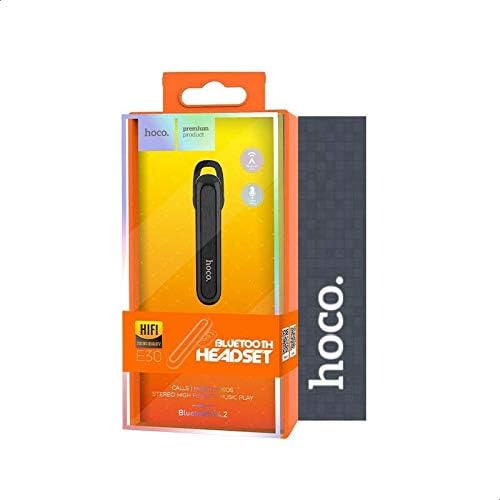
Nọmba 4.3: The retail packaging for the Hoco E30 Wireless Earphone, displaying branding and key features.
5. Eto
5.1 Gbigba agbara si Earphone
Before first use, fully charge your Hoco E30 earphone.
- Connect the provided USB charging cable to the charging port on the earphone.
- Connect the other end of the USB cable to a DC 5V power source (e.g., a USB wall adapter or computer USB port).
- Ina Atọka gbigba agbara yoo tan imọlẹ.
- Charging typically takes approximately 2 hours. The indicator light will change or turn off once charging is complete.
5.2 Sisopọ pẹlu ẹrọ kan
To connect your Hoco E30 earphone to your smartphone or other Bluetooth-enabled device:
- Ensure the earphone is fully charged and turned off.
- Press and hold the multi-function button on the earphone until the indicator light flashes red and blue alternately, indicating it is in pairing mode.
- Lori ẹrọ rẹ, mu Bluetooth ṣiṣẹ ki o wa awọn ẹrọ to wa.
- Select "Hoco E30" from the list of found devices.
- Once paired, the indicator light on the earphone will flash blue slowly, and you will hear a confirmation tone.
- The earphone has a transmission range of up to 10 meters (33 feet).
6. Awọn ilana Iṣiṣẹ
6.1 Agbara Tan / Pa
- Agbara Tan: Press and hold the multi-function button for approximately 3 seconds until the blue indicator light flashes and you hear a power-on tone.
- Agbara Pa: Press and hold the multi-function button for approximately 5 seconds until the red indicator light flashes and you hear a power-off tone.
6.2 ipe Management
- Idahun Ipe: Briefly press the multi-function button when an incoming call rings.
- Ipe Ipari: Tẹ bọtini iṣẹ-pupọ ni kukuru lakoko ipe kan.
- Kọ Ipe: Press and hold the multi-function button for 2 seconds when an incoming call rings.
- Nọmba Ikẹhin Tun Tun: Tẹ bọtini iṣẹ-ọpọlọpọ lẹẹmeji nigbati kii ṣe lori ipe kan.
6.3 Sisisẹsẹhin Orin
- Ṣiṣẹ/Daduro: Briefly press the multi-function button to play or pause music.
- Orin t’okan: Press and hold the multi-function button for 2 seconds to skip to the next track.
- Tẹlẹ Orin: Press and hold the multi-function button for 2 seconds (during playback) to go to the previous track.
Note: The Hoco E30 supports A2DP and AVRCP protocols for high-quality audio streaming and remote control. Volume control is typically managed via the connected device.
6.4 Battery Status Display
The Hoco E30 earphone supports battery level display on compatible Apple iOS devices and some Android smartphones. Check your device's notification bar or Bluetooth settings for this feature.
7. Itọju
- Ninu: Use a soft, dry cloth to clean the earphone. Do not use harsh chemicals or abrasive materials.
- Ibi ipamọ: Tọ́jú gbohùngbohùn náà sí ibi tí ó tutù tí ó sì gbẹ, tí kò sí ibi tí oòrùn lè tàn dé àti ibi tí ó gbóná jù.
- Itọju Batiri: To prolong battery life, avoid fully discharging the earphone frequently. Charge it regularly, even if not in use for extended periods.
8. Laasigbotitusita
If you encounter issues with your Hoco E30 earphone, try the following solutions:
| Isoro | Ojutu |
|---|---|
| Earphone kìí tan agbára. | Ensure the earphone is fully charged. Connect it to a power source and try again. |
| Ko le so pọ pẹlu ẹrọ. |
|
| Ko si ohun tabi didara ohun ti ko dara. |
|
| Gbigba agbara ko ṣiṣẹ. |
|
9. Awọn pato
| Ẹya ara ẹrọ | Ẹ̀kúnrẹ́rẹ́ |
|---|---|
| Awoṣe | E30 |
| Ẹya Bluetooth | V4.2 WT |
| Awọn Ilana atilẹyin | Agbekọri, Ọfẹ, A2DP, AVRCP |
| Gbigbe Range | 10 mita (33 ẹsẹ) |
| Igbohunsafẹfẹ gbigbe | 2.4 GHz |
| Ngba agbara Voltage | DC 5V |
| Akoko gbigba agbara | Isunmọ. wakati meji 2 |
| Agbara Batiri | 60 mAh |
| Aago Ọrọ | Isunmọ. wakati meji 3.5 |
| Akoko Sisisẹsẹhin Orin | Isunmọ. wakati meji 3.5 |
| Akoko Iduro | Isunmọ. wakati meji 110 |
| Apapọ Ọja iwuwo | 6 giramu |
| Awọn iwọn (L x W x H) | 58mm x 14mm x 25mm |
| Ohun elo | Ṣiṣu |
| Ọna Iṣakoso | Fọwọkan |
| Àwọ̀ | Dudu ati fadaka |
10. Atilẹyin ọja ati Support
Hoco products are designed and manufactured to the highest quality standards. This product is covered by a limited warranty from the date of purchase. Please refer to the warranty card included in your package for specific terms and conditions.
For technical support or warranty claims, please contact your local Hoco distributor or visit the official Hoco webaaye fun alaye diẹ sii.