
HOCO E21
Hoco E21 Razor-Edge Wireless Headset User Manual
Awoṣe: E21
Ọrọ Iṣaaju
This manual provides comprehensive instructions for the safe and efficient use of your Hoco E21 Razor-Edge Wireless Headset. Please read this manual thoroughly before using the device and retain it for future reference.
The Hoco E21 is a compact and lightweight wireless headset designed for mobile communication, featuring Bluetooth V4.1 connectivity.
Package Awọn akoonu
- Hoco E21 Razor-Edge Wireless Headset
- Ngba agbara USB
- Itọsọna olumulo
Note: Specific accessories may vary. Please check the product packaging.
Ọja Pariview
Familiarize yourself with the components of your Hoco E21 headset.
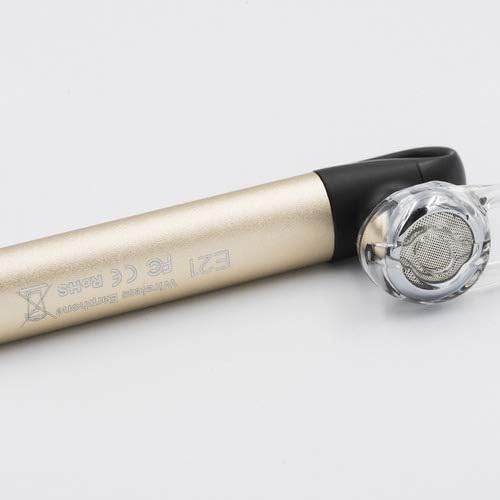
Nọmba 1: Hoco E21 Razor-Edge Wireless Headset, showing its compact design and gold finish.

Nọmba 2: Sun mo tipetipe view of the Hoco E21 headset, highlighting the earbud and the "E21" model engraving on the gold body.

Nọmba 3: Detail of the Hoco E21 headset, showing the "hoco." brand logo and the integrated clip for secure attachment.

Nọmba 4: Close-up of the charging port located at the end of the Hoco E21 headset, indicating where the charging cable connects.
Ṣeto
1. Ngba agbara si Agbekọri
Before first use, fully charge the headset. Connect the charging cable to the headset's charging port and the other end to a USB power source (e.g., computer USB port, USB wall adapter).
- Ngba agbara Voltage: DC5V
- Akoko gbigba agbara: O fẹrẹ to awọn wakati 2
The indicator light will typically show red during charging and turn off or blue when fully charged.
2. Sisopọ pẹlu Ẹrọ kan
The Hoco E21 uses Bluetooth V4.1 for wireless connectivity.
- Rii daju pe agbekari ti wa ni pipa.
- Press and hold the multi-function button (usually the main button) until the indicator light flashes red and blue alternately, indicating pairing mode.
- On your mobile phone or device, enable Bluetooth and search for available devices.
- Select "Hoco E21" (or similar name) from the list of found devices.
- Tí a bá béèrè fún ọ̀rọ̀ìpamọ́, tẹ "0000" (odò mẹ́rin).
- Once paired, the indicator light will typically flash blue slowly, and you may hear a confirmation tone.
The headset supports protocols such as headset, hands-free, A2DP, and Avrcp.
Awọn ilana Iṣiṣẹ
Titan / Paa
- Agbara Tan: Tẹ mọlẹ bọtini iṣẹ-ọpọlọpọ fun isunmọ awọn aaya meji.
- Agbara Pa: Tẹ mọlẹ bọtini iṣẹ-ọpọlọpọ fun isunmọ awọn aaya meji.
Isakoso Ipe
- Idahun Ipe: Kukuru tẹ bọtini iṣẹ-ọpọlọpọ.
- Ipe Ipari: Kukuru tẹ bọtini iṣẹ-ọpọlọpọ nigba ipe kan.
- Kọ Ipe: Tẹ ki o si mu bọtini iṣẹ-pupọ naa fun awọn aaya meji lakoko ipe ti nwọle.
- Nọmba Ikẹhin Tun Tun: Double-tẹ awọn olona-iṣẹ bọtini.
Sisisẹsẹhin Orin
- Ṣiṣẹ/Daduro: Kukuru tẹ bọtini iṣẹ-ọpọlọpọ.
The control method is listed as "Touch". Specific touch gestures for next/previous track are not detailed in the product specifications but are typical for such devices.
Itoju
- Jẹ́ kí agbekọri naa gbẹ. Yẹra fun fifi ara si ọrinrin, ojo, tabi omi.
- Ma ṣe fi agbekari han si awọn iwọn otutu to gaju.
- Fi aṣọ gbígbẹ tó rọ, tó sì rọ̀ nu agbekọri naa. Má ṣe lo awọn kemikali líle tabi awọn ohun elo afọmọ.
- Tọju agbekari ni itura, aye gbigbẹ nigbati ko si ni lilo.
- Yago fun sisọ tabi tẹri agbekari si awọn ipa to lagbara.
Laasigbotitusita
| Isoro | Owun to le Fa | Ojutu |
|---|---|---|
| Agbekọri ko ni agbara. | Batiri kekere. | Gba agbara si agbekari ni kikun. |
| Ko le so pọ pẹlu ẹrọ. | Agbekọri ko si ni ipo isopo; Bluetooth ti ku lori ẹrọ; ẹrọ naa ti jinna ju. | Ensure headset is in pairing mode (flashing red/blue). Turn on Bluetooth on your device. Move headset closer to device (within 10m). |
| Ko si ohun tabi didara ohun ti ko dara. | Volume too low; headset not properly connected; interference. | Adjust volume on both headset and device. Re-pair the headset. Move away from sources of interference. |
| Agbekọri ma n ge asopọ nigbagbogbo. | Out of range; low battery. | Stay within 10m transmission range. Charge the headset. |
Awọn pato
| Ẹya ara ẹrọ | Ẹ̀kúnrẹ́rẹ́ |
|---|---|
| Orukọ awoṣe | E21 |
| Brand | HOCO |
| Asopọmọra Technology | Ailokun (Bluetooth V4.1) |
| Bluetooth Protocols Supported | Headset, Hands-free, A2DP, Avrcp |
| Gbigbe Range | 10 mita |
| Igbohunsafẹfẹ gbigbe | 2.4GHz |
| Agbara Batiri | 45 mAh |
| Ngba agbara Voltage | DC5V |
| Akoko gbigba agbara | O fẹrẹ to awọn wakati 2 |
| Ọja Mefa | 65 × 13 × 25 mm |
| Package Mefa | 6.4 x 3.4 x 1.1 cm |
| Package iwuwo | 60 g |
| Àwọ̀ | Wura |
| Ohun elo | Ṣiṣu, Roba |
| Ọna Iṣakoso | Fọwọkan |
| Awọn ẹrọ ibaramu | Awọn foonu alagbeka |
| Awọn irinše to wa | Ear Cushions, Headband |
| Olupese | Hoco |
Atilẹyin ọja ati Support
Specific warranty information is not provided in this manual. Please refer to the warranty card included with your product or visit the official HOCO webAaye fun alaye atilẹyin ọja ofin ati ipo.
For technical support or customer service inquiries, please contact your retailer or the HOCO customer support channels as indicated on the product packaging or official webojula.
Ask a question about this manual
Ask about setup, troubleshooting, compatibility, parts, safety, or missing instructions. Manuals+ will review the question and use this page’s manual context to help answer it.