
1. Ifihan ati Loriview
The Asustor AS5304T is a high-performance 4-bay Network Attached Storage (NAS) device designed for personal private cloud storage, media streaming, and data backup. Featuring an Intel Celeron Quad-Core processor and 4GB DDR4 RAM (expandable), it offers robust performance for various applications. Dual 2.5GbE ports provide high-speed network connectivity, ensuring efficient data transfer.

Figure 1: Asustor AS5304T 4-Bay NAS device.
Fidio 1: Pariview of Asustor Nimbustor NAS AS5202T AS5304T features.
2. Ohun ti o wa ninu Apoti
Upon unboxing your Asustor AS5304T, you should find the following items:
- Asustor AS5304T NAS Unit
- Quick Bẹrẹ Itọsọna
- 2x RJ-45 Cat 5e Ethernet Cables
- 1x AC Adapter & Power Cable
- 16x Phillips Screws for 2.5" Drives
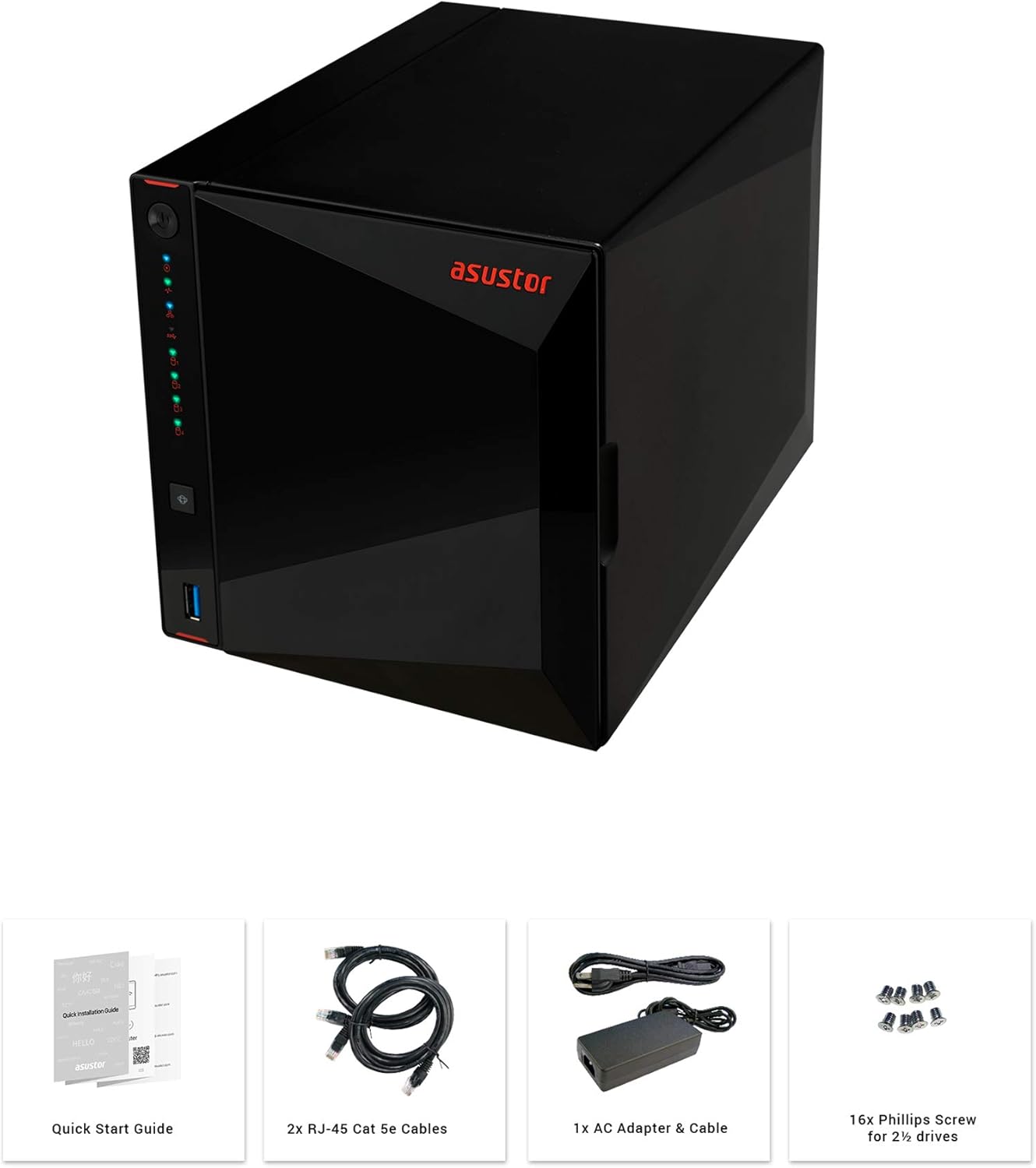
Figure 2: Unboxing contents of the Asustor AS5304T.
3. Hardware Features and Specifications
The Asustor AS5304T is equipped with advanced hardware for reliable and high-performance network storage.
- Olupilẹṣẹ: Intel Celeron Quad-Core
- Ramu: 4GB DDR4 (expandable)
- Awọn Okun Wakọ: 4x Hot-swappable 3.5"/2.5" SATA HDD/SSD bays
- Awọn ibudo nẹtiwọki: 2x 2.5 Gigabit Ethernet (2.5GbE) ports
- Awọn ibudo USB: 3x USB 3.2 Gen 1 ports (1 front, 2 rear)
- HDMI: 1x HDMI 2.0a port
- Awọn iwọn: 9.06 x 6.85 x 6.69 inches
- Ìwúwo: 4.84 iwon
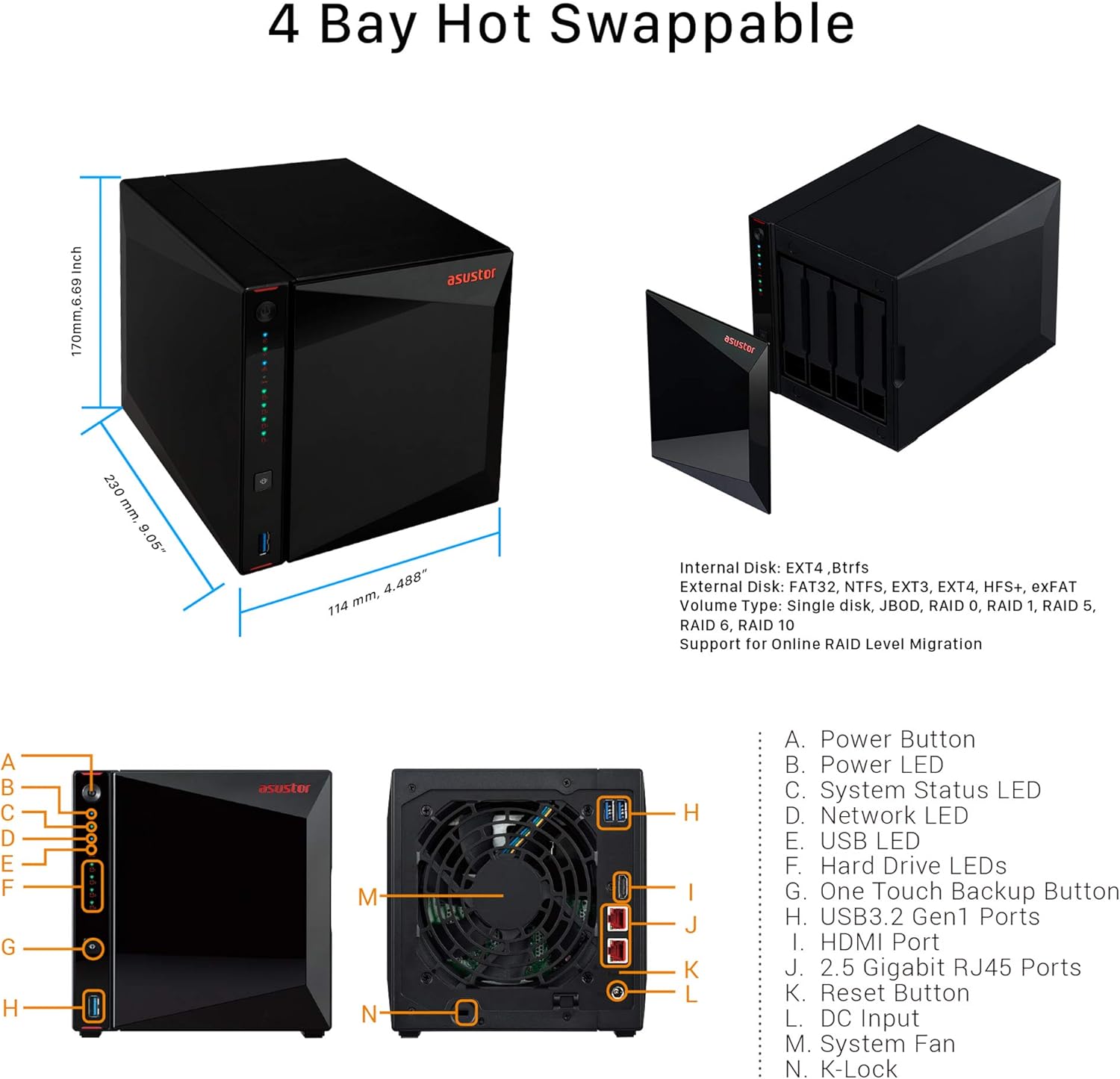
Figure 3: Asustor AS5304T dimensions and port layout.
4. Eto ati fifi sori
Follow these steps to set up and install your Asustor AS5304T NAS:
- Fi sori ẹrọ Awọn awakọ lile: Unlock the drive tray, place your 3.5" or 2.5" hard drive or SSD into the tray, and relock the tray. Slide the tray back into the NAS unit.
- Awọn okun Sopọ: Connect the power adapter to the NAS and plug it into a power outlet. Connect one or both Ethernet cables from the NAS to your network router or switch.
- Agbara Tan: Tẹ bọtini agbara ni iwaju NAS.
- Initialize NAS: Download and install the ASUSTOR Control Center software on your Windows or macOS computer, or the AiMaster app for Android/iOS devices. Use the software/app to easily initialize your NAS.

Figure 4: Drive installation and cable connection steps.
Video 2: Quickstart Guide for ASUSTOR NAS devices, demonstrating initial setup procedures.
5. Awọn ilana Iṣiṣẹ
The Asustor AS5304T runs on the ASUSTOR Data Master (ADM) operating system, providing a user-friendly interface for managing your NAS. Key operating features include:
- File Isakoso: Access, organize, and share files nipasẹ awọn web interface or mobile apps.
- App Central: Expand NAS functionality with a wide range of apps for media streaming (Plex, Kodi), surveillance (Surveillance Center), download management, and more.
- Backup Solutions: Configure comprehensive backup plans to external drives, cloud services, or other NAS devices.
- Wiwọle Alagbeka: Use AiMaster, AiFoto, AiMusic, and other mobile apps to access your files, stream media, and manage your NAS from anywhere.
- Idaraya Ile: Stream 4K video, manage music libraries, and share content across your home network.

Olusin 5: Pariview of Asustor NAS features and applications.
6. Itọju
Regular maintenance ensures the longevity and optimal performance of your NAS:
- Jeki mimọ: Periodically clean the exterior of the NAS and ensure ventilation areas are free from dust.
- Awọn imudojuiwọn famuwia: Regularly check for and install ADM firmware updates to benefit from new features, security patches, and performance improvements.
- Ṣiṣayẹwo Ilera Wakọ: Utilize the Storage Manager in ADM to monitor the health status of your hard drives.
- Data Afẹyinti: Always maintain up-to-date backups of critical data stored on your NAS.
7. Laasigbotitusita
If you encounter issues with your NAS, consider the following basic troubleshooting steps:
- Ko si Agbara: Ensure the power cable is securely connected to both the NAS and the power outlet. Test the outlet with another device.
- Ko si Isopọ Nẹtiwọọki: Verify that Ethernet cables are securely connected to the NAS and your router/switch. Check network settings in ADM.
- Wakọ Ko ṣe awari: Ensure hard drives are properly seated in their trays. Check drive health status in Storage Manager.
- Iṣẹ ṣiṣe ti o lọra: Check network traffic and CPU/RAM usage in ADM. Consider upgrading RAM if consistently high.
- Eto Tun bẹrẹ: Tun bẹrẹ irọrun le nigbagbogbo yanju awọn abawọn sọfitiwia kekere.
8. Awọn pato
| Ẹya ara ẹrọ | Sipesifikesonu |
|---|---|
| Ọja Mefa | 9.06 x 6.85 x 6.69 inches |
| Iwọn Nkan | 4.84 iwon |
| Olupese | Asustor |
| ASIN | B07PYJ2KNC |
| Nọmba awoṣe ohun kan | 90IX0181-BW3S10 |
| Awọn batiri | 1 CR123A batiri ti a beere. |
| Brand | Asustor |
| Awọn ẹrọ ibaramu | Kamẹra |
9. Atilẹyin ọja ati Support
The Asustor AS5304T comes with a 3-year manufacturer's warranty. For technical support, firmware updates, and additional resources, please visit the official Asustor webaaye tabi kan si atilẹyin alabara wọn.


