
Ọrọ Iṣaaju
This manual provides instructions for the safe and efficient operation of your RIDGID R84086B 18-Volt Cordless Mini Bluetooth Radio. This compact and versatile device offers portable audio entertainment and device charging, featuring AM/FM radio, Bluetooth connectivity, and an auxiliary input. It is powered by RIDGID 18-Volt batteries and can also function as a power bank for charging other devices.
Alaye Aabo
Máa ka gbogbo ìkìlọ̀ àti ìtọ́ni nípa ààbò kí o tó lo ọjà yìí. Àìtẹ̀lé àwọn ìtọ́ni wọ̀nyí lè yọrí sí ìkọlù iná mànàmáná, iná, àti/tàbí ìpalára ńlá.
- Do not expose the radio to rain or wet conditions. Water entering the radio will increase the risk of electric shock.
- Use only with specified battery packs. Using any other battery packs may create a risk of injury and fire.
- Do not operate the radio in explosive atmospheres, such as in the presence of flammable liquids, gases, or dust.
- Keep the radio away from heat sources, direct sunlight, and extreme temperatures.
- Always ensure the battery is properly seated before use.
Ọja Pariview
Familiarize yourself with the components of your RIDGID R84086B radio.
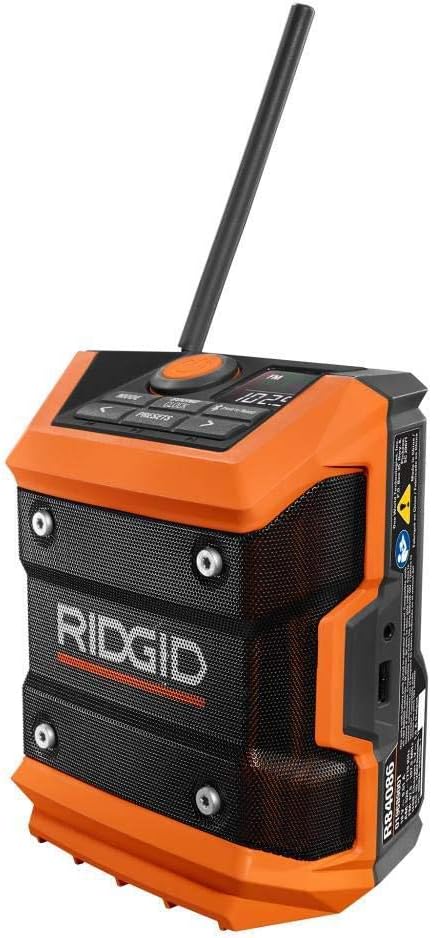
olusin 1: Iwaju view of the RIDGID R84086B radio, showing the control panel, speaker, and extended antenna.

Figure 2: The RIDGID R84086B radio in a workshop setting, demonstrating its portability and use with a smartphone.
Ṣeto
Fifi sori batiri
- Rí i dájú pé redio náà ti pa.
- Align a charged RIDGID 18-Volt battery pack with the battery port on the radio.
- Gbe idii batiri naa sinu ibudo titi yoo fi tẹ ni aabo sinu aaye.
Atunṣe Antenna
For optimal radio reception, extend and adjust the antenna as needed. The antenna can be rotated and tilted to improve signal strength.
Awọn ilana Iṣiṣẹ
Titan / Paa
Press the orange power button located on the control panel to turn the radio on or off.
Aṣayan Ipo
Tẹ awọn MODE button to cycle through available audio sources: FM Radio, AM Radio, Bluetooth, and Auxiliary (AUX) input.
Radio Tuning (AM/FM)
- Select FM or AM mode using the MODE bọtini.
- Use the left (<) ati ọtun (>) arrow buttons to manually tune to a desired frequency.
- Láti fi ibùdó kan pamọ́ gẹ́gẹ́ bí èyí tí a ti ṣètò tẹ́lẹ̀, tẹ kí o sì di mọ́lẹ̀ tito button, then use the arrow buttons to select a preset number and press tito lẹẹkansi lati jẹrisi.
Asopọ Bluetooth
- Yan ipo Bluetooth nipa lilo awọn MODE button. The Bluetooth icon on the display will flash, indicating it is in pairing mode.
- Lori ẹrọ alagbeka rẹ, mu Bluetooth ṣiṣẹ ki o wa awọn ẹrọ to wa.
- Select "RIDGID Radio" from the list of devices to pair. Once paired, the Bluetooth icon will stop flashing and remain solid.
Input Iranlọwọ
To use the auxiliary input, connect an audio device (e.g., smartphone, MP3 player) to the 3.5mm AUX port on the side of the radio using a standard audio cable. Select AUX mode using the MODE bọtini.
Atunse ohun
Tẹ awọn SOUND/CLOCK button to access sound settings. Use the arrow buttons to adjust bass and treble levels for your preferred audio experience.
Power Bank Išė
The radio features a USB port that allows you to charge compatible devices. Connect your device to the USB port using an appropriate charging cable. The radio's battery will provide power to charge your device.
Video: Demonstration of the RIDGID R84086B radio's features, including battery installation, mode selection, radio tuning, auxiliary input, and power bank functionality.
Itoju
Ninu
Regularly clean the radio with a soft, damp cloth. Do not use harsh chemicals or abrasive cleaners. Ensure all ports are free of dust and debris.
Itọju Batiri
Store battery packs in a cool, dry place away from direct sunlight. Do not store battery packs in a discharged condition. Always charge batteries fully before extended storage.
Laasigbotitusita
Ko si Agbara
- Rí i dájú pé batiri náà ti gba agbára dáadáa, ó sì ti fi sínú rẹ̀ dáadáa.
- Check for any obstructions in the battery port.
Gbigba Redio ti ko dara
- Extend and adjust the antenna for better signal.
- Move the radio to a different location to avoid interference.
Awọn oran Asopọmọra Bluetooth
- Ensure the radio is in Bluetooth pairing mode.
- Rii daju pe Bluetooth ẹrọ alagbeka rẹ ti ṣiṣẹ ati laarin iwọn.
- Gbiyanju yiyo ati tun so pọ ẹrọ naa.
Awọn pato
| Brand | RIDGID |
| Nọmba awoṣe | R84086B |
| Asopọmọra Technology | Bluetooth |
| Orisun agbara | Battery Powered (RIDGID 18-Volt) |
| Iwọn Nkan | 1.75 iwon |
| Awọn ẹrọ ibaramu | Foonuiyara |
| Ni wiwo Hardware | USB |
| UPC | 723548648427 |
Atilẹyin ọja ati Support
Alaye atilẹyin ọja
This product comes with a 90-day limited warranty. Please refer to the warranty card included with your purchase for full terms and conditions.
Onibara Support
For technical assistance, troubleshooting, or warranty claims, please contact RIDGID customer support. Contact information can typically be found on the official RIDGID webaaye tabi lori apoti ọja rẹ.