
UOTEK UT-850N
UOTEK UT-850N 1-Port USB to RS-485/422 Serial Converter
Itọsọna olumulo
1. Ifihan
The UOTEK UT-850N is a universal USB to RS-485/422 serial converter designed to bridge the communication gap between modern PCs and industrial equipment utilizing RS-485/422 interfaces. This device converts USB signals to balanced differential RS-485/422 signals, providing essential connectivity without requiring an external power supply. It features surge and ESD protection, ensuring reliable data transmission in various environments.
This manual provides detailed instructions for the setup, operation, and maintenance of your UT-850N converter.
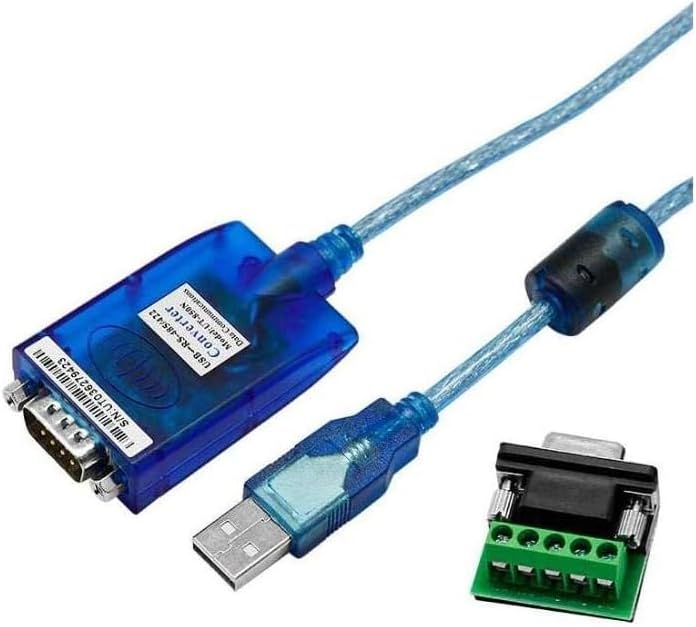
Image 1.1: UOTEK UT-850N USB to RS-485/422 Serial Converter with included terminal block.
2. Awọn ẹya ara ẹrọ
- Awọn idiwọn: USBV1.1, RS-485/422 EIA.
- Ifihan USB: VCC, DATA+, DATA-, GND, FG.
- RS-485 Signal: T+, T-, GND.
- RS-422 Signal: T+, T-, R+, R-, GND.
- Ipo Ṣiṣẹ: Asynchronous, point-to-point or point-to-multipoint, 2-wire half-duplex or 4-wire full-duplex.
- Iṣakoso itọsọna: Automatic data flow direction control technology.
- Oṣuwọn Baud: 300-921.6Kbps, auto-detect serial signal.
- Agbara ikojọpọ: Supports point-to-multipoint communication, connecting up to 32 sets of RS-422 or RS-485 devices.
- Ijinna Gbigbe: Up to 5,000m (9,600bps) for RS-485/422; up to 5m for USB.
- Idaabobo ibudo: Surge protection, ±15KV ESD protection.
- Awọn asopọ: USB-A male, DB9 male.
- Media Gbigbe: Twisted-pair or shielded cable.
- Gigun USB: 1.5m.
- Iwọn Iṣiṣẹ: -20°C si 75°C.
- Ọriniinitutu ibatan: 5% si 95%.
- Atilẹyin Eto Iṣẹ: Windows (Android/2000/2003/2008/2012/XP/Vista/7/8/8.1/10/CE), Mac, Linux.
3. Eto
3.1 Driver fifi sori
For Windows 8, Windows 10, and newer operating systems, the UT-850N converter typically operates driver-free (plug & play). For older operating systems such as Windows 2000/2003/XP/Vista/7, or for specific Linux/Mac OS versions, driver installation may be required. Please refer to the manufacturer's website for the latest driver downloads if automatic installation does not occur.

Image 3.1: The UT-850N converter supports various operating systems, including Windows, Mac, Linux, and Android.
3.2 Hardware Asopọ
- Connect the USB-A male connector of the UT-850N to an available USB port on your computer.
- Identify the RS-485/422 interface on your industrial device.
- Connect the DB9 male connector of the UT-850N to your RS-485/422 device. Use the included terminal block for screw-terminal connections if your device requires it.

Image 3.2: The UT-850N converter connected to a terminal block for RS-485/422 wiring.
3.3 Wiring Diagrams and Pin Assignments
The UT-850N uses a DB9 male connector for RS-485/422. The pin assignments are crucial for correct communication. Refer to the following diagrams for standard wiring configurations.

Image 3.3: Pin assignments for DB9 male connector and physical dimensions of the UT-850N.
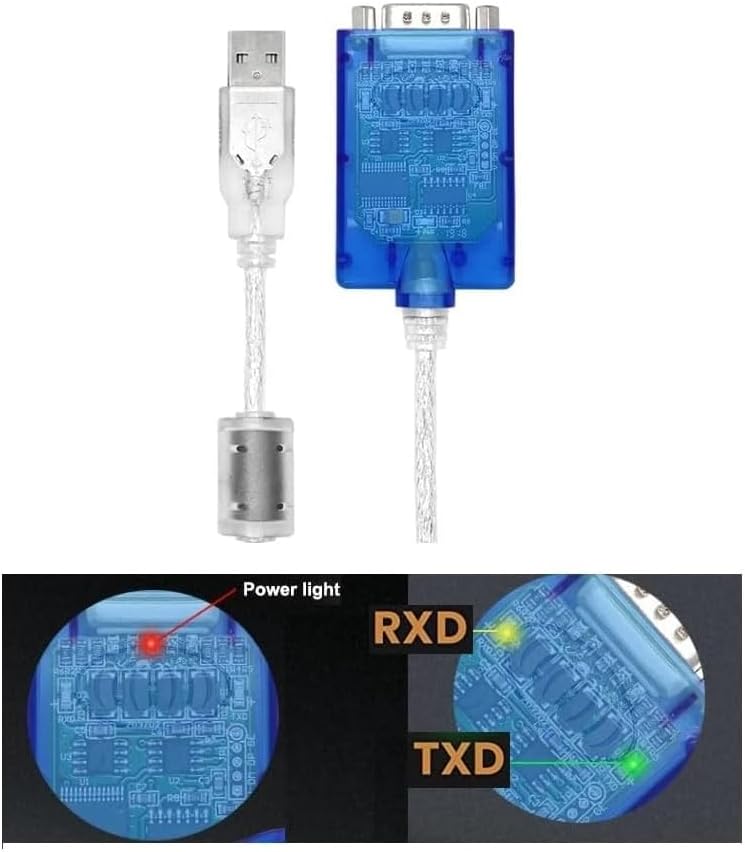
Image 3.4: Wiring diagrams for USB to RS-485 (point-to-point, multipoint, half-duplex) and USB to RS-422 (point-to-point, multipoint, full-duplex) connections.
4. Ṣiṣẹ
4.1 Awọn ipo Ṣiṣẹ
The UT-850N supports both RS-485 (2-wire half-duplex) and RS-422 (4-wire full-duplex) communication modes. It can be configured for point-to-point or point-to-multipoint communication. The device features internal zero-delay auto receiving and transmitting functions, automatically controlling data flow direction without requiring handshake signals (RTS, DTR).
4.2 Baud Oṣuwọn
The converter automatically detects the serial signal baud rate, supporting a range from 300bps to 921.6Kbps.
4.3 LED Atọka
The UT-850N is equipped with LED indicators to show its status:
- Imọlẹ Agbara: Indicates that the device is powered on and connected to the USB port.
- RXD (Receive Data) Light: Flashes when data is being received by the converter from the RS-485/422 side.
- TXD (Transmit Data) Light: Flashes when data is being transmitted by the converter to the RS-485/422 side.

Aworan 4.1: Isunmọ view of the UT-850N showing the Power, RXD, and TXD LED indicators.
5. Itọju
To ensure the longevity and optimal performance of your UOTEK UT-850N converter, follow these maintenance guidelines:
- Jeki Gbẹgbẹ: Yago fun ṣiṣafihan ẹrọ naa si ọrinrin tabi olomi.
- Sọ di mimọ: Use a soft, dry cloth to clean the exterior. Do not use harsh chemicals or solvents.
- Iṣakoso iwọn otutu: Operate and store the device within the specified temperature range (-20°C to 75°C).
- Itọju USB: Avoid bending or kinking the cable excessively to prevent internal damage.
- Idaabobo ESD: While the device has built-in ESD protection, always handle it with care, especially in dry environments, to minimize static discharge risks.
6. Laasigbotitusita
If you encounter issues with your UT-850N converter, consider the following:
- Ko si Imọlẹ Agbara: Ensure the USB cable is securely connected to both the converter and the computer. Try a different USB port or computer.
- No Data Transmission (RXD/TXD not flashing):
- Verify all RS-485/422 wiring connections are correct according to the diagrams in Section 3.3.
- Check the baud rate settings on both your computer's serial port software and the connected industrial device. Ensure they match.
- Confirm that the industrial device is powered on and functioning correctly.
- For older operating systems, ensure the correct drivers are installed.
- Intermittent Connection/Data Errors:
- Check for electromagnetic interference (EMI) sources near the cable. Use shielded cables if necessary.
- Ensure the transmission distance does not exceed the specified limits (5,000m for RS-485/422, 5m for USB).
- Verify that the terminal resistors are correctly applied in RS-485/422 networks, especially for long distances or multi-point setups.
- Device Not Recognized by PC: Try connecting to a different USB port. Reinstall or update the USB serial port drivers if applicable.
7. Awọn pato
| Ẹya ara ẹrọ | Sipesifikesonu |
|---|---|
| Awoṣe | UT-850N |
| Awọn ajohunše | USBV1.1, RS-485/422 EIA |
| USB Signal | VCC, DATA+, DATA-, GND, FG |
| RS-485 ifihan agbara | T+, T-, GND |
| RS-422 ifihan agbara | T+, T-, R+, R-, GND |
| Ipo Ṣiṣẹ | Asynchronous, point-to-point/multipoint, 2-wire half-duplex or 4-wire full-duplex |
| Iṣakoso itọsọna | Automatic data flow direction control |
| Oṣuwọn Baud | 300-921.6Kbps (auto-detect) |
| Agbara ikojọpọ | Up to 32 RS-422 or RS-485 devices |
| Ijinna gbigbe | RS-485/422: 5,000m (at 9,600bps); USB: ≤ 5m |
| Ibudo Idaabobo | Surge, ±15KV ESD protection |
| Awọn asopọ | USB-A male, DB9 male |
| Media gbigbe | Twisted-pair or shielded cable |
| USB Ipari | 1.5m |
| Awọn iwọn otutu ti nṣiṣẹ | -20°C si 75°C |
| Ọriniinitutu ibatan | 5% si 95% (ti kii ṣe itọlẹ) |
| OS atilẹyin | Win Android/2000/2003/2008/2012/XP/Vista/7/8/8.1/10/CE, Mac, Linux |
| Iwọn Nkan | 5.5 iwon |
| Package Mefa | 8.15 x 5.98 x 1.46 inches |
8. Atilẹyin ọja ati Support
For warranty information and technical support, please refer to the official UOTEK webAaye ayelujara tabi kan si oniṣowo ti a fun ni aṣẹ rẹ. Pa iwe-ẹri rira rẹ mọ fun awọn ẹtọ atilẹyin ọja.
Ask a question about this manual
Ask about setup, troubleshooting, compatibility, parts, safety, or missing instructions. Manuals+ will review the question and use this page’s manual context to help answer it.