
1. Ifihan
This manual provides comprehensive instructions for the setup, operation, maintenance, and troubleshooting of your Canyon CNS-SW71SS Smartwatch. Please read this manual carefully before using your device to ensure proper function and longevity.
The Canyon CNS-SW71SS Smartwatch is designed to help you monitor your fitness activities and stay connected. It features a 1.22-inch color screen, multi-sport modes, heart rate monitoring, sleep tracking, and notification alerts. Its IP68 water resistance makes it suitable for various environments.
2. Ọja Ipariview
2.1 Key Awọn ẹya ara ẹrọ
- 1.22-inch color touch screen display.
- Multi-sport mode for tracking various activities.
- Daily activity monitoring: calories, steps, heart rate, and sleep.
- Notifications for incoming calls, SMS, emails, calendar events, and social media.
- Music control and remote camera function.
- Smart alarm and weather data display.
- Titi di ọjọ 7 ti igbesi aye batiri.
- IP68 water resistance (submersible up to 1 meter for 30 minutes).
- Bluetooth 4.0 Asopọmọra.
- Compatible with iOS and Android operating systems.
- Comes with two interchangeable wristbands: metal and TPU.
2.2 irinše
The Canyon CNS-SW71SS Smartwatch consists of the main watch unit, interchangeable wristbands, and a charging cable.

olusin 1: Iwaju view of the Canyon CNS-SW71SS Smartwatch, showing the display with steps, distance, calories, and heart rate data.

olusin 2: Angled view of the Canyon CNS-SW71SS Smartwatch, featuring a silver metal mesh strap and a round display.
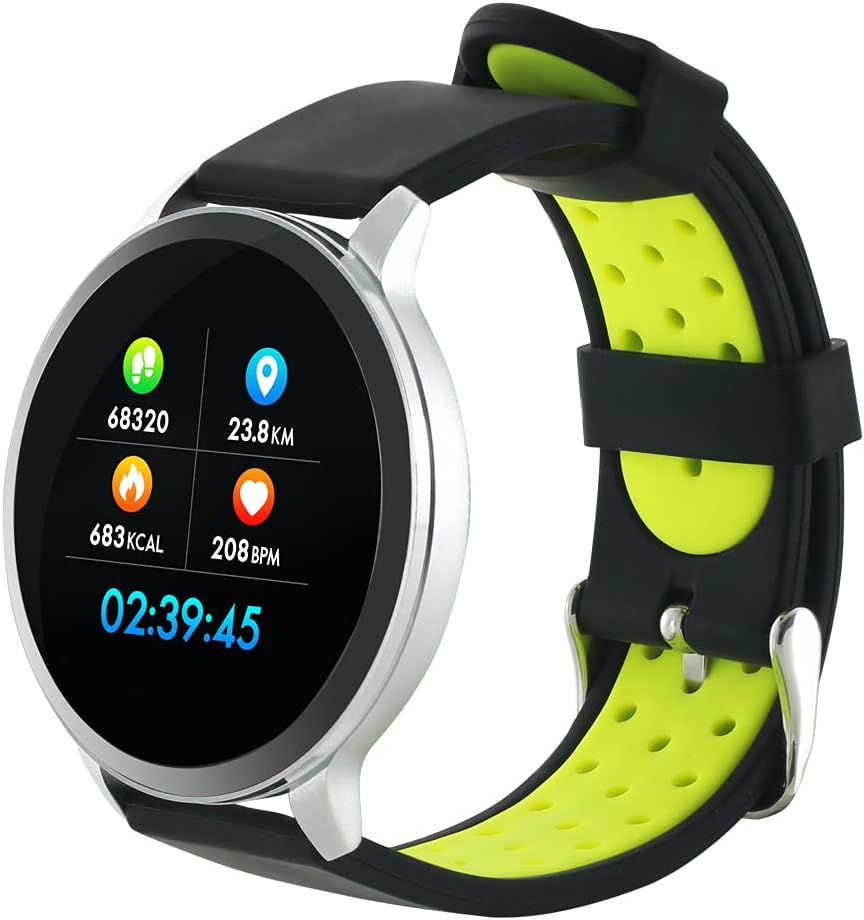
Figure 3: The Canyon CNS-SW71SS Smartwatch shown with an alternative black and lime green TPU strap, highlighting its interchangeable design.

olusin 4: Ẹyìn view of the Canyon CNS-SW71SS Smartwatch, displaying the optical heart rate sensor and magnetic charging contacts.

Figure 5: The retail packaging for the Canyon CNS-SW71SS Smartwatch, illustrating key features and the included two straps.
3. Eto
3.1 Gbigba agbara Smartwatch
- Connect the charging cable to a USB power adapter (not included) or a computer's USB port.
- Align the magnetic charging pins of the cable with the charging contacts on the back of the smartwatch. The watch will vibrate and display a charging icon.
- Allow approximately 2-3 hours for a full charge. A full charge provides up to 7 days of usage.
3.2 Installing the Canyon Fit Application
- Scan the QR code provided in the packaging or search for "Canyon Fit" in your smartphone's app store (Google Play Store for Android, Apple App Store for iOS).
- Ṣe igbasilẹ ati fi sori ẹrọ ohun elo naa.
- Open the Canyon Fit app and follow the on-screen instructions to create an account and set up your profile.
3.3 Sisopọ pọ pẹlu Foonuiyara Foonuiyara rẹ
- Rii daju pe smartwatch rẹ ti gba agbara ati ṣiṣẹ.
- Mu Bluetooth ṣiṣẹ lori foonuiyara rẹ.
- Open the Canyon Fit application.
- Navigate to the device pairing section within the app (usually found under 'Device' or 'Profile').
- Select your smartwatch (e.g., "CNS-SW71SS") from the list of available devices.
- Jẹrisi ibeere isopọmọ lori foonu alagbeka rẹ ati smartwatch rẹ ti o ba beere lọwọ rẹ.
3.4 Attaching/Changing Wristbands
The smartwatch comes with two wristbands (metal and TPU) that can be interchanged. To attach or change a wristband, locate the quick-release pins on the underside of the strap. Slide the pin to detach the current strap and then align and slide the pin of the new strap into the corresponding holes on the watch body until it clicks into place.
4. Awọn ilana Iṣiṣẹ
4.1 Ipilẹ Lilọ kiri
- Afi ika te: Swipe left/right to navigate through different functions and menus. Swipe up/down to view notifications or quick settings.
- Bọtini ẹgbẹ: Press the side button to return to the main watch face or to wake up the screen. A long press may access power options or specific features depending on the context.
4.2 Amọdaju Àtòjọ
- Ipo Idaraya pupọ: Access the 'Workout' or 'Sport' menu on your watch. Select your desired activity (e.g., running, cycling, walking) to start tracking. The watch will record duration, distance, calories burned, and heart rate.
- Iṣẹ́ ojoojúmọ́: The watch automatically tracks your steps, distance, and calories burned throughout the day. View these statistics on the watch face or in the Canyon Fit app.
- Abojuto Oṣuwọn Ọkàn: The watch continuously monitors your heart rate. You can also manually initiate a heart rate measurement from the heart rate interface.
- Titele orun: Wear the smartwatch to bed, and it will automatically track your sleep patterns, including deep sleep, light sleep, and wake times. View detailed sleep analysis in the Canyon Fit app.
4.3 iwifunni
Once paired with your smartphone and with notification permissions granted in the Canyon Fit app, your smartwatch will display alerts for:
- Awọn ipe ti nwọle
- Awọn ifiranṣẹ SMS
- Awọn imeeli
- Awọn iṣẹlẹ Kalẹnda
- Social Media Apps (e.g., WhatsApp, Facebook, InstagÀgbo)
Ra soke lori oju aago si view recent notifications. You can dismiss notifications from the watch.
4.4 Afikun Awọn iṣẹ
- Iṣakoso Orin: While music is playing on your phone, you can use the watch to play/pause, skip tracks, and adjust volume.
- Kamẹra jijin: Open the camera function in the Canyon Fit app. Use your smartwatch as a remote shutter button to take photos on your phone.
- Itaniji Smart: Set alarms through the Canyon Fit app. The watch will vibrate to wake you up gently.
- Data oju ojo: Once connected to your phone, the watch will display current weather conditions and forecasts for your location.
5. Itọju
5.1 Ninu
- Nu iboju aago ati ara rẹ pẹlu asọ, damp asọ.
- For the metal strap, use a soft brush to gently clean any debris. For the TPU strap, wash with mild soap and water.
- Rii daju pe awọn olubasọrọ gbigba agbara jẹ mimọ ati ki o gbẹ ṣaaju gbigba agbara.
- Yago fun lilo awọn kẹmika lile tabi awọn ohun elo abrasive fun mimọ.
5.2 Omi Resistance (IP68)
The Canyon CNS-SW71SS Smartwatch is IP68 rated, meaning it is resistant to dust and can be immersed in water up to 1 meter deep for a maximum of 30 minutes. While it can withstand splashes, rain, and brief immersion, it is not recommended for hot showers, saunas, or diving, as steam and high water pressure can compromise the seals.
- Ma ṣe tẹ awọn bọtini eyikeyi nigba ti aago ba wa ni inu omi.
- Gbẹ aago naa daradara lẹhin ti o ba fi omi han.
5.3 batiri Itọju
- Yago fun gbigba agbara si batiri ni kikun nigbagbogbo.
- Gba agbara si ẹrọ nigbagbogbo, paapaa ti ko ba si ni lilo, lati ṣetọju ilera batiri.
- Tọju aago ni itura, aye gbigbẹ nigbati o ko ba wa ni lilo fun awọn akoko gigun.
6. Laasigbotitusita
- Wo ti ko tan: Rii daju pe aago naa ti gba agbara ni kikun. Sopọ mọ ṣaja fun o kere 30 iṣẹju.
- Ko le so pọ pẹlu foonuiyara:
- Rii daju pe Bluetooth ti ṣiṣẹ lori foonu rẹ.
- Ensure the Canyon Fit app has necessary permissions.
- Tun foonu rẹ bẹrẹ mejeeji ati smartwatch.
- Gbiyanju aiṣiṣẹpọ ati tun-sọpọ ẹrọ naa nipasẹ ohun elo naa.
- Awọn iwifunni ko han:
- Check notification settings in the Canyon Fit app and your phone's system settings.
- Rii daju pe aago naa ti sopọ nipasẹ Bluetooth.
- Inaccurate heart rate/activity data:
- Rii daju pe aago naa ti wọ snugly lori ọwọ ọwọ rẹ, kii ṣe ju tabi alaimuṣinṣin pupọ.
- Nu sensọ lori ẹhin aago naa.
- Environmental factors or certain movements can affect accuracy.
- Iboju ko dahun: Try restarting the smartwatch by holding down the side button. If unresponsive, allow the battery to fully drain and then recharge.
7. Awọn pato
| Orukọ awoṣe | CNS-SW71SS |
| Brand | CANYON |
| Iwọn Ifihan | 1.22 inches |
| Ibamu System isẹ | Android, iOS |
| Asopọmọra Technology | Bluetooth 4.0 |
| Omi Resistance Rating | IP68 |
| Pataki Awọn ẹya ara ẹrọ | Wireless Charging (implied by product data), Multi-Sport Mode, Heart Rate Monitor, Sleep Tracker, Notifications |
| Awọn ẹrọ ibaramu | Foonuiyara |
| Batiri | Rechargeable (1 included) |
| Awọn aṣayan Awọ | Black, Lime Green, Silver |
8. Atilẹyin ọja ati Support
For warranty information and technical support, please refer to the documentation included with your purchase or visit the official Canyon website. You can also contact Canyon customer service for assistance with product issues or inquiries.
Atilẹyin Ayelujara: https://canyon.eu/support/ (Eksample link, please verify official support page)