
1. Ifihan
This manual provides comprehensive instructions for the installation, operation, and maintenance of your ECOELER PIR Motion Sensor Light Switch. This device is designed to provide convenient, hands-free lighting control by detecting motion and ambient light levels, helping to conserve energy.
Awọn ẹya pataki pẹlu:
- Isẹ-Ọfẹ: Automatically activates lights upon motion detection.
- Awọn ọna Meji: Supports Occupancy (OCC) and Vacancy (VAC) modes for flexible control.
- Awọn eto isọdi: Adjustable time delays, sensitivity, and light level sensing.
- Ibamu gbooro: Works with 300W LED, 300W CFL, and 600W incandescent light bulbs.
- Ifọwọsi aabo: UL Certified, FCC Listed, and California Title 24 Compliant.

Image 1.1: ECOELER Motion Sensor Light Switch with UL, FCC, and Title 24 certifications.
2. Alaye Aabo
IKILO: EWU TI mọnamọna. Improper installation can lead to serious injury or death. Always consult a qualified electrician to ensure proper wiring and installation, especially if you are unfamiliar with electrical work.
- Ge asopọ agbara: ALWAYS turn off power at the circuit breaker or fuse box before installing or servicing the switch.
- Ti beere fun Waya Ailopin: This switch requires a neutral wire for operation. Verify your electrical box has a neutral wire (typically white) before proceeding with installation.
- Lilo inu ile Nikan: Apẹrẹ fun awọn ohun elo inu ile.
- Ibamu fifuye: Maṣe kọja wat ti o pọjutage ratings: 300W LED, 300W CFL, 600W Incandescent.
- Pólà Kan Nìkan: This switch is designed for single-pole circuits only. It is not suitable for 3-way or multi-way circuits.
3. Ọja Ipariview ati irinše
The ECOELER Motion Sensor Light Switch integrates a Passive Infrared (PIR) sensor to detect motion and an ambient light sensor to optimize energy usage. The switch features a manual ON/OFF button and adjustable dials for customization.
Awọn eroja to wa:
- Motion Sensor Switch (YM2108 Series)
- Odi Awo
- Iṣagbesori Skru (4)
- Terminal Caps (4)
- Itọsọna olumulo

Image 3.1: Included accessories and product dimensions.
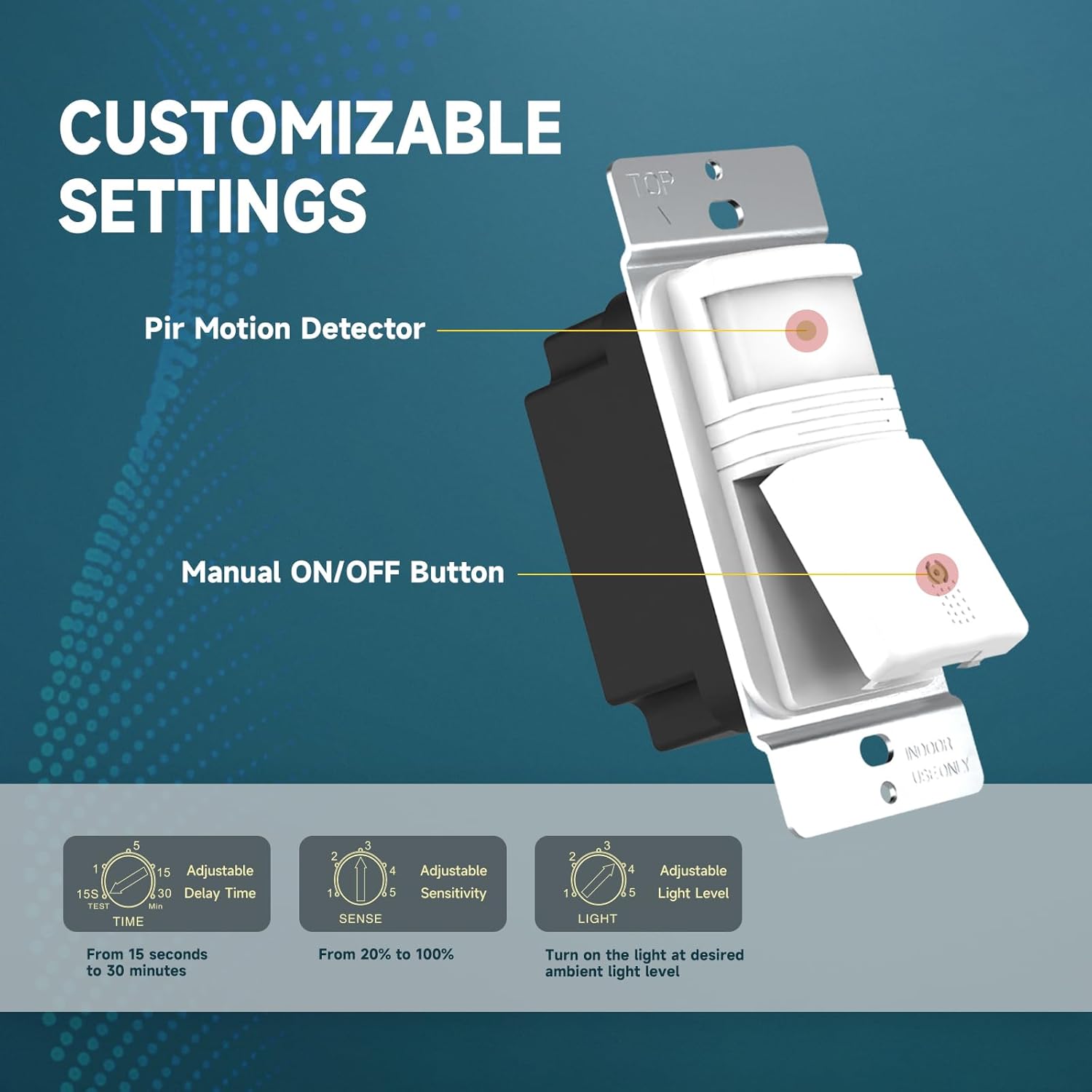
Aworan 3.2: Pariview of the PIR Motion Detector, Manual ON/OFF Button, and adjustment dials for Time, Sense, and Light.
4. Eto ati fifi sori
Atokọ iṣaju fifi sori ẹrọ:
- Rii daju pe agbara wa ni PA ni ẹrọ fifọ.
- Confirm the presence of a neutral wire in your electrical box.
- Tools required: Screwdriver, wire strippers, electrical tape (optional).
Itọsọna Asopọmọra:
Follow these steps carefully. If you are unsure, consult a qualified electrician.
- Pa a agbara ni Circuit fifọ.
- Yọ awọn ti wa tẹlẹ odi awo ati ki o yipada.
- Identify the wires in your electrical box: Hot (Black), Load (Red), Neutral (White), and Ground (Green or bare copper).
- Connect the wires from the ECOELER switch to your house wiring using the provided terminal caps:
- Black wire (Switch) si Hot wire (Circuit Box)
- Red wire (Switch) si Load wire (Circuit Box) (connects to light/fan)
- White wire (Switch) si Neutral wire (Circuit Box) (O beere)
- Green wire (Switch) si Ground wire (Circuit Box)
- Carefully push the wired switch into the electrical box.
- Secure the switch to the electrical box with the mounting screws.
- So awo ogiri.
- Mu pada agbara ni awọn Circuit fifọ.
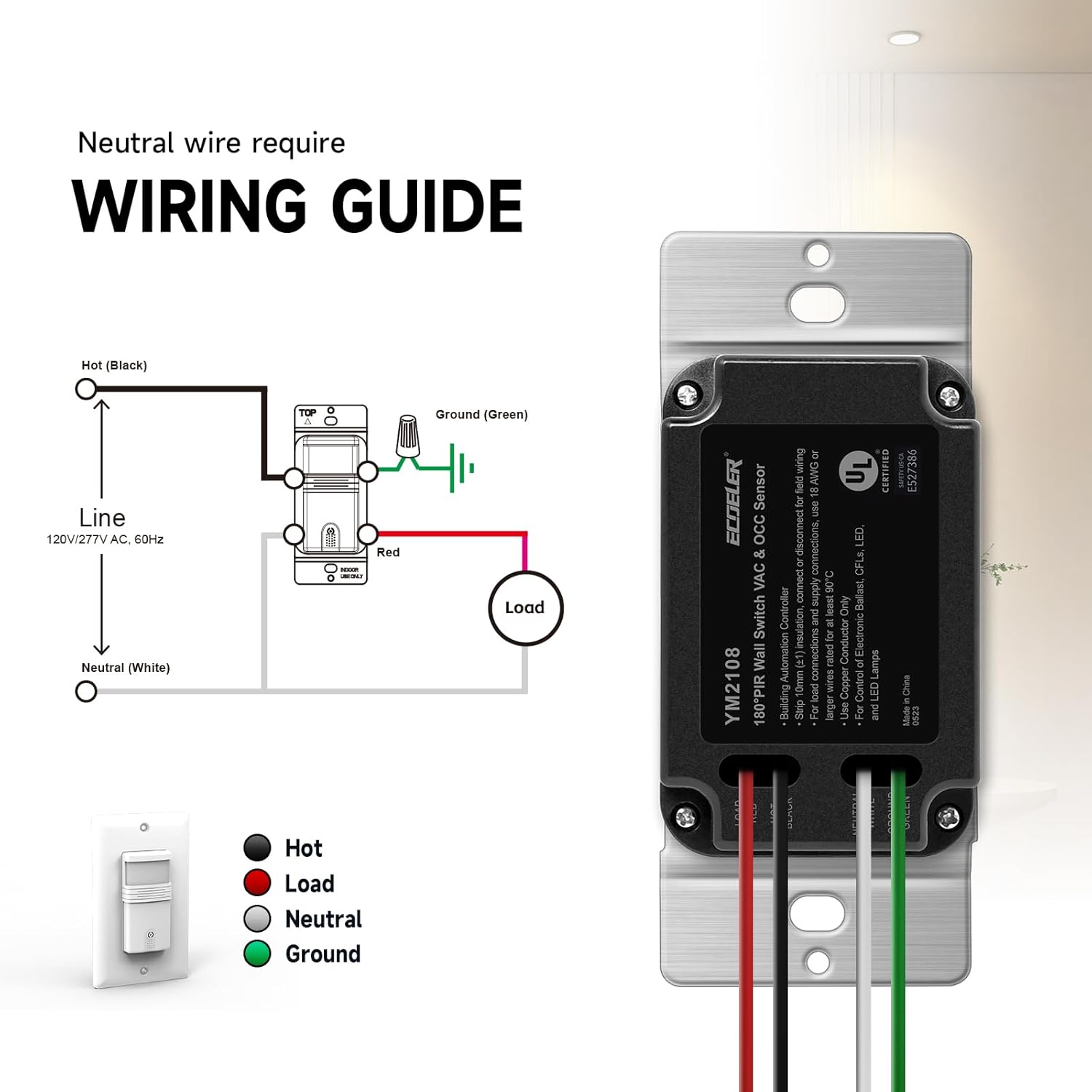
Image 4.1: Detailed wiring diagram for the ECOELER Motion Sensor Light Switch (YM2108 Series).
5. Awọn ilana Iṣiṣẹ
Your ECOELER Motion Sensor Light Switch offers two primary operating modes and several adjustable settings to customize its performance.
Awọn ọna ṣiṣe:
The mode selector switch is located on the front of the device, typically beneath a small cover or flap.
- OCC (Occupancy) Mode: In this mode, the lights will automatically turn ON when motion is detected and automatically turn OFF when the space is unoccupied for the set time delay. This mode provides full hands-free operation.
- VAC (Vacancy) Mode: In this mode, the lights must be turned ON manually using the manual ON/OFF button. The lights will then automatically turn OFF when no motion is detected for the set time delay. This mode is ideal for rooms where manual control is preferred for turning on, but automatic turn-off is desired for energy saving.
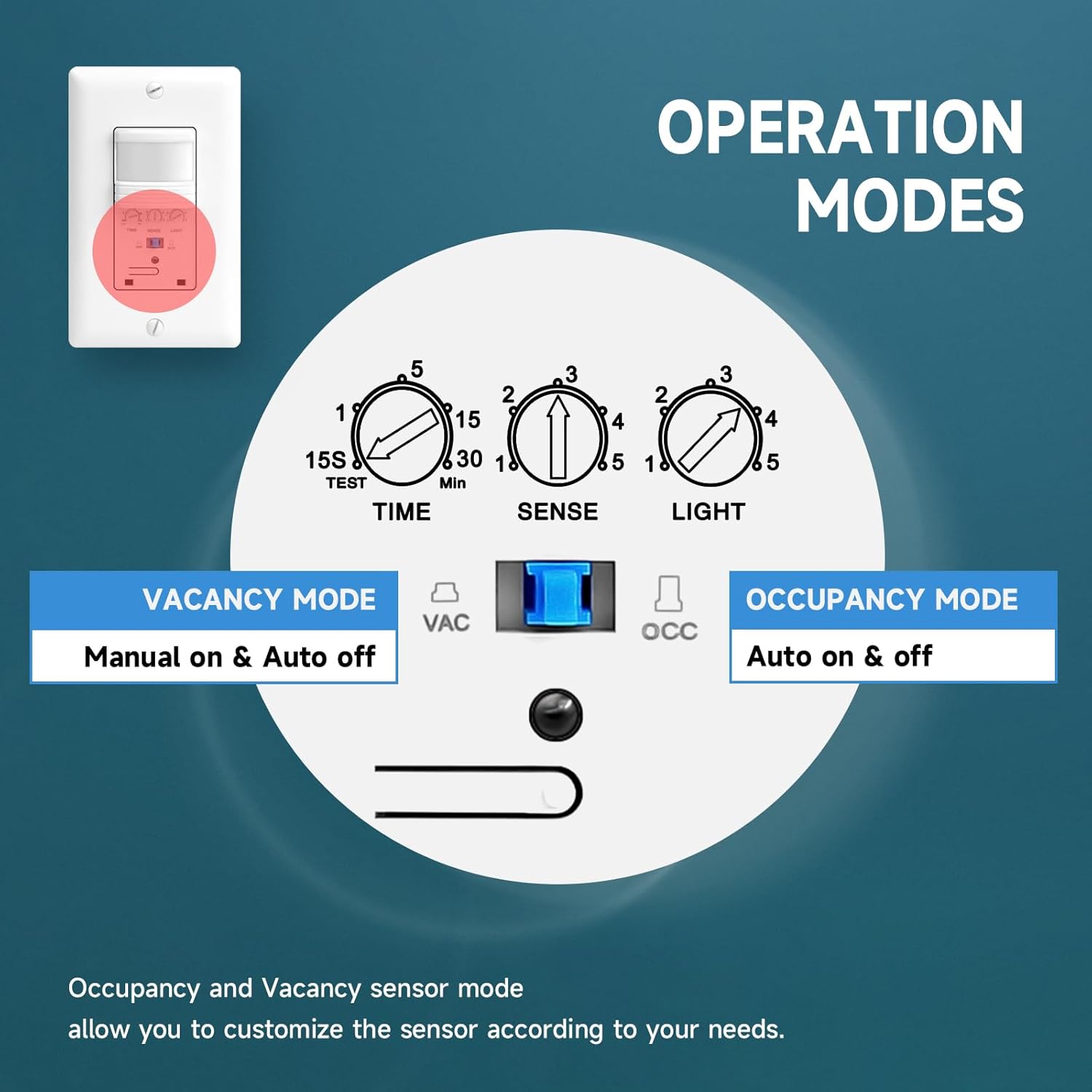
Image 5.1: Mode selection switch for Occupancy (Auto on & off) and Vacancy (Manual on & Auto off).
Awọn Eto Atunṣe:
Three small rotary dials allow you to fine-tune the switch's behavior. These are typically located behind a small cover on the front of the switch.
- ÀKÓKÒ (Ìdádúró Àkókò): Adjusts how long the lights remain ON after the last detected motion.
- Range: 15 seconds (TEST) to 30 minutes.
- Setting 'TEST' is for quick testing of motion detection.
- SENSE (Sensitivity): Controls the motion detection range.
- Range: Approximately 6.56 ft (20%) to 29.52 ft (100%).
- Adjust as needed to prevent unwanted triggers or ensure adequate coverage.
- LIGHT (Ambient Light Level): Determines the ambient light threshold at which the sensor will allow the lights to turn ON.
- Range: 1=5lux (very dark) to 5=all day (always allow lights to turn on, regardless of ambient light).
- Setting '5' effectively disables the ambient light sensor, allowing the lights to turn on with motion even in bright conditions.

Image 5.2: Detailed breakdown of adjustable settings for Time, Sense, and Light.
6. Itọju
The ECOELER Motion Sensor Light Switch requires minimal maintenance to ensure optimal performance.
- Ninu: Periodically wipe the sensor lens and switch surface with a soft, dry cloth. Do not use abrasive cleaners, solvents, or excessive moisture, as this can damage the device.
- Idilọwọ-ọfẹ: Ensure the sensor's field of view is not obstructed by furniture, curtains, or other objects, as this can affect motion detection.
- Ko si Awọn apakan Iṣẹ Olumulo: Do not attempt to open or repair the switch. Refer all servicing to qualified personnel.
7. Laasigbotitusita
If you experience issues with your motion sensor light switch, try the following troubleshooting steps:
| Isoro | Owun to le Fa | Ojutu |
|---|---|---|
| Àwọn ìmọ́lẹ̀ kìí tan nígbà tí wọ́n bá ń rìn. |
|
|
| Lights stay ON too long or turn OFF too quickly. |
|
|
| Lights turn ON unexpectedly (false triggers). |
|
|
| Lights do not turn OFF. |
|
|
8. Awọn pato
| Sipesifikesonu | Ẹ̀kúnrẹ́rẹ́ |
|---|---|
| Ipo Isẹ | Automatic (Occupancy/Vacancy) |
| Ti isiyi Rating | 10 Amps |
| Awọn ọna Voltage | 120 Volt (AC) |
| Olubasọrọ Iru | Ṣii ni deede |
| Asopọmọra Iru | Wiring Cap Connect |
| Yipada Iru | PIR Sensor išipopada |
| Ebute | Dabaru |
| Ohun elo | Acrylonitrile Butadiene Styrene, Copper, Metal, Plastic, Steel |
| Awọn Iwọn Nkan (L x W x H) | 4.6 x 2.87 x 2.24 inches |
| Circuit Iru | Ọ̀nà kan (Ọ̀pá kan) |
| Iṣagbesori Iru | Ògiri Ògiri |
| Actuator Iru | sensọ išipopada PIR |
| Isalẹ otutu Rating | 32 Iwọn Fahrenheit (0°C) |
| Oke otutu Rating | 131 Iwọn Fahrenheit (55°C) |
| Adarí Iru | Sensọ išipopada |
| Ọna Iṣakoso | Laifọwọyi ati Afowoyi |
| Wattage | 600 watts (Incandescent), 300 watts (LED/CFL) |
| Àwọ̀ | Funfun |
| Iwọn Ẹka | 10 Count (for this specific product variant) |
| Ohun elo olubasọrọ | Irin ti ko njepata |
| International Idaabobo Rating | IP40 |
| Pato sipesifikesonu | UL; Title 24; FCC |
| Nọmba awoṣe (ASIN) | B07R8BKV1K |
9. atilẹyin ọja Information
All ECOELER products come with a 1-odun atilẹyin ọja from the date of purchase. This warranty covers non-man-made damage under normal use. For any warranty claims or replacement solutions, please contact our support team.
10. Atilẹyin
For further assistance, technical support, or to report any issues not covered in this manual, please contact ECOELER customer service. Refer to the product packaging or the ECOELER official webAaye fun lọwọlọwọ alaye olubasọrọ.