
1. Ifihan
Thank you for choosing the Dacom Athlete G05 Bluetooth Headset. This manual provides comprehensive instructions to help you set up, operate, and maintain your new wireless headphones. Please read this manual carefully before use to ensure optimal performance and longevity of your device.
2. Package Awọn akoonu
Daju pe gbogbo awọn nkan ti a ṣe akojọ rẹ si isalẹ wa ninu package rẹ:
- 1 x Dacom Athlete G05 Bluetooth Headset
- 1 x Okun Ngba agbara USB
- 1 x Itọsọna olumulo (iwe yii)
3. Ọja Ipariview
The Dacom Athlete G05 is a wireless stereo earphone designed for sports and running, featuring a comfortable in-ear design with ear hooks for secure fit. It connects via Bluetooth V4.1.
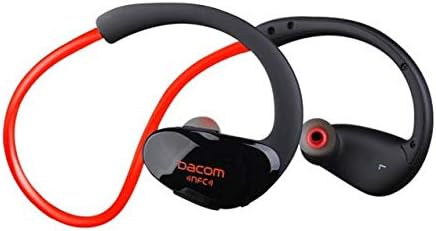
Nọmba 3.1: Iwaju view of the Dacom Athlete G05 Bluetooth Headset, showing the earbud and ear hook design.
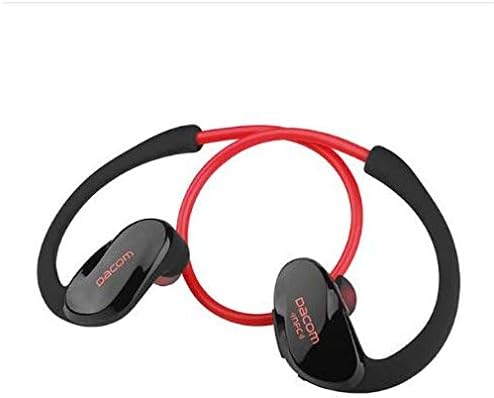
Nọmba 3.2: Ẹyìn view of the Dacom Athlete G05 Bluetooth Headset, illustrating the connecting cable between the two earbuds.
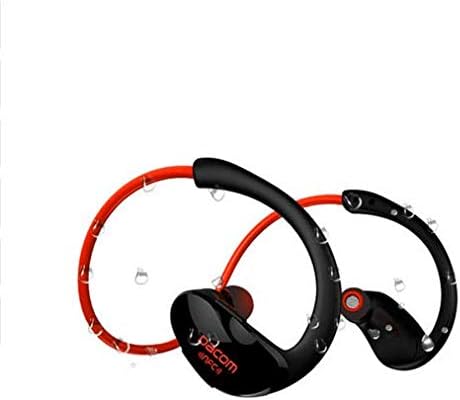
Nọmba 3.3: Dacom Athlete G05 Bluetooth Headset demonstrating water resistance, suitable for sports activities.
4. Eto
4.1 Ngba agbara si Agbekọri
Before first use, fully charge your Dacom Athlete G05 headset. A full charge typically takes approximately 1.5 to 2 hours.
- Connect the provided USB charging cable to the charging port on the headset.
- Connect the other end of the USB cable to a power adapter (DC5V 150mAh output recommended) or a computer's USB port.
- The battery indicator light will illuminate during charging and change color or turn off once fully charged.
A fully charged headset provides approximately 8 hours of talk time or music playback, and up to 180 hours of standby time.
4.2 Sisopọ Bluetooth
Láti so agbekọri rẹ pọ̀ mọ́ ẹ̀rọ tí Bluetooth ń ṣiṣẹ́ (fún àpẹẹrẹ, fóònù alágbèéká, tábìlẹ́ẹ̀tì):
- Rí i dájú pé agbekọri naa ti gba agbara ni kikun ati pe o ti pa.
- Press and hold the multi-function button on the headset until the Bluetooth indicator light flashes red and blue alternately, indicating it is in pairing mode.
- Lori ẹrọ rẹ, mu Bluetooth ṣiṣẹ ki o wa awọn ẹrọ to wa.
- Select "Dacom Athlete G05" (or similar name) from the list of found devices.
- Tí a bá béèrè fún ọ̀rọ̀ìpamọ́, tẹ "0000" (odò mẹ́rin).
- Once paired, the Bluetooth indicator light will flash blue slowly or turn solid blue, and you will hear a confirmation tone.
The headset supports Bluetooth V4.1 and profiles such as Headset, Handsfree, A2DP, AVRC, and APT-X.
5. Awọn ilana Iṣiṣẹ
5.1 Agbara Tan / Pa
- Agbara Tan: Tẹ bọtini iṣẹ-pupọ naa ki o si di mu fun bii iṣẹju-aaya mẹta titi ti ina ifihan naa yoo fi tàn bulu ati pe iwọ yoo gbọ ohun orin ti n ṣiṣẹ.
- Agbara Pa: Tẹ bọtini iṣẹ-pupọ naa ki o si di mu fun bii iṣẹju-aaya mẹta titi ti ina ifihan naa yoo fi tan pupa ti o si gbọ ohun orin pipa agbara.
5.2 ipe Management
- Idahun Ipe: Kukuru tẹ bọtini iṣẹ-ọpọlọpọ nigbati ipe ba wọle.
- Ipe Ipari: Kukuru tẹ bọtini iṣẹ-ọpọlọpọ nigba ipe kan.
- Kọ Ipe: Tẹ ki o si mu bọtini iṣẹ-pupọ naa fun awọn aaya meji nigbati ipe ba wọle.
- Nọmba Ikẹhin Tun Tun: Tẹ bọtini iṣẹ-ọpọlọpọ lẹẹmeji nigbati kii ṣe lori ipe kan.
5.3 Sisisẹsẹhin Orin
- Ṣiṣẹ/Daduro: Kukuru tẹ bọtini iṣẹ-ọpọlọpọ.
- Orin t’okan: Tẹ bọtini Iwọn didun + fun igba pipẹ.
- Tẹlẹ Orin: Tẹ bọtini Iwọn didun fun igba pipẹ.
- Iwọn didun Up: Tẹ bọtini didun + kukuru.
- Iwọn didun isalẹ: Tẹ bọtini didun kukuru.
Note: The headset features touch control for various functions.
6. Itọju ati Itọju
- Keep the headset dry. Do not expose it to extreme temperatures or humidity.
- Fọ àwọn ètí ìró àti àwọn ohun tí a fi ń gba agbára mọ́ déédéé pẹ̀lú aṣọ rírọ̀ tí ó gbẹ.
- Yago fun sisọ tabi tẹri agbekari si awọn ipa to lagbara.
- Tọju agbekari ni itura, aye gbigbẹ nigbati ko si ni lilo.
- Do not attempt to disassemble or modify the headset, as this will void the warranty.
7. Laasigbotitusita
| Isoro | Owun to le Solusan |
|---|---|
| Agbekọri ko ni agbara. | Ensure the headset is fully charged. Connect to a power source and try again. |
| Ko le so pọ pẹlu ẹrọ. |
|
| Ko si ohun tabi iwọn kekere. |
|
| Asopọmọra igba diẹ. |
|
8. Awọn pato
| Ẹya ara ẹrọ | Ẹ̀kúnrẹ́rẹ́ |
|---|---|
| Orukọ ọja | Athlete sports Bluetooth headset |
| Nọmba awoṣe | G05 |
| Ẹya Bluetooth | V4.1 |
| Kilasi Bluetooth | Kilasi 2 |
| Ni atilẹyin Profiles | Headset, Handsfree, A2DP, AVRC, APT-X |
| Gbigba agbara Input | DC5V 150mAh (Power adapter output) |
| Batiri Iru | High-performance lithium polymer battery |
| Aago Ọrọ | O fẹrẹ to awọn wakati 8 |
| Ti ndun Time | O fẹrẹ to awọn wakati 8 |
| Akoko Iduro | O fẹrẹ to awọn wakati 180 |
| Range Igbohunsafẹfẹ Audio | 20Hz-20kHz |
| BT Radio Frequency | 2.400-2.481GHz |
| Imudaniloju ijade | 16Ω 3mW |
| Ifamọ | 100-105dB |
| Agbekọri Fọọmù ifosiwewe | Ninu Eti |
| Asopọmọra Technology | Ailokun |
| Ọna Iṣakoso | Fọwọkan |
| Ohun elo | Ṣiṣu |
| Àwọ̀ | Pupa |
9. Atilẹyin ọja ati Support
Dacom products are manufactured to the highest quality standards. For warranty information or technical support, please refer to the warranty card included with your purchase or visit the official Dacom webojula. Jọwọ ṣe idaduro ẹri rira rẹ fun awọn iṣeduro atilẹyin ọja.