1. Ọja Ipariview
The PCE Instruments PCE-RCM 8 is a multi-function air quality meter designed for indoor monitoring. It accurately measures various air quality parameters, including particulate matter (PM1.0, PM2.5, PM10), formaldehyde (HCHO), total volatile organic compounds (TVOC), carbon dioxide (CO₂), as well as ambient temperature and humidity. Its compact design, clear LCD display, and data logging capabilities make it suitable for use in homes, offices, schools, and other indoor environments.
Awọn ẹya pataki:
- Measures PM1.0, PM2.5, PM10, HCHO, TVOC, CO₂, Temperature, and Humidity.
- Integrated data logging function for reviewing past measurements.
- Clear 320 x 240 pixel LCD display for real-time readings.
- Built-in rechargeable lithium-ion battery for portable use.
- Audible alarm function for critical air quality levels.

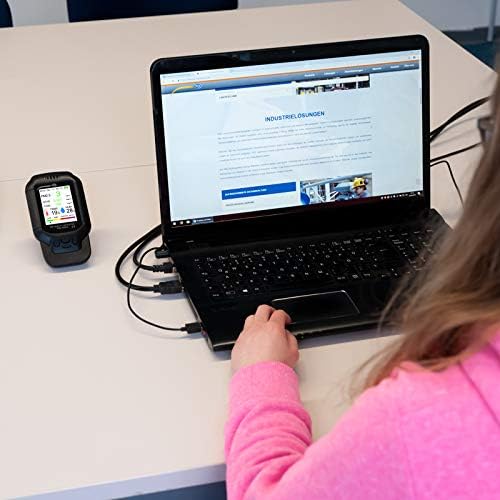
Image 1.1: The PCE-RCM 8 Air Quality Meter connected to a laptop, showing its display with various air quality parameters. This setup allows for data transfer and analysis.
2. Eto
2.1 Unboxing ati To wa irinše
Carefully unpack the PCE-RCM 8 Air Quality Meter and verify that all components are present. The standard delivery content includes:
- 1 x PCE-RCM 8 Particle Counter
- 1 x Micro USB Ngba agbara USB
- 1 x Itọsọna olumulo (iwe yii)
Inspect the device for any signs of damage. If any components are missing or damaged, contact your supplier immediately.
2.2 Ngba agbara si Ẹrọ
The PCE-RCM 8 is equipped with a built-in 1000 mAh lithium-ion battery. Before initial use, fully charge the device.
- Connect the micro USB charging cable to the charging port on the PCE-RCM 8.
- So opin keji okun USB pọ mọ adapter agbara USB deede (ko si ninu rẹ) tabi ibudo USB kọmputa kan.
- The charging indicator on the device will illuminate. Allow the device to charge until the indicator shows a full charge, typically a few hours.
The device can be operated while charging.
2.3 Titan / Pa a
To power on the device, press and hold the power button located on the side/front of the unit until the display illuminates. To power off, press and hold the power button again until the display turns off.
3. Isẹ
3.1 Ifihan Loriview
The PCE-RCM 8 features a 320 x 240 pixel LCD display that shows real-time measurements for all monitored parameters. The display typically shows:
- PM1.0, PM2.5, PM10 concentrations (µg/m³)
- HCHO (Formaldehyde) concentration (mg/m³)
- TVOC (Total Volatile Organic Compounds) concentration (mg/m³)
- Igba otutu (° C / ° F)
- Ọriniinitutu (% RH)
- Atọka Didara afẹfẹ (AQI)
- Atọka ipo batiri
- Data logging status
Aworan 3.1: alaye view of the PCE-RCM 8 display, illustrating the layout of measured parameters.
3.2 Gbigba Awọn wiwọn
Once powered on, the PCE-RCM 8 will automatically begin taking measurements. The measuring rate is approximately 1.5 seconds. For accurate readings, ensure the device is placed in an open area, away from direct airflow, heat sources, or strong chemical fumes that could interfere with sensor operation.
The device is designed for indoor use. Avoid exposing it to extreme temperatures or high humidity environments outside its specified operating range.
3.3 Data Wọle Išė
The PCE-RCM 8 includes a data logger function, allowing you to review past measurement parameters. Consult the on-screen menu or specific buttons (if available) to access and navigate the logged data. The manual does not specify how to access this, so refer to the device's on-screen interface for detailed instructions on data retrieval.
3.4 Iṣẹ itaniji
The device features an audible alarm function. This alarm is triggered when certain measured parameters exceed predefined thresholds, indicating potentially unhealthy air quality levels. Refer to the device's settings menu to adjust alarm thresholds or to enable/disable the alarm.
4. Itọju
4.1 Ninu
To ensure optimal performance and longevity of your PCE-RCM 8, keep the device clean. Use a soft, dry cloth to wipe the exterior. Do not use abrasive cleaners, solvents, or immerse the device in water. Ensure that the sensor openings are free from dust and debris.
4.2 Ibi ipamọ
When not in use for extended periods, store the PCE-RCM 8 in a cool, dry place, away from direct sunlight and extreme temperatures. The recommended storage conditions are -10 to 60°C (14 to 140°F) and 20 to 85% relative humidity. Ensure the battery is partially charged before long-term storage to maintain battery health.
5. Laasigbotitusita
If you encounter issues with your PCE-RCM 8, please refer to the following common troubleshooting steps:
- Ẹrọ ko ṣiṣẹ lori: Ensure the battery is fully charged. Connect the device to a power source using the USB cable and try again.
- Awọn kika ti ko pe:
- Ensure the device is placed in an area with good air circulation, away from direct drafts, vents, or sources of contamination.
- Verify that the sensor openings are clean and unobstructed.
- Allow the device to stabilize for a few minutes after powering on, especially when moving it to a new environment.
- Check if any calibration options are available in the device's settings menu for specific sensors (e.g., temperature).
- Ifihan ko ṣiṣẹ: If the device powers on but the display remains blank or shows errors, try restarting the device. If the issue persists, contact customer support.
- Batiri ko dani idiyele: Ensure you are using the provided USB cable and a compatible power adapter. If the battery life significantly degrades, it may require service.
For issues not covered here, or if troubleshooting steps do not resolve the problem, please contact PCE Instruments customer support.
7. Atilẹyin ọja ati Support
7.1 atilẹyin ọja Alaye
PCE Instruments products are covered by a manufacturer's warranty. The specific terms and duration of the warranty may vary by region and product. Please refer to the warranty card included with your product packaging or visit the official PCE Instruments webaaye fun alaye atilẹyin ọja alaye.
7.2 Onibara Support
For technical assistance, service, or inquiries regarding your PCE-RCM 8 Air Quality Meter, please contact PCE Instruments customer support. Contact information can typically be found on the official PCE Instruments webaaye tabi ni apoti ọja.
PCE Instruments Official Webojula: www.pce-instruments.com
