
1. Ifihan
This manual provides essential information for the safe and efficient installation, operation, and maintenance of the IFM D100/DY34-A Speed Controller. This device is designed for pulse rate and rotational speed control in industrial applications, operating on 110/120 VAC power. Please read this manual thoroughly before attempting to install or operate the unit.
2. Alaye Aabo
IKILO: Electrical mọnamọna ewu. Fifi sori ẹrọ ati itọju yẹ ki o ṣe nipasẹ oṣiṣẹ ti o peye nikan.
- Always disconnect power before installing, wiring, or performing maintenance on the device.
- Rii daju didasilẹ to dara lati ṣe idiwọ mọnamọna itanna.
- Daju pe awọn ipese voltage matches the device's specified voltage (110/120 VAC).
- Do not operate the device in environments exceeding its specified temperature or humidity limits.
- Protect the device from moisture and corrosive substances.
- Refer to local and national electrical codes for all wiring and installation procedures.
3. Ọja Ipariview
The IFM D100/DY34-A is a compact speed controller designed for precise monitoring and control of rotational speeds or pulse rates. It features robust construction suitable for industrial environments.
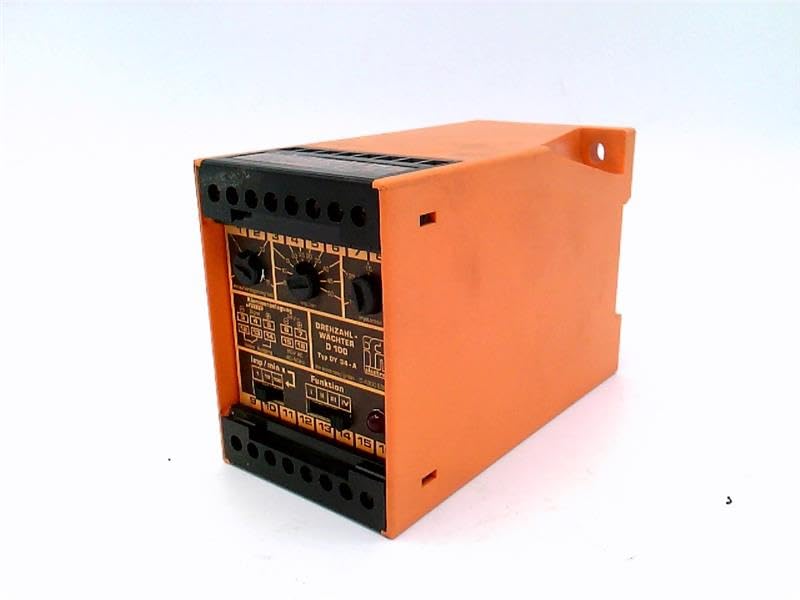
Nọmba 1: Iwaju view of the IFM D100/DY34-A Speed Controller. The image shows the orange casing, black terminal blocks at the top and bottom, and control dials on the front panel labeled for functions like "DREHZAHL-WACHTER D 100" (Rotational Speed Monitor D 100) and "Funktion" (Function).
Awọn eroja pataki pẹlu:
- Awọn bulọọki Ipari: For power input, sensor connections, and output signals.
- Àwọn ìpè ìṣàkóso: Used for setting parameters such as speed thresholds and operating modes.
- Awọn imọlẹ Atọka: (If visible/implied) For status indication (e.g., power, output active, error).
4. Eto
4.1 Iṣagbesori
The controller is typically mounted on a DIN rail within an electrical enclosure. Ensure adequate ventilation around the unit to prevent overheating.
- Securely attach the unit to a standard DIN rail.
- Ensure sufficient clearance for wiring and heat dissipation.
4.2 Onirin
Refer to the wiring diagram provided on the unit or in the detailed technical documentation for specific connections. General wiring steps include:
- Ibi ti ina elekitiriki ti nwa: Connect the 110/120 VAC power supply to the designated terminals. Observe correct polarity if applicable.
- Iṣawọle sensọ: Connect the pulse or rotational speed sensor to the input terminals. Ensure the sensor type (e.g., NPN, PNP) is compatible with the controller.
- Awọn isopọ Iṣjade: Connect the control output(s) to the driven device (e.g., motor contactor, alarm).
- Ilẹ: Connect the protective earth ground to the designated ground terminal.
CAUTION: Incorrect wiring can damage the device or connected equipment. Double-check all connections before applying power.
5. Awọn ilana Iṣiṣẹ
5.1 Ibẹrẹ Agbara-soke
- Lẹ́yìn tí o bá ti parí gbogbo wáyà, lo agbára sí ẹ̀rọ náà.
- Observe any power indicator lights to confirm the unit is receiving power.
5.2 Eto paramita
The D100/DY34-A features adjustable parameters via its front panel dials. These typically include:
- Set Point (Threshold): Adjust this dial to set the desired speed or pulse rate at which the output will activate or deactivate.
- Hysteresis/Window: (If available) Adjust to prevent rapid switching of the output when the input signal fluctuates around the set point.
- Aṣayan iṣẹ ṣiṣe: Select the operating mode (e.g., overspeed, underspeed, window function).
Consult the detailed technical manual for precise instructions on calibrating and setting each parameter for your specific application.
5.3 isẹ
Once configured, the controller continuously monitors the input signal from the connected sensor. When the monitored speed or pulse rate crosses the set threshold, the corresponding output will change state according to the selected function.
6. Itọju
The IFM D100/DY34-A Speed Controller is designed for reliable operation with minimal maintenance. However, periodic checks are recommended.
- Ninu: Jẹ́ kí ẹ̀rọ náà mọ́ tónítóní kí ó sì wà ní mímọ́ kúrò nínú eruku àti ìdọ̀tí. Lo aṣọ rírọ̀ tí ó gbẹ fún fífọ mọ́. Má ṣe lo àwọn ohun ìfọṣọ tàbí àwọn ohun èlò ìfọṣọ.
- Awọn isopọ: Ṣe àyẹ̀wò àwọn ìsopọ̀ wáyà lẹ́ẹ̀kọ̀ọ̀kan fún wíwọ̀n àti àmì ìbàjẹ́.
- Awọn ipo Ayika: Rii daju pe agbegbe iṣẹ wa laarin iwọn otutu pato ati awọn sakani ọriniinitutu.
WARNING: Disconnect all power before performing any maintenance or cleaning.
7. Laasigbotitusita
If the speed controller is not functioning as expected, consider the following common issues:
| Isoro | Owun to le Fa | Ojutu |
|---|---|---|
| Ko si ina Atọka agbara | Ko si ipese agbara; ti ko tọ onirin; fẹ fiusi. | Check power source; verify wiring connections; replace fuse if necessary. |
| Ìjáde kò ṣiṣẹ́/dínkù | Incorrect set point; faulty sensor; incorrect function setting; wiring error. | Adjust set point; check sensor operation; verify function selector; inspect output wiring. |
| Awọn kika kika alaibamu | Sensor interference; loose connections; faulty sensor. | Check sensor cabling for shielding; tighten connections; test or replace sensor. |
If problems persist after attempting these solutions, contact IFM technical support or a qualified service technician.
8. Awọn pato
The following specifications are for the IFM D100/DY34-A Speed Controller:
- Awoṣe: D100/DY34-A
- Iṣagbewọle Voltage: 110/120 VAC
- Iṣẹ: Pulse Rate/Rotational Speed Control
- Ìwọ̀n Nkan: 1.84 iwon
- Olupese: EFECTOR (IFM)
- ASIN: B07RRL4XY3
- Akọkọ Wa: Oṣu Kẹta Ọjọ 21, Ọdun 2025
9. Atilẹyin ọja ati Support
For information regarding warranty coverage, technical support, or service, please refer to the official IFM website or contact your local IFM distributor. Keep your purchase receipt and product serial number handy when contacting support.
Note: Specific warranty terms and conditions may vary by region and purchase date.