
Ọrọ Iṣaaju
This manual provides comprehensive instructions for the Antec VSK10 Micro-ATX computer case. Please read this manual carefully before installation to ensure proper setup and optimal performance of your system.
Ọja Pariview
The Antec VSK10 is a Micro-ATX case designed for efficient system building, offering a balance of functionality and compact design. It supports Micro-ATX and ITX motherboards and provides various features for component installation and cooling.
Awọn ẹya pataki:
- Motherboard Support: Up to Micro-ATX
- Cooling: Supports up to 4 x 140mm fans and 280mm radiator (front), 1 x 120mm fan (rear, included)
- Drive Bays: 2 x 3.5" HDD (compatible with 2 x 2.5" SSD), 2 x 2.5" SSD
- Imugboroosi Iho: 4
- Front I/O: 2 x USB 3.0 Ports
- Material: SPCC + Plastic

Apejuwe aworan: An angled front view of the Antec VSK10 Micro-ATX computer case, showcasing its sleek black design and front panel.
Eto ati fifi sori
This section details the steps required to install your components into the Antec VSK10 case. Ensure your system is powered off and unplugged before beginning installation.
1. Ngbaradi Ọran naa
Remove the side panels by unscrewing the thumbscrews located at the rear of the case. Gently slide the panels backward and lift them off. This provides access to the interior for component installation.
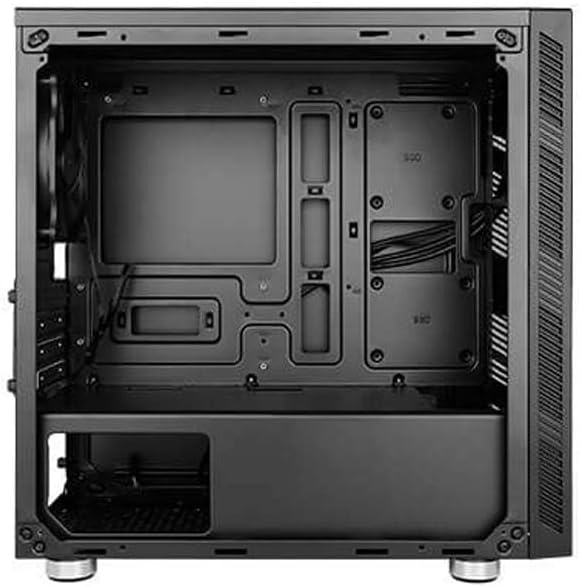
Apejuwe aworan: Ohun ti abẹnu view of the Antec VSK10 Micro-ATX case, showing the motherboard tray, drive bays, and power supply shroud. Cable routing cutouts are visible.
2. Modaboudu fifi sori
Align your Micro-ATX or ITX motherboard with the pre-installed standoffs inside the case. Carefully place the motherboard onto the standoffs and secure it using the provided screws. Ensure the I/O shield is installed in the rear opening before securing the motherboard.
3. Fifi sori Ipese Agbara
Install the power supply unit (PSU) into the dedicated compartment at the bottom rear of the case. Ensure the PSU fan faces the bottom ventilation opening for optimal airflow. Secure the PSU with screws from the rear of the case.

Apejuwe aworan: Ru ode view of the Antec VSK10 case, showing the I/O shield cutout, four expansion slots, the rear fan mount, and the power supply mounting area at the bottom.
4. wakọ sori
The VSK10 case supports both 3.5" HDDs and 2.5" SSDs:
- 3.5" HDD / 2.5" SSD: Install drives into the removable drive cage located beneath the PSU shroud. Follow the instructions for your specific drive type to secure it within the cage.
- 2.5" SSD: Dedicated mounting points are available on the motherboard tray for 2.5" SSDs. Secure these drives directly to the tray using screws.
5. Fifi sori Kaadi Imugboroosi
Remove the necessary expansion slot covers from the rear of the case corresponding to your expansion card (e.g., graphics card). Insert your expansion card into the motherboard's PCIe slot and secure it with a screw.
6. Fifi sori ẹrọ afẹ́fẹ́ ati radiator
The VSK10 offers flexible cooling options:
- Iwaju: Supports 2 x 140mm or 3 x 120mm intake fans, or a 280mm radiator.
- Ẹyìn: Includes 1 x 120mm exhaust fan.
- Oke: Ṣe atilẹyin fun awọn onijakidijagan 2 x 120mm tabi 2 x 140mm.
Ensure fans are oriented correctly for optimal airflow (typically intake at the front, exhaust at the rear and top).

Apejuwe aworan: Iwaju ode view of the Antec VSK10 case, featuring a brushed black finish and a side intake vent for airflow.
7. Iṣakoso USB
Utilize the cable routing cutouts and tie-down points located behind the motherboard tray to manage and organize your cables. Effective cable management improves airflow and the overall aesthetic of your build.
Awọn ilana Iṣiṣẹ
Igbimọ iwaju I / O
The front panel provides convenient access to essential ports and controls for your system.
- Bọtini agbara: Press to power on or power off the system.
- Bọtini atunto: Tẹ lati tun eto naa bẹrẹ.
- Awọn ibudo USB 3.0 (x2): So awọn ẹrọ ibaramu USB 3.0 fun gbigbe data iyara-giga.
- Awọn Jacks Audio: So olokun ati microphones.

Apejuwe aworan: An angled view of the Antec VSK10 case, highlighting the top panel with front I/O ports including two USB 3.0 ports and audio jacks, alongside the power and reset buttons.
Itoju
Regular maintenance helps ensure the longevity and optimal performance of your PC components and the case itself.
- Awọn Ajọ Eruku: The VSK10 includes dust filters to prevent dust buildup. Regularly clean these filters by removing and washing them with water, or by using compressed air. Ensure they are completely dry before reinstallation.
- Ninu inu: Periodically open the case and use compressed air to remove dust from internal components such as fans, heatsinks, and graphics cards. Avoid touching components directly.
- Ṣíṣàyẹ̀wò Ìṣàkóso Okùn: Ensure cables remain neatly routed and do not obstruct airflow or interfere with fan operation.
Laasigbotitusita
This section addresses common issues you might encounter during or after system assembly.
- Eto Ko Titan:
- Check all power connections, including the PSU to the wall outlet, PSU to motherboard (24-pin and CPU 8-pin), and front panel power switch header.
- Ensure the PSU switch at the rear is in the 'ON' position.
- Ko si Abajade Ifihan:
- Verify that the monitor is connected to the graphics card (or motherboard integrated graphics, if applicable) and is powered on.
- Reseat the graphics card and RAM modules firmly into their slots.
- Igbóná púpọ̀:
- Rí i dájú pé gbogbo àwọn afẹ́fẹ́ inú àpótí náà ń yípo àti pé wọ́n ń darí wọn dáadáa fún afẹ́fẹ́ tó dára jùlọ.
- Clean dust filters and internal components to remove any dust buildup.
- Verify the CPU cooler is properly seated and making good contact with the CPU.
- Awọn ibudo USB Ko Ṣiṣẹ:
- Check if the front panel USB 3.0 header is correctly connected to the corresponding header on the motherboard.
Awọn pato
The following table details the technical specifications of the Antec VSK10 Micro-ATX Case.
| Ẹya ara ẹrọ | Sipesifikesonu |
|---|---|
| Orukọ awoṣe | VSK10 |
| Iru Irú | Micro-ATX Case |
| Modaboudu Support | Micro-ATX, ITX |
| Ohun elo | SPCC + Plastic |
| Drive Bays (Internal) | 2 x 3.5" HDD (compatible with 2 x 2.5" SSD), 2 x 2.5" SSD |
| Imugboroosi Iho | 4 |
| Atilẹyin Fan iwaju | 2 x 140mm tabi 3 x 120mm |
| Atilẹyin Fẹ́ẹ́rẹ́ Ẹ̀yìn | 1 x 120mm (pẹlu) |
| Àtìlẹ́yìn Àwọn Afẹ́fẹ́ Tó Gbéga Jùlọ | 2 x 120mm tabi 2 x 140mm |
| Iwaju Radiator Support | Ti o de 280mm |
| Ru Radiator Support | Ti o de 120mm |
| Iwaju Awọn Ibudo I / O | 2 x USB 3.0, Audio Ni/Ode |
| Ipari GPU ti o pọju | 350 mm |
| O pọju Sipiyu kula Giga | 160 mm |
| O pọju PSU Gigun | 160 mm |
| Awọn iwọn Ọja (LxWxH) | 17 x 10 x 9 inches (isunmọ 432 x 254 x 229 mm) |
| Iwọn Nkan | 8.14 poun (isunmọ 3.7 kg) |
Atilẹyin ọja ati Support
Fun alaye alaye atilẹyin ọja, awọn ofin, ati awọn ipo, jọwọ tọka si Antec osise website or the warranty card included with your product. For technical support or further assistance, please visit the Antec support page or contact their customer service department. Keep your proof of purchase for any warranty claims.


