
Ọrọ Iṣaaju
Thank you for choosing the Mipro MR-823 Dual Hand Wireless Microphone system. This manual provides detailed instructions for the proper setup, operation, and maintenance of your new wireless microphone system. Please read this manual thoroughly before using the product to ensure optimal performance and longevity.
Alaye Aabo
- Ma ṣe fi ẹrọ naa han si ojo tabi ọrinrin lati yago fun ina tabi mọnamọna.
- Ma ṣe gbe awọn nkan ti o kun fun awọn olomi, gẹgẹbi awọn vases, sori ẹyọ.
- Rii daju pe fentilesonu to dara; maṣe dina eyikeyi awọn ṣiṣi atẹgun.
- Lo awọn asomọ/awọn ẹya ara ẹrọ ti olupese pato.
- Tọkasi gbogbo iṣẹ si awọn oṣiṣẹ iṣẹ ti o peye. Iṣẹ iṣẹ nilo nigbati ohun elo ba ti bajẹ ni ọna eyikeyi.
Package Awọn akoonu
Jọwọ ṣayẹwo awọn akoonu inu package rẹ lati rii daju pe gbogbo awọn nkan wa:
- 1 x Mipro MR-823 Wireless Receiver Unit
- 2 x Awọn Gbohungbohun Alailowaya Afọwọ́kọ
- Adapter agbara
- Okun ohun
Ọja Pariview
The Mipro MR-823 system consists of a receiver unit and two handheld wireless microphones, designed for clear and reliable audio transmission.
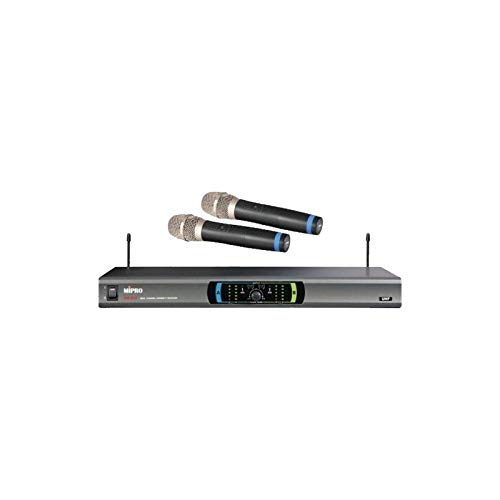
This image displays the complete Mipro MR-823 Dual Hand Wireless Microphone system. It features a sleek, rectangular receiver unit with a control panel and two antennas, accompanied by two black handheld wireless microphones. The microphones have silver grilles and blue accents near the base of the grille.
Awọn ẹya ara ẹrọ Olugba:
- Front panel display for channel and status indication.
- Volume controls for each microphone channel.
- Antenna inputs for optimal signal reception.
- Audio output jacks (XLR and 1/4" unbalanced) on the rear panel.
Handheld Microphone Features:
- Integrated transmitter.
- Agbara yipada.
- Batiri kompaktimenti.
Ṣeto
- Yọ awọn ohun elo kuro: Fara yọ gbogbo awọn ohun kan kuro ninu apoti.
- Position Receiver: Place the receiver unit on a stable, flat surface, away from potential sources of interference (e.g., computers, Wi-Fi routers). Ensure adequate ventilation around the unit.
- Asopọmọra Antenna: Screw the two antennas securely into their respective connectors on the rear of the receiver. Position them vertically for best reception.
- So Oju-iwe So pọ: Connect the receiver's audio output (XLR or 1/4" unbalanced) to your mixer, amplifier, or sound system using the provided audio cable.
- So agbara: Plug the power adapter into the DC input on the receiver and then into a suitable power outlet. Do not power on the unit yet.
- Fi Awọn Batiri Gbohungbohun sori ẹrọ: Open the battery compartment of each handheld microphone and insert fresh batteries, observing the correct polarity.
- Agbara Tan: Turn on your audio system first, then power on the Mipro MR-823 receiver. Finally, turn on each handheld microphone.
Awọn ilana Iṣiṣẹ
Amuṣiṣẹpọ ikanni:
The MR-823 system typically features automatic frequency synchronization. Once the receiver and microphones are powered on, they should automatically link to an available clear channel. Refer to the receiver's display for channel information.
Iṣatunṣe Iwọn didun:
Use the individual volume control knobs on the front panel of the receiver to adjust the output level of each microphone. Start with a low volume and gradually increase it to avoid feedback or distortion.
Lilo gbohungbohun:
- Mu gbohungbohun mu isunmọ 2-6 inches lati ẹnu rẹ fun gbigbe ohun to dara julọ.
- Avoid covering the microphone grille with your hand, as this can affect sound quality and signal strength.
- Ensure a clear line of sight between the microphones and the receiver for best wireless performance.
Itoju
- Ninu: Use a soft, dry cloth to clean the exterior of the receiver and microphones. Do not use liquid cleaners or abrasive chemicals.
- Rirọpo Batiri: Replace microphone batteries when the low battery indicator appears or when audio quality degrades. Always use fresh, high-quality batteries.
- Ibi ipamọ: When not in use for extended periods, remove batteries from the microphones and store the system in a cool, dry place, away from direct sunlight and extreme temperatures.
- Itọju Antenna: Fi ọwọ́ mú àwọn eriali náà dáadáa kí ó má baà tẹ̀ tàbí kí ó fọ́.
Laasigbotitusita
| Isoro | Owun to le Fa | Ojutu |
|---|---|---|
| Ko si ohun lati gbohungbohun | Microphone not powered on; Low or dead batteries; Receiver not powered on; Volume too low; Microphone out of range; Frequency mismatch. | Ensure microphone and receiver are on; Replace batteries; Check receiver power; Increase volume; Move closer to receiver; Re-sync frequencies if necessary. |
| Didara ohun ti ko dara / Aimi | Interference; Low batteries; Microphone too far from receiver; Obstructions; Incorrect gain settings. | Change operating frequency (if available); Replace batteries; Reduce distance; Remove obstructions; Adjust receiver volume. |
| Esi (ohun igbe) | Microphone too close to speakers; Volume too high; Room acoustics. | Move microphone away from speakers; Lower volume; Adjust speaker placement or use acoustic treatment. |
| Iwọn alailowaya kukuru | Obstructions; Interference; Antenna position. | Ensure clear line of sight; Re-position antennas; Avoid placing receiver near metal objects or other wireless devices. |
Awọn pato
| Ẹya ara ẹrọ | Sipesifikesonu |
|---|---|
| Brand | MIPRO |
| Awoṣe | MR-823 |
| Ipalara | 250 ohm |
| Orisun agbara | Agbara Batiri |
| Ifihan Ibuwọlu-si-Noise | 78 dB |
| Iwọn Igbohunsafẹfẹ | 100 Hz - 10 kHz |
| Idahun Igbohunsafẹfẹ | 16 kHz |
| Package Mefa | 34.01 x 24.99 x 21.01 cm |
| Iwọn Nkan | 122 g |
| Awọn batiri ti a beere | No (for receiver, but yes for microphones) |
| Pataki Ẹya | Ailokun |
| Àwọ̀ | Dudu |
| Pola Àpẹẹrẹ | Omnidirectional |
Atilẹyin ọja ati Support
For warranty information and technical support, please refer to the warranty card included with your product or visit the official MIPRO webojula. Tọju iwe-ẹri rira rẹ bi ẹri rira fun eyikeyi awọn ibeere atilẹyin ọja.
If you encounter issues not covered in this manual, please contact MIPRO customer service or your authorized dealer for assistance.