
1. Ifihan
Ìwé ìtọ́ni yìí pèsè àwọn ìwífún pàtàkì fún fífi sori ẹ̀rọ, ìṣiṣẹ́, àti ìtọ́jú ẹ̀rọ rẹ dáadáa ViewSonic VX3276-4K-MHD 32 Inch 4K UHD Monitor. Designed with a modern, minimalist style and ultra-thin bezels, this monitor delivers stunning 3840x2160p resolution, HDR10 content support, and versatile connectivity options for both home and office environments. Please read this manual thoroughly before using your monitor to ensure optimal performance and safety.

Aworan: Awọn ViewSonic VX3276-4K-MHD monitor displayed on a desk, highlighting its modern aesthetic and ultra-slim profile, suitable for office, graphic design, and home entertainment.

Aworan: A sunmọ-soke view emphasizing the ultra-slim panel of the monitor, contributing to its sleek design.

Àwòrán: Ìfihàn àtẹ̀gùnasing its frameless design, providing an expansive viewiriri iriri.
2. Alaye Aabo
- Máa gbé àtẹ̀gùn náà sí orí ilẹ̀ tí ó dúró ṣinṣin, tí ó tẹ́jú kí ó má baà jábọ́.
- Má ṣe dí àwọn ihò afẹ́fẹ́. Rí i dájú pé àyè tó wà ní àyíká monitor náà fún afẹ́fẹ́ tó yẹ.
- Lo adapter agbara ati awọn okun waya ti olupese pese nikan.
- Jẹ́ kí àwòkọ́ náà jìnnà sí omi, ọrinrin àti ooru tó le koko.
- Avoid exposing the screen to direct sunlight for extended periods.
- Maṣe gbiyanju lati tun atẹle naa ṣe funrararẹ. Tọkasi gbogbo iṣẹ si awọn oṣiṣẹ iṣẹ ti o peye.
- Yọọ atẹle naa kuro ninu iṣan agbara ṣaaju ṣiṣe mimọ.
3. Ohun ti o wa ninu Apoti
Nigbati o ba ṣii package, rii daju pe gbogbo awọn nkan wọnyi wa:
- ViewSonic VX3276-4K-MHD Monitor
- Okun agbara
- Okun HDMI
- Quick Bẹrẹ Itọsọna
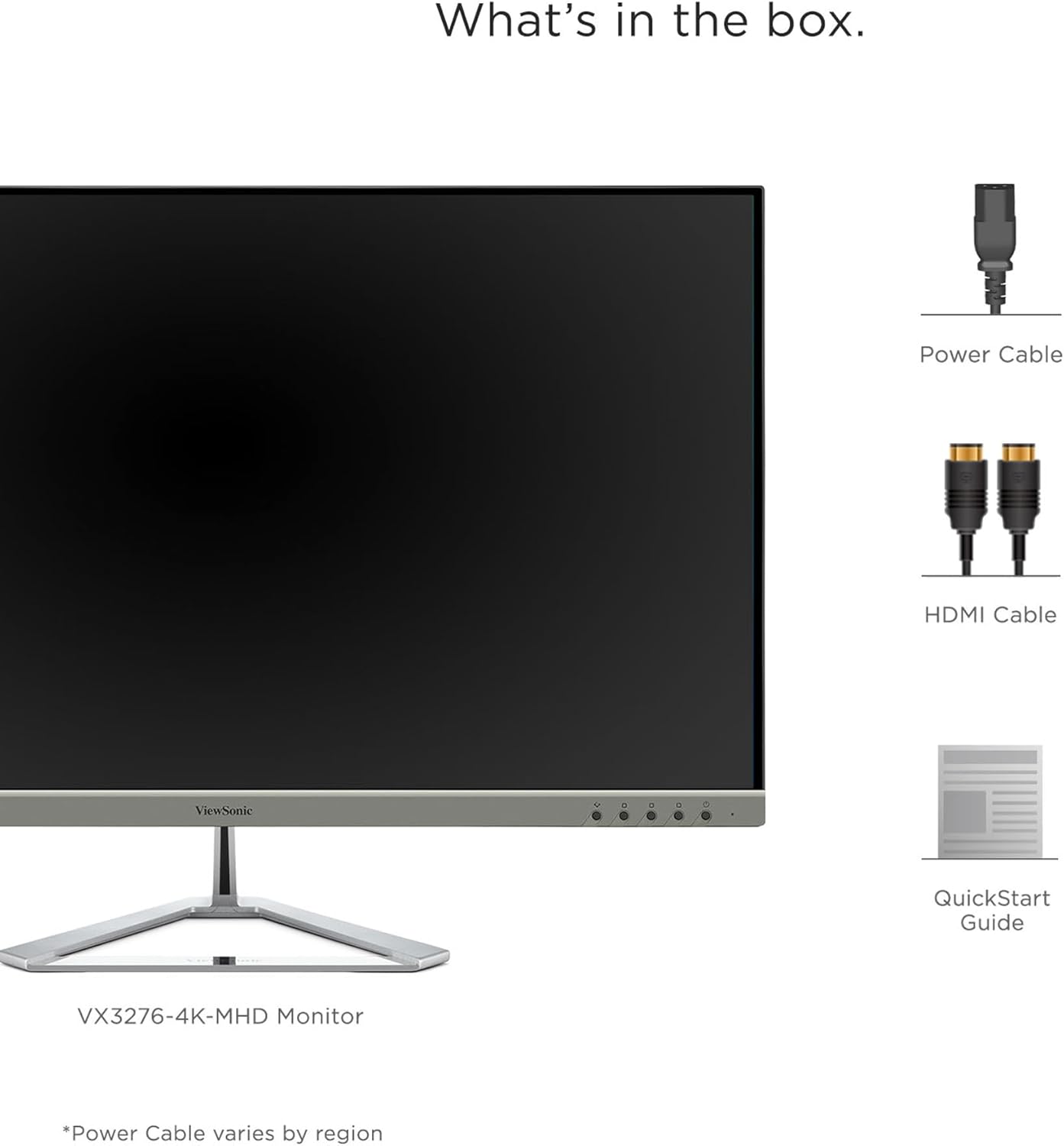
Image: A visual representation of the items included in the ViewSonic VX3276-4K-MHD monitor package.
4. Eto
4.1 Nto Iduro
Carefully remove the monitor and stand components from the packaging. Attach the stand base to the stand neck, then secure the assembled stand to the back of the monitor. Ensure all screws are tightened appropriately.
4.2 Nsopọ Atẹle
The VX3276-4K-MHD monitor offers versatile connectivity options. Connect your computer or other devices using the appropriate cables:
- HDMI: Use the provided HDMI cable to connect to your computer's HDMI port. The monitor features two HDMI 2.0 inputs.
- Ibudo Ifihan: Connect using a DisplayPort cable for high-resolution video and audio transmission.
- Mini DisplayPort: Use a Mini DisplayPort cable for compatible devices.
- Ohun Jade: Connect external speakers or headphones to the 3.5mm audio out jack.

Image: The back of the monitor displaying the various input ports, including HDMI, DisplayPort, Mini DisplayPort, and Audio Out, along with the integrated 2-Watt speakers.

Image: An illustration highlighting the versatile connectivity options of the monitor, including HDMI, DisplayPort, and Mini DisplayPort.
4.3 Asopọ agbara
Connect the power cable to the monitor's AC input and then plug it into a grounded electrical outlet.
4.4 Fifi sori ẹrọ VESA (Aṣayan)
The monitor is VESA compatible (100x100mm) for wall mounting or use with compatible monitor arms. Ensure you use appropriate VESA-compliant mounting hardware (not included) and follow the mounting instructions provided with your VESA mount.

Image: The VESA compatible mounting points on the rear of the monitor, allowing for flexible installation options.
5. Awọn ilana Iṣiṣẹ
5.1 Titan / Pa a
Press the power button located on the lower left side of the monitor to turn it on or off. The power LED will indicate the monitor's status.
5.2 Lori-iboju Ifihan (OSD) Akojọ aṣyn
Use the physical buttons on the back of the monitor to navigate and adjust settings within the On-Screen Display (OSD) menu. These buttons allow you to control various display parameters such as brightness, contrast, color settings, and input selection.
5.3 Optimized View Ètò (ViewNjagun)
The monitor features exclusive ViewMode presets to optimize screen performance for different applications. These presets include "Game," "Movie," "Web," "Text," and "Mono." Select the appropriate mode for your current activity to enhance your viewiriri iriri.

Image: An illustration demonstrating the different ViewMode settings (Game, Movie, Web, Text, Mono) that optimize the display for specific content.
5.4 Display Quality and HDR10 Support
Experience stunning 4K UHD (3840x2160p) resolution with the MVA panel technology, offering ultra-wide viewing angles and vibrant colors. HDR10 content support delivers a high dynamic range for deep contrast, rich color, and detailed visuals.

Image: A visual comparison highlighting the clarity and detail provided by the 4K Ultra HD resolution.

Image: A comparison demonstrating the superior contrast and vibrant colors achieved with HDR10 content support compared to conventional display.

Image: An illustration demonstrating the wide 178-degree viewing angles provided by MVA Panel Technology.
5.5 Imudara Viewing Comfort (Eye-Care)
The monitor incorporates Flicker-Free technology and a Blue Light Filter to reduce eye fatigue during prolonged use, promoting a more comfortable viewiriri iriri.

Image: A simulated comparison showing the benefits of Flicker-Free and Blue Light technology in reducing eye strain.
5.6 Integrated Speakers
The monitor includes dual integrated 2-Watt speakers for audio output. You can also connect external audio devices via the Audio Out port.

Image: An illustration indicating the location and function of the dual integrated 2-Watt speakers on the monitor.
5.7 Multi-Tasking and Productivity
The large 32-inch screen and 4K resolution provide ample screen real estate for multi-tasking, allowing you to open multiple windows side-by-side for enhanced productivity.

Image: The monitor set up in a home office, demonstrating its capability to display multiple applications simultaneously for efficient multi-tasking.
6. Itọju
6.1 Ninu iboju
Lati nu iboju naa, rọra nu rẹ pẹlu asọ ti ko ni lint. Fun awọn ami alagidi, fẹẹrẹ dampen the cloth with water or a mild, non-abrasive screen cleaner. Never spray liquid directly onto the screen.
6.2 Ṣiṣe mimọ Casing
Lo asọ ti o rọ, ti o gbẹ lati nu atẹle naa casing. Avoid using strong detergents or abrasive cleaners, as they may damage the surface.
7. Laasigbotitusita
7.1 Kò sí àwòrán lórí ìbòjú
- Rii daju pe okun agbara ti sopọ ni aabo si atẹle mejeeji ati iṣan agbara.
- Verify that the video cable (HDMI, DisplayPort, Mini DisplayPort) is firmly connected to both the monitor and your computer.
- Ṣayẹwo boya orisun titẹ sii to pe ti yan ninu akojọ aṣayan OSD.
- Jẹrisi pe kọmputa rẹ ti wa ni titan ko si ni ipo oorun.
7.2 Àwòrán náà jẹ́ àláìmọ́ tàbí ó ti bàjẹ́
- Adjust the display resolution on your computer to the monitor's native resolution (3840x2160).
- Ṣayẹwo okun fidio fun eyikeyi ibajẹ tabi awọn asopọ alaimuṣinṣin.
- Tun atẹle naa pada si awọn eto aiyipada ile-iṣẹ nipasẹ akojọ OSD.
7.3 Kò sí ohùn láti ọ̀dọ̀ àwọn agbọ́hùnsọ
- Ensure the volume on the monitor and your computer is not muted and is set to an audible level.
- Verify that the audio output is correctly configured on your computer to use the monitor's speakers.
- If using an external audio device, ensure it is properly connected to the Audio Out port.
8. Awọn pato

Image: A diagram illustrating the physical dimensions of the ViewSonic VX3276-4K-MHD monitor, including screen size and overall measurements.
| Ẹya ara ẹrọ | Ẹ̀kúnrẹ́rẹ́ |
|---|---|
| Brand | ViewSonic |
| Nọmba awoṣe | VX3276-4K-MHD |
| Iwon iboju | 32 inches |
| Ipinnu | 4K UHD (3840x2160p) |
| Apakan Ipin | 16:9 |
| Oṣuwọn sọtun | 60 Hz |
| Akoko Idahun | 4 Milise-aaya |
| Ifihan Iru | LED LCD (MVA Panel Technology) |
| Imọlẹ | 300 cd/m2 |
| Ipin Itansan | 2500:1 |
| Viewigun igun | Awọn iwọn 178 |
| Asopọmọra | 2x HDMI, 1x DisplayPort, 1x Mini DisplayPort |
| Ohun | Dual Integrated 2W Speakers, 1x Audio Out |
| Pataki Awọn ẹya ara ẹrọ | HDR10 Support, Flicker-Free, Blue Light Filter, ViewMode Presets, Anti-Glare Screen, FreeSync |
| Iṣagbesori Iru | VESA Compatible (100x100mm) |
| Iwọn (D x W x H) | 9.1"D x 28.1"W x 19.9"H |
| Iwọn Nkan | 15 iwon |
| Agbara agbara | 56 Wattis |
9. Atilẹyin ọja & Atilẹyin
9.1 atilẹyin ọja Alaye
Awọn ViewSonic VX3276-4K-MHD monitor comes with a Three-year limited warranty on parts, labor, and backlight. Jọwọ ṣe idaduro ẹri rira rẹ fun awọn iṣeduro atilẹyin ọja.
9.2 Onibara Support
For technical assistance, product registration, or further information, please visit the official ViewSonic website or contact their customer support. Refer to the Quick Start Guide for specific contact details or scan the QR code on the back of your monitor for support resources.
Fídíò: Òṣìṣẹ́ kan ViewIfihan fidio sonicasing the features and design of the ViewSonic 32 Inch VX3276-4K-MHD Monitor. This video provides a general overview ti ọja.