
HZPOWEN eggreh-001
HZPOWEN AC/DC Adapter Charger User Manual
Model: eggreh-001
1. Ọja Ipariview
This HZPOWEN AC/DC Adapter Charger is designed as a replacement power supply for various jump starters and power packs. It provides reliable power for charging and maintaining the readiness of your automotive battery jump starters and portable power supplies.
It is compatible with a range of models including Duralast Gold BP-DLG, BPDLG 700 AMP, 900 Amp BP-DL900 Peak Jump Starter Battery Jumpers, Duracell Powerpack 450 Amp, 450A, 300 amp Jump Starter Power Supply Cords, Duracell Power pack 600 Heavy Duty Portable 600 Watt Power pack 600HD 852-2007 AC Charger Input Socket, Solar Booster Pac ESA22 ES2500 SOLESA-22 SOLES2500KE ES5000 SOLES5000, and CEN TECH 5 IN 1 PORTABLE POWER PACK ITEM 60703 Battery Charger.

Figure 1: The HZPOWEN AC/DC Adapter Charger. This image displays the main unit with its two-prong US-style plug and the attached output cable terminating in a barrel connector.
Awọn ẹya pataki:
- Ibamu gbooro: Designed to work with multiple brands and models of jump starters and power packs.
- Awọn iwe-ẹri Abo: CE, FCC, and RoHS certified, ensuring adherence to safety and environmental standards.
- Awọn aabo ti a ṣe sinu: Features multiple safety mechanisms to protect both the adapter and the connected device.

Figure 2: Built-in Safety Protections. This diagram illustrates the protective features of the adapter, including temperature protection, over-load protection, over-charge protection, and short-circuit protection.
2. Awọn ilana iṣeto
Before using the adapter, ensure that your jump starter or power pack is compatible with the specifications of this charger. Verify the input voltage and connector size requirements of your device.
Nsopọ Adapter:
- Locate the charging input socket on your jump starter or power pack.
- Insert the barrel connector of the HZPOWEN adapter firmly into the device's charging socket. The connector size is 5.5mm x 2.5mm.
- Plug the two-prong AC plug of the adapter into a standard 100-240V AC wall outlet.
Once connected, your device should begin charging. Refer to your device's manual for specific charging indicators.
3. Ṣiṣẹ Ṣaja
The HZPOWEN AC/DC Adapter Charger operates automatically once connected to a power source and a compatible device. It is designed to provide a stable 12V 2A output for efficient charging.
Ilana gbigba agbara:
- Rii daju pe awọn opin mejeeji ti ohun ti nmu badọgba ti sopọ ni aabo.
- The adapter will automatically detect the charging needs of the connected device.
- Monitor your device's charging status indicators to determine when charging is complete.
- Once charging is complete, disconnect the adapter from the wall outlet first, then from your device.
The adapter is equipped with safety features to prevent overcharging and short circuits, ensuring safe operation.
4. Itọju ati Itọju
Proper care and maintenance will extend the lifespan of your HZPOWEN AC/DC Adapter Charger.
- Ninu: Wipe the adapter with a dry, soft cloth. Do not use liquid cleaners or solvents.
- Ibi ipamọ: Tọju ohun ti nmu badọgba ni itura, aye gbigbẹ kuro lati orun taara ati ọrinrin nigbati ko si ni lilo.
- Mimu: Avoid bending or crimping the cable excessively, especially near the connectors, as this can damage internal wires.
- Ayewo: Lorekore ṣayẹwo ohun ti nmu badọgba ati okun fun eyikeyi awọn ami ti ibajẹ, gẹgẹbi awọn onirin frayed tabi sisan casing. Dá lílò dúró tí a bá rí ìbàjẹ́.
5. Laasigbotitusita
If you encounter issues with your HZPOWEN AC/DC Adapter Charger, refer to the following common problems and solutions:
| Isoro | Owun to le Fa | Ojutu |
|---|---|---|
| Adapter not charging device. |
|
|
| Charging stops intermittently. |
|
|
| Adapter naa lero gbigbona lakoko lilo. |
|
|
If the problem persists after trying these solutions, please contact HZPOWEN customer support.
6. Awọn pato
| Ẹya ara ẹrọ | Ẹ̀kúnrẹ́rẹ́ |
|---|---|
| Brand | HZPOWEN |
| Nọmba awoṣe | ẹyin-001 |
| Iṣagbewọle Voltage Ibiti | 100-240V AC, 50/60Hz |
| O wujade Voltage/lọwọlọwọ | 12V DC, 2A |
| Asopọmọra Iwon | 5.5mm x 2.5mm |
| Àwọ̀ | Dudu |
| Iwọn Nkan | 2.89 iwon |
| Package Mefa | 3.74 x 2.8 x 2.24 inches |
| Awọn iwe-ẹri | CE, FCC, RoHS |
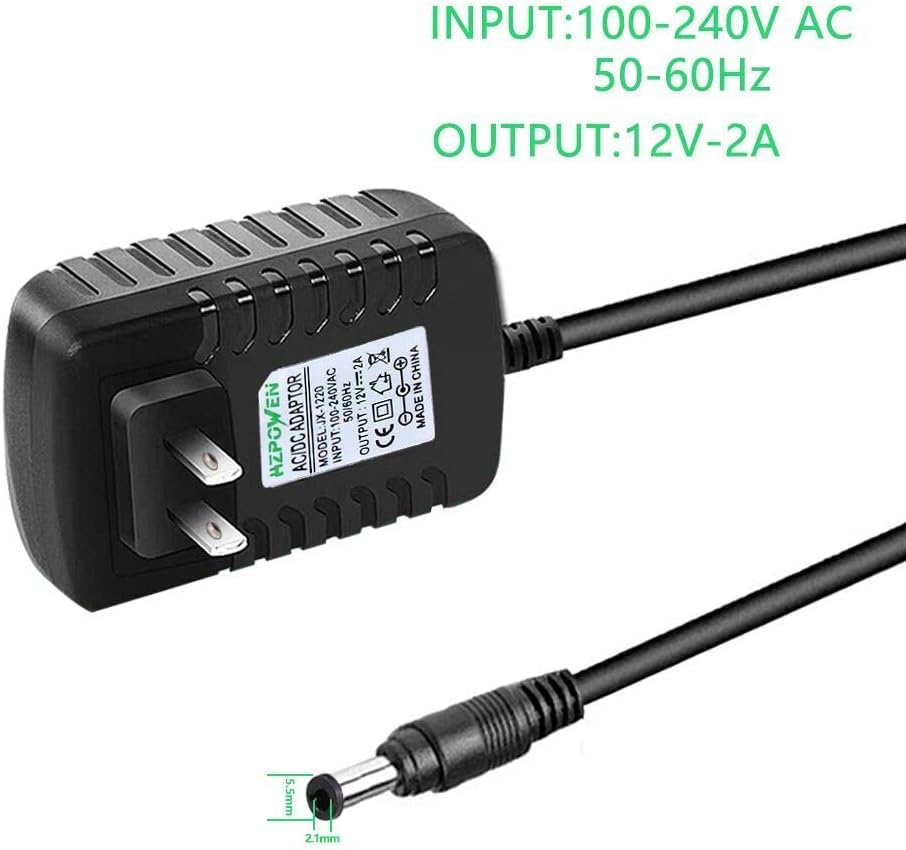
Figure 3: Input and Output Specifications. This image visually confirms the adapter's input voltage range (100-240V AC, 50-60Hz) and output specifications (12V-2A).

Figure 4: Adapter Dimensions. This image provides a visual representation of the adapter's physical dimensions, including its width, height, and depth.
7. Atilẹyin ọja ati Support
Specific warranty information for this HZPOWEN product is not provided in the product details. For warranty claims or technical support, please contact HZPOWEN directly through their official webojú-òpó wẹ́ẹ̀bù tàbí olùtajà tí wọ́n ti ra ọjà náà lọ́wọ́ rẹ̀.
When contacting support, please have your product model number (eggreh-001) and purchase details ready.
Ask a question about this manual
Ask about setup, troubleshooting, compatibility, parts, safety, or missing instructions. Manuals+ will review the question and use this page’s manual context to help answer it.