
1. Ifihan
This manual provides essential instructions for the safe and effective use of your HZPOWEN AC/DC Adapter Charger. Please read this manual thoroughly before using the product and retain it for future reference.
The HZPOWEN AC/DC Adapter Charger is designed to provide reliable power for various compatible jump starters and portable power stations. It features a universal input voltage range and specific output for charging your devices.
2. Awọn Ilana Aabo pataki
- Do not expose the adapter to rain or moisture.
- Do not disassemble the adapter. Refer all servicing to qualified personnel.
- Rii daju pe iwọn didun ti adapter naatage and current ratings match your device's requirements before connecting. Incorrect voltage le ba ẹrọ rẹ jẹ.
- Avoid using the adapter if the cord or plug is damaged.
- Keep the adapter away from heat sources and direct sunlight.
- Yọọ ohun ti nmu badọgba lati inu iṣan agbara nigbati ko si ni lilo.

Image 1: HZPOWEN AC/DC Adapter Charger. This image displays the main unit of the adapter with its attached power cord and barrel connector. The label on the adapter shows input and output specifications.
3. Awọn alaye ọja
| Ẹya ara ẹrọ | Sipesifikesonu |
|---|---|
| Awoṣe | HP-13510 |
| Iṣagbewọle Voltage Ibiti | AC 100-240V, 50/60Hz |
| O wujade Voltage | DC 13.5V |
| Ijade lọwọlọwọ | 1A |
| Asopọmọra Iwon | 5.5mm x 2.5mm (Asopọ̀ Bọ́ọ̀lù) |
| Awọn iwe-ẹri | CE / FCC / RoHS |
| Awọn iwọn | Approx. 3.1 x 1.96 x 1.18 inches (main body) |
| Iwọn | Isunmọ. 3.84 iwon |

Image 2: Adapter Dimensions. This image illustrates the physical dimensions of the adapter, including its length, width, and height in inches.
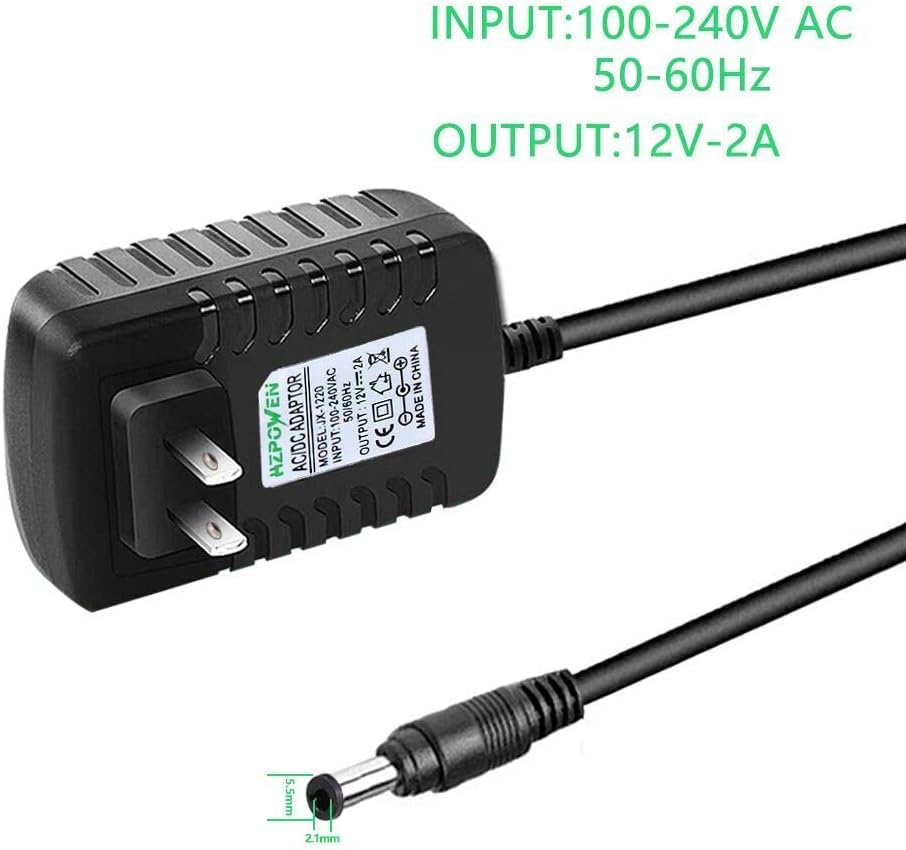
Image 3: Connector Size. This image highlights the barrel connector, showing its outer diameter of 5.5mm and inner diameter of 2.1mm. Akiyesi: The product description states a 5.5mm x 2.5mm connector. Please verify your device's required inner diameter for compatibility.
4. Ibamu
This adapter is designed to be compatible with a range of jump starters and portable power stations, including but not limited to:
- Peak Stanley FATMAX 700 Peak 350 AMP J7CSR, J7CS Jump Starter
- Peak 300, 450, 600, 700 Amp Lọ Starters
- Duralast Gold BP-DLG, BP-DL900 (700 AMP, 900 Amp) Jump Starter
- Duracell Powerpack 450 Amp, 300 Amp
- Stanley J309, J3B09 (600 Peak 300 Amp)
Akiyesi pataki:
Ṣe àyẹ̀wò ìpele ìṣípayá nígbà gbogbotage and connector size requirements of your specific device before connecting this adapter. While this adapter is rated for 13.5V 1A with a 5.5mm x 2.5mm connector (as per product description), some compatible devices may have slightly different requirements (e.g., 12V output or 5.5mm x 2.1mm connector as seen in some product images). Using an adapter with incorrect specifications can damage your device.
5. Awọn ilana iṣeto
- Ṣayẹwo Adapter: Before first use, visually inspect the adapter and its cable for any signs of damage. Do not use if damaged.
- Jẹrisi Ibamu Ẹrọ: Confirm that your jump starter or portable power station requires a 13.5V DC input and has a compatible 5.5mm x 2.5mm barrel connector.
- Sopọ si Ẹrọ: Insert the barrel connector of the HZPOWEN adapter firmly into the charging port of your jump starter or portable power station.
- Sopọ si Ile-iṣẹ Agbara: Plug the AC prongs of the adapter into a standard AC 100-240V wall outlet.
- Bibẹrẹ Gbigba agbara: Once connected, your device should begin charging. Refer to your device's manual for specific charging indicators (e.g., LED lights).
6. Awọn ilana Iṣiṣẹ
The HZPOWEN AC/DC Adapter Charger operates automatically once connected to a power source and a compatible device. It is designed for continuous charging until the connected device reaches full capacity, or until disconnected.
- Akoko gbigba agbara: Charging duration will vary depending on the capacity and current charge level of your jump starter or portable power station. Consult your device's manual for estimated charging times.
- Idaabobo overcharge: The adapter is equipped with built-in safety protections, including overcharge protection, to prevent damage to your device from excessive charging.
- Abojuto iwọn otutu: The adapter includes temperature protection to ensure safe operation.

Image 4: Built-in Safety Protections. This diagram illustrates the various safety features integrated into the adapter, including protection against temperature fluctuations, overloads, overcharging, and short circuits.
7. Itọju ati Itọju
- Ninu: Ge asopọ ohun ti nmu badọgba lati gbogbo awọn orisun agbara ṣaaju ṣiṣe mimọ. Lo asọ asọ ti o gbẹ lati nu ita. Ma ṣe lo awọn olutọpa olomi tabi awọn olomi.
- Ibi ipamọ: Store the adapter in a cool, dry place away from direct sunlight and extreme temperatures. Coil the cable loosely to prevent kinks or damage.
- Ayewo: Periodically inspect the adapter and cable for any signs of wear, cuts, or damage. Replace the adapter if any damage is observed.
8. Laasigbotitusita
| Isoro | Owun to le Fa | Ojutu |
|---|---|---|
| Ẹrọ ko gba agbara |
|
|
| Adapter naa gbona nigba lilo |
|
|
9. Atilẹyin ọja ati Support
HZPOWEN products are typically covered by a manufacturer's warranty. For specific warranty details, including duration and terms, please refer to the product packaging or contact HZPOWEN customer support directly.
For technical assistance, troubleshooting, or warranty claims, please contact your retailer or the manufacturer. Keep your purchase receipt as proof of purchase.
Olupese: HZPOWEN
Webojula: Visit HZPOWEN Store on Amazon