
1. Ifihan ati Loriview
The Fender Tone Master Twin Reverb amplifier faithfully models the circuitry and 85-watt power output of an original Twin tube amp using advanced digital processing. It features a high-performance 200-watt digital power amp to achieve the headroom and dynamic range of a vintage Twin tube amp. Equipped with two Jensen N-12K neodymium speakers and housed in a resonant pine cabinet, this amplifier delivers authentic Twin Reverb tone and volume at approximately half the weight of an all-tube original. Front panel controls provide a playing experience identical to the tube version, including Fender's renowned reverb and tremolo effects. Rear panel features offer modern convenience, such as an output power selector, balanced XLR line output with Impulse Response (IR) cabinet simulations, a mute switch for silent use, and a USB port for firmware updates.
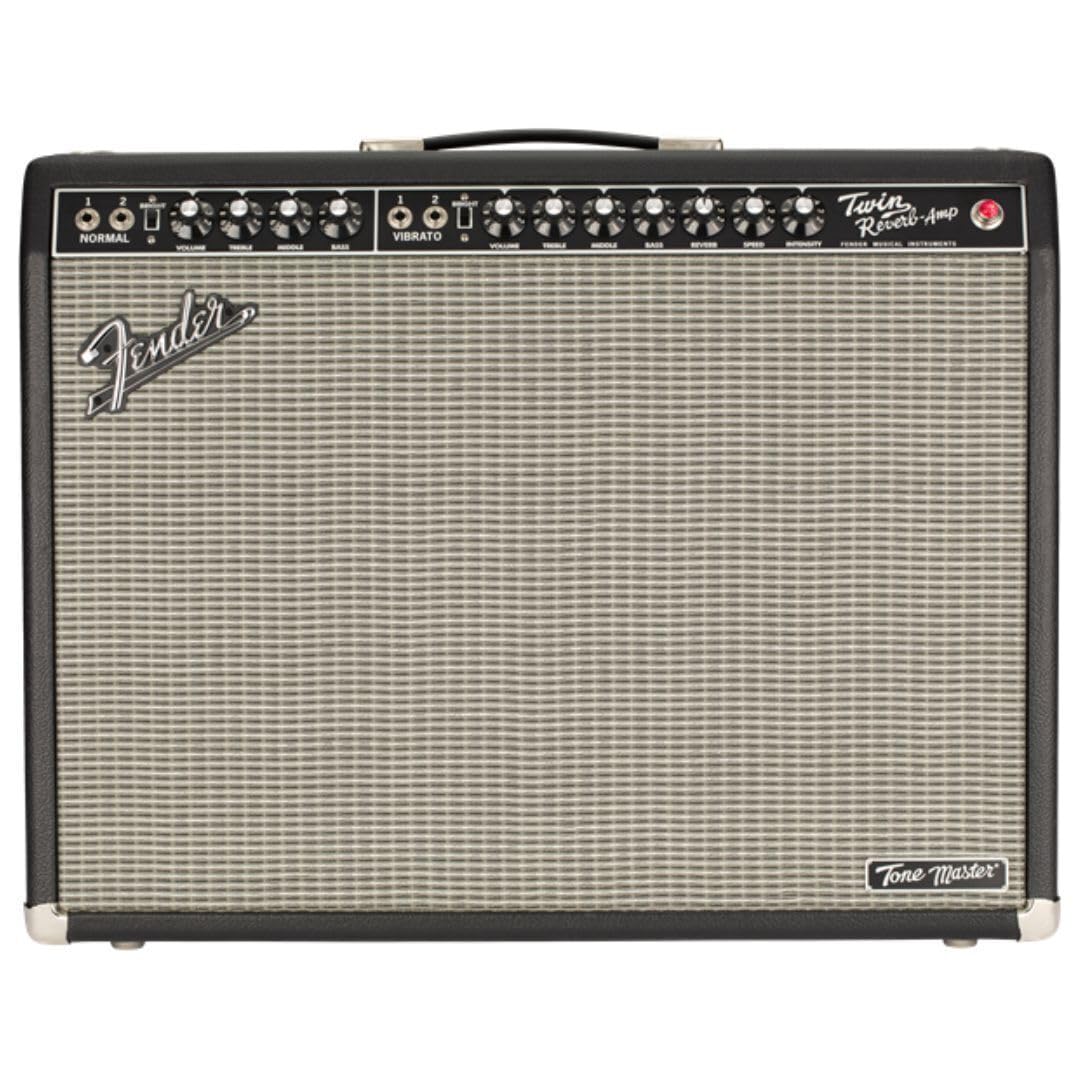
olusin 1: Iwaju view of the Fender Tone Master Twin Reverb Guitar Amplifier.
2. Eto
2.1 Ṣiṣii silẹ
Fara yọ awọn amplifier from its packaging. Retain all packing materials for future transport or service needs. Inspect the ampìfọ́mọ́ra fún àmì ìbàjẹ́ èyíkéyìí. Tí a bá rí ìbàjẹ́, kan sí oníṣòwò rẹ lẹ́sẹ̀kẹsẹ̀.
2.2 Awọn isopọ
- Jack Input: Connect your guitar to the INPUT jack on the front panel using a standard 1/4-inch instrument cable.
- Cable Agbara: Connect the supplied power cable to the AC INPUT on the rear panel and then to a grounded AC outlet.
- Ẹsẹ ẹlẹsẹ: Connect the optional footswitch to the FTSW jack on the front panel for remote control of certain functions.
- Balanced XLR Line Output: Use this output on the rear panel to connect to a mixing console or recording interface. This output includes Impulse Response (IR) cabinet simulations.
- Ibudo USB: The USB port on the rear panel is used for firmware updates.
2.3 Agbara Tan / Pa
- Rí i dájú pé gbogbo àwọn ìsopọ̀ wà ní ààbò àti pé a ti ṣètò àwọn ìṣàkóso ìró ohùn sí èyí tó kéré jù.
- Flip the POWER switch on the rear panel to the ON position. The power indicator light on the front panel will illuminate.
- Wait a few seconds for the amplifier lati initialize.
- To turn off, reverse the procedure: turn down volume, then flip the POWER switch to OFF.

olusin 2: Ẹyìn view ti awọn amplifier, highlighting power input, speaker outputs, and XLR line out.
3. Ṣiṣẹ
3.1 Iwaju Panel idari
The front panel provides intuitive controls mirroring a traditional Twin Reverb tube amplifier.
- Ikanni deede: Features VOLUME, TREBLE, MIDDLE, and BASS controls for a clean, uncolored tone.
- Vibrato Channel: Offers VOLUME, TREBLE, MIDDLE, BASS, REVERB, INTENSITY, and SPEED controls. This channel includes built-in reverb and tremolo effects.
- Yipada Imọlẹ: Located on both channels, this switch adds a high-frequency boost for a brighter tone.

Àwòrán 3: Ìparí ti amplifier's front panel controls.
3.2 Ru Panel Awọn ẹya ara ẹrọ
- Output Power Selector: Allows selection between full 85-watt output and five attenuated settings for reduced volume without sacrificing tone.
- Balanced XLR Line Output: Provides a professional-grade output for direct connection to PA systems or recording equipment. Includes switchable Impulse Response (IR) cabinet simulations for versatile tone shaping.
- Yipada Mute: Silences the amplifier's speakers for silent practice or recording.
- Ibudo USB: For connecting to a computer to perform firmware updates, ensuring your amplifier always has the latest features and performance enhancements.
4. Itọju
4.1 Itọju Gbogbogbo
Lati rii daju awọn longevity ati ti aipe iṣẹ ti rẹ amplifier, keep it in a clean, dry environment away from extreme temperatures and humidity. Avoid placing heavy objects on top of the amplifier.
4.2 Ninu
Lo asọ, gbẹ asọ lati nu awọn ode ti awọn amplifier. Do not use abrasive cleaners or solvents, as these can damage the finish. Ensure the ampA ti yọ lifier kuro ki a to nu.
4.3 Fentilesonu
Always ensure adequate ventilation around the ampìfọ́mọ́ra láti dènà ìgbóná jù. Má ṣe dí àwọn ihò afẹ́fẹ́ kankan.
5. Laasigbotitusita
5.1 Ko si Agbara
- Check that the power cable is securely connected to both the amplifier ati ki o kan ṣiṣẹ AC iṣan.
- Verify that the POWER switch is in the ON position.
- Ensure the AC outlet is functioning by testing it with another device.
5.2 Ko si Ohun
- Confirm your guitar is properly connected to the INPUT jack.
- Check that the VOLUME controls on both the amplifier and your guitar are turned up.
- Ensure the MUTE switch on the rear panel is not engaged.
- Test with a different instrument cable and guitar to rule out faulty equipment.
5.3 Daru Ohun
- Reduce the VOLUME or GAIN settings on the amplifier.
- Check your guitar's output level; some active pickups can be very hot.
- Rii daju pe amplifier is not set to an excessively attenuated power setting if you desire a clean tone at high volume.
5.4 Hum/Noise
- Rí i dájú pé gbogbo àwọn okùn wa ni ààbò tó péye àti pé wọ́n wà ní ipò tó dára.
- Gbiyanju pulọọgi amplifier into a different AC outlet or a power conditioner.
- Gbe awọn ampyọ kuro ninu awọn ẹrọ itanna miiran ti o le fa idamu.
6. Awọn pato
| Orukọ awoṣe | Tone Master Twin Reverb |
| Nọmba awoṣe | 2274200000 |
| Ijade Wattage | 200 Watts (simulates 85-watt tube amp) |
| Awọn agbọrọsọ | Two (2) 12-inch Jensen N-12K Neodymium Speakers |
| Ohun elo minisita | Resonant Pine |
| Awọn iwọn (H x W x D) | 31.7 x 26.3 x 15.9 inches |
| Iwọn Nkan | 45.2 iwon |
| Awọn ipa | Reverb, Tremolo |
7. Atilẹyin ọja ati Support
This Fender Tone Master Twin Reverb Guitar Amplifier comes with a 2-year warranty. For warranty service, technical support, or any questions regarding your amplifier, please contact Fender customer support or visit the official Fender website for detailed information and service center locations.