
1. Ifihan
The CEM DT-9516 is a professional True RMS Digital Multimeter designed for safe, reliable, and accurate electrical measurements. This compact and easy-to-use instrument is ideal for identifying and resolving issues in various electrical and electronic systems. It features auto-ranging capabilities and a 6000-count display, making it suitable for both professional and hobbyist applications.
2. Alaye Aabo
Read all safety information and operating instructions before using this meter.
Ẹrọ yii ni ibamu pẹlu awọn iṣedede ailewu wọnyi:
- EN61010-1 nran IV 600V, Nran III 1000V
- 1000V input protection on all ranges
- 10A/1000V and 0.8A/1000V fuses protection on current ranges
Awọn iṣọra Aabo Gbogbogbo:
- Rí i dájú pé àwọn ìtọ́wò ìdánwò wà ní ipò tó dára àti pé wọ́n so wọ́n pọ̀ dáadáa.
- Ma ṣe gbiyanju lati wiwọn voltagawọn iṣan omi tabi awọn sisan omi ti o kọja awọn opin ti o pọju ti a sọ.
- Lo iṣọra nigbati o ba n ṣiṣẹ pẹlu awọn iyika laaye.
- Replace batteries and fuses only with the specified types and ratings.
- Má ṣe lo mita náà bí ó bá dàbí pé ó ti bàjẹ́ tàbí tí àpótí náà bá ṣí sílẹ̀.
3. Eto ati Ibẹrẹ Ibẹrẹ
3.1 Fifi sori batiri
The CEM DT-9516 requires three (3) AAA batteries for operation. These are typically included with the device.
- Locate the battery compartment cover on the rear of the multimeter.
- Lo screwdriver lati ṣii yara batiri naa.
- Insert three AAA batteries, observing the correct polarity (+ and -) as indicated inside the compartment.
- Rọpo ideri kompaktimenti batiri ki o ni aabo pẹlu dabaru.

Figure 1: CEM DT-9516 Multimeter with test leads, AAA batteries, and a protective carrying case.
3.2 Nsopọ Awọn itọsọna Igbeyewo
Before taking any measurements, ensure the test leads are correctly connected to the multimeter.
- Sopọ awọn pupa test lead to the VΩHz%CAP àpò ìtẹ̀wọlé (ìtẹ̀wọlé rere).
- Sopọ awọn dudu test lead to the COM input jack (common/negative input).
- For current measurements (mA, µA), connect the red lead to the mAµA Jack input.
- For high current measurements (up to 10A), connect the red lead to the 10A Jack input.

Nọmba 2: Alaye view of the multimeter's input jacks and function switch, indicating where to connect test leads for various measurements.
4. Awọn ilana Iṣiṣẹ
The DT-9516 features an intuitive interface with a large LCD display and a rotary function switch for selecting measurement modes.

Olusin 3: Pariview of the CEM DT-9516 Multimeter's controls and display elements.
4.1 Function Switch and Auto Ranging
Turn the rotary switch to the desired measurement function. The DT-9516 is an auto-ranging multimeter, meaning it automatically selects the appropriate measurement range for the input signal, simplifying operation.

Figure 4: The multimeter's auto-ranging feature allows for intuitive operation without manual range selection.
4.2 Awọn iṣẹ wiwọn
The DT-9516 offers a wide range of measurement capabilities:
- Voltage (AC/DC): Select the 'V' position on the rotary switch. The meter will automatically detect AC or DC voltage.
- Current (AC/DC): Select the 'mAµA' or '10A' position. Ensure test leads are connected to the correct current input jacks.
- Agbára ìdènà (Ω): Select the 'Ω' position.
- Capacitance (CAP): Select the 'CAP' position.
- Frequency (Hz%): Select the 'Hz%' position.
- Idanwo Diode: Select the diode symbol position.
- Itesiwaju: Select the continuity symbol position. An audible tone indicates continuity.
- Iwọn otutu: Select the temperature symbol position. This function typically requires a K-type thermocouple (sold separately).
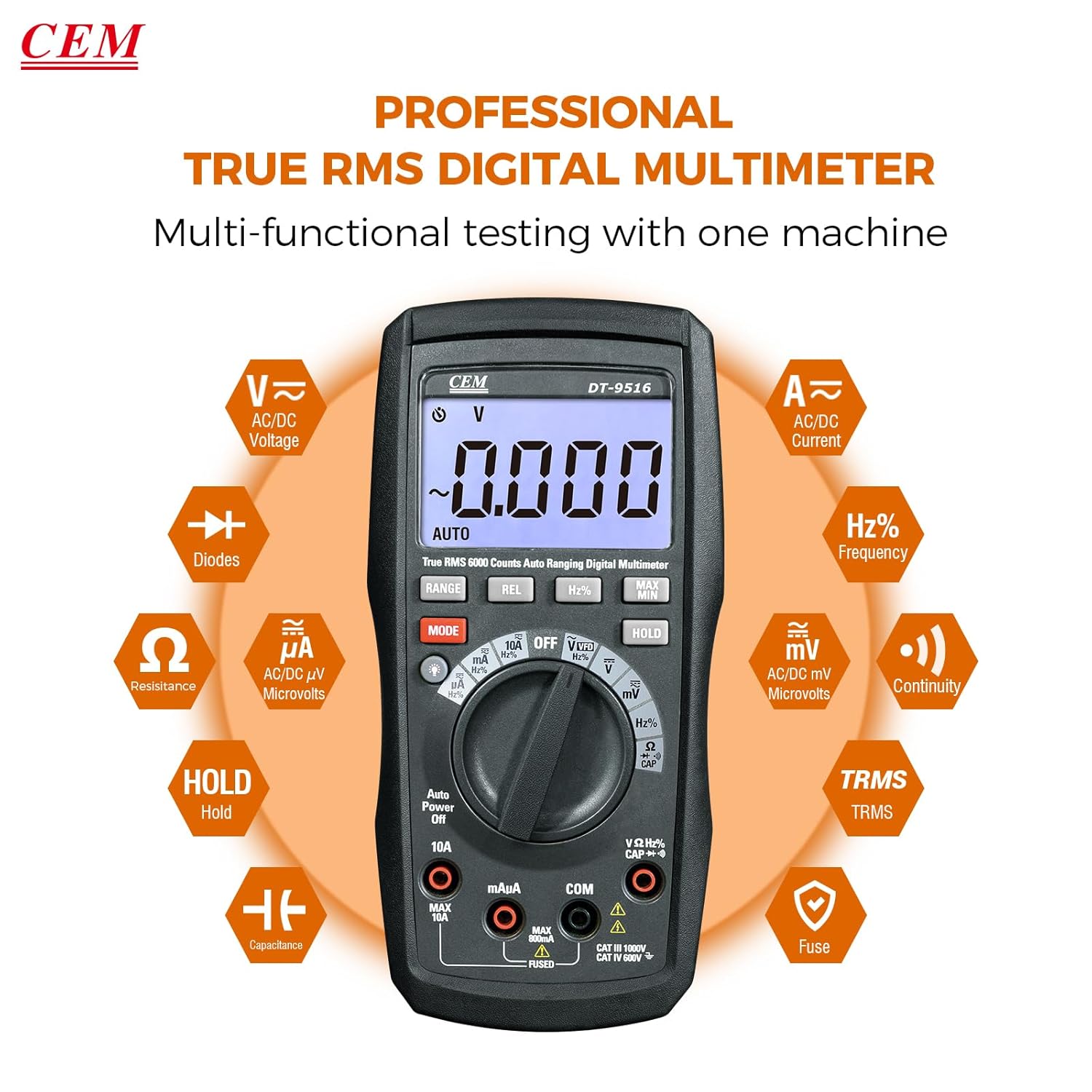
Figure 5: The multimeter's multi-functional testing capabilities are clearly illustrated.

Figure 6: The 6000-count display provides higher resolution and more accurate readings.
4.3 Awọn iṣẹ pataki
- Iṣẹ VFD: The Variable Frequency Drive (VFD) function utilizes a low-pass filter for accurate measurement of VFD signals. Select the 'VFD' position on the rotary switch.
- Idaduro data (HOLD): Tẹ awọn DIMU button to freeze the current measurement on the display. Press again to release. This is useful for recording readings in difficult-to-view awọn ipo.
- O pọju/MIN: Tẹ awọn MAX/MIN button to record the maximum and minimum values during a measurement session.
- REL (Ìwọ̀n Ìbátan): Tẹ awọn REL button to store the current reading as a reference value. Subsequent measurements will be displayed as a deviation from this reference.
- Imọlẹ ẹhin: Press the backlight button (often integrated with another function or a dedicated button) to illuminate the display for better visibility in low-light conditions.

Figure 7: The VFD function enables precise measurement of variable frequency drive signals.

Figure 8: The Data Hold function allows users to lock and record measurement values with a single button press.

Figure 9: The high-definition LCD display ensures clear digital readings at a glance, even with multiple indicators.
5. Itọju
5.1 Ninu
Pa ọran naa pẹlu ipolowoamp Aṣọ àti ọṣẹ ìfọṣọ díẹ̀. Má ṣe lo àwọn ohun ìfọṣọ tàbí àwọn ohun olómi. Jẹ́ kí àwọn ibi tí a fi ń wọlé wà ní ìpamọ́ pẹ̀lú ẹ̀gbin àti ọrinrin.
5.2 Batiri Rirọpo
When the battery indicator appears on the display, replace the batteries as described in Section 3.1. Always use three new AAA batteries.
5.3 Fiusi Rirọpo
If the current measurement functions cease to operate, the internal fuses may need replacement. Refer to the safety section for fuse specifications (10A/1000V and 0.8A/1000V). Fuse replacement should only be performed by qualified personnel.
Warning: Disconnect all test leads from the meter and any circuit before opening the case for battery or fuse replacement.
6. Laasigbotitusita
- Ko si Ifihan: Ṣàyẹ̀wò fífi bátìrì sílẹ̀ kí o sì gba agbára. Rọpò bátìrì tí ó bá pọndandan.
- Awọn kika ti ko tọ:
- Ensure test leads are properly connected to the correct input jacks for the selected function.
- Verify the function switch is set to the appropriate measurement type.
- Ṣayẹwo fun awọn okun idanwo ti o bajẹ.
- For current measurements, check the internal fuses.
- "OL" or "OVERLOAD" on Display: The measured value exceeds the selected range. The auto-ranging feature should typically prevent this, but if it occurs, ensure the meter is capable of measuring the expected value.
7. Awọn pato
| Ẹya ara ẹrọ | Ẹ̀kúnrẹ́rẹ́ |
|---|---|
| Nọmba awoṣe | DT-9516 |
| Ifihan | LCD 6000 Counts |
| Ẹka Abo | CAT IV 600V, CAT III 1000V |
| Voltage Idiwon | AC / DC to 1000V |
| Iwọn Iwọn lọwọlọwọ | AC/DC up to 10A |
| Idiwọn Resistance | Titi di 60 MΩ |
| Iwọn Iwọn agbara | Up to 6000µF |
| Wiwọn Igbohunsafẹfẹ | Titi di 10MHz |
| Idanwo Diode | Bẹẹni |
| Igbeyewo Ilọsiwaju | Yes (with audible indicator) |
| Pataki Awọn ẹya ara ẹrọ | True RMS, Auto Ranging, VFD Function, Data Hold, MAX/MIN, Relative Measurement, Backlight |
| Awọn batiri | 3 x AAA (pẹlu) |
| Package Mefa | 20.6 x 13 x 7.9 cm |
| Iwọn | 654 g |
| Olupese | Shenzhen Everbest Machinery Industry Co.,Ltd. |
| UPC | 887327951600 |
8. Atilẹyin ọja ati Support
CEM products are manufactured to high-quality standards. For specific warranty terms and conditions, please refer to the warranty card included with your product or contact CEM customer support.
For technical assistance, troubleshooting, or service inquiries, please contact your local CEM distributor or visit the official CEM webojula fun support oro.