
APIELE GQ19AF-10EZ
APIELE 10 Amp 19mm Latching Push Button Switch User Manual
Model: GQ19AF-10EZ
Ọrọ Iṣaaju
This user manual provides detailed instructions for the installation, operation, and maintenance of the APIELE 10 Amp 19mm Latching Push Button Switch. This high-quality metal switch is designed for various applications, including automotive, motorcycle modification, and control equipment.
Alaye Aabo
- Ensure power is disconnected before installation or maintenance to prevent electrical shock.
- Daju voltage and current ratings match your application to avoid damage to the switch or connected devices.
- Do not exceed the specified 10 Amp current rating or 12V operating voltage.
- Handle with care to avoid damaging internal components.
- If you are unsure about any installation steps, consult a qualified electrician.
Ọja Pariview
The APIELE 10 Amp 19mm Latching Push Button Switch features a durable metal construction and an integrated LED ring. It is designed for reliable performance in various environments.
Awọn ẹya pataki:
- Latching Operation: Push once for ON, push again for OFF.
- Iwọn to gaju lọwọlọwọ: 10 Amps.
- Imọlẹ LED: 12V LED ring for status indication.
- Ikole ti o tọ: High-quality metal material.
- IP65 Mabomire: Suitable for wet or dusty environments.
- Igbesi aye gigun: Electrical life of 200,000 times, mechanical life of 1,000,000 cycles.
Awọn eroja:
The product includes the push button switch and a connector for wiring.
- 1 x Latching Push Button Switch
- 1 x Connector with pre-attached wires

Figure 1: APIELE 10 Amp 19mm Latching Push Button Switch (Red LED, Silver Stainless Steel).

Figure 2: Various angles of the APIELE push button switch, showcasing awọn oniwe-logan oniru.

Figure 3: Comparison highlighting the larger press part and stronger contact terminals of the new design (right) compared to the old design (left).

Figure 4: Illustration of the switch's durability, rated for 200,000 press times and 40,000 hours of lamp aye.

Figure 5: Visual representation of the IP65 waterproof protection, indicating suitability for wet or dusty environments.
Awọn pato
| Sipesifikesonu | Iye |
|---|---|
| Nọmba awoṣe | GQ19AF-10EZ |
| Iṣagbesori Iho Iwon | 19mm (3/4 inch) |
| Ipo Isẹ | Latching (ON-OFF) |
| Olubasọrọ iṣeto ni | 1NO (Normally Open) |
| Ti isiyi Rating | 10 Amps |
| Awọn ọna Voltage | 12 Volts (for LED) |
| Idaabobo ìyí | IP65 mabomire |
| Itanna Life | 200,000 igba |
| Igbesi aye ẹrọ | 1,000,000 iyipo |
| Ohun elo ikarahun | Stainless Steel (Silver) |
| Ebute Iru | Dabaru |
| Ọja Mefa | 1.57 x 0.39 x 1.18 inches |

Figure 6: Detailed technical specifications and dimensions of the switch.
Eto ati fifi sori
Follow these steps for proper installation of your APIELE Latching Push Button Switch.
Aworan atọka:
The switch comes with a pre-wired connector for ease of installation. Refer to the diagram below for pin assignments:
- Okun Pupa: Positive LED Pin "+"
- Waya Dudu: Negative LED Pin "-"
- Blue Waya: Normal Open Pin

Figure 7: Wiring diagram showing the function of each colored wire on the connector.
Awọn igbesẹ fifi sori ẹrọ:
- Múra Ihò Ìfipamọ́: Drill a 19mm (3/4 inch) diameter hole in the desired mounting surface.
- Fi Yipada sii: Insert the switch body into the prepared hole from the front.
- Ṣe aabo pẹlu Nut: Thread the securing nut onto the switch body from the back and tighten it to hold the switch firmly in place.
- Asopọmọra Waya: Attach the provided connector to the switch terminals. Ensure correct polarity for the LED function.

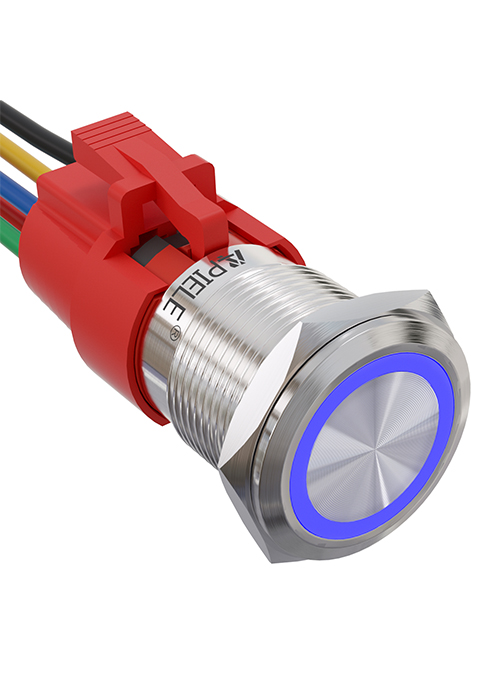
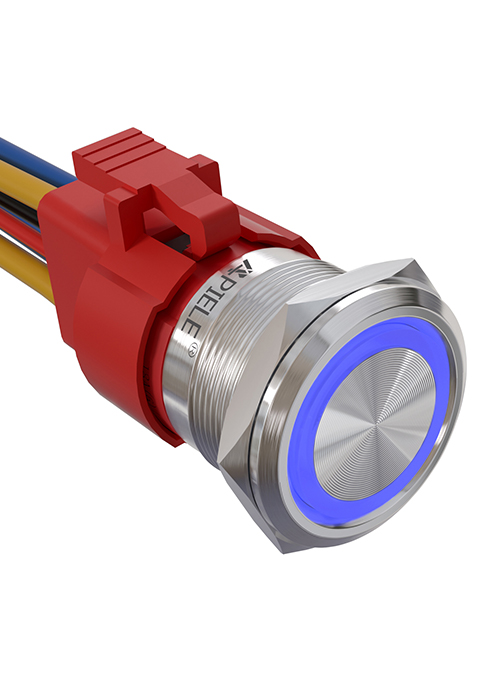

Figure 8: Visual guide for the installation process of the push button switch.
Video 1: This video demonstrates the features and installation of the 10 Amp Latching Push Button switch, including its waterproof capabilities and various applications.
Awọn ilana Iṣiṣẹ
The APIELE Latching Push Button Switch operates with a simple ON-OFF mechanism.
- To turn on the connected device, press the button once. The LED ring will illuminate, indicating the switch is in the ON state.
- To turn off the connected device, press the button again. The LED ring will turn off, indicating the switch is in the OFF state.
Video 2: This video showcases the functionality of the 10 Amp 19mm Latching/Momentary Push Button Switch, demonstrating its use in various applications like automotive dashboards and coffee machines.
Awọn ohun elo:
This versatile switch is suitable for a wide range of applications, including but not limited to:
- Automobile and motorcycle modifications
- Control equipment switch modifications
- Awọn bọtini ilẹkun
- SOS buttons
- Elevator buttons
- Awọn ohun elo ile

Olusin 9: Examples of common applications for the APIELE push button switch, including doorbell, car, and elevator buttons.
Itoju
The APIELE Latching Push Button Switch is designed for minimal maintenance due to its durable construction and IP65 waterproof rating.
- Ninu: Wipe the switch surface with a soft, damp cloth. Avoid using abrasive cleaners or solvents that could damage the finish or internal components.
- Ayewo: Máa ṣàyẹ̀wò àwọn ìsopọ̀ wáyà láti rí i dájú pé wọ́n wà ní ààbò àti pé wọn kò ní ìbàjẹ́.
- Idaabobo Ayika: While waterproof, prolonged submersion is not recommended. Ensure the mounting area is properly sealed if exposed to extreme moisture.
Laasigbotitusita
| Isoro | Owun to le Fa | Ojutu |
|---|---|---|
| Switch does not activate/deactivate device. | Incorrect wiring; Loose connection; No power to circuit; Faulty device. | Check wiring against diagram (Figure 7); Ensure all connections are secure; Verify power supply to the circuit; Test the connected device independently. |
| LED ko ni tan imọlẹ. | Incorrect LED wiring polarity; No power to LED circuit; Damaged LED. | Check LED wire polarity (Red for +, Black for -); Verify 12V power supply to LED pins; If LED is damaged, the switch may need replacement. |
| Switch feels loose after installation. | Mounting nut not tightened sufficiently. | Tighten the securing nut on the back of the switch. |
Atilẹyin ọja ati Support
APIELE products are manufactured to high standards. For any issues or support inquiries, please contact APIELE Electric directly through their official channels or the retailer from whom the product was purchased.
Ṣabẹwo si APIELE Store on Amazon fun alaye siwaju sii ati olubasọrọ awọn aṣayan.
Ask a question about this manual
Ask about setup, troubleshooting, compatibility, parts, safety, or missing instructions. Manuals+ will review the question and use this page’s manual context to help answer it.