
1. Ifihan
This manual provides detailed instructions for the installation, operation, and maintenance of your Antec NX210 Mid-Tower ATX Computer Cabinet. Please read this manual thoroughly before beginning assembly or use to ensure proper functionality and safety.
The Antec NX210 is designed to accommodate ATX, Micro-ATX, and ITX motherboards, offering ample space for components and efficient cooling with pre-installed ARGB fans.
2. Alaye Aabo
Ṣe akiyesi awọn iṣọra ailewu atẹle lakoko fifi sori ẹrọ ati iṣẹ:
- Máa yọ agbára iná kúrò nínú ihò ògiri kí o tó fi àwọn ohun èlò mìíràn sí i tàbí kí o yọ wọ́n kúrò láti dènà ìkọlù iná mànàmáná.
- Handle components with care to avoid damage from static electricity. Consider using an anti-static wrist strap.
- Keep the cabinet away from direct sunlight, heat sources, and moisture.
- Rí i dájú pé afẹ́fẹ́ ń yọ́ dáadáa kí ó má baà gbóná jù. Má ṣe dí àwọn afẹ́fẹ́ inú.
- Pa awọn ẹya kekere ati awọn irinṣẹ mọ kuro ni ọwọ awọn ọmọde.
3. Package Awọn akoonu
Jẹrisi pe gbogbo awọn ohun kan wa ninu package:
- Antec NX210 Mid-Tower ATX Computer Cabinet
- 4 x 120mm ARGB Fans (3 pre-installed in front, 1 pre-installed in rear)
- Accessory Box (screws, cable ties, etc.)
- Afowoyi Olumulo (iwe-ipamọ yii)
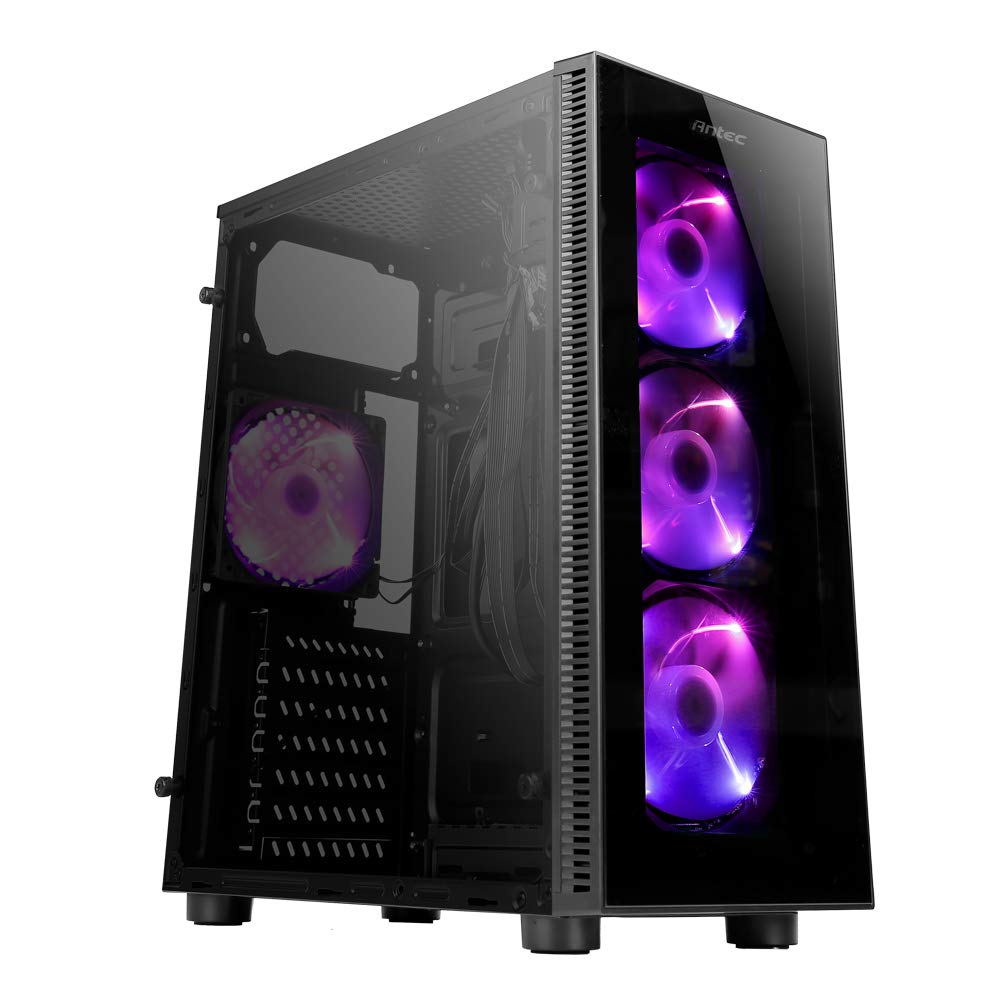
Image: Antec NX210 Mid-Tower ATX Computer Cabinet, showcasing its tempered glass side panel and front ARGB fans.
4. Product Features and Layout
4.1 Ita Views

Aworan: Iwaju ati sẹhin views of the Antec NX210 cabinet, highlighting the tempered glass front panel with ARGB fans and the rear I/O panel layout.

Image: Left side (tempered glass) and right side (solid panel) views of the Antec NX210 cabinet.
4.2 Pánẹ́lì I/O òkè
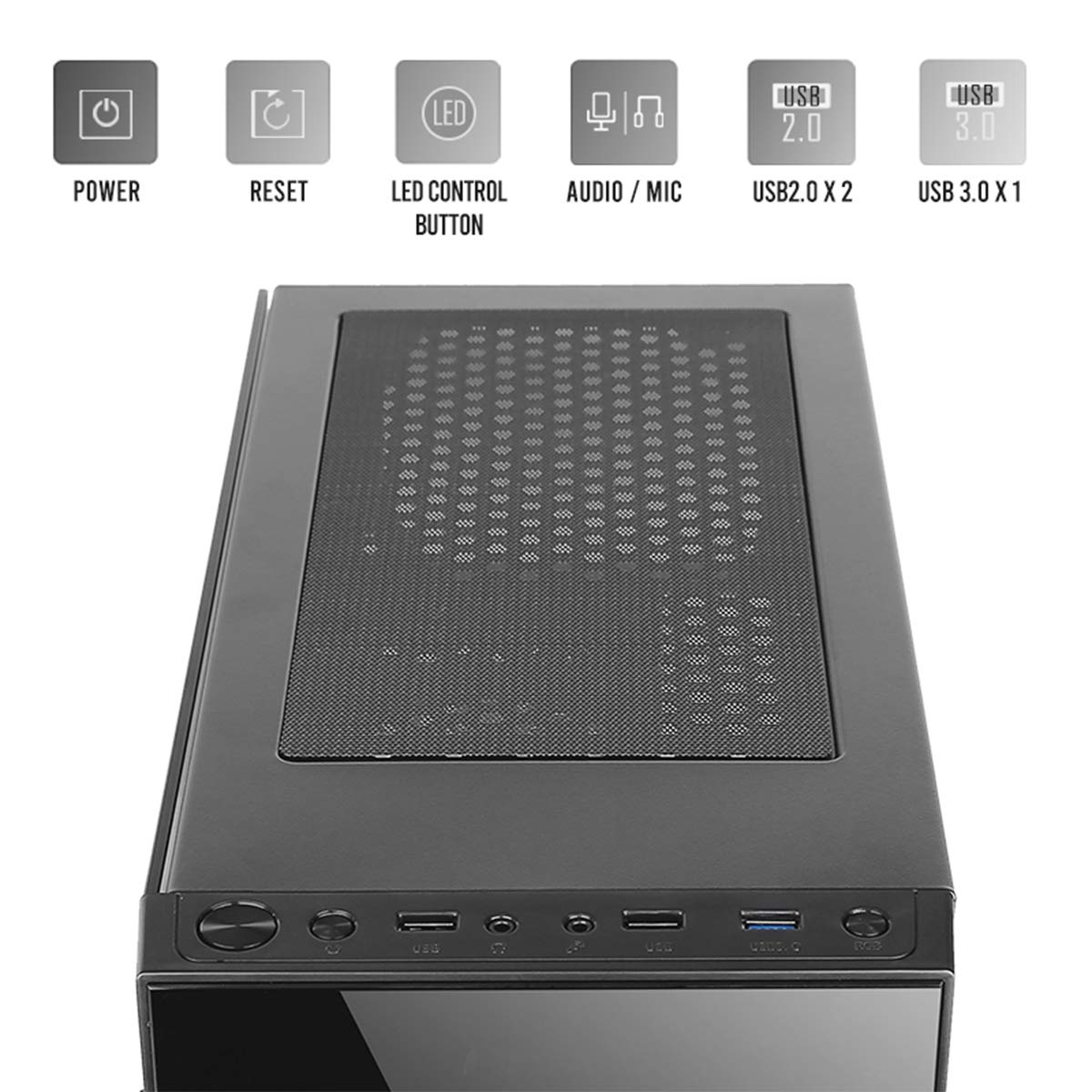
Image: Close-up of the top I/O panel, showing the Power button, Reset button, LED Control button, Audio/Mic jacks, 2x USB 2.0 ports, and 1x USB 3.0 port.
- Bọtini agbara: To turn the system on or off.
- Bọtini atunto: Lati tun eto naa bẹrẹ.
- Bọtini Iṣakoso LED: To cycle through ARGB lighting effects for the pre-installed fans.
- Audio / Mic Jacks: Fún sísopọ̀ àwọn agbekọri àti makirofóònù.
- Awọn ibudo USB 2.0 (x2): Fun asopọ awọn ẹrọ USB 2.0.
- Ibudo USB 3.0 (x1): For connecting USB 3.0 devices, offering faster data transfer speeds.
4.3 Internal Layout and Component Support

Image: Diagram illustrating the internal layout of the Antec NX210, indicating locations for motherboard, SSDs, HDDs, GPU, CPU cooler, and PSU.
- Atilẹyin modaboudu: Up to ATX (also supports Micro-ATX, ITX).
- 2.5" SSD Support: 3 drive bays.
- 3.5" HDD Support: 1 drive bay.
- Graphics Card Support: Up to 310mm in length.
- CPU Cooler Support: Up to 155mm in height.
- PSU atilẹyin: Up to 220mm in length (top-mounted).
4.4 itutu System

Image: Diagram showing fan and radiator mounting options for the Antec NX210, including pre-installed fans.
- Awọn onijakidijagan ti a ti fi sii tẹlẹ: 4 x 120mm ARGB fans (3 in front, 1 in rear).
- Atilẹyin fun awọn afẹ́fẹ́ iwaju: 3x120mm.
- Atilẹyin fun afẹfẹ ẹhin: 1x120mm.
- Atilẹyin radiator: Front up to 240mm, Rear up to 120mm.
5. Eto ati fifi sori
Follow these general steps for installing components into your Antec NX210 cabinet. Specific component manuals should be consulted for detailed installation instructions.
5.1 Ngbaradi Minisita
- Place the cabinet on a stable, flat surface.
- Remove the tempered glass side panel by unscrewing the thumbscrews at the rear and carefully pulling the panel away.
- Remove the right-side metal panel by unscrewing the thumbscrews at the rear.
5.2 Fifi sori modaboudu
- Install the I/O shield into the rear opening of the cabinet.
- Align your motherboard with the standoffs inside the cabinet. Ensure the standoffs match your motherboard's form factor (ATX, Micro-ATX, ITX).
- Ṣe aabo modaboudu pẹlu awọn skru ti a pese.
5.3 Power Ipese Unit (PSU) fifi sori
- The Antec NX210 supports a top-mounted ATX PS2 power supply.
- Slide the PSU into the designated top compartment from the rear of the cabinet.
- Secure the PSU with screws from the rear of the cabinet.
5.4 Storage Drive Installation (HDD/SSD)
- HDD 3.5": Locate the 3.5" drive bay. Slide the HDD into the bay and secure it with screws.
- 2.5" SSD: Locate the 2.5" SSD mounting points behind the motherboard tray. Secure the SSDs with screws.
5.5 Graphics Card (GPU) fifi sori
- Remove the necessary PCIe slot covers from the rear of the cabinet.
- Insert the graphics card into the appropriate PCIe slot on the motherboard.
- Fi awọn skru so kaadi eya aworan mọ.
5.6 USB Management
Lo àwọn ibi tí a ti gé àwọn okùn ìtọ́sọ́nà àti àwọn ibi tí a ti so mọ́ ẹ̀yìn àtẹ motherboard láti ṣàkóso àwọn okùn. Èyí mú kí afẹ́fẹ́ àti ẹwà wọn sunwọ̀n síi.
5.7 Nsopọ Front Panel Cables
Connect the front panel cables (Power SW, Reset SW, HDD LED, Power LED, USB 2.0, USB 3.0, HD Audio) to the corresponding headers on your motherboard. Refer to your motherboard manual for exact pin layouts.
6. Awọn ilana Iṣiṣẹ
6.1 Agbara Lori
After all components are installed and cables connected, close both side panels. Connect the power cable to the PSU and a wall outlet. Press the Power button on the top I/O panel to turn on your system.
6.2 Iṣakoso Fẹ́ẹ́fù ARGB
The pre-installed ARGB fans are connected to an internal controller. Use the Bọtini Iṣakoso LED on the top I/O panel to cycle through various lighting modes and effects. The fans will display a default lighting effect upon initial power-up.
7. Itọju
Regular maintenance helps ensure optimal performance and longevity of your computer cabinet.
- Awọn Ajọ Eruku: The Antec NX210 features a dust filter on the top panel. Regularly remove and clean this filter to prevent dust buildup and maintain good airflow.
- Ninu inu: Periodically open the side panels and use compressed air to remove dust from internal components and fan blades. Ensure the system is powered off and unplugged before cleaning.
- Ode Ninu: Mu ese ita gbangba pẹlu asọ, damp asọ. Yago fun abrasive ose tabi epo.
8. Laasigbotitusita
If you encounter issues, consider the following basic troubleshooting steps:
- Ko si Agbara:
- Rii daju pe PSU ti sopọ daradara si iṣan ogiri ati iyipada agbara lori PSU wa ni ipo 'ON'.
- Verify that the front panel Power button cable is correctly connected to the motherboard header.
- Check all internal power connections (24-pin ATX, 8-pin CPU, PCIe power for GPU).
- Fans Not Spinning / ARGB Not Working:
- Ensure all fan power cables are securely connected to the motherboard or fan controller.
- Verify ARGB cables are correctly connected to the internal controller and the controller is powered.
- Try pressing the LED Control Button on the top I/O panel to cycle effects.
- Awọn ibudo USB Ko Ṣiṣẹ:
- Check that the USB 2.0 and USB 3.0 front panel cables are correctly connected to the corresponding headers on your motherboard.
For more complex issues, consult the manuals for your individual components or seek professional assistance.
9. Awọn pato

Image: Diagram showing the physical dimensions of the Antec NX210 cabinet.
| Ẹya ara ẹrọ | Ẹ̀kúnrẹ́rẹ́ |
|---|---|
| Awoṣe | NX210 |
| Iru Irú | Ile-iṣọ Mid |
| Awọn iwọn (L x W x H) | 43.99 x 38.99 x 21.01 cm (isunmọ 395 x 210 x 445 mm) |
| Ohun elo | SPCC, Gilasi tempered |
| Modaboudu Support | ATX, Micro-ATX, ITX |
| Imugboroosi Iho | 7 |
| Wakọ Bays | 1 x 3.5" HDD, 3 x 2.5" SSD |
| Iwaju Awọn Ibudo I / O | Power, Reset, LED Control Button, MIC/Audio, 2 x USB 2.0, 1 x USB 3.0 |
| Awọn onijakidijagan ti a ti fi sii tẹlẹ | 4 x 120mm ARGB fans (3 front, 1 rear) |
| Atilẹyin Olufẹ (Iwaju) | 3 x 120mm |
| Atilẹyin Fan (Tẹhin) | 1 x 120mm |
| Atilẹyin Radiator (Iwaju) | Ti o de 240mm |
| Atilẹyin Radiator (Tẹhin) | Ti o de 120mm |
| Max GPU Ipari | 310mm |
| Max Sipiyu kula Iga | 155mm |
| PSU Atilẹyin | ATX PS2 (Top Mounted), Max length 220mm |
| Ajọ eruku | Oke |
| Iwọn Nkan | 4.8 kg |
10. Atilẹyin ọja ati Support
The Antec NX210 Computer Cabinet comes with a 1 Odun atilẹyin ọja lati ọjọ ti o ra. Jọwọ ṣe idaduro ẹri rira rẹ fun awọn iṣeduro atilẹyin ọja.
For technical support or warranty inquiries, please contact Antec customer service or your local distributor.
Olupese: Antec Inc. 8F, No 107, Jhouzih St, Neihu District, Taipei City 114, Taiwan
Oluwọle (India): Acro Engineering Company, Khasra No 522/1, Village Jonapur, Delhi - 110 030
O le wa alaye diẹ sii ati awọn orisun atilẹyin lori osise naa Ile itaja Antec lori Amazon.