
1. Ifihan
This manual provides detailed instructions for the setup, operation, and maintenance of the Waveshare 2.8inch 320x240 Pixels IPS LCD with 4-Wire Resistive Touch Screen. This display module is designed for embedded systems and features an SPI communication interface.

olusin 1: Iwaju view of the Waveshare 2.8inch Resistive Touch LCD module.
2. Awọn ẹya ara ẹrọ
- Multicolor graphic IPS LCD display, 2.8inch diagonal, 320×240 pixels.
- Integrated 4-wire resistive touch screen.
- Onboard touch controller for smoother touch experience.
- SPI interface, requiring minimal pin connections.
- Programmable backlight control for power efficiency.
- Accompanied by development resources and example code (for STM32/AVR/PIC).
3. Eto
3.1 Interface Definition
The display module utilizes an SPI communication interface. Refer to the following table and image for pin definitions and connections.
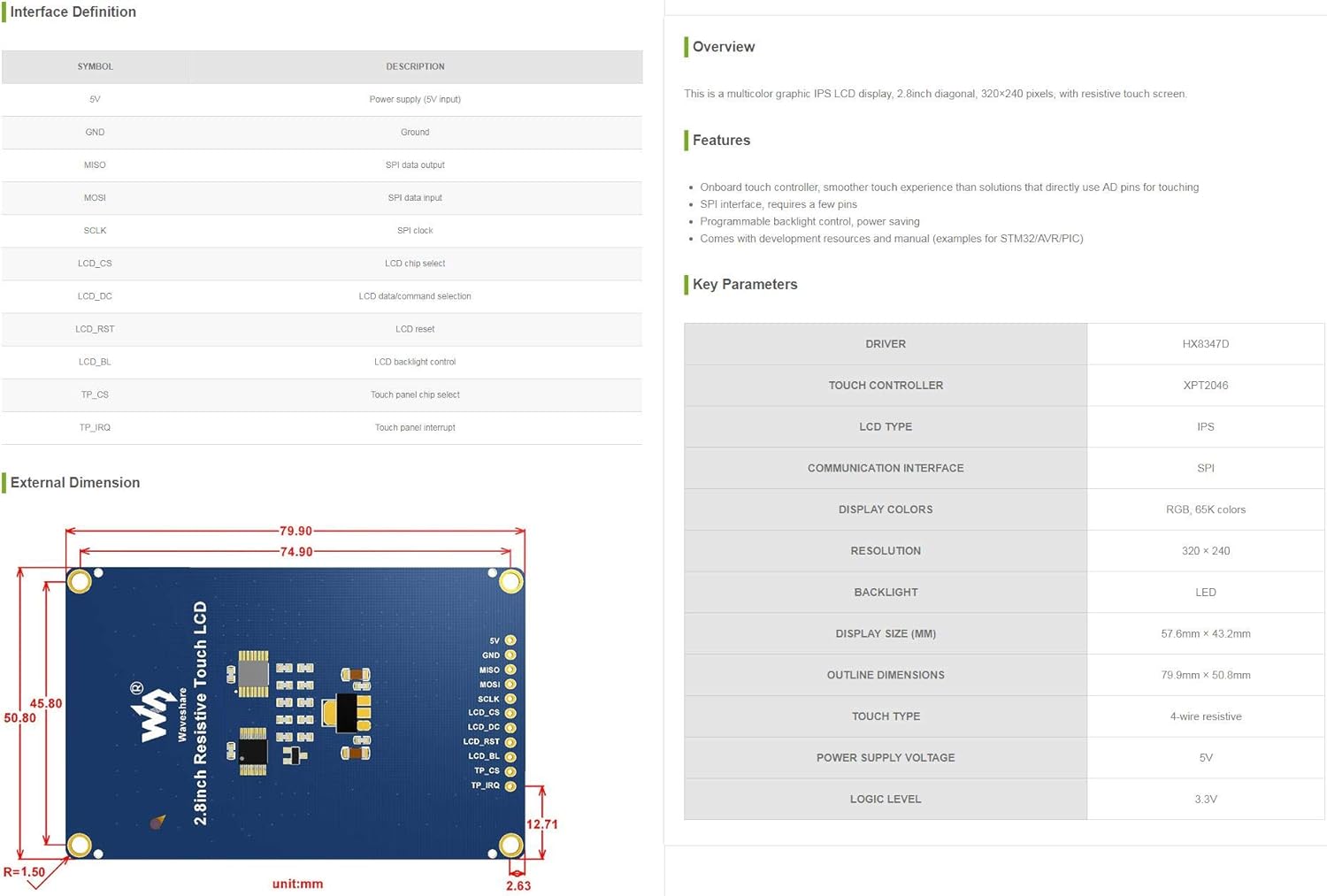
Figure 2: Interface Definition and Key Parameters of the LCD module.
| Aami | Apejuwe |
|---|---|
| 5V | Power supply (5V input) |
| GND | Ilẹ |
| MOSI | Ijade data SPI |
| MISO | SPI data igbewọle |
| SCLK | SPI aago |
| LCD_CS | LCD ërún yan |
| LCD_DC | LCD data/command selection |
| LCD_RST | LCD reset |
| LCD_BL | LCD backlight control |
| TP_CS | Touch panel chip select |
| TP_IRQ | Fọwọkan nronu da gbigbi |

olusin 3: Pada view of the LCD module showing pin labels and components.
3.2 Ibẹrẹ Asopọ
Connect the display module to your microcontroller or development board using the SPI interface. Ensure correct voltage (5V) and ground connections. Refer to the pin definitions for proper wiring of data, clock, chip select, and control lines for both the LCD and touch panel.
Waveshare provides comprehensive development resources and example code for various platforms such as STM32, AVR, and PIC. These resources are essential for initial setup and programming. Please visit the official Waveshare website for detailed documentation and code examples.
4. Awọn ilana Iṣiṣẹ
4.1 Ifihan isẹ
Once correctly connected and powered, the LCD can be initialized and controlled via the SPI interface. Use the provided example code as a starting point to display graphics, text, and other visual information. The display supports 320x240 pixels resolution with 65K colors.

Figure 4: The LCD module displaying text content.
4.2 Iṣẹ́ Ibojú Fọwọkan
The integrated 4-wire resistive touch screen allows for user interaction. The onboard touch controller (XPT2046) handles touch input, providing coordinates via the SPI interface. Implement touch detection and coordinate reading in your software using the provided examples.
4.3 Backlight Iṣakoso
The backlight of the LCD is programmable, allowing for dynamic adjustment of brightness. This feature can be utilized to optimize power consumption or adapt to different lighting environments. Refer to the documentation for specific commands or methods to control the backlight via the LCD_BL pin.
5. Itọju
- Ninu: Use a soft, dry, lint-free cloth to clean the display surface. Avoid abrasive cleaners or solvents that may damage the screen or touch layer.
- Mimu: Handle the module by its edges to avoid touching the display area or electronic components.
- Ibi ipamọ: Store the module in a cool, dry environment, away from direct sunlight and extreme temperatures.
- Agbara: Always ensure the correct power supply voltage (5V) is used to prevent damage to the module.
6. Laasigbotitusita
- Display not lighting up: Check power connections (5V, GND) and ensure the backlight control (LCD_BL) is correctly configured and enabled.
- Ko si ifihan ti o wu jade: Verify SPI communication lines (MOSI, MISO, SCLK, LCD_CS, LCD_DC, LCD_RST) are correctly wired and that the LCD initialization sequence in your code is correct.
- Iboju ifọwọkan ko dahun: Check touch panel connections (TP_CS, TP_IRQ) and ensure the touch controller (XPT2046) is correctly initialized and polled in your software.
- Incorrect colors or distorted image: Ensure the display driver (HX8347D) is correctly initialized with the appropriate settings for resolution and color depth.
7. Awọn pato
Key technical specifications for the Waveshare 2.8inch Resistive Touch LCD module:
| Paramita | Iye |
|---|---|
| Iwọn Ifihan | 2.8 inch |
| Ipinnu | 320 × 240 awọn piksẹli |
| Ifihan Iru | IPS LCD |
| Awọn awọ ifihan | RGB, 65K colors |
| Fọwọkan Iru | 4-waya Resistive |
| Ibaraẹnisọrọ Interface | SPI |
| Ifihan Awakọ | HX8347D |
| Fọwọkan Adarí | XPT2046 |
| Imọlẹ ẹhin | LED (Programmable) |
| Ipese Agbara Voltage | 5V |
| Ipele Kannaa | 3.3V |
| Awọn iwọn ila | 79.9mm × 50.8mm |
| Agbegbe Ifihan (mm) | 57.6mm × 43.2mm |
| Iwọn Nkan | 1.12 iwon (isunmọ 31.75g) |
| Package Mefa | 4.21 x 3.11 x 1.14 inches |
8. Atilẹyin ọja ati Support
Waveshare products are typically covered by a standard manufacturer's warranty. For specific warranty details, technical support, or to access the latest development resources and documentation, please visit the official Waveshare website or contact their customer service directly. Ensure you have your product model number (2.8inch Resistive Touch LCD) and purchase information available when seeking support.
Official Waveshare Webojula: www.waveshare.com