
CalAmp LMU0330G-7-G1000
LMU-330 2G GSM / GPRS GPS Tracker User Manual
Orúkọ ìtajà: CalAmp
Ọja Pariview
Awọn CalAmp LMU-330 is an economical, full-featured vehicle tracking product designed for covert and reliable installation in automobiles. This device utilizes 2G GSM / GPRS technology for communication and operates on 850/1900 MHz frequencies. It is equipped with an internal battery and antenna, making it a versatile solution for various automotive track and trace applications.
The LMU-330 is an ideal solution for applications such as stolen vehicle recovery, vehicle finance management, and auto rental tracking, providing reliable GPS tracking capabilities.
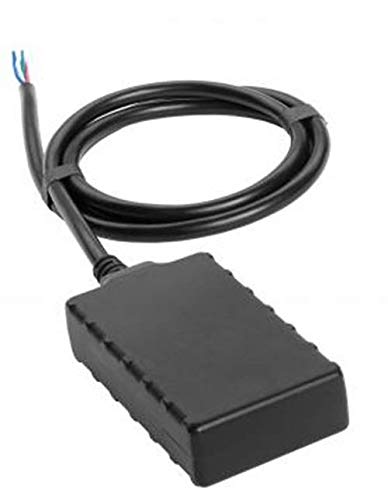
Image: The CalAmp LMU-330 GPS Tracker, a compact black rectangular device with an integrated wiring harness extending from one end. The wires are typically used for power and data connections within a vehicle.
Eto ati fifi sori
The LMU-330 is designed for professional installation due to its hardwired nature. Proper installation ensures optimal performance and reliability.
Atokọ iṣaju fifi sori ẹrọ:
- Ensure the vehicle's electrical system is compatible with the device's power requirements.
- Identify a secure, covert location within the vehicle for installation, away from direct heat or moisture.
- Gather necessary tools: wire strippers, crimpers, multimeter, electrical tape, zip ties, and appropriate connectors.
- Verify the device's internal battery is charged or will receive power upon installation.
Awọn igbesẹ fifi sori ẹrọ:
- Ge batiri ọkọ kuro: For safety, disconnect the vehicle's negative battery terminal before beginning any wiring.
- Gbe Ẹrọ naa soke: Securely mount the LMU-330 in the chosen covert location. Ensure the device has a clear line of sight to the sky for optimal GPS signal reception, if possible, or at least not completely enclosed by metal.
- Awọn isopọ Waya:
- Connect the device's power wire (typically red) to a constant 12V DC power source in the vehicle.
- Connect the device's ground wire (typically black) to a reliable chassis ground point.
- If applicable, connect ignition sense wire (often white or yellow) to a circuit that is active only when the ignition is on.
- Secure all connections using crimp connectors and insulate with electrical tape or heat shrink tubing.
- Reconnect Vehicle Battery: Tun ebute batiri odi ti ọkọ naa so.
- Jẹrisi isẹ: Check for LED indicators on the device (if present) to confirm power and network connectivity. Perform initial tests to ensure GPS tracking data is being transmitted.
Ṣiṣẹ ẹrọ naa
Awọn CalAmp LMU-330 operates autonomously once properly installed and configured. It continuously monitors and transmits location data and other relevant vehicle parameters using its integrated GPS and 2G GSM/GPRS modules.
Awọn aaye Isẹ pataki:
- Ìtẹ̀lé Àìfọwọ́sowọ́pọ̀: The device automatically begins tracking and transmitting data once powered on and connected to the cellular network.
- Gbigbe Data: Location data, speed, ignition status, and other configured parameters are sent to a designated server or platform via the 2G GPRS network.
- Batiri inu: The integrated battery provides backup power, allowing the device to continue tracking even if the primary vehicle power is interrupted.
- Geofencing: Depending on the backend platform, the device can support geofencing capabilities, triggering alerts when the vehicle enters or exits predefined areas.
- Awọn titaniji ati Awọn iwifunni: The system can be configured to send alerts for various events, such as ignition on/off, unauthorized movement, or power disconnection.
Access to tracking data and device configuration is typically managed through a web-based portal or mobile application provided by your service provider.
Itoju
Awọn CalAmp LMU-330 is designed for low maintenance. However, periodic checks can help ensure its continued reliability and performance.
Awọn iṣe Itọju ti a ṣeduro:
- Iduroṣinṣin asopọ: Periodically inspect the wiring connections to ensure they remain secure and free from corrosion.
- Ibi ẹrọ: Ensure the device remains securely mounted in its original location and has not shifted, which could affect GPS signal reception.
- Awọn imudojuiwọn sọfitiwia: While typically managed remotely by your service provider, ensure the device's firmware is up-to-date for optimal performance and security.
- Ṣayẹwo Ayika: Verify that the installation location remains free from excessive moisture, dust, or extreme temperatures that could damage the device.
Avoid attempting to open the device casing, as this may void any warranties and could damage internal components.
Laasigbotitusita
If you encounter issues with your LMU-330 GPS Tracker, refer to the following common troubleshooting steps:
| Isoro | Owun to le Fa | Ojutu |
|---|---|---|
| No GPS Signal / Inaccurate Location |
|
|
| No Data Transmission (No tracking updates) |
|
|
| Ẹrọ Ko Nṣiṣẹ Tan-an |
|
|
For issues not covered here, please contact your CalAmp service provider or authorized dealer for further assistance.
Awọn pato
| Nọmba awoṣe | LMU0330G-7-G1000 |
| Brand | CalAmp |
| Fọọmù ifosiwewe | Tracker: Fleet / Asset |
| Imọ ọna ẹrọ | 2G GSM / GPRS |
| Igbohunsafẹfẹ | 2G: 850/1900 MHz |
| Olugbeja | Multiple Carriers |
| Awọn ẹya ara ẹrọ | Internal Battery + Internal Antenna |
| Asopọmọra Technology | Cellular |
| Pataki Awọn ẹya ara ẹrọ | Gbigba agbara |
| Ohun elo atilẹyin | Itaniji |
| Awọn Lilo Ni pato Fun Ọja | Titele ọkọ |
| Ohun ti o wa ninu Apoti | Battery (internal) |
| Olupese | CalAmp |
| Ọjọ Akọkọ Wa | Oṣu Kẹjọ Ọjọ 16, Ọdun 2019 |
| ASIN | B07WN37KR8 |
Atilẹyin ọja ati Support
Information regarding the specific warranty terms and conditions for the CalAmp LMU-330 is not available in this manual. For warranty details, technical support, or service inquiries, please contact your authorized CalAmp dealer or the service provider from whom you purchased the device.
It is recommended to retain your purchase receipt and any service agreements for future reference.
Ask a question about this manual
Ask about setup, troubleshooting, compatibility, parts, safety, or missing instructions. Manuals+ will review the question and use this page’s manual context to help answer it.