
1. Ifihan
O ṣeun fun riraasing the MUSE M-10 Red Radio Alarm Clock. This manual provides essential information for the safe and efficient operation of your device. Please read these instructions carefully before use and retain them for future reference.

Figure 1: MUSE M-10 Red Radio Alarm Clock. This image shows the front view of the red alarm clock with its digital LED display showing '12:00' and various control buttons on the top panel.
2. Awọn ilana aabo
- Ka gbogbo awọn itọnisọna ṣaaju ṣiṣe ẹrọ.
- Do not expose this appliance to rain or moisture to prevent fire or shock hazards.
- Rí i dájú pé ohun tí a fi ń ṣe agbára náà rọrùn láti wọlé.
- Lo awọn asomọ/awọn ẹya ara ẹrọ ti olupese pato.
- Ma ṣe gbe ọja naa si imọlẹ orun taara tabi sunmọ awọn orisun ooru.
- Avoid placing the product on surfaces that are unstable or subject to vibration.
- Maṣe ṣii casing; tọka gbogbo iṣẹ si oṣiṣẹ ti o peye.
- Sọ awọn batiri ti a lo ni ifojusọna, ni atẹle awọn ilana agbegbe.
3. Ọja Ipariview
3.1 Iwaju Panel ati Ifihan
The front panel features a clear 0.6-inch white LED display for time and alarm indicators.
3.2 Top Panel idari
The top panel houses all control buttons for easy access:
- MEM: Memory button for saving and recalling radio presets.
- Ṣeto: Button for setting time and alarm parameters.
- AL1: Alarm 1 setting button.
- AL2: Alarm 2 setting button.
- << HR: Hour adjustment button (backward).
- MIN >>: Minute adjustment button (forward).
- SOOZE: Activates the snooze function during an alarm.
- ORUN: Activates the sleep timer function.
- DIMMER: Ṣe atunṣe imọlẹ ifihan.

Olusin 2: Pariview of the MUSE M-10 Red Radio Alarm Clock's functions, including its 0.6-inch white LED display, PLL radio, 20 FM presets, dimmer, dual alarm, snooze, and sleep features.
4. Eto
4.1 Asopọ agbara
Connect the provided AC adapter to the DC IN jack on the rear of the unit and then plug it into a standard wall outlet. The unit will power on and the display will light up.
4.2 Batiri Afẹyinti fifi sori
For time and alarm settings backup during a power outage, install 2 x AAA batteries (not included) into the battery compartment located on the bottom of the unit. Ensure correct polarity (+/-) when inserting batteries.
5. Awọn ilana Iṣiṣẹ
5.1 Ṣiṣeto Aago naa
- Tẹ mọlẹ SET bọtini titi ti wakati awọn nọmba filasi.
- Lo awọn << HR or MIN >> awọn bọtini lati ṣatunṣe awọn wakati.
- Tẹ SET again, and the minute digits will flash.
- Lo awọn << HR or MIN >> awọn bọtini lati ṣatunṣe awọn iṣẹju.
- Tẹ SET lẹ́ẹ̀kan sí i láti jẹ́rìísí àti ìjáde àkókò ètò.
5.2 Eto Awọn itaniji (Itaniji 1 ati Itaniji 2)
Ẹ̀rọ náà ní àwọn ohun ìkìlọ̀ méjì tí ó dá dúró.
- Tẹ mọlẹ AL1 (tabi AL2) bọtini titi awọn nọmba wakati itaniji yoo fi n tàn.
- Lo awọn << HR or MIN >> awọn bọtini lati ṣeto wakati itaniji ti o fẹ.
- Tẹ AL1 (tabi AL2) again, and the alarm minute digits will flash.
- Lo awọn << HR or MIN >> awọn bọtini lati ṣeto awọn iṣẹju itaniji ti o fẹ.
- Tẹ AL1 (tabi AL2) lẹ́ẹ̀kan síi láti yan orísun itaniji: Buzzer or Redio.
- Tẹ AL1 (tabi AL2) once more to confirm and activate the alarm. An alarm icon will appear on the display.
5.3 FM Radio isẹ
The unit has a PLL FM radio with 20 preset stations.
- Yiyi: Tẹ awọn << HR or MIN >> buttons to manually tune the radio frequency. Press and hold these buttons for automatic scanning to the next available station.
- Fifipamọ awọn tito tẹlẹ: Tune si ibudo ti o fẹ. Tẹ mọlẹ MEM button until 'P01' (or the next available preset number) flashes. Use << HR or MIN >> lati yan nọmba tito tẹlẹ, lẹhinna tẹ MEM lẹẹkansi lati fipamọ.
- ÌRallNT Pres Awọn tito tẹlẹ: Ni soki tẹ awọn MEM bọtini lati yipo nipasẹ awọn ibudo ti a ti ṣeto tẹlẹ.
5.4 Iṣiṣẹ Snooze
Nigbati itaniji ba ndun, tẹ awọn ṢEGBE bọ́tìnì láti pa ìró náà lẹ́nu fún ìgbà díẹ̀ fún bí ìṣẹ́jú mẹ́sàn-án. Ìró náà yóò tún dún lẹ́yìn àkókò yìí.
5.5 Sleep Timer Function
Tẹ awọn ORUN button repeatedly to set a sleep timer (e.g., 90, 60, 30, 15 minutes, or OFF). The radio will play for the selected duration and then automatically turn off.
5.6 Ìfihàn Dímẹ́rà
Tẹ awọn DIMMER button repeatedly to cycle through display brightness levels: High, Low, or Off.

Figure 3: Key features of the MUSE M-10 Red Radio Alarm Clock, including snooze, radio or buzzer alarm, dimmable display, and FM PLL radio with 20 presets.
6. Itọju
- Ninu: Mu ese kuro pẹlu asọ ti o gbẹ. Ma ṣe lo abrasive ose tabi epo.
- Rirọpo Batiri: Replace backup batteries annually or when the display shows signs of dimming during power outages.
- Ibi ipamọ: Tí o bá ń tọ́jú ẹ̀rọ náà fún ìgbà pípẹ́, yọ àwọn bátírì àfikún kúrò kí ó má baà jò.
7. Laasigbotitusita
| Isoro | Owun to le Fa | Ojutu |
|---|---|---|
| Ko si agbara/Ifihan ti a ti pa | Adaparọ agbara ko sopọ tabi aṣiṣe. | Check power adapter connection. Try a different outlet. |
| Itaniji ko dun | Itaniji ko mu ṣiṣẹ tabi ṣeto ti ko tọ. | Ensure alarm icon is visible on display. Re-check alarm time and source settings. |
| Gbigba redio ti ko dara | FM antenna not extended or poor signal area. | Fully extend the FM wire antenna. Adjust its position for better reception. |
| Akoko / eto ti sọnu lẹhin agbara utage | Àwọn bátìrì àtìlẹ́yìn kò fi sí tàbí wọ́n ti bàjẹ́. | Install new AAA batteries for backup. |
8. Awọn pato
- Awoṣe: M-10 pupa
- Brand: MUSE
- Ifihan: 0.6-inch White LED, Digital
- Redio: FM PLL Radio with 20 Presets
- Itaniji: Itaniji Meji (Buzzer tabi Redio)
- Awọn ẹya pataki: Snooze, Sleep Timer, Display Dimmer (High/Low/Off)
- Orisun Agbara: AC Adapter (included), 2 x AAA batteries for backup (not included)
- Awọn iwọn (L x W x H): 12 x 7 x 10.9 cm (isunmọ 4.7 x 2.8 x 4.3 inches)
- Ìwúwo: 200 giramu (isunmọ 0.44 lbs)
- Ohun elo: Ṣiṣu
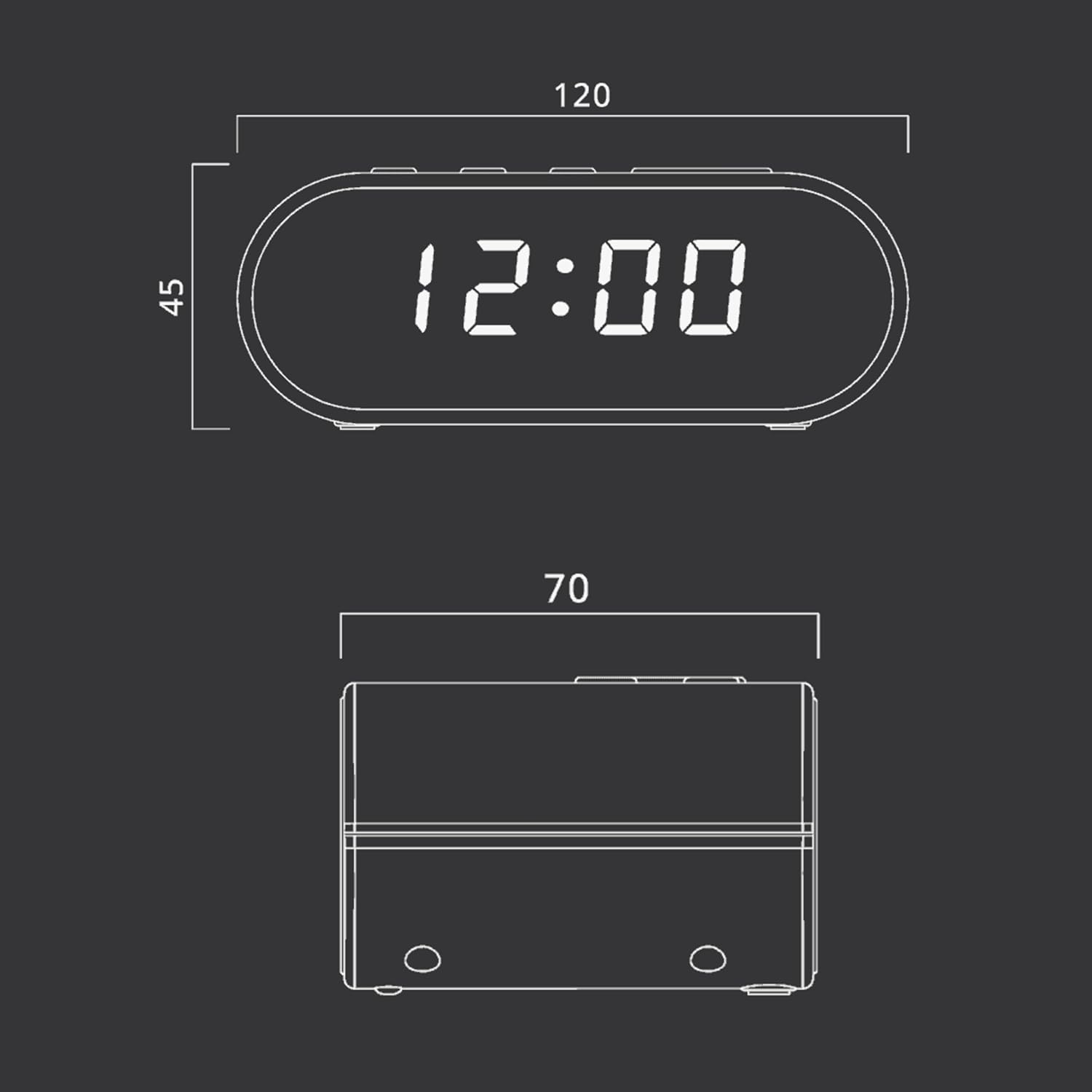
Figure 4: Dimensional drawing of the MUSE M-10 Red Radio Alarm Clock, showing its length (120mm), width (70mm), and height (45mm).
9. Atilẹyin ọja ati Support
For warranty information or technical support, please refer to the warranty card included with your product or contact your local MUSE distributor. Keep your purchase receipt as proof of purchase.